
Solved re: Internal keyboard died

reble

New member
Member
VIP
Local time
7:45 AM
Messages
326
Location
Kennewick, Wa
re: Internal keyboard died

This is a Dell Inspiron 15-3541 laptop, OS Windows 7 home 32bit. The laptop has been on for 30 minutes and working fine. I went to start a game and the internal keyboard stopped working for no reason. The wireless keyboard/mouse still works and the laptop still works but the internal keyboard is still dead. I rebooted, no good, I unplugged the charge cord from the laptop and dropped main battery and let the laptop sit unpowered for 5 minutes, no go. I let the laptop sit unpowered for 3 hours, no go. What gives?

Steve
 

My Computer

Computer type
Laptop
Computer Manufacturer/Model Number
Dell Inspiron 3541
OS
windows 7 home 32 bit, I just changed back from 64 to 32bit
CPU
amc a6-6310, radon r4 graphics 1800mhz with 4 cores
Memory
6.8gb
Graphics Card(s)
not sure off hand
Sound Card
not shure off hand
Monitor(s) Displays
built in lcd
Screen Resolution
1366 x 768
Hard Drives
1 500gb sata internal HDD and 1 250 gb's sata HDD in a USB external USB case.
Keyboard
Wifi with attached wifi mouse
Internet Speed
don't know
Antivirus
Zone Alarm
Browser
Firefox
Other Info
The gateway laptop model MD2614U died because a voltage regulator on the motherboard went poof. The Gateway laptop has been scraped.
It could have in fact died, I'm not sure. I'm kinda in the same boat with my laptop, but some keys just don't function like they're suppose to. I am going to buy a replacement keyboard on eBay and see if that works. I have tried going to device manager and uninstalling the driver then rebooting the computer. That didn't help, but might for you. If not, have you installed any hardware or software prior to the keyboard not working?
 

My Computer

Computer type
PC/Desktop
OS
Windows 7 Ultimate x64
re: Internal keyboard died

No hardware or software was installed prier to the keyboard stop working. I tried uninstalling the driver and rebooting, no go. I guss I will have to replace the keyboard also

It could have in fact died, I'm not sure. I'm kinda in the same boat with my laptop, but some keys just don't function like they're suppose to. I am going to buy a replacement keyboard on eBay and see if that works. I have tried going to device manager and uninstalling the driver then rebooting the computer. That didn't help, but might for you. If not, have you installed any hardware or software prior to the keyboard not working?
 

My Computer

Computer type
Laptop
Computer Manufacturer/Model Number
Dell Inspiron 3541
OS
windows 7 home 32 bit, I just changed back from 64 to 32bit
CPU
amc a6-6310, radon r4 graphics 1800mhz with 4 cores
Memory
6.8gb
Graphics Card(s)
not sure off hand
Sound Card
not shure off hand
Monitor(s) Displays
built in lcd
Screen Resolution
1366 x 768
Hard Drives
1 500gb sata internal HDD and 1 250 gb's sata HDD in a USB external USB case.
Keyboard
Wifi with attached wifi mouse
Internet Speed
don't know
Antivirus
Zone Alarm
Browser
Firefox
Other Info
The gateway laptop model MD2614U died because a voltage regulator on the motherboard went poof. The Gateway laptop has been scraped.
Try to boot without the external keyboard.
 

My Computers

System One System Two

  • Computer type
    PC/Desktop
    Computer Manufacturer/Model Number
    custom build
    OS
    Windows 7 HP 64
    CPU
    i5 6600K - 800MHz to 4200MHz
    Motherboard
    GA-Z170-HD3P
    Memory
    4+4G GSkill DDR4 3000
    Graphics Card(s)
    IG - Intel 530
    Monitor(s) Displays
    Samsung 226BW
    Screen Resolution
    1680x1050
    Hard Drives
    (1) -1 SM951 – 128GB M.2 AHCI PCIe SSD drive for Windows 7 and Lubuntu
    (2) -1 WD SATA 3 - 1T for Data
    (3) -1 WD SATA 3 - 1T for backup
    PSU
    Thermaltake 450W TR2 gold
    Keyboard
    Old and good Chicony mechanical keyboard
    Mouse
    Logitech mX performance - 9 buttons (had to disable some)
    Internet Speed
    500Mb/s
    Browser
    Firefox 64
    Other Info
    TinyWall firewall
  • Computer type
    Laptop
    System Manufacturer/Model Number
    Asus Q550LF
    OS
    Windows 7 Pro
    CPU
    i7-4500U 800MHz to 3.0GHz
    Motherboard
    Asus Q550LF
    Memory
    (4+4)G DDR3 1600
    Graphics Card(s)
    IG intel 4400 + NVIDIA GeForce GT 745M
    Sound Card
    Realtek
    Monitor(s) Displays
    LG Display LP156WF4-SPH1
    Screen Resolution
    1920 x 1080
    Hard Drives
    BX500 120G SSD for Windows and programs +
    1T HDD for data
    Internet Speed
    500 Mb/s
    Browser
    Firefox
    Other Info
    TinyWall firewall
re: Internal keyboard died

I tried rebooting without the external keyboard plugged in, still no go. I tested the internal keyboard with a keyboard testing prog. If I bang hard enough on the internal keyboard's keys I can sometimes get a few of keys to light up on the tester prog

Try to boot without the external keyboard.
 

My Computer

Computer type
Laptop
Computer Manufacturer/Model Number
Dell Inspiron 3541
OS
windows 7 home 32 bit, I just changed back from 64 to 32bit
CPU
amc a6-6310, radon r4 graphics 1800mhz with 4 cores
Memory
6.8gb
Graphics Card(s)
not sure off hand
Sound Card
not shure off hand
Monitor(s) Displays
built in lcd
Screen Resolution
1366 x 768
Hard Drives
1 500gb sata internal HDD and 1 250 gb's sata HDD in a USB external USB case.
Keyboard
Wifi with attached wifi mouse
Internet Speed
don't know
Antivirus
Zone Alarm
Browser
Firefox
Other Info
The gateway laptop model MD2614U died because a voltage regulator on the motherboard went poof. The Gateway laptop has been scraped.
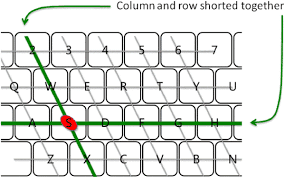
Sounds like a mechanical issue with the Connecting Cables between the Keyboard Matrix and the Motherboard, these can be various types, Easiect to fix would be one where the connection is made using a plug and socket, This could simply need re-attaching but if the issue is with the actual keyboard then it may be possible to replace the keyboard completely (depending on the manufacturer still having stock). Of course a lot of laptops will have the keyboard connected to the Motherboard with soldered connections which could make the re-attaching /replacing the keyboard much more difficult, also the actual matrix may be broken so only some keys are not working, but this would also need a replacement

Keyboard matrix ...

Keyboard Matrix.png

Also this type of work can be expensive if you need to employ a technician to do the repairs, and even if you are capable of doing the work yourself obtaining proprietary parts can prove both difficult and expensive - and so the big question to be asked is Is the repair viable on an older device - A question only you can answer

If you can get by using a remote keyboard then the system should give more useful life
 

My Computers

System One System Two

  • Computer type
    PC/Desktop
    Computer Manufacturer/Model Number
    ChillBlast - Custom to my design
    OS
    Windows 11 Pro x64 [Latest Release and Release Preview]
    CPU
    Ryzen 9 5950X, 3.8 - 5.2 MHz
    Motherboard
    Asus Prime X570-Pro
    Memory
    64GB [2 x 32GB] DDR4 3200MHz
    Graphics Card(s)
    4GB NVIDIA GEFORCE GTX 1650 Ti
    Sound Card
    On-board SPDIF to 5.1 System + HDMI [5.1 system]
    Monitor(s) Displays
    32" UHD 32 Bit HDR Monitor + 43" UHD 4K 32Bit HDR TV
    Screen Resolution
    2 x 3840 x 2160 @60Hz
    Hard Drives
    1TB M2 SSD OS, 500GB Fast Access SSD, 2 x 8TB Data + Various Externals from 1TB to 4TB, 10TB NAS
    PSU
    NZXT C750 80 PLUS Gold 750W Modular PSU
    Case
    Workstation Case [Matt Black]
    Cooling
    NZXT Kraken X63 280mm CPU Cooler +2x Quiet Case fans
    Keyboard
    Logitech Wireless MX Keys & K400 + others
    Mouse
    Logitech Wireless MX Master 3S
    Internet Speed
    920 MB Down 50 MB Up
    Antivirus
    BitDefender Total Security Pro
    Browser
    Chrome (always run latest Non-Beta)
    Other Info
    Also run ...
    Laptop - Quad 8GB - Windows 10 Pro x64
    Nexus 7 Android tablet x2
    Samsung 10.2" tablet
    Blackview TAB 8 4G Android Tablet c/w Keyboard
    Wacom Intuos Pro Medium Pen Pad
    Wacom Intuos Pro Small Pen Pad
    Wacom Expresskeys Remote
    Loopdeck+ Graphics Controller
    Shuttle Pro v2 Control
  • Computer type
    Laptop
    System Manufacturer/Model Number
    Dell XPS 17 10750H
    OS
    Windows 11 Pro x64 Latest RP
    CPU
    Intel I7 10750H 5.0GHz
    Motherboard
    Dell XPS
    Memory
    32GB [2x16GB] DDR4 2933 MHz
    Graphics Card(s)
    nVidia GTX1650Ti 4 GB GDDR6
    Sound Card
    Stock [Realtek] 4 Speaker
    Monitor(s) Displays
    17" IPS UHD+ Infinity Edge Touchscreen
    Screen Resolution
    3840 x 2400
    Hard Drives
    2TB M2 NVMe, 4TB External + various 500GB & 1TB External NVMe (also have access to spinner HDD from
    PSU
    Stock
    Case
    Stock XPS Aluminium & Carbon Fibre
    Cooling
    Stock - Active Fan Control
    Keyboard
    Backlit + Various Logitech
    Mouse
    Stock Track Pad + Logitech MX Trackball
    Internet Speed
    72 MB Down 18MB Up
    Browser
    Chrome
    Other Info
    Also run ...
    Laptop - Quad 8GB - Windows 10 Pro x64
    Nexus 7 Android tablet x2
    10.2" tablet
    Sony Z3 Android Smartphone
    Wacom Intuos Pro Medium Pen Pad
    Wacom Intuos Pro Small Pen Pad
    Wacom Expresskeys Remote
    Loopdeck+ Graphics Controller
    Shuttle Pro v2 Control Pad
    10TB NAS
re: Internal keyboard died

The internal keyboard is easy to replace. The ribbon cable is not soldered to the motherboard, it is a plugin type. I found that out when I opened the case about a month ago to see if the laptop need the dust blown out, no dust found. In order to open the case there is 2 screws under the keyboard. I will check the ribbon cable connection for the keyboard. It mite have come lose during the move. We are just finishing a move from an old apt to a new one.

Sounds like a mechanical issue with the Connecting Cables between the Keyboard Matrix and the Motherboard, these can be various types, Easiect to fix would be one where the connection is made using a plug and socket, This could simply need re-attaching but if the issue is with the actual keyboard then it may be possible to replace the keyboard completely (depending on the manufacturer still having stock). Of course a lot of laptops will have the keyboard connected to the Motherboard with soldered connections which could make the re-attaching /replacing the keyboard much more difficult, also the actual matrix may be broken so only some keys are not working, but this would also need a replacement

Keyboard matrix ...

View attachment 404414

Also this type of work can be expensive if you need to employ a technician to do the repairs, and even if you are capable of doing the work yourself obtaining proprietary parts can prove both difficult and expensive - and so the big question to be asked is Is the repair viable on an older device - A question only you can answer

If you can get by using a remote keyboard then the system should give more useful life
 

My Computer

Computer type
Laptop
Computer Manufacturer/Model Number
Dell Inspiron 3541
OS
windows 7 home 32 bit, I just changed back from 64 to 32bit
CPU
amc a6-6310, radon r4 graphics 1800mhz with 4 cores
Memory
6.8gb
Graphics Card(s)
not sure off hand
Sound Card
not shure off hand
Monitor(s) Displays
built in lcd
Screen Resolution
1366 x 768
Hard Drives
1 500gb sata internal HDD and 1 250 gb's sata HDD in a USB external USB case.
Keyboard
Wifi with attached wifi mouse
Internet Speed
don't know
Antivirus
Zone Alarm
Browser
Firefox
Other Info
The gateway laptop model MD2614U died because a voltage regulator on the motherboard went poof. The Gateway laptop has been scraped.
That sounds good, and with it being a Dell there may be spares available, if it's more than a loose cable, I worked with dell for many years and always found them professional to deal with but of course not the cheapest, (unless you were dealing with high volume sales when they could be very flexible)
 

My Computers

System One System Two

  • Computer type
    PC/Desktop
    Computer Manufacturer/Model Number
    ChillBlast - Custom to my design
    OS
    Windows 11 Pro x64 [Latest Release and Release Preview]
    CPU
    Ryzen 9 5950X, 3.8 - 5.2 MHz
    Motherboard
    Asus Prime X570-Pro
    Memory
    64GB [2 x 32GB] DDR4 3200MHz
    Graphics Card(s)
    4GB NVIDIA GEFORCE GTX 1650 Ti
    Sound Card
    On-board SPDIF to 5.1 System + HDMI [5.1 system]
    Monitor(s) Displays
    32" UHD 32 Bit HDR Monitor + 43" UHD 4K 32Bit HDR TV
    Screen Resolution
    2 x 3840 x 2160 @60Hz
    Hard Drives
    1TB M2 SSD OS, 500GB Fast Access SSD, 2 x 8TB Data + Various Externals from 1TB to 4TB, 10TB NAS
    PSU
    NZXT C750 80 PLUS Gold 750W Modular PSU
    Case
    Workstation Case [Matt Black]
    Cooling
    NZXT Kraken X63 280mm CPU Cooler +2x Quiet Case fans
    Keyboard
    Logitech Wireless MX Keys & K400 + others
    Mouse
    Logitech Wireless MX Master 3S
    Internet Speed
    920 MB Down 50 MB Up
    Antivirus
    BitDefender Total Security Pro
    Browser
    Chrome (always run latest Non-Beta)
    Other Info
    Also run ...
    Laptop - Quad 8GB - Windows 10 Pro x64
    Nexus 7 Android tablet x2
    Samsung 10.2" tablet
    Blackview TAB 8 4G Android Tablet c/w Keyboard
    Wacom Intuos Pro Medium Pen Pad
    Wacom Intuos Pro Small Pen Pad
    Wacom Expresskeys Remote
    Loopdeck+ Graphics Controller
    Shuttle Pro v2 Control
  • Computer type
    Laptop
    System Manufacturer/Model Number
    Dell XPS 17 10750H
    OS
    Windows 11 Pro x64 Latest RP
    CPU
    Intel I7 10750H 5.0GHz
    Motherboard
    Dell XPS
    Memory
    32GB [2x16GB] DDR4 2933 MHz
    Graphics Card(s)
    nVidia GTX1650Ti 4 GB GDDR6
    Sound Card
    Stock [Realtek] 4 Speaker
    Monitor(s) Displays
    17" IPS UHD+ Infinity Edge Touchscreen
    Screen Resolution
    3840 x 2400
    Hard Drives
    2TB M2 NVMe, 4TB External + various 500GB & 1TB External NVMe (also have access to spinner HDD from
    PSU
    Stock
    Case
    Stock XPS Aluminium & Carbon Fibre
    Cooling
    Stock - Active Fan Control
    Keyboard
    Backlit + Various Logitech
    Mouse
    Stock Track Pad + Logitech MX Trackball
    Internet Speed
    72 MB Down 18MB Up
    Browser
    Chrome
    Other Info
    Also run ...
    Laptop - Quad 8GB - Windows 10 Pro x64
    Nexus 7 Android tablet x2
    10.2" tablet
    Sony Z3 Android Smartphone
    Wacom Intuos Pro Medium Pen Pad
    Wacom Intuos Pro Small Pen Pad
    Wacom Expresskeys Remote
    Loopdeck+ Graphics Controller
    Shuttle Pro v2 Control Pad
    10TB NAS
It was the ribbon cable. It was jarred lose during the move. Now I just have later were the F10 key cap jumped to when I was popping the latch behind the F10 key. The key it self still work :-) :D
 

My Computer

Computer type
Laptop
Computer Manufacturer/Model Number
Dell Inspiron 3541
OS
windows 7 home 32 bit, I just changed back from 64 to 32bit
CPU
amc a6-6310, radon r4 graphics 1800mhz with 4 cores
Memory
6.8gb
Graphics Card(s)
not sure off hand
Sound Card
not shure off hand
Monitor(s) Displays
built in lcd
Screen Resolution
1366 x 768
Hard Drives
1 500gb sata internal HDD and 1 250 gb's sata HDD in a USB external USB case.
Keyboard
Wifi with attached wifi mouse
Internet Speed
don't know
Antivirus
Zone Alarm
Browser
Firefox
Other Info
The gateway laptop model MD2614U died because a voltage regulator on the motherboard went poof. The Gateway laptop has been scraped.
Great news :D
 

My Computers

System One System Two

  • Computer type
    PC/Desktop
    Computer Manufacturer/Model Number
    ChillBlast - Custom to my design
    OS
    Windows 11 Pro x64 [Latest Release and Release Preview]
    CPU
    Ryzen 9 5950X, 3.8 - 5.2 MHz
    Motherboard
    Asus Prime X570-Pro
    Memory
    64GB [2 x 32GB] DDR4 3200MHz
    Graphics Card(s)
    4GB NVIDIA GEFORCE GTX 1650 Ti
    Sound Card
    On-board SPDIF to 5.1 System + HDMI [5.1 system]
    Monitor(s) Displays
    32" UHD 32 Bit HDR Monitor + 43" UHD 4K 32Bit HDR TV
    Screen Resolution
    2 x 3840 x 2160 @60Hz
    Hard Drives
    1TB M2 SSD OS, 500GB Fast Access SSD, 2 x 8TB Data + Various Externals from 1TB to 4TB, 10TB NAS
    PSU
    NZXT C750 80 PLUS Gold 750W Modular PSU
    Case
    Workstation Case [Matt Black]
    Cooling
    NZXT Kraken X63 280mm CPU Cooler +2x Quiet Case fans
    Keyboard
    Logitech Wireless MX Keys & K400 + others
    Mouse
    Logitech Wireless MX Master 3S
    Internet Speed
    920 MB Down 50 MB Up
    Antivirus
    BitDefender Total Security Pro
    Browser
    Chrome (always run latest Non-Beta)
    Other Info
    Also run ...
    Laptop - Quad 8GB - Windows 10 Pro x64
    Nexus 7 Android tablet x2
    Samsung 10.2" tablet
    Blackview TAB 8 4G Android Tablet c/w Keyboard
    Wacom Intuos Pro Medium Pen Pad
    Wacom Intuos Pro Small Pen Pad
    Wacom Expresskeys Remote
    Loopdeck+ Graphics Controller
    Shuttle Pro v2 Control
  • Computer type
    Laptop
    System Manufacturer/Model Number
    Dell XPS 17 10750H
    OS
    Windows 11 Pro x64 Latest RP
    CPU
    Intel I7 10750H 5.0GHz
    Motherboard
    Dell XPS
    Memory
    32GB [2x16GB] DDR4 2933 MHz
    Graphics Card(s)
    nVidia GTX1650Ti 4 GB GDDR6
    Sound Card
    Stock [Realtek] 4 Speaker
    Monitor(s) Displays
    17" IPS UHD+ Infinity Edge Touchscreen
    Screen Resolution
    3840 x 2400
    Hard Drives
    2TB M2 NVMe, 4TB External + various 500GB & 1TB External NVMe (also have access to spinner HDD from
    PSU
    Stock
    Case
    Stock XPS Aluminium & Carbon Fibre
    Cooling
    Stock - Active Fan Control
    Keyboard
    Backlit + Various Logitech
    Mouse
    Stock Track Pad + Logitech MX Trackball
    Internet Speed
    72 MB Down 18MB Up
    Browser
    Chrome
    Other Info
    Also run ...
    Laptop - Quad 8GB - Windows 10 Pro x64
    Nexus 7 Android tablet x2
    10.2" tablet
    Sony Z3 Android Smartphone
    Wacom Intuos Pro Medium Pen Pad
    Wacom Intuos Pro Small Pen Pad
    Wacom Expresskeys Remote
    Loopdeck+ Graphics Controller
    Shuttle Pro v2 Control Pad
    10TB NAS
Back
Top