
Hi,
The harddrive looks like:

Basically, I want to take all 244GB of space from the "New Volume (R and put it onto the OS (C drive so that it's 3xxGB instead of 116GB
I'm using Paragon Hard Disk Manager 12 Suite and when I tell it to redistribute space it allows me to set the C drive to 361GB but leaves a 96mb "New Volume (R" partition behind as shown:
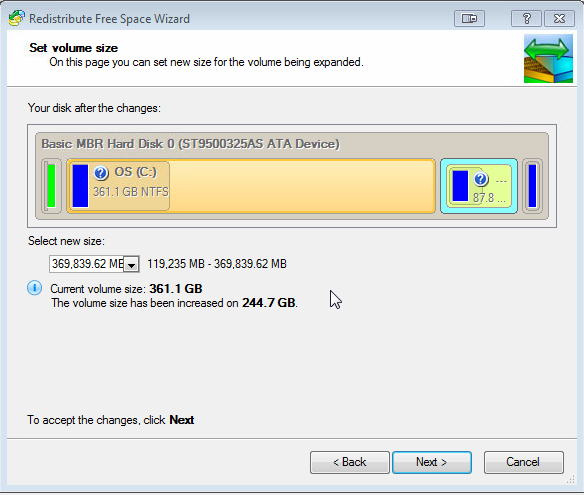
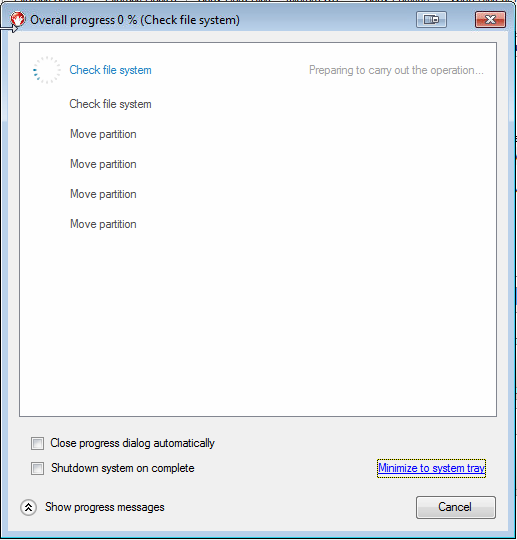
I would be happy with that if it worked because I could just allocate the R drive and lose only 96MB, however if I press apply the program sits there for ages just "Check file system" and never changes... as shown:
How can I reallocate the space back to the C drive correctly?
The harddrive looks like:
Basically, I want to take all 244GB of space from the "New Volume (R
and put it onto the OS (C drive so that it's 3xxGB instead of 116GBI'm using Paragon Hard Disk Manager 12 Suite and when I tell it to redistribute space it allows me to set the C drive to 361GB but leaves a 96mb "New Volume (R
" partition behind as shown:
I would be happy with that if it worked because I could just allocate the R drive and lose only 96MB, however if I press apply the program sits there for ages just "Check file system" and never changes... as shown:
How can I reallocate the space back to the C drive correctly?
My Computer
- Computer type
- PC/Desktop
- OS
- Microsoft Windows 7 Ultimate 64-bit
- CPU
- Intel(R) Core(TM)2 Quad CPU Q9550 @ 2.83GHz
- Motherboard
- ASUSTeK Computer INC. P5Q-PRO
- Memory
- 8.00 GB
- Graphics Card(s)
- AMD Radeon HD 6800 Series
- Sound Card
- (1) Microsoft LifeCam Cinema. (2) AMD High Definition Audi
- Screen Resolution
- 1920 x 1080 x 32 bits (4294967296 colors) @ 60 Hz
- Hard Drives
- (1) OCZ-AGILITY3 (2) OCZ-AGILITY3 (3) SAMSUNG HD103SJ (4) SAMSUNG HD103SJ (5) SAMSUNG HD103UJ (6) ST3500320AS
- Keyboard
- Logitech G15
- Mouse
- Razer Diamondback
- Antivirus
- MalwareBytes Anti-Malware & Microsoft Security Essentials
- Browser
- Chrome

