Re-use a HD?

RoWin7

New member
Power User
Local time
10:46 AM
Messages
1,406
Location
NYS, US
Just got to this and bumped it up for questions. See my last post, #7.

I believe I saw a post at this board about reusing Computer A's HD, Windows and programs intact, in Computer B if I add Computer B's drivers to the DVD first afterward. My experience for many years was that this can't be done. Did I misread something?
 
Last edited:

My Computer

Computer type
PC/Desktop
Computer Manufacturer/Model Number
HP p6-2020t
OS
Win 7 Ult 64-bit
CPU
G620 2.6GHZ Pentium R
Memory
6 GB
Monitor(s) Displays
25" HPLV2311
Screen Resolution
1920 x 1200
Hard Drives
1 SATA, 1 exterior SATA
Case
HP
Cooling
PSU
Antivirus
Glasswire
Browser
Waterfox; Firefox; Chrome for work
Other Info
Firewall--Glasswire
Similar specs in Gateway DX4200
Verizon FIOS Wired network

1 other Win7 computer-- has SSD
reusing Computer A's HD, Windows and programs intact, in Computer B

What dvd?

Do you mean moving an installation on a hard disk to a different machine?

Yes, it can be done.

1. It might need adjusting to new hardware. This can be done by plugging the hd into the new machine. Then use bootable media to do the adjustment.
Make Windows 7 bootable after motherboard swap

2. Windows license will need activating on the new machine
 

My Computers

System One System Two

  • Computer type
    PC/Desktop
    OS
    7 X64
    CPU
    i5 8400
    Motherboard
    gigabyte b365m ds3h
    Memory
    2x8gb 3200mhz
    Hard Drives
    various
    PSU
    pure power 11 400w cm
    Case
    Coolermaster
    Cooling
    cryorig m9i
  • Computer type
    PC/Desktop
    OS
    7x64
    CPU
    g5400
    Motherboard
    ga b365m ds3h
    Memory
    8gb ddr4 2400
    PSU
    xfx pro 450w
Hi,

Your superstitions were correct. In Windows Vista, and possibly Windows 7, you used to be able to set the HDD controller from the proprietary HDD controller back to a Microsoft Generic controller, then swap out the motherboard. The steps for this was broadcast on Mich Tulloc MVP website, but he has now pulled the page. I think at some point in time, Microsoft re-wrote the license agreement, preventing users from changin the Motherboard. Could be why the page was pulled.
 

My Computer

Computer type
PC/Desktop
OS
Windows 7 x64, Vista x64, 8.1 smartphone
CPU
Intel E8400 65W 64-bit
Motherboard
Gigabyte EP45-UD3LR
Memory
DDR2 2 x 2GB, 1GB x 2
Graphics Card(s)
XFX Radeon HD5750
Sound Card
AMD High Definition Audio; Realtek High Definition Audio
Monitor(s) Displays
iiyama prolite X2377HDS
Screen Resolution
1920 x 1080
Hard Drives
500GB 7200 rpm Seagate ST3500413AS 16MB, 500GB 5400 rpm Toshiba MQ02ABF050H 32MB, 200GB 7200 rpm Seagate ST3200820AS 8MB, 2TB 7200 rpm Western Digital WD20EZRX 64MB
PSU
Enermax Liberty Modular
Case
Antec P193 Midi Tower
Keyboard
Mionix ZIBAL 60
Mouse
Razer USB 2.0 Diamondback Mouse or Huion Graphics Tablet
Browser
Internet Explorer, Lunascape, Firefox, Opera, Avast Safezone
There is also a more recent version of free paragon available.

Download Paragon Rescue Kit Free Edition 14

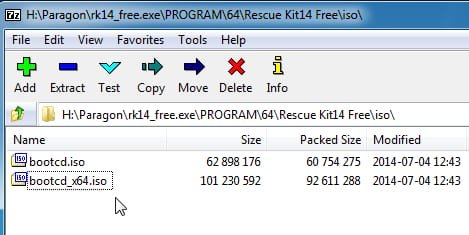
the iso can be copied out of RK14_free.exe using 7-zip

rk14-isofiles.jpg

In addition many paid disk imaging programs have the adjust to new hardware function - Aomei, paragon, macrium, O&O etc.
 

My Computers

System One System Two

  • Computer type
    PC/Desktop
    OS
    7 X64
    CPU
    i5 8400
    Motherboard
    gigabyte b365m ds3h
    Memory
    2x8gb 3200mhz
    Hard Drives
    various
    PSU
    pure power 11 400w cm
    Case
    Coolermaster
    Cooling
    cryorig m9i
  • Computer type
    PC/Desktop
    OS
    7x64
    CPU
    g5400
    Motherboard
    ga b365m ds3h
    Memory
    8gb ddr4 2400
    PSU
    xfx pro 450w
What dvd?

Do you mean moving an installation on a hard disk to a different machine?

Yes, it can be done.

1. It might need adjusting to new hardware. This can be done by plugging the hd into the new machine. Then use bootable media to do the adjustment.
Make Windows 7 bootable after motherboard swap

2. Windows license will need activating on the new machine


Yes, I have an extra license, but I'm trying to skip installing about 50 programs, the updates and numerous OS tweaks. I goofed on "adding drivers to the ISO." I meant adding them to the HD.
 
Last edited:

My Computer

Computer type
PC/Desktop
Computer Manufacturer/Model Number
HP p6-2020t
OS
Win 7 Ult 64-bit
CPU
G620 2.6GHZ Pentium R
Memory
6 GB
Monitor(s) Displays
25" HPLV2311
Screen Resolution
1920 x 1200
Hard Drives
1 SATA, 1 exterior SATA
Case
HP
Cooling
PSU
Antivirus
Glasswire
Browser
Waterfox; Firefox; Chrome for work
Other Info
Firewall--Glasswire
Similar specs in Gateway DX4200
Verizon FIOS Wired network

1 other Win7 computer-- has SSD
To use Rescue kit 14 iso - burn it cd/dvd. Haven't tested extracting it to usb, but posiibly something like yumi would do it.
Boot it up.

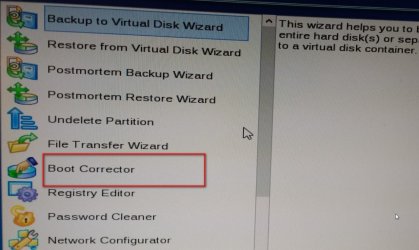
Select BOOT CORRECTOR (double click it )

bootcorrector1.jpg


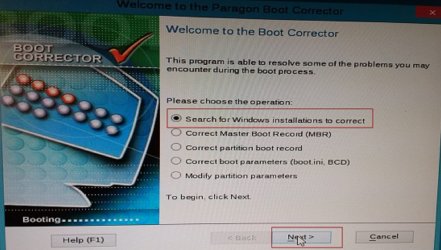
Then select Search for Windows Installations and click Next

searchsmal.jpg

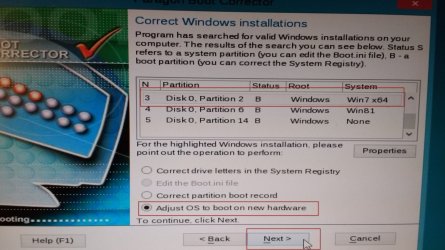
Then click the OS you want to adjust. Dot the Adjust box, and click Next

tickadjsml.jpg
 

My Computers

System One System Two

  • Computer type
    PC/Desktop
    OS
    7 X64
    CPU
    i5 8400
    Motherboard
    gigabyte b365m ds3h
    Memory
    2x8gb 3200mhz
    Hard Drives
    various
    PSU
    pure power 11 400w cm
    Case
    Coolermaster
    Cooling
    cryorig m9i
  • Computer type
    PC/Desktop
    OS
    7x64
    CPU
    g5400
    Motherboard
    ga b365m ds3h
    Memory
    8gb ddr4 2400
    PSU
    xfx pro 450w
I just got to this, 2 months later. It's been a crazy time at work.

1--What's SYSPREP? dO I need it?

2--Please confirm: I install the old drive, then run rk14 from the usb, then correct the registry and boot.ini.

3---Run Simplix

4--When the HD finds all the new drivers on the web, how will it "know" not to use the old drivers?

5--The last image says I can edit the boot.ini file and correct the registry. Only if someone tells me what to change them to. How would I get into boot.ini? Isn't it in DOS? Will the registry make all the necessary changes by itself re: programs and preferences?

6--The bootcd_64.iso file--will that fit on a DVD?
 
Last edited:

My Computer

Computer type
PC/Desktop
Computer Manufacturer/Model Number
HP p6-2020t
OS
Win 7 Ult 64-bit
CPU
G620 2.6GHZ Pentium R
Memory
6 GB
Monitor(s) Displays
25" HPLV2311
Screen Resolution
1920 x 1200
Hard Drives
1 SATA, 1 exterior SATA
Case
HP
Cooling
PSU
Antivirus
Glasswire
Browser
Waterfox; Firefox; Chrome for work
Other Info
Firewall--Glasswire
Similar specs in Gateway DX4200
Verizon FIOS Wired network

1 other Win7 computer-- has SSD
Back
Top