Assume I have a rather new external (Toshiba) 3TB USB harddisk.
During the last days I experienced a data loss because one of the data blocks on the hard disk seems to get damaged.
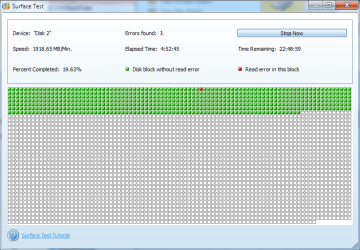
I run a surface test with one of these hardidsk management tools like Minitool Partition Wizard.
It shows exactly ONE bad block on the hard disk (see attached snapshot).
So if I backup the current stuff to another hard disk, then re-format the hard disk and finally re-transfer the data files on the hard disk in focus: Can I continue to use this hard disk without problems?
I have heard that new hard disks are smart enough to exclude such error blocks from their internal table of free available blocks.
So if I later copy some files onto it then the files will NEVER be copied to the bad block.
It will be completely invisible in the future.
I guess you would need to normal format it for the sectors to be marked bad. But the general understanding is once bad sectors start to form the disk is unreliable.
No warranty left on it?
I wouldn't trust it any longer especially if your data is not backed up somewhere else.
My Computer
At a glance
Windows 7 Ultimate x64 SP1AMD Phenom 2 1090T2x8GB Kingston HyperX Fury Black 1600Mhz Unga...MSI GTX 970 Gaming 4G
Computer type
PC/Desktop
Computer Manufacturer/Model Number
Custom Build
OS
Windows 7 Ultimate x64 SP1
CPU
AMD Phenom 2 1090T
Motherboard
Gigabyte GA-890FXA-UD5
Memory
2x8GB Kingston HyperX Fury Black 1600Mhz Unganged
Graphics Card(s)
MSI GTX 970 Gaming 4G
Sound Card
Realtek On-Board HD 7.1 Audio / Logitech G35
Monitor(s) Displays
3xAcer GD245HQ
Screen Resolution
1920x1080
Hard Drives
Samsung 850 Pro 512GB SSD - OS /
WD Caviar Black SATA 3 - 1 TBx2 - Dynamic RAID 0 /
WD Caviar Green SATA 2 - 640GBx2 - Dynamic RAID 0 /
WD Caviar Green SATA 2 - 640GB - Internal Backup /
Seagate Barracude SATA 3 - 3TB - External Backup/ Sync
PSU
HighPower 1000W
Case
Cooler Master HAF 932
Cooling
Noctua NH-D14
Keyboard
Logitech G19
Mouse
Logitech G500
Internet Speed
100/4 Mbit Cable (100GB quota)
Antivirus
ZoneAlarm Extreme Security / MBAM Pro / MBAE Free / SAS Free