Read/write issue with Homegroup

atmos

New member
Local time
2:05 PM
Messages
9
Location
Red Wing, MN
Hello,

On my PC (win7) I have a folder shared with homegroup as read/write. On my laptop (win7), I can access the folder, open an xcel file within the folder, and it opens as read only.

Why is it not read/write like it is configured as?

Thanks
 

My Computer

Computer Manufacturer/Model Number
Home buit PC and Macbook
OS
W7 Pro 64 and Snow Leopard - W7 Pro 32
CPU
AMD Phenom II X4 945 Deneb 3.0GHz 4 x 512KB L2 Cache 6MB L3
Motherboard
ASUS M4A78-E
Memory
F2-8500CL5D-4GBTD x4, 8GB Total
Graphics Card(s)
VisionTek 900244 Radeon HD 4870 512MB 256-bit GDDR5 PCI Expr
Sound Card
Stock
Monitor(s) Displays
Acer H213H
Hard Drives
WD Caviar Black WD5001AALS 500GB 7200 RPM 32MB Cache SATA 3.0Gb/s 3.5"
Internet Speed
18mbps
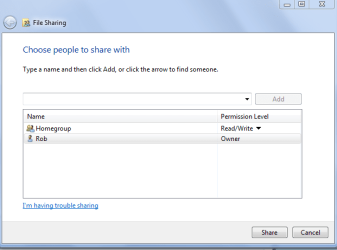
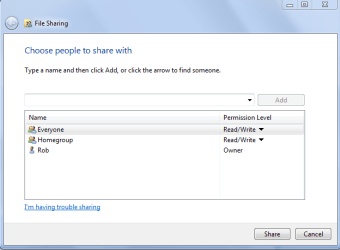
Do the permissions on your shared file look like the picture below? In some cases it might help to add "Everyone" like in the second picture. But that setting would give access to people outside the Homegroup.
 

Attachments

  • Homegroup read write.PNG
    Homegroup read write.PNG
    13.5 KB · Views: 22
  • Everyone read write.PNG
    Everyone read write.PNG
    14.2 KB · Views: 17

My Computer

Computer type
PC/Desktop
Computer Manufacturer/Model Number
Home built
OS
Windows 7 Ult, Windows 8.1 Pro,
CPU
Q9650-4.275GHz, E8600 4.5GHz, E6750-3.8GHz
Motherboard
Evga 780i FTW
Memory
G.Skill PC2 9600 1200Mhz 5 5 5 15 2T
Graphics Card(s)
GTX480
Sound Card
Asus Xonar D2
Monitor(s) Displays
HannsG
Screen Resolution
1680X1050
Hard Drives
GSkill Phoenix Pro 120GB SSD
PSU
ThermalTake Toughpower 1000Watt modular
Case
ThermalTake XaserV
Cooling
Xigmatek S1283
Keyboard
Logitech G15
Mouse
Logitech G9
Internet Speed
T1
Do the permissions on your shared file look like the picture below? In some cases it might help to add "Everyone" like in the second picture. But that setting would give access to people outside the Homegroup.


I have just homegroup and owner, not everyone. I will try what your recommended though. Thanks!

Also, just found that windows live mesh is doing exactly what I wanted to do - sink files/folders across 2 computers.
 

My Computer

Computer Manufacturer/Model Number
Home buit PC and Macbook
OS
W7 Pro 64 and Snow Leopard - W7 Pro 32
CPU
AMD Phenom II X4 945 Deneb 3.0GHz 4 x 512KB L2 Cache 6MB L3
Motherboard
ASUS M4A78-E
Memory
F2-8500CL5D-4GBTD x4, 8GB Total
Graphics Card(s)
VisionTek 900244 Radeon HD 4870 512MB 256-bit GDDR5 PCI Expr
Sound Card
Stock
Monitor(s) Displays
Acer H213H
Hard Drives
WD Caviar Black WD5001AALS 500GB 7200 RPM 32MB Cache SATA 3.0Gb/s 3.5"
Internet Speed
18mbps
Back
Top