Solved Reading BIOS-located product key info

wowser

New member
Local time
11:52 PM
Messages
6
If using Nirsoft or other produkey viewer, on a machine with win 7 installed, did the "putting the product key into the BIOS" happen before win 8/8.1/10? The machine I'm dealing with, has no sticker, and potentially no BIOS product key info. But before their HDD failed, it had win 7 home premium loaded and activated.
 

My Computer My Computer

Computer type
PC/Desktop
Computer Manufacturer/Model Number
Asus
OS
Win 7 64bit Pro
CPU
intel core i3 inside
Motherboard
P8B75-M
Memory
4GB DDR3
Graphics Card(s)
machine died before running sys info that would've told me
Sound Card
see above
Monitor(s) Displays
Panasonic 50-inch TV
Screen Resolution
Not sure
Hard Drives
1TB
Case
desktop tower
Keyboard
Logitech K260 wireless
Mouse
Logitech wireless
Internet Speed
ADSL
Antivirus
n/a
Browser
IE
Hi wowser, welcome to Seven Forums,

I notice that in your system specs you don't know what memory or graphics card you have got!

You need to edit your profile with ALL your system and hardware specifications in your UserCP > Edit System Spec setup. It will help us to help you!

The tutorial below [Published by Brink and written by CyberZeus] let's you easily see all of your system information, along with the option of making filling out your system specifications here at Seven Forums easier. How to See Your System Specs with "System Info"

I hope this helps!
 

My Computer My Computer

Computer type
Laptop
Computer Manufacturer/Model Number
Fujitsu LIFEBOOK
OS
Win 7 HP SP1 64-bit Vista HB SP2 32-bit Linux Mint 18.3
CPU
Intel(R) Pentium(R) CPU P6200 @ 2.13GHz
Motherboard
FUJITSU FJNBB06
Memory
4.00 GB
Graphics Card(s)
Intel(R) Graphics Media Accelerator HD
Sound Card
[1] Realtek High Definition Audio [2] Intel(R) Display Audio
Screen Resolution
1366 x 768 x 32 bits (4294967296 colors) @ 59 Hz
Hard Drives
TOSHIBA MK5076GSX
Antivirus
AVG FREE

My Computer My Computer

Computer type
PC/Desktop
Computer Manufacturer/Model Number
HP Desktop & Compaq Laptop
OS
Win 10 x64, Linux Lite, Win 7 x64, BlackArch, & Kali
Hard Drives
Samsung 850 Pro 256Gb,
Hitachi HDD 1Tb,
Crucial MX SSD 250Gb
Segate 3Tb USB 3.0 Ext. Backup HDD
Internet Speed
150Mbps dn, 20Mbps up
Antivirus
Avast Free, Malwarebytes Anti-Exploit & Anti-Ransomware
Browser
Firefox, Chrome, Opera, & VPN
If using Nirsoft or other produkey viewer, on a machine with win 7 installed, did the "putting the product key into the BIOS" happen before win 8/8.1/10? The machine I'm dealing with, has no sticker, and potentially no BIOS product key info. But before their HDD failed, it had win 7 home premium loaded and activated.

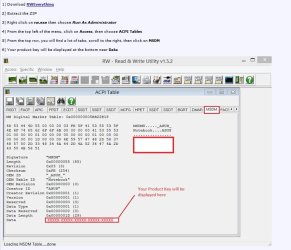
RWEverything – Read & Write Everything

You can find it using RWeverything

rweverything.jpg
 

My Computers My Computers

System One System Two

  • Computer type
    PC/Desktop
    OS
    7 X64
    CPU
    i5 8400
    Motherboard
    gigabyte b365m ds3h
    Memory
    2x8gb 3200mhz
    Hard Drives
    various
    PSU
    pure power 11 400w cm
    Case
    Coolermaster
    Cooling
    cryorig m9i
  • Computer type
    PC/Desktop
    OS
    7x64
    CPU
    g5400
    Motherboard
    ga b365m ds3h
    Memory
    8gb ddr4 2400
    PSU
    xfx pro 450w
Machine died, hardware failure

Thank you for the info, I tried the Nirsoft utility mentioned, and 2 others, but they did not find any product key info in the BIOS as far as I can tell.

Since then, the computer HAS given up the ghost.
 

My Computer My Computer

Computer type
PC/Desktop
Computer Manufacturer/Model Number
Asus
OS
Win 7 64bit Pro
CPU
intel core i3 inside
Motherboard
P8B75-M
Memory
4GB DDR3
Graphics Card(s)
machine died before running sys info that would've told me
Sound Card
see above
Monitor(s) Displays
Panasonic 50-inch TV
Screen Resolution
Not sure
Hard Drives
1TB
Case
desktop tower
Keyboard
Logitech K260 wireless
Mouse
Logitech wireless
Internet Speed
ADSL
Antivirus
n/a
Browser
IE
Back
Top