I've got a 4G USB drive that I am using as a readyboost drive. Half the time it seems to work fine but frequently when I start my computer up I get a dialog "Do you want to scan and fix LEXAR (Z: ). There might be a problem with some files on this device or disk etc.
Do you think the disk is faulty or is it some sort of bug?
hi
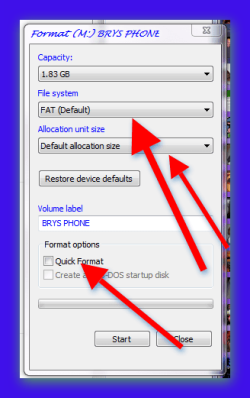
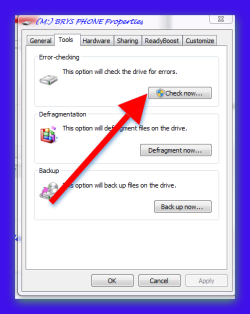
best advice would be to reformat the drive see my pic and use the settings as i have shown then i would check disk as in pic then assign readyboost and see if this helps.
format
1
Start your computer and plug in the flash drive in the USB port.
2
Click on "Computer in the start menu. and locate the drive"
3
right click on the drive and click format and choose your settings
check disk for errors
1
right click on the drive
2
click properties
3
click tools
4
in error checking click "check now box"
Attachments
brys Snap ?10 ?December ?2011 09h27m28s 001.png
17.6 KB
· Views: 0
brys Snap ?10 ?December ?2011 09h30m35s 002.png
15.2 KB
· Views: 1
My Computer
Computer Manufacturer/Model Number
packard bell IXTREME M5722
OS
Operating System : Windows 7 Home Premium Edition 6.01.7600 SP1 (x64)
CPU
Processor : Intel Core 2 Quad Q8300 @ 2500 MHz
Motherboard
Mainboard : Packard Bell (Acer EG43M )
Memory
Physical Memory :8GB Corsair4x 2GB 800MHz C5 DDR2
Graphics Card(s)
Video Card : XFX 6700 AMD
Monitor(s) Displays
Maestro 234DL - BenQ V2220 - BenQ VW2420H
Screen Resolution
Current Display :1920x1080p pixels at 60 Hz in HD LED
Hard Drives
Hard Disks : WDC (1000 GB)
Drive C: (Hard Disk) : 428 GB available on 491 GB
Drive D: (Hard Disk) : 426 GB available on 492 GB
SAMSUNG spinpoint HD103SJ 1000.2 GB
(X 2) KINGSTON SSD NOW V 30GB
PSU
XFX ProSeries 550W PSU
Case
PACKARD BELL IXTREME
Cooling
System Blower Current: 150mA Air Flow16CFM ;Akasa 90mm rear
EXTRA COOLING>(FAN CONTROLLER) PC Bay Cooler 3 x 40mm fans; Akasa AK-HD-BL Blue hard drive cooler 2 x 40 mm fan 4500 rpm 29.7 dBA
Bios> American Megatrends Inc.
Version : P01-A1
Date : 08/31/2009
Thanks. I've tried most of these things. I went to the Properties->Readyboost and it reported that the drive was dedicated to readyboost (as I initially set it). When I tried to check the disk it reported that it was in use.
When I rebooted, everything was reported as being fine.
I used 3 4g drives in the past, I never noticed any improvement in file loading.
Also,
Windows killed all three of the 3 drives, 2 dont even work anymore and 1 only tranfers at like 244k/sec.
I dont think flash drives are really cut out for whatever windows does to them.
Just my experience.
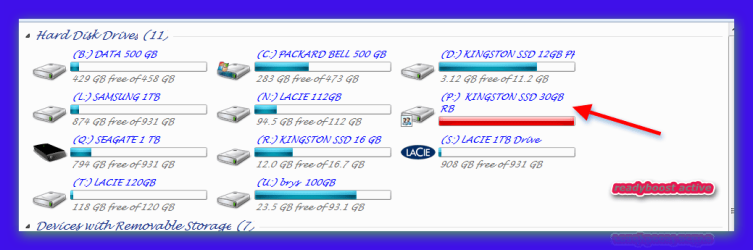
very likely when you assign a drive for readyboost you normally dedicate it for it in the settings so when its being used you can not write to it its solely used for the readyboost function, now if you open up my computer do you see the drive full up with a red line ? like mine in the pic?
Attachments
brys Snap ?10 ?December ?2011 11h12m05s 003.png
23.2 KB
· Views: 8
My Computer
Computer Manufacturer/Model Number
packard bell IXTREME M5722
OS
Operating System : Windows 7 Home Premium Edition 6.01.7600 SP1 (x64)
CPU
Processor : Intel Core 2 Quad Q8300 @ 2500 MHz
Motherboard
Mainboard : Packard Bell (Acer EG43M )
Memory
Physical Memory :8GB Corsair4x 2GB 800MHz C5 DDR2
Graphics Card(s)
Video Card : XFX 6700 AMD
Monitor(s) Displays
Maestro 234DL - BenQ V2220 - BenQ VW2420H
Screen Resolution
Current Display :1920x1080p pixels at 60 Hz in HD LED
Hard Drives
Hard Disks : WDC (1000 GB)
Drive C: (Hard Disk) : 428 GB available on 491 GB
Drive D: (Hard Disk) : 426 GB available on 492 GB
SAMSUNG spinpoint HD103SJ 1000.2 GB
(X 2) KINGSTON SSD NOW V 30GB
PSU
XFX ProSeries 550W PSU
Case
PACKARD BELL IXTREME
Cooling
System Blower Current: 150mA Air Flow16CFM ;Akasa 90mm rear
EXTRA COOLING>(FAN CONTROLLER) PC Bay Cooler 3 x 40mm fans; Akasa AK-HD-BL Blue hard drive cooler 2 x 40 mm fan 4500 rpm 29.7 dBA
Bios> American Megatrends Inc.
Version : P01-A1
Date : 08/31/2009
in my experience readyboost does work have a read here>>> ReadyBoost - Windows 7 features - Microsoft Windows i have 8GB ram and i use a ssd for readyboost and i have 27 GB dedicated for it and it works fine when needed
Attachments
brys Snap ?10 ?December ?2011 11h30m47s 006.png
17.3 KB
· Views: 4
brys Snap ?10 ?December ?2011 11h24m27s 005.png
16.9 KB
· Views: 1
My Computer
Computer Manufacturer/Model Number
packard bell IXTREME M5722
OS
Operating System : Windows 7 Home Premium Edition 6.01.7600 SP1 (x64)
CPU
Processor : Intel Core 2 Quad Q8300 @ 2500 MHz
Motherboard
Mainboard : Packard Bell (Acer EG43M )
Memory
Physical Memory :8GB Corsair4x 2GB 800MHz C5 DDR2
Graphics Card(s)
Video Card : XFX 6700 AMD
Monitor(s) Displays
Maestro 234DL - BenQ V2220 - BenQ VW2420H
Screen Resolution
Current Display :1920x1080p pixels at 60 Hz in HD LED
Hard Drives
Hard Disks : WDC (1000 GB)
Drive C: (Hard Disk) : 428 GB available on 491 GB
Drive D: (Hard Disk) : 426 GB available on 492 GB
SAMSUNG spinpoint HD103SJ 1000.2 GB
(X 2) KINGSTON SSD NOW V 30GB
PSU
XFX ProSeries 550W PSU
Case
PACKARD BELL IXTREME
Cooling
System Blower Current: 150mA Air Flow16CFM ;Akasa 90mm rear
EXTRA COOLING>(FAN CONTROLLER) PC Bay Cooler 3 x 40mm fans; Akasa AK-HD-BL Blue hard drive cooler 2 x 40 mm fan 4500 rpm 29.7 dBA
Bios> American Megatrends Inc.
Version : P01-A1
Date : 08/31/2009