
Readyboost HELP

koondawg06

New member
Local time
11:31 AM
Messages
26
Hello all,
I must say whoever made this web forum did a fantastic job! I'm not sure if I'm in the right subform but I have a question about readyboost.

I have Windows 7 installed on my Dell Inspiron 1501 laptop. My laptop came preloaded with Windows Vista, and I have since then upgraded. I have a built in SD reader slot on my laptop in which I have been trying to use it for Readyboost using an SD card.

Here's the problem. I have four SD cards that I have tried to get to work using ReadyBoost. I have one 1GB SanDisk, one 1GB off brand, one 4GB High-Speed 150x Turbo SD card made by A-Data, and one 4GB Sandisk Ultra II SDHC card with 15 mb/s* specifications. I have seen on various sites that the 150x and Ultra II cards SHOULD work for readyboost. BUT, when I go to event viewer after running some tests I usually get a message such as this:

"The device (Unknown Unknown) will not be used for a ReadyBoost cache because it has insufficient read performance: 1881 KB/sec."

I first thought maybe my A-data card had a bad sector or something because I bought it used on eBay, so I went and bought this Ultra II card at Walmart brand new.

It didn't work on Vista either. However, when I plug a USB flash drive (8GB SanDisk) Readyboost says that it meets the requirements for readyboost. Does anyone have ANY suggestions on how to make Readyboost work for my SD slot? I want to use it then so I don't have to pull any drives when I go traveling.
 

My Computer

Computer Manufacturer/Model Number
Dell Inspiron 1501
OS
Windows 7 Ultimate x64
CPU
AMD Sempron Processor 3600+ 2.00 GHz
Motherboard
Dell Inc. 0UW744
Memory
2.00 GB (DDR2 PC2-5300)
Graphics Card(s)
(On Board) ATI Radeon Xpress 1150
Sound Card
On Board
Monitor(s) Displays
Acer 21.5 in. x123H
Screen Resolution
1920X1080 on Monitor, 1280X800 on Laptop Display
Hard Drives
120 GB 5400 RPM Serial ATA Internal Hard Drive
Have you updated the drivers for it?
 

My Computer

Computer Manufacturer/Model Number
Sony Vaio FZ21Z
OS
Windows 7 Ultimate x64 ®™
CPU
Intel Core 2 Duo (2.2 GHz)
Motherboard
Sony (Intel Chipset)
Memory
2x 2GB Corsair (667 MHz)
Graphics Card(s)
NVIDIA 8600M GS (256MB)
Sound Card
Sigmatel
Monitor(s) Displays
15.4" TFT X-Black
Screen Resolution
1280x800
Hard Drives
Western Digital 300GB Scorpio Black (7200rpm)
Mouse
Logitech Anywhere MX
Internet Speed
Sky 5MB
Did the card you bought have Readyboost on the package?
 

My Computer

Computer Manufacturer/Model Number
Sony Vaio Z46GDU
OS
Windows 7 Ultimate x86-64
CPU
[email protected] 1066MHz FSB
Motherboard
Sony branded
Memory
6GB DDR3 1066MHz
Graphics Card(s)
9300M GS 256MB Dedicated (Speed) + Intel4500MHD (Stamina)
Sound Card
Realtek HD Audio
Monitor(s) Displays
13.1' WXGA
Screen Resolution
1600x900
Hard Drives
320GB 7200RPM w/ 16MB cache
Internet Speed
1MB/s
When I view the properties of the devices under the hardware tab, the Update Driver... and Rollback driver... are grayed out. Also, the package does not say anything about readyboost.. But I wasn't aware that any manufacturers advertised that they were readyboost compatible yet.

Here's the specs on the SanDisk Ultra II:
Amazon.com: SanDisk Ultra II SDHC 4GB SD Memory Card (SDSDRH-004G-A11, US Retail Package): Electronics
Speed Class Rating of 4
Up to 15mb/s read/write speeds...

You'd think it'd work? Some of my co-workers in my IT department tell me that just a plain old SD card works on theirs...
 

My Computer

Computer Manufacturer/Model Number
Dell Inspiron 1501
OS
Windows 7 Ultimate x64
CPU
AMD Sempron Processor 3600+ 2.00 GHz
Motherboard
Dell Inc. 0UW744
Memory
2.00 GB (DDR2 PC2-5300)
Graphics Card(s)
(On Board) ATI Radeon Xpress 1150
Sound Card
On Board
Monitor(s) Displays
Acer 21.5 in. x123H
Screen Resolution
1920X1080 on Monitor, 1280X800 on Laptop Display
Hard Drives
120 GB 5400 RPM Serial ATA Internal Hard Drive
Hello all,
I must say whoever made this web forum did a fantastic job! I'm not sure if I'm in the right subform but I have a question about readyboost.

I have Windows 7 installed on my Dell Inspiron 1501 laptop. My laptop came preloaded with Windows Vista, and I have since then upgraded. I have a built in SD reader slot on my laptop in which I have been trying to use it for Readyboost using an SD card.

Here's the problem. I have four SD cards that I have tried to get to work using ReadyBoost. I have one 1GB SanDisk, one 1GB off brand, one 4GB High-Speed 150x Turbo SD card made by A-Data, and one 4GB Sandisk Ultra II SDHC card with 15 mb/s* specifications. I have seen on various sites that the 150x and Ultra II cards SHOULD work for readyboost. BUT, when I go to event viewer after running some tests I usually get a message such as this:

"The device (Unknown Unknown) will not be used for a ReadyBoost cache because it has insufficient read performance: 1881 KB/sec."

I first thought maybe my A-data card had a bad sector or something because I bought it used on eBay, so I went and bought this Ultra II card at Walmart brand new.

It didn't work on Vista either. However, when I plug a USB flash drive (8GB SanDisk) Readyboost says that it meets the requirements for readyboost. Does anyone have ANY suggestions on how to make Readyboost work for my SD slot? I want to use it then so I don't have to pull any drives when I go traveling.
Have you tried the cards more than once?

I'm guessing you probably have, but I figured I would ask, because my Corsair 8GB flash drive initially gave me a "this device is not sufficient" message, and just for the hell of it, I tried it a second time, and suddenly it worked.

The device didn't change at all, so I have no explanation as to why it suddenly worked.
 

My Computer

Computer type
PC/Desktop
Computer Manufacturer/Model Number
Gigabyte Technology Co., Ltd.
OS
Win 7 Ultimate 64-bit SP1 (desktop)
CPU
Intel Core 2 Duo E8400
Motherboard
Gigabyte GA-EP35-DS3R
Memory
2x 2GB OCZ DDR II SDRAM PC2-6400
Graphics Card(s)
NVIDIA GeForce 9400GT
Monitor(s) Displays
HP 2009m(primary), Acer P191W
Screen Resolution
1600x900, 1440x900
Hard Drives
Internal:WD Caviar Black 640GB 32MB cache 7200RPM
External:Samsung Story Station 1TB HDD desktop drive
500GB Toshiba portable drive
PSU
Antec Earthwatts EA500D
Case
Antec Sonata III
Cooling
4 fans
Keyboard
Logitech Wave
Mouse
Logitech M-SBF90
Internet Speed
Slow due to home Wireless-G router
Antivirus
MSE, Hitman Pro, Malwarebytes
Browser
Chrome and Palemoon
Other Info
Laptop....Acer 5750Z-4835
15.6" HD Widescreen CineCrystal™ LED-backlit LCD Display: (1366x768 resolution, 16:9 aspect ratio)
Intel® Pentium® Processor B940 (2.0GHz, 2MB L3 cache)
Windows® 7 Home Premium,500GB Hard Drive,4GB DDR3 RAM, Intel® HD Graphics,8X DVD-Super Multi Double-Layer Drive
Multi-in-1 Digital Media Card Reader,802.11b/g/n Wi-Fi
Chrome and Palemoon, MSE, Hitman Pro
Try finding the latest drivers for your reader first. If you can't skip to below step anyway but try to find updated drivers afterward if possible, it will give you better performance and less problems with the ReadyBoost.

Reformat the card in NTFS (do full format) and go to Control Panel\Device Manager\Disk Drives\"Your SD Card or Reader"\, select and right click 'Properties' on "Your SD Card or Reader", select the 'Policies' tab, mark 'Better Performance' and hit 'OK'.

Afterwards enable ReadyBoost like normal (recommend = 'Dedicate this Drive for ReadyBoost'), it should past.

Hope it's not too cluttered but works for me on all my SD/USB drives with no ReadyBoost sticker.

:p
 

My Computer

OS
Windows 7 Professional
CPU
Intel Core i7-2670QM
Memory
Samsung 8GB
Graphics Card(s)
NVIDIA GT 555M
Hard Drives
Intel 525 120GB | HGST Travelstar 1TB
Mouse
CM Storm Xornet | Microsoft Sculpt Comfort
Internet Speed
25 Mbps | 600 Kbps
Other Info
Centrino 6205 | Seagate Backup Plus 1TB
Yes, I have tried plugging the SD cards in multiple times, and testing them multiple times also.

I went to Dell's website to find the latest drivers but for my model they only have drivers for Windows XP and Vista 32-bit. I am running Windows 7 64-bit. I briefly googled the drivers I needed but couldn't really find anything. I had windows search for the drivers automatically and it said the drivers I had were the latest.

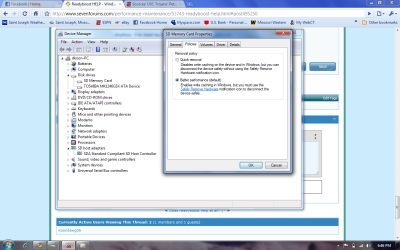
Under device manager it has my reader listed as "SDA Standard Compliant SD Host Controller" When I view the properties I only have four tabs: General, Driver, Details, and Resources... No such policies tab :(

Any other suggestions? I'm stumped...
 

My Computer

Computer Manufacturer/Model Number
Dell Inspiron 1501
OS
Windows 7 Ultimate x64
CPU
AMD Sempron Processor 3600+ 2.00 GHz
Motherboard
Dell Inc. 0UW744
Memory
2.00 GB (DDR2 PC2-5300)
Graphics Card(s)
(On Board) ATI Radeon Xpress 1150
Sound Card
On Board
Monitor(s) Displays
Acer 21.5 in. x123H
Screen Resolution
1920X1080 on Monitor, 1280X800 on Laptop Display
Hard Drives
120 GB 5400 RPM Serial ATA Internal Hard Drive
You should have the card in the reader before going to device manager.

If I remember correctly in device manager either look for your SD card or reader and right click properties. This worked for me on two different laptops both with Vista and 7 and all cards not being Readyboost certified.

Would you mind snipping the device manager with 'disk drives' expanded and card inserted?
 

My Computer

OS
Windows 7 Professional
CPU
Intel Core i7-2670QM
Memory
Samsung 8GB
Graphics Card(s)
NVIDIA GT 555M
Hard Drives
Intel 525 120GB | HGST Travelstar 1TB
Mouse
CM Storm Xornet | Microsoft Sculpt Comfort
Internet Speed
25 Mbps | 600 Kbps
Other Info
Centrino 6205 | Seagate Backup Plus 1TB
Ok.. I checked the Policies tab under the properties and better performance was the default option for the device. I've also formatted the drive each of the different ways including FAT32 with no change in readyboost working. I wonder if my reader isn't fast enough itself?
 

My Computer

Computer Manufacturer/Model Number
Dell Inspiron 1501
OS
Windows 7 Ultimate x64
CPU
AMD Sempron Processor 3600+ 2.00 GHz
Motherboard
Dell Inc. 0UW744
Memory
2.00 GB (DDR2 PC2-5300)
Graphics Card(s)
(On Board) ATI Radeon Xpress 1150
Sound Card
On Board
Monitor(s) Displays
Acer 21.5 in. x123H
Screen Resolution
1920X1080 on Monitor, 1280X800 on Laptop Display
Hard Drives
120 GB 5400 RPM Serial ATA Internal Hard Drive
Well then I'm not any help anymore.

I've never heard of a card reader, SD card or USB stick that defaults to performance in Windows XP, Vista or 7.

Either I'm not explainning things right, your card reader is not properly recognized by Windows, your Windows is acting funny or you are doing something wrong.

I've used a 2GB SanDisk Cruzer Micro for ReadyBoost on both Vista and 7, all three Windows XP, Vista and 7 defaults to 'Quick Removal' for data lost precautions when first recognized by the OS; not too mention my 2GB SanDisk Cruzer is not Readyboost approved it is just average in transfer speed but my Transcend 8GB card is 1.5x faster but failed for Readyboost the first time in Windows 7, surprise, surprise?...

Anyhow, I've tried my best...good luck with Readyboost.


:p
 

My Computer

OS
Windows 7 Professional
CPU
Intel Core i7-2670QM
Memory
Samsung 8GB
Graphics Card(s)
NVIDIA GT 555M
Hard Drives
Intel 525 120GB | HGST Travelstar 1TB
Mouse
CM Storm Xornet | Microsoft Sculpt Comfort
Internet Speed
25 Mbps | 600 Kbps
Other Info
Centrino 6205 | Seagate Backup Plus 1TB
Well thanks I certainly do appreciate your help.. Like I said my 8GB SanDisk Cruzer USB drive works with Readyboost fine.. I guess I just need to quit being lazy and buy a flash drive to use for Readyboost... But here's the screenshot of what I'm seeing under device manager.
 

Attachments

  • SD.png
    SD.png
    238.1 KB · Views: 236

My Computer

Computer Manufacturer/Model Number
Dell Inspiron 1501
OS
Windows 7 Ultimate x64
CPU
AMD Sempron Processor 3600+ 2.00 GHz
Motherboard
Dell Inc. 0UW744
Memory
2.00 GB (DDR2 PC2-5300)
Graphics Card(s)
(On Board) ATI Radeon Xpress 1150
Sound Card
On Board
Monitor(s) Displays
Acer 21.5 in. x123H
Screen Resolution
1920X1080 on Monitor, 1280X800 on Laptop Display
Hard Drives
120 GB 5400 RPM Serial ATA Internal Hard Drive
Well I'll be damn, that's the first I've ever seen that.

Well the only other thing is drivers. I've used a Sandisk 2GB SD Card Calss 6 with Readyboost and a Transcend 2GB Mini SD Class 6 with Readyboost also.

The card reader was made by Realtek so the updated drivers were really easy to find.

Would you happen to know the model of your laptop? I can look for updated drivers for your reader if you have the model.

:p
 

My Computer

OS
Windows 7 Professional
CPU
Intel Core i7-2670QM
Memory
Samsung 8GB
Graphics Card(s)
NVIDIA GT 555M
Hard Drives
Intel 525 120GB | HGST Travelstar 1TB
Mouse
CM Storm Xornet | Microsoft Sculpt Comfort
Internet Speed
25 Mbps | 600 Kbps
Other Info
Centrino 6205 | Seagate Backup Plus 1TB
I don't think you are going to get something out of SD cards. Even few USB sticks buy you anything. Run this program ( HD Tune website ) for your HDD and then for your cards and compare the nums. Especially the access time is important. Anything over 15ms is no good because the disk can do better. Also a typical HDD data rate is in the 50 to 60MB/sec range. So what are you gaining.
I would buy more RAM. Scan your system here ( RAM Memory Upgrade: Dell, Mac, Apple, HP, Compaq. USB drives, flash cards, SSD at Crucial.com ) and you will know your options.
 

My Computer

Computer Manufacturer/Model Number
HP, Dell, Gateway, Toshiba - 4 laptops and 2 desktops
OS
Vista, Windows7, Mint Mate, Zorin, Windows 8
CPU
from 1.6GHz Duo to i7
Monitor(s) Displays
2x HP w2207
Hard Drives
5x HDD, 7x SSD, 12x Externals
Keyboard
with trackball - no mices
Mouse
Trackball mice
Internet Speed
DSL 6000
Nemix if you could find some updated drivers for my reader that'd be great. I've done some looking but I may be overlooking due to my frustration. It's a Dell Inspiron 1501 (Just updated my system specs if u need more).

whs --- I have just heard people say that readyboost helps and SD cards are so inexpensive any more I thought I would give it a try. I wish my laptop had more than 2 slots for ram cause I feel like since I bought those sticks about a year or so ago that they are kind of going to waste if I get more ram..
 

My Computer

Computer Manufacturer/Model Number
Dell Inspiron 1501
OS
Windows 7 Ultimate x64
CPU
AMD Sempron Processor 3600+ 2.00 GHz
Motherboard
Dell Inc. 0UW744
Memory
2.00 GB (DDR2 PC2-5300)
Graphics Card(s)
(On Board) ATI Radeon Xpress 1150
Sound Card
On Board
Monitor(s) Displays
Acer 21.5 in. x123H
Screen Resolution
1920X1080 on Monitor, 1280X800 on Laptop Display
Hard Drives
120 GB 5400 RPM Serial ATA Internal Hard Drive
Hey,

Here is a list of drivers I found for your card reader which is made by Ricoh:

1 = Original Drivers from Dell website, XP & Vista
2 = Updated Drivers from X-Drivers.com, XP & Vista
3 = Windows 7 Drivers from X-Drivers.com, XP, Vista & Windows 7


All drivers that work with Vista should also work with 7 but you'll have to manually install those ones. It's just in the case the Windows 7 drivers for some reason do not install but I've thoroughly checked the model of the card reader through the original Dell drivers. They are the same model just updated drivers.

Let me know if they install, then make sure you're SD card if NTFS formatted and Card Reader is checked for Performance through Device Manager, then test for ReadyBoost.

:p
 

Attachments

My Computer

OS
Windows 7 Professional
CPU
Intel Core i7-2670QM
Memory
Samsung 8GB
Graphics Card(s)
NVIDIA GT 555M
Hard Drives
Intel 525 120GB | HGST Travelstar 1TB
Mouse
CM Storm Xornet | Microsoft Sculpt Comfort
Internet Speed
25 Mbps | 600 Kbps
Other Info
Centrino 6205 | Seagate Backup Plus 1TB
Nemix if you could find some updated drivers for my reader that'd be great. I've done some looking but I may be overlooking due to my frustration. It's a Dell Inspiron 1501 (Just updated my system specs if u need more).

whs --- I have just heard people say that readyboost helps and SD cards are so inexpensive any more I thought I would give it a try. I wish my laptop had more than 2 slots for ram cause I feel like since I bought those sticks about a year or so ago that they are kind of going to waste if I get more ram..


Just make the measurements with HD Tune and you'll see what the nums say.
 

My Computer

Computer Manufacturer/Model Number
HP, Dell, Gateway, Toshiba - 4 laptops and 2 desktops
OS
Vista, Windows7, Mint Mate, Zorin, Windows 8
CPU
from 1.6GHz Duo to i7
Monitor(s) Displays
2x HP w2207
Hard Drives
5x HDD, 7x SSD, 12x Externals
Keyboard
with trackball - no mices
Mouse
Trackball mice
Internet Speed
DSL 6000
Nemix if you could find some updated drivers for my reader that'd be great. I've done some looking but I may be overlooking due to my frustration. It's a Dell Inspiron 1501 (Just updated my system specs if u need more).

whs --- I have just heard people say that readyboost helps and SD cards are so inexpensive any more I thought I would give it a try. I wish my laptop had more than 2 slots for ram cause I feel like since I bought those sticks about a year or so ago that they are kind of going to waste if I get more ram..


Just make the measurements with HD Tune and you'll see what the nums say.

I will if I ever get it to work :p
 

My Computer

Computer Manufacturer/Model Number
Dell Inspiron 1501
OS
Windows 7 Ultimate x64
CPU
AMD Sempron Processor 3600+ 2.00 GHz
Motherboard
Dell Inc. 0UW744
Memory
2.00 GB (DDR2 PC2-5300)
Graphics Card(s)
(On Board) ATI Radeon Xpress 1150
Sound Card
On Board
Monitor(s) Displays
Acer 21.5 in. x123H
Screen Resolution
1920X1080 on Monitor, 1280X800 on Laptop Display
Hard Drives
120 GB 5400 RPM Serial ATA Internal Hard Drive
WHich one do you suggest I try first Nemix?
 

My Computer

Computer Manufacturer/Model Number
Dell Inspiron 1501
OS
Windows 7 Ultimate x64
CPU
AMD Sempron Processor 3600+ 2.00 GHz
Motherboard
Dell Inc. 0UW744
Memory
2.00 GB (DDR2 PC2-5300)
Graphics Card(s)
(On Board) ATI Radeon Xpress 1150
Sound Card
On Board
Monitor(s) Displays
Acer 21.5 in. x123H
Screen Resolution
1920X1080 on Monitor, 1280X800 on Laptop Display
Hard Drives
120 GB 5400 RPM Serial ATA Internal Hard Drive
In short the 3rd one for Windows 7.

Run the setup and install, then go to Control Panel/Device Manager to check if the drivers have been updated.
 

My Computer

OS
Windows 7 Professional
CPU
Intel Core i7-2670QM
Memory
Samsung 8GB
Graphics Card(s)
NVIDIA GT 555M
Hard Drives
Intel 525 120GB | HGST Travelstar 1TB
Mouse
CM Storm Xornet | Microsoft Sculpt Comfort
Internet Speed
25 Mbps | 600 Kbps
Other Info
Centrino 6205 | Seagate Backup Plus 1TB
Well I installed the 3rd one,... and I went to device manager and checked out my reader's driver version and it hadn't changed... butttttttt I plugged my SD card in anyways and after testing it about 10 times it finally worked!!!!!! Thank you so much nemix for not giving up on it... I really appreciate it!!!
 

My Computer

Computer Manufacturer/Model Number
Dell Inspiron 1501
OS
Windows 7 Ultimate x64
CPU
AMD Sempron Processor 3600+ 2.00 GHz
Motherboard
Dell Inc. 0UW744
Memory
2.00 GB (DDR2 PC2-5300)
Graphics Card(s)
(On Board) ATI Radeon Xpress 1150
Sound Card
On Board
Monitor(s) Displays
Acer 21.5 in. x123H
Screen Resolution
1920X1080 on Monitor, 1280X800 on Laptop Display
Hard Drives
120 GB 5400 RPM Serial ATA Internal Hard Drive
Back
Top