ReadyBoost - Info\Help needed

sfrj

New member
Local time
6:37 PM
Messages
19
Hello,

Last night ive enabled Ready boost on my Windows 7 PRO.
I am using 2GB OCZ USB stick for it.

What happens is after some time, 10-20 sometimes an hour or so it just stops working.
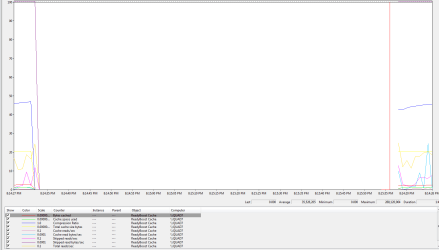
(Please see the images i attached for this).

At first, when computer boots, it works fine, even on the Monitor.png you can see it, and you can see no activity when it stops working.

Why is that?

I tried both USB connecetors (front software ones and back MB ones).

In power options i also disabled " USB Selective suspend setting".

Please advise,
sfrj
 

Attachments

  • ok.png
    ok.png
    4.7 KB · Views: 413
  • problem.png
    problem.png
    4.2 KB · Views: 412
  • monitor.png
    monitor.png
    56.6 KB · Views: 25

My Computer

OS
Windows 7 x64
CPU
Q9550 (3.7Ghz)
Motherboard
Asus P5E
Memory
Mushkin 8GB 1066
Graphics Card(s)
ATI 4870
Hard Drives
Many
PSU
Antec True Power
Case
Antec
Cooling
Zalman 9700NT
There is report on the web that claims:

disable sleep
and
set power options to high performance
 

My Computer

Computer Manufacturer/Model Number
Asus P5B
OS
Windows 7 Ultimate
CPU
Intel Q9550
Motherboard
Asus P5B
Memory
4x2GB HyperX
Graphics Card(s)
ATI HD3850 512
Sound Card
Creative X-Fi Platinum
Monitor(s) Displays
Samsung 50 / Samsung 24
Screen Resolution
1920*1080 / 1920*1200
Hard Drives
Multiple RAID volumes
PSU
ThermalTake ToughPower
Case
Armor
Cooling
Liquid
Keyboard
$6 2.4 gHz desktop
Internet Speed
Just this side of fast enough.
Sleep is disabled and power options is set to high performance already.

://
 

My Computer

OS
Windows 7 x64
CPU
Q9550 (3.7Ghz)
Motherboard
Asus P5E
Memory
Mushkin 8GB 1066
Graphics Card(s)
ATI 4870
Hard Drives
Many
PSU
Antec True Power
Case
Antec
Cooling
Zalman 9700NT
No idea why it stopped. But if this is on the system you specified in your system specs, then the whole ready boost is counterproductive. With 8GB of RAM you will probably have no paging activity anyhow. All you buy is the Ready Boost overhead. You can check the Hard Page Faults in Resource Monitor > Memory tab. I bet you have all zeros.
 

My Computer

Computer Manufacturer/Model Number
HP, Dell, Gateway, Toshiba - 4 laptops and 2 desktops
OS
Vista, Windows7, Mint Mate, Zorin, Windows 8
CPU
from 1.6GHz Duo to i7
Monitor(s) Displays
2x HP w2207
Hard Drives
5x HDD, 7x SSD, 12x Externals
Keyboard
with trackball - no mices
Mouse
Trackball mice
Internet Speed
DSL 6000
I was just testing it, to see how\what it does (i might use it for other computers if i figure out what is the causing the current problem).

It is all zeros under Memory in Resource monitor, but still i would like to know what is causing the problem described above.

thanks
 

My Computer

OS
Windows 7 x64
CPU
Q9550 (3.7Ghz)
Motherboard
Asus P5E
Memory
Mushkin 8GB 1066
Graphics Card(s)
ATI 4870
Hard Drives
Many
PSU
Antec True Power
Case
Antec
Cooling
Zalman 9700NT
I was just testing it, to see how\what it does (i might use it for other computers if i figure out what is the causing the current problem).

It is all zeros under Memory in Resource monitor, but still i would like to know what is causing the problem described above.

thanks
I am just guessing, but it is a long shot: The system probably monitors the usage of the stick for paging, and if none has occured after a certain length of time, it switches Ready Boost off to reduce the overhead.
You should know that the system still writes all the pages to the disk, even if Ready Boost is active. This is to make sure that the system remains operational if someone pulls the stick. After all it is a "removable device".
PS: years back I used Ready Boost on a 1GB Vista system. I have never seen it to be switched off.
 

My Computer

Computer Manufacturer/Model Number
HP, Dell, Gateway, Toshiba - 4 laptops and 2 desktops
OS
Vista, Windows7, Mint Mate, Zorin, Windows 8
CPU
from 1.6GHz Duo to i7
Monitor(s) Displays
2x HP w2207
Hard Drives
5x HDD, 7x SSD, 12x Externals
Keyboard
with trackball - no mices
Mouse
Trackball mice
Internet Speed
DSL 6000
I was thinking the same, to be honest, but wanted to ask more ppl about their opinion, that is why i came here.

Is there anybody else who could confirm this? or, something else is causing it.

Thanks all for fast and good support.
s-f-r-j
 

My Computer

OS
Windows 7 x64
CPU
Q9550 (3.7Ghz)
Motherboard
Asus P5E
Memory
Mushkin 8GB 1066
Graphics Card(s)
ATI 4870
Hard Drives
Many
PSU
Antec True Power
Case
Antec
Cooling
Zalman 9700NT
I am just guessing, but it is a long shot: The system probably monitors the usage of the stick for paging, and if none has occured after a certain length of time, it switches Ready Boost off to reduce the overhead...
I'm not buying... I would expect that to be documented and widely published.
 

My Computer

Computer Manufacturer/Model Number
Asus P5B
OS
Windows 7 Ultimate
CPU
Intel Q9550
Motherboard
Asus P5B
Memory
4x2GB HyperX
Graphics Card(s)
ATI HD3850 512
Sound Card
Creative X-Fi Platinum
Monitor(s) Displays
Samsung 50 / Samsung 24
Screen Resolution
1920*1080 / 1920*1200
Hard Drives
Multiple RAID volumes
PSU
ThermalTake ToughPower
Case
Armor
Cooling
Liquid
Keyboard
$6 2.4 gHz desktop
Internet Speed
Just this side of fast enough.
I am just guessing, but it is a long shot: The system probably monitors the usage of the stick for paging, and if none has occured after a certain length of time, it switches Ready Boost off to reduce the overhead...
I'm not buying... I would expect that to be documented and widely published.
As I said - I am guessing. On the other hand, how often do people put a ready boost stick into their system when they have 8GBs of RAM.
What is your explanation for the phenomenon.
 

My Computer

Computer Manufacturer/Model Number
HP, Dell, Gateway, Toshiba - 4 laptops and 2 desktops
OS
Vista, Windows7, Mint Mate, Zorin, Windows 8
CPU
from 1.6GHz Duo to i7
Monitor(s) Displays
2x HP w2207
Hard Drives
5x HDD, 7x SSD, 12x Externals
Keyboard
with trackball - no mices
Mouse
Trackball mice
Internet Speed
DSL 6000
I described above, just playing with it, testing it, to see how it works\what it does, no specific reason.

I was browsing this forum, found some info about that, and wanted to try, that is all :)
 

My Computer

OS
Windows 7 x64
CPU
Q9550 (3.7Ghz)
Motherboard
Asus P5E
Memory
Mushkin 8GB 1066
Graphics Card(s)
ATI 4870
Hard Drives
Many
PSU
Antec True Power
Case
Antec
Cooling
Zalman 9700NT
I just set this device (usb stick) in BIOS to act as HDD.

It is o.k. for now, let you guys know if that fixed it.
 

My Computer

OS
Windows 7 x64
CPU
Q9550 (3.7Ghz)
Motherboard
Asus P5E
Memory
Mushkin 8GB 1066
Graphics Card(s)
ATI 4870
Hard Drives
Many
PSU
Antec True Power
Case
Antec
Cooling
Zalman 9700NT
I just set this device (usb stick) in BIOS to act as HDD.

It is o.k. for now, let you guys know if that fixed it.
That's an interesting twist. Please keep us posted what it does.
 

My Computer

Computer Manufacturer/Model Number
HP, Dell, Gateway, Toshiba - 4 laptops and 2 desktops
OS
Vista, Windows7, Mint Mate, Zorin, Windows 8
CPU
from 1.6GHz Duo to i7
Monitor(s) Displays
2x HP w2207
Hard Drives
5x HDD, 7x SSD, 12x Externals
Keyboard
with trackball - no mices
Mouse
Trackball mice
Internet Speed
DSL 6000
Forgot to add you on your question why i have decided to do this.

Last night i did short stroke on my raid 0 to get more performance (speed) on it (as i did).

So my C:\ is now 60 GB only, i disabled hibernate and lowered page file, so, i found info about this, and wanted to try it, to see if it helps at all.

Btw, it is still working, will keep you updated...

thanks
 

My Computer

OS
Windows 7 x64
CPU
Q9550 (3.7Ghz)
Motherboard
Asus P5E
Memory
Mushkin 8GB 1066
Graphics Card(s)
ATI 4870
Hard Drives
Many
PSU
Antec True Power
Case
Antec
Cooling
Zalman 9700NT
Okay, the problem was the Stick actually.

Got another stick 2 days ago, and everything is perfect.

This one:
Patriot Memory - Products


Perfomance Monitor:
24g2h5u.png


Thanks all for the time!
 

My Computer

OS
Windows 7 x64
CPU
Q9550 (3.7Ghz)
Motherboard
Asus P5E
Memory
Mushkin 8GB 1066
Graphics Card(s)
ATI 4870
Hard Drives
Many
PSU
Antec True Power
Case
Antec
Cooling
Zalman 9700NT

My Computer

Computer Manufacturer/Model Number
packard bell IXTREME M5722
OS
Operating System : Windows 7 Home Premium Edition 6.01.7600 SP1 (x64)
CPU
Processor : Intel Core 2 Quad Q8300 @ 2500 MHz
Motherboard
Mainboard : Packard Bell (Acer EG43M )
Memory
Physical Memory :8GB Corsair4x 2GB 800MHz C5 DDR2
Graphics Card(s)
Video Card : XFX 6700 AMD
Monitor(s) Displays
Maestro 234DL - BenQ V2220 - BenQ VW2420H
Screen Resolution
Current Display :1920x1080p pixels at 60 Hz in HD LED
Hard Drives
Hard Disks : WDC (1000 GB)
Drive C: (Hard Disk) : 428 GB available on 491 GB
Drive D: (Hard Disk) : 426 GB available on 492 GB
SAMSUNG spinpoint HD103SJ 1000.2 GB
(X 2) KINGSTON SSD NOW V 30GB
PSU
XFX ProSeries 550W PSU
Case
PACKARD BELL IXTREME
Cooling
System Blower Current: 150mA Air Flow16CFM ;Akasa 90mm rear
Keyboard
Gigabyte Aivia K8100
Mouse
TRUST-Wireless Laser Mouse - Carbon edition MI-7770C
Internet Speed
TP-LINK > TL-WN951N / AV500 Gigabit Powerline Adapters
Browser
chrome dev
Other Info
EXTRA COOLING>(FAN CONTROLLER) PC Bay Cooler 3 x 40mm fans; Akasa AK-HD-BL Blue hard drive cooler 2 x 40 mm fan 4500 rpm 29.7 dBA
Bios> American Megatrends Inc.
Version : P01-A1
Date : 08/31/2009
So what kind of speed increases are you likely to see? In all honesty - it will vary from system to system. On a machine with only 1GB of RAM that is being used heavily, ReadyBoost will provide a noticeable performance increase. Conversely on a system with 4GB of RAM that is not really being stressed by application usage, the benefits of ReadyBoost will not be readily apparent.
Windows Vista - SuperFetch & ReadyBoost - Ask the Performance Team - Site Home - TechNet Blogs
 

My Computer

OS
7 Ultimate x64
CPU
i5-2500k
Motherboard
Asus P8P67 Pro
Memory
8GB G.Skill Ripjaws X F3-12800CL7D-8GBXH 1866MHz 8-9-8-24
Graphics Card(s)
EVGA GTX 570 SC
Sound Card
X-Fi Titanium Fatality
Monitor(s) Displays
Samsung S27A550H 27" LED
Screen Resolution
1920x1080
Hard Drives
OCZ Vertex 3 120GB.
1TB Samsung F3.
2TB Samsung F4.
PSU
PC Power & Cooling Silencer 760
Case
Lian Li Lancool K62
Cooling
Thermalright Venomous X Black/Scythe S-Flex/Shin-Etsu X23
Keyboard
MS Natural Elite 4000 Ergonomic
Mouse
Logitech G500
Internet Speed
6MB/768
Other Info
Logitech Z-5500 505 watts.
D-Link DGL-4500.
Tripp-Lite Smart Pro 1500.
Back
Top