Readyboost Not Recognizing USB 2.0 Port

nanop33

New member
Local time
1:17 PM
Messages
6
Location
Calgary, Alberta
My first time posting on these forums, not sure where to put the thread so I'll just leave it here.
I tried today to use my 3rd Generation iPod Nano as a flash drive to use it with Readyboost to boost my memory, but when I got to the Readyboost tab this error came up:
asdf.png

As you can see, Readyboost says I'm not plugged into an USB 2.0 Port, my drivers tell me I have USB 2.0 installed. This error occurs in all 3 of my ports.
Here are my specs:
specs.png

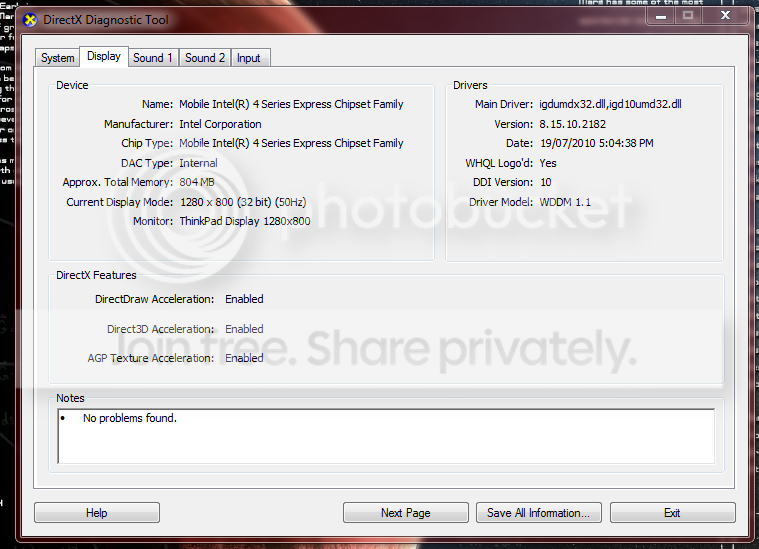
display.png

Also, I used an iPhone cord to plug my iPod into the computer, if that makes any difference.
Hopefully someone will be able to help me out :(
Thanks in advance.
 

My Computer

Computer Manufacturer/Model Number
Lenovo Thinkpad T500
OS
Microsoft Windows 7 Ultimate 32-bit
CPU
Intel Mobile Core 2 Duo P8600 @ 2.40GHz
Motherboard
LENOVO 2242CTO
Memory
1.9GB Single-Channel DDR3 @ 532MHz (7-7-7-20)
Graphics Card(s)
Mobile Intel(R) 4 Series Express Chipset Family
Sound Card
Conexant 20561 SmartAudio HD
Monitor(s) Displays
ThinkPad Display 1280x800 @ 1280x800
Screen Resolution
1280x800
Hard Drives
156GB Western Digital WDC WD1600BEVS-08VAT2 (IDE)
Keyboard
Standard PS/2 Keyboard
Mouse
HID-compliant mouse; ThinkPad UltraNav Pointing Device
Other Info
HL-DT-ST RW/DVD MU10N;
SFSBKDU 0DEF492V SCSI CdRom Device;
Intel(R) WiFi Link 5100 AGN;
Intel(R) 82567LF Gigabit Network;
SPDIF Interface (Conexant 20561 SmartAudio HD);
Speakers (Conexant 20561 SmartAudio HD) (default);
Internal Microphone (Conexant 20561 SmartAudio HD);
Bump + Double Post + More info
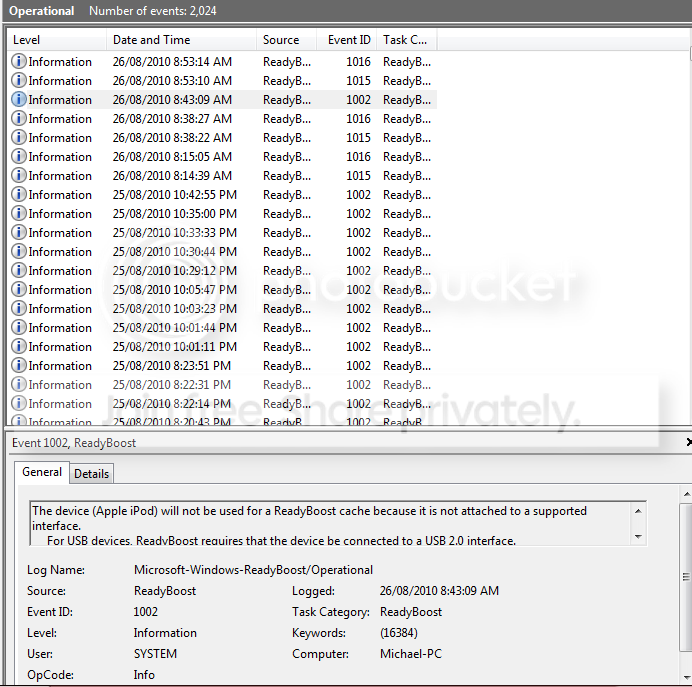
What the Event Viewer log says:
Capture.png


I guess Readyboost have something against my USB2 drivers or something :huh:
 

My Computer

Computer Manufacturer/Model Number
Lenovo Thinkpad T500
OS
Microsoft Windows 7 Ultimate 32-bit
CPU
Intel Mobile Core 2 Duo P8600 @ 2.40GHz
Motherboard
LENOVO 2242CTO
Memory
1.9GB Single-Channel DDR3 @ 532MHz (7-7-7-20)
Graphics Card(s)
Mobile Intel(R) 4 Series Express Chipset Family
Sound Card
Conexant 20561 SmartAudio HD
Monitor(s) Displays
ThinkPad Display 1280x800 @ 1280x800
Screen Resolution
1280x800
Hard Drives
156GB Western Digital WDC WD1600BEVS-08VAT2 (IDE)
Keyboard
Standard PS/2 Keyboard
Mouse
HID-compliant mouse; ThinkPad UltraNav Pointing Device
Other Info
HL-DT-ST RW/DVD MU10N;
SFSBKDU 0DEF492V SCSI CdRom Device;
Intel(R) WiFi Link 5100 AGN;
Intel(R) 82567LF Gigabit Network;
SPDIF Interface (Conexant 20561 SmartAudio HD);
Speakers (Conexant 20561 SmartAudio HD) (default);
Internal Microphone (Conexant 20561 SmartAudio HD);
I believe readyboost requires a device and controller which can handle 2.5MB/sec throughput for 4K random reads and 1.75MB/sec throughput for 512K random writes (that's the test, at least it was for Vista).
 

My Computer

Computer type
PC/Desktop
Computer Manufacturer/Model Number
Custom
OS
Windows 10 Pro x64
CPU
Intel Core i7 4790K @ 4.5GHz
Motherboard
Asus Maximus Hero VII
Memory
32GB DDR3
Graphics Card(s)
Nvidia GeForce GTX970
Sound Card
Realtek HD Audio
Screen Resolution
1920x1200
Hard Drives
1x Samsung 250GB SSD
4x WD RE 2TB (RAIDZ)
PSU
Corsair AX760i
Case
Fractal Design Define R4
Cooling
Noctua NH-D15
As you can see from the Event Viewer log it shows nothing of an error due to my iPod being too slow, rather it's the port problem that keeps coming up
I can show you a screenshot of another drive that's too slow connected to the system, in which the problem with the speed comes up, if it's required
 

My Computer

Computer Manufacturer/Model Number
Lenovo Thinkpad T500
OS
Microsoft Windows 7 Ultimate 32-bit
CPU
Intel Mobile Core 2 Duo P8600 @ 2.40GHz
Motherboard
LENOVO 2242CTO
Memory
1.9GB Single-Channel DDR3 @ 532MHz (7-7-7-20)
Graphics Card(s)
Mobile Intel(R) 4 Series Express Chipset Family
Sound Card
Conexant 20561 SmartAudio HD
Monitor(s) Displays
ThinkPad Display 1280x800 @ 1280x800
Screen Resolution
1280x800
Hard Drives
156GB Western Digital WDC WD1600BEVS-08VAT2 (IDE)
Keyboard
Standard PS/2 Keyboard
Mouse
HID-compliant mouse; ThinkPad UltraNav Pointing Device
Other Info
HL-DT-ST RW/DVD MU10N;
SFSBKDU 0DEF492V SCSI CdRom Device;
Intel(R) WiFi Link 5100 AGN;
Intel(R) 82567LF Gigabit Network;
SPDIF Interface (Conexant 20561 SmartAudio HD);
Speakers (Conexant 20561 SmartAudio HD) (default);
Internal Microphone (Conexant 20561 SmartAudio HD);
That's possible too - I have an HP with the same USB2 controller, so if you're sure you've plugged it into a USB controller configured in the BIOS for "high speed" rather than compatible, I can test and see if mine work for readyboost.
 

My Computer

Computer type
PC/Desktop
Computer Manufacturer/Model Number
Custom
OS
Windows 10 Pro x64
CPU
Intel Core i7 4790K @ 4.5GHz
Motherboard
Asus Maximus Hero VII
Memory
32GB DDR3
Graphics Card(s)
Nvidia GeForce GTX970
Sound Card
Realtek HD Audio
Screen Resolution
1920x1200
Hard Drives
1x Samsung 250GB SSD
4x WD RE 2TB (RAIDZ)
PSU
Corsair AX760i
Case
Fractal Design Define R4
Cooling
Noctua NH-D15
Run the device thru HD Tune and see what it says in terms of performance. The message you get from the system may be misleading.
Also try with a fast USB stick to check whether Ready Boost works in your system.
 

My Computer

Computer Manufacturer/Model Number
HP, Dell, Gateway, Toshiba - 4 laptops and 2 desktops
OS
Vista, Windows7, Mint Mate, Zorin, Windows 8
CPU
from 1.6GHz Duo to i7
Monitor(s) Displays
2x HP w2207
Hard Drives
5x HDD, 7x SSD, 12x Externals
Keyboard
with trackball - no mices
Mouse
Trackball mice
Internet Speed
DSL 6000
the flash drive or memory card should have at least 1 gigabyte (GB) of available space. If your drive or card doesn't have enough available space for ReadyBoost, you'll see a message telling you to free some space on it. For best results, use a flash drive or flash memory card with at least double the amount of available space as the amount of memory (RAM) in your computer.

That's from the Win 7 help on ready boost.

Ready boost is of questionable benefit on Win 7 computers.
 

My Computer

Computer Manufacturer/Model Number
Toshiba Satellite S875D-S7239 laptop
OS
MS Windows 7 Ultimate SP1 64-bit
CPU
AMD A10-4600M
Motherboard
AMD Pumori (Socket FT1)
Memory
6.00 GB Dual-Channel DDR3 @ 798MHz (11-11-12-28)
Graphics Card(s)
AMD Radeon HD 7660G
Sound Card
High Definition Audio Device
Monitor(s) Displays
Generic PnP Monitor (1600x900@60Hz)
Screen Resolution
1600x900@60Hz
Hard Drives
SSD 119GB Corsair CSSD-V128GB2 ATA Device
Keyboard
Standard PS/2 Keyboard
Mouse
HP Wireless Optical Mobile Mouse Model FHA-3410
Internet Speed
What the local pub, local coffee shop offers.
Other Info
Optical Drive:MATSHITA BD-CMB UJ160B ATA Device


Also have an Asus ha1002xp netbook with Win 7 Ultimate installed.
As you can see from the Event Viewer log it shows nothing of an error due to my iPod being too slow, rather it's the port problem that keeps coming up
I can show you a screenshot of another drive that's too slow connected to the system, in which the problem with the speed comes up, if it's required

And more info for you:
If your computer has a hard disk that uses solid-state drive (SSD) technology, you may not see an option to speed up your computer with ReadyBoost when you plug in a USB flash drive or flash memory card. This is because some SSD drives are so fast they're unlikely to benefit from ReadyBoost.

As you see, we benefit greatly when you complete your System Specs. Here's how:

________________________________________

HOW TO FILL OUT YOUR SYSTEM SPECS

In the line at the top of www.SevenForums.com you will see UserCP.
That is an abbreviation for User Control Panel.
Click on UserCP.
In the left-hand column, under Your Profile you will see Edit System Spec.
Click on Edit System Spec
You can copy and paste from the output of Speccy, Speccy - System Information - Free Download to fill out much of the info. Be sure to use the Other Info section of your System Specs for such info as your optical drive, your wireless adapter, your speakers, etc.
 

My Computer

Computer Manufacturer/Model Number
Toshiba Satellite S875D-S7239 laptop
OS
MS Windows 7 Ultimate SP1 64-bit
CPU
AMD A10-4600M
Motherboard
AMD Pumori (Socket FT1)
Memory
6.00 GB Dual-Channel DDR3 @ 798MHz (11-11-12-28)
Graphics Card(s)
AMD Radeon HD 7660G
Sound Card
High Definition Audio Device
Monitor(s) Displays
Generic PnP Monitor (1600x900@60Hz)
Screen Resolution
1600x900@60Hz
Hard Drives
SSD 119GB Corsair CSSD-V128GB2 ATA Device
Keyboard
Standard PS/2 Keyboard
Mouse
HP Wireless Optical Mobile Mouse Model FHA-3410
Internet Speed
What the local pub, local coffee shop offers.
Other Info
Optical Drive:MATSHITA BD-CMB UJ160B ATA Device


Also have an Asus ha1002xp netbook with Win 7 Ultimate installed.
Failed to mention, the ready boost info is available by:
WIN + F1 key combo | type Ready Boost | Enter key

WIN is the key with the wavy flag on it.
 

My Computer

Computer Manufacturer/Model Number
Toshiba Satellite S875D-S7239 laptop
OS
MS Windows 7 Ultimate SP1 64-bit
CPU
AMD A10-4600M
Motherboard
AMD Pumori (Socket FT1)
Memory
6.00 GB Dual-Channel DDR3 @ 798MHz (11-11-12-28)
Graphics Card(s)
AMD Radeon HD 7660G
Sound Card
High Definition Audio Device
Monitor(s) Displays
Generic PnP Monitor (1600x900@60Hz)
Screen Resolution
1600x900@60Hz
Hard Drives
SSD 119GB Corsair CSSD-V128GB2 ATA Device
Keyboard
Standard PS/2 Keyboard
Mouse
HP Wireless Optical Mobile Mouse Model FHA-3410
Internet Speed
What the local pub, local coffee shop offers.
Other Info
Optical Drive:MATSHITA BD-CMB UJ160B ATA Device


Also have an Asus ha1002xp netbook with Win 7 Ultimate installed.
Sorry about that, I'll fill it in shortly.
I do not own a SSD, just a regular old HDD. My iPod also has around 6GB of space left in it.
Also, when I enter my BIOS Setup, the options seem unusually limited. All I have on the menu is Config, Date/TIme, SEcurity, Startup, Restart, and HDD diagnostic program. No Advanced tab either
When I go into Config -> USB, all I got there is USB Bios Support (Enabled) and Always On USB (Disabled). So cluberti, I don't know how to check for the settings you have mentioned

@whs
I see that the application you have recommended does not show the minimum write speed of the drive should I use the free trial.
Is it ok if I use another program instead or is there another you would like to recommend?
 

My Computer

Computer Manufacturer/Model Number
Lenovo Thinkpad T500
OS
Microsoft Windows 7 Ultimate 32-bit
CPU
Intel Mobile Core 2 Duo P8600 @ 2.40GHz
Motherboard
LENOVO 2242CTO
Memory
1.9GB Single-Channel DDR3 @ 532MHz (7-7-7-20)
Graphics Card(s)
Mobile Intel(R) 4 Series Express Chipset Family
Sound Card
Conexant 20561 SmartAudio HD
Monitor(s) Displays
ThinkPad Display 1280x800 @ 1280x800
Screen Resolution
1280x800
Hard Drives
156GB Western Digital WDC WD1600BEVS-08VAT2 (IDE)
Keyboard
Standard PS/2 Keyboard
Mouse
HID-compliant mouse; ThinkPad UltraNav Pointing Device
Other Info
HL-DT-ST RW/DVD MU10N;
SFSBKDU 0DEF492V SCSI CdRom Device;
Intel(R) WiFi Link 5100 AGN;
Intel(R) 82567LF Gigabit Network;
SPDIF Interface (Conexant 20561 SmartAudio HD);
Speakers (Conexant 20561 SmartAudio HD) (default);
Internal Microphone (Conexant 20561 SmartAudio HD);
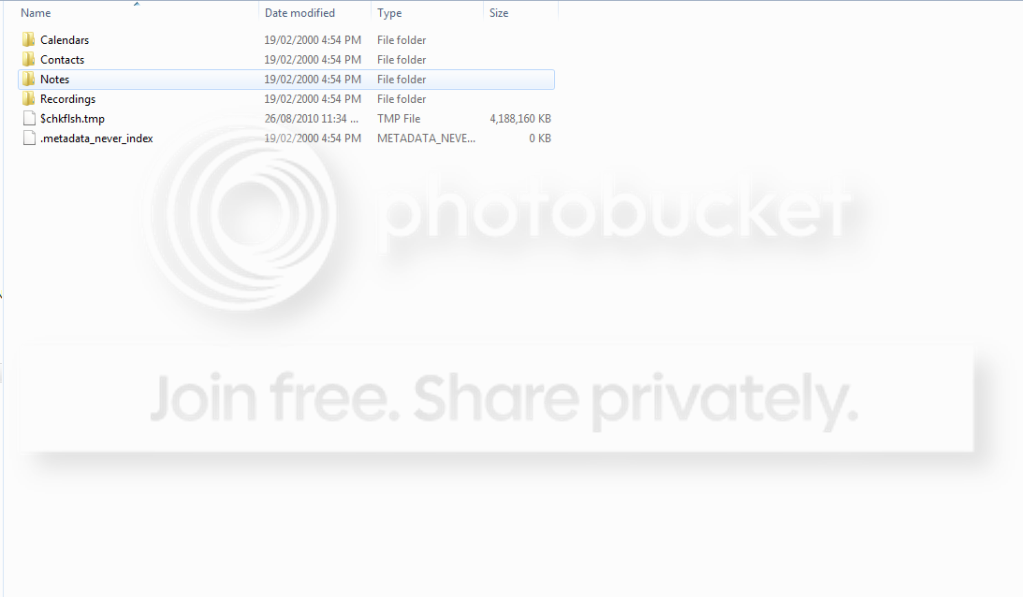
Size (the TMP file)
checkflashsize.png

Speed taken by iPod to read/write
checkflashspeed.png
 

My Computer

Computer Manufacturer/Model Number
Lenovo Thinkpad T500
OS
Microsoft Windows 7 Ultimate 32-bit
CPU
Intel Mobile Core 2 Duo P8600 @ 2.40GHz
Motherboard
LENOVO 2242CTO
Memory
1.9GB Single-Channel DDR3 @ 532MHz (7-7-7-20)
Graphics Card(s)
Mobile Intel(R) 4 Series Express Chipset Family
Sound Card
Conexant 20561 SmartAudio HD
Monitor(s) Displays
ThinkPad Display 1280x800 @ 1280x800
Screen Resolution
1280x800
Hard Drives
156GB Western Digital WDC WD1600BEVS-08VAT2 (IDE)
Keyboard
Standard PS/2 Keyboard
Mouse
HID-compliant mouse; ThinkPad UltraNav Pointing Device
Other Info
HL-DT-ST RW/DVD MU10N;
SFSBKDU 0DEF492V SCSI CdRom Device;
Intel(R) WiFi Link 5100 AGN;
Intel(R) 82567LF Gigabit Network;
SPDIF Interface (Conexant 20561 SmartAudio HD);
Speakers (Conexant 20561 SmartAudio HD) (default);
Internal Microphone (Conexant 20561 SmartAudio HD);
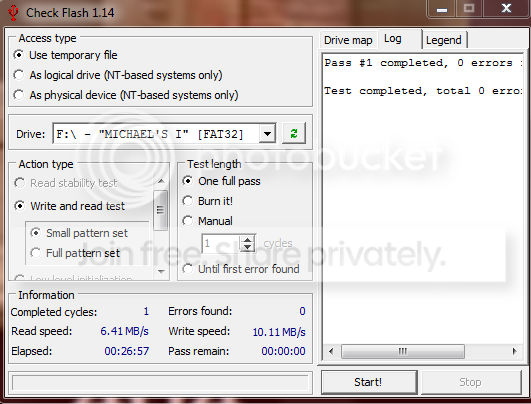
The speed measurements are only meaningful for 4K blocks. Not sure what your measurements are. The min. requirement for 4K blocks is 2.5MB/sec write and 1.75MB/sec read. But that is a minimum. The access time also plays a role. If it less than the access time of the HDD, the whole exercise is counter productive. 1ms would be a safe access time.
 

My Computer

Computer Manufacturer/Model Number
HP, Dell, Gateway, Toshiba - 4 laptops and 2 desktops
OS
Vista, Windows7, Mint Mate, Zorin, Windows 8
CPU
from 1.6GHz Duo to i7
Monitor(s) Displays
2x HP w2207
Hard Drives
5x HDD, 7x SSD, 12x Externals
Keyboard
with trackball - no mices
Mouse
Trackball mice
Internet Speed
DSL 6000
Correct. Counter-productive. I wish I'd saved links to the articles indicating that Ready Boost is no boost nowadays.
 

My Computer

Computer Manufacturer/Model Number
Toshiba Satellite S875D-S7239 laptop
OS
MS Windows 7 Ultimate SP1 64-bit
CPU
AMD A10-4600M
Motherboard
AMD Pumori (Socket FT1)
Memory
6.00 GB Dual-Channel DDR3 @ 798MHz (11-11-12-28)
Graphics Card(s)
AMD Radeon HD 7660G
Sound Card
High Definition Audio Device
Monitor(s) Displays
Generic PnP Monitor (1600x900@60Hz)
Screen Resolution
1600x900@60Hz
Hard Drives
SSD 119GB Corsair CSSD-V128GB2 ATA Device
Keyboard
Standard PS/2 Keyboard
Mouse
HP Wireless Optical Mobile Mouse Model FHA-3410
Internet Speed
What the local pub, local coffee shop offers.
Other Info
Optical Drive:MATSHITA BD-CMB UJ160B ATA Device


Also have an Asus ha1002xp netbook with Win 7 Ultimate installed.
Correct. Counter-productive. I wish I'd saved links to the articles indicating that Ready Boost is no boost nowadays.
I used it on the wife's 1MB system in 2007 with Vista. And it did help a little. But no comparison to after I upgraded to 2GBs. RAM just cannot be beat.
 

My Computer

Computer Manufacturer/Model Number
HP, Dell, Gateway, Toshiba - 4 laptops and 2 desktops
OS
Vista, Windows7, Mint Mate, Zorin, Windows 8
CPU
from 1.6GHz Duo to i7
Monitor(s) Displays
2x HP w2207
Hard Drives
5x HDD, 7x SSD, 12x Externals
Keyboard
with trackball - no mices
Mouse
Trackball mice
Internet Speed
DSL 6000
Bleh, I only needed to boost my memory by a bit
How much pagefile should I add to make an impact?
 

My Computer

Computer Manufacturer/Model Number
Lenovo Thinkpad T500
OS
Microsoft Windows 7 Ultimate 32-bit
CPU
Intel Mobile Core 2 Duo P8600 @ 2.40GHz
Motherboard
LENOVO 2242CTO
Memory
1.9GB Single-Channel DDR3 @ 532MHz (7-7-7-20)
Graphics Card(s)
Mobile Intel(R) 4 Series Express Chipset Family
Sound Card
Conexant 20561 SmartAudio HD
Monitor(s) Displays
ThinkPad Display 1280x800 @ 1280x800
Screen Resolution
1280x800
Hard Drives
156GB Western Digital WDC WD1600BEVS-08VAT2 (IDE)
Keyboard
Standard PS/2 Keyboard
Mouse
HID-compliant mouse; ThinkPad UltraNav Pointing Device
Other Info
HL-DT-ST RW/DVD MU10N;
SFSBKDU 0DEF492V SCSI CdRom Device;
Intel(R) WiFi Link 5100 AGN;
Intel(R) 82567LF Gigabit Network;
SPDIF Interface (Conexant 20561 SmartAudio HD);
Speakers (Conexant 20561 SmartAudio HD) (default);
Internal Microphone (Conexant 20561 SmartAudio HD);
How much is your pagefile actually used. Go to Resource Monitor > Memory tab and have a look at the little graph on th right that is called Hard Fault/sec.
 

My Computer

Computer Manufacturer/Model Number
HP, Dell, Gateway, Toshiba - 4 laptops and 2 desktops
OS
Vista, Windows7, Mint Mate, Zorin, Windows 8
CPU
from 1.6GHz Duo to i7
Monitor(s) Displays
2x HP w2207
Hard Drives
5x HDD, 7x SSD, 12x Externals
Keyboard
with trackball - no mices
Mouse
Trackball mice
Internet Speed
DSL 6000
Back
Top