Solved ReadyBoost Problems in Win 7

Rich Hackney

New member
Local time
3:54 PM
Messages
35
Readyboost worked fine for me all during the Vista deployment.

But, in windows 7, it did not autostart and the log file showed nothing. Now I am getting the following error messages:

Session "ReadyBoot" has terminated with error(s) 0xC0000188

The maximum file size for session "ReadyBoot" has been reached. As a result, events may be lost (not logged) to file C:\Windows\Prefetch\ReadyBoot\ReadyBoot.etl. The maximum files size is currently set to 20971520 bytes

Also, when autoplay starts, it does not provide the speed up your system. It displays make drive open files or backup files.

Can anyone help with this? Thanks in advance.
 

My Computer

OS
Windows 7 beta
Hi Rick Hackney and welcome to the forum!

Most ReadyBoost errors I've encountered are from power fluctuations or sudden shutdowns. You might want to reformat the Flash Disk again and enable ReadyBoost manually. If you get the same errors try running the Check Disk on it.

Let us know how it turns out ;)
 

My Computer

Computer Manufacturer/Model Number
Custom Build
OS
Windows 7 Build 7048 x64
CPU
Athlon 64 X2 Dual Core 4600+
Motherboard
EMX-AMD750G-PRO
Memory
4 x 1GB Kingston 400MHz 6-6-6-18 (800MHz)
Graphics Card(s)
ATI Radeon 3650
Sound Card
Realtek HD Audio
Monitor(s) Displays
22" AOC 2216Vw
Screen Resolution
1680x1050
Cooling
Arctic Cooling Freezer 64 Pro PWM
Keyboard
Generic Enhanced Natural Keyboard
Mouse
Logitech VX Nano
Other Info
Edifier M1550
Readyboost errors

How do it turn it on manually?
 

My Computer

OS
Windows 7 beta
Readyboost errors

Check disk yielded no problems and open autoplay is no longer an option in properties.
 

My Computer

OS
Windows 7 beta
How do it turn it on manually?

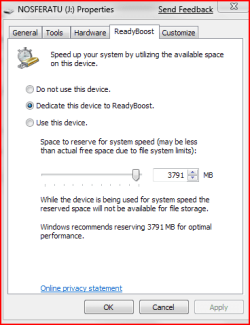
Right-click the drive>Properties>ReadyBoost>Select options you'd like to apply

Check disk yielded no problems and open autoplay is no longer an option in properties.

To reset Autoplay options, go to Start>All Programs>Default Programs>Change AutoPlay Settings>Reset all defaults

Format the USB Drive for ReadyBoost:
Right-click device
Click on Restore device defaults
If this will not work, you can make sure that the following settings are imposed;
File system should be set to (FAT32) Default
Allocation unit size, either Defualt or at 4096 bytes
Proceed with format
After the format, you can right-click the device and enable ReadyBoost

Please try and restart after all these ;)

Let us know how it turns out.
 

Attachments

  • Capture.PNG
    Capture.PNG
    10.9 KB · Views: 341
Last edited:

My Computer

Computer Manufacturer/Model Number
Custom Build
OS
Windows 7 Build 7048 x64
CPU
Athlon 64 X2 Dual Core 4600+
Motherboard
EMX-AMD750G-PRO
Memory
4 x 1GB Kingston 400MHz 6-6-6-18 (800MHz)
Graphics Card(s)
ATI Radeon 3650
Sound Card
Realtek HD Audio
Monitor(s) Displays
22" AOC 2216Vw
Screen Resolution
1680x1050
Cooling
Arctic Cooling Freezer 64 Pro PWM
Keyboard
Generic Enhanced Natural Keyboard
Mouse
Logitech VX Nano
Other Info
Edifier M1550
Got through all formatting and default to drive, but when right clicking properties, all I get is tools, hardware, customize, general and sharing -no readyboost. My USB flash is sony 8 gig and worked in Vista (certified vista ready) and I even tried a smaller certified 4 gig drive - same problem. I am really stumped over this one.
 

My Computer

OS
Windows 7 beta
Please do the following;

Click on Win+R and type msconfig
Go to services
Verify if you have "Superfetch" checked
If not, put a check on it and restart system

If it's checked;
Click on Win+R
Type services.msc
Scroll to Superfetch and verify if it's started
If it is, please restart the service

Check your drive options again.

Please let us know if this works out ;)
 

My Computer

Computer Manufacturer/Model Number
Custom Build
OS
Windows 7 Build 7048 x64
CPU
Athlon 64 X2 Dual Core 4600+
Motherboard
EMX-AMD750G-PRO
Memory
4 x 1GB Kingston 400MHz 6-6-6-18 (800MHz)
Graphics Card(s)
ATI Radeon 3650
Sound Card
Realtek HD Audio
Monitor(s) Displays
22" AOC 2216Vw
Screen Resolution
1680x1050
Cooling
Arctic Cooling Freezer 64 Pro PWM
Keyboard
Generic Enhanced Natural Keyboard
Mouse
Logitech VX Nano
Other Info
Edifier M1550
I have superfetch enabled and running. Tried all sorts of formatting options and no matter what I do, the readyboost tab will not reappear in right click | properties.
 

My Computer

Computer Manufacturer/Model Number
self built
OS
7600.20510 x86
CPU
P4 550 3.4 GHz HT running at 3.5 GHz
Motherboard
MSI PM8M3-V (MS-7211 v1.x) Micro-ATX mainboard
Memory
OCZ 2 GB(2x1GB) DDR400mHz running @ 414 mHz
Graphics Card(s)
HIS Radeon HD 3850 IceQ 3 Turbo HDMI Dual DL-DVI AGP
Sound Card
MOTU Traveler firewire studio interface 192 kHz 24 bit
Monitor(s) Displays
22" widescreen Acer X223W LCD, 17" Compaq P75 CRT
Screen Resolution
1680x1050 and 1280x1024
Hard Drives
SATA I x2 WD, 400 GB and 120 GB, SATA 2 WD Caviar Black 1 TB
PSU
350W generic
Case
Cybertronpc, it glows blue
Cooling
stock cpu fan, Ice-Q 3 gpu and system, many case fans
Keyboard
Logitch Classical Keyboard 200
Mouse
Logitech Mediaplay cordless
Internet Speed
1792/448 kbits/sec
Other Info
SATA II PCI fake RAID adapter, 1 GB Readyboost, original ATI Remote Wonder (even works with WMC perfectly), Logitech Rumblepad 2 game controller x2
Readyboost errors

Wow, turning on superfetch did the trick!! Thanks for all the diagnostic advice. This was the only other problem that I am having the Win 7000 build.

Thanks again!
 

My Computer

OS
Windows 7 beta
Wow, turning on superfetch did the trick!! Thanks for all the diagnostic advice. This was the only other problem that I am having the Win 7000 build.

Thanks again!

You're most welcome! Glad it worked out for yah ;)
 

My Computer

Computer Manufacturer/Model Number
Custom Build
OS
Windows 7 Build 7048 x64
CPU
Athlon 64 X2 Dual Core 4600+
Motherboard
EMX-AMD750G-PRO
Memory
4 x 1GB Kingston 400MHz 6-6-6-18 (800MHz)
Graphics Card(s)
ATI Radeon 3650
Sound Card
Realtek HD Audio
Monitor(s) Displays
22" AOC 2216Vw
Screen Resolution
1680x1050
Cooling
Arctic Cooling Freezer 64 Pro PWM
Keyboard
Generic Enhanced Natural Keyboard
Mouse
Logitech VX Nano
Other Info
Edifier M1550
I have superfetch enabled and running. Tried all sorts of formatting options and no matter what I do, the readyboost tab will not reappear in right click | properties.

Can you please give more info on this, like was this flash disk working on vista and what size is the flash disk?

If you could give other indications as to when this happened, it would really be helpful. Thanks.
 

My Computer

Computer Manufacturer/Model Number
Custom Build
OS
Windows 7 Build 7048 x64
CPU
Athlon 64 X2 Dual Core 4600+
Motherboard
EMX-AMD750G-PRO
Memory
4 x 1GB Kingston 400MHz 6-6-6-18 (800MHz)
Graphics Card(s)
ATI Radeon 3650
Sound Card
Realtek HD Audio
Monitor(s) Displays
22" AOC 2216Vw
Screen Resolution
1680x1050
Cooling
Arctic Cooling Freezer 64 Pro PWM
Keyboard
Generic Enhanced Natural Keyboard
Mouse
Logitech VX Nano
Other Info
Edifier M1550
Yes, the actual drive itself was working well for readyboost on both Vista SP1 and 2 which I have since deleted and now only have XPSP3 and 7022. It was also working on 7000 and when I had that. On 7000 is when I noticed it was not flashing. Then I checked it and there was no readyboost tab. Now, the same on my 7022.
 

My Computer

Computer Manufacturer/Model Number
self built
OS
7600.20510 x86
CPU
P4 550 3.4 GHz HT running at 3.5 GHz
Motherboard
MSI PM8M3-V (MS-7211 v1.x) Micro-ATX mainboard
Memory
OCZ 2 GB(2x1GB) DDR400mHz running @ 414 mHz
Graphics Card(s)
HIS Radeon HD 3850 IceQ 3 Turbo HDMI Dual DL-DVI AGP
Sound Card
MOTU Traveler firewire studio interface 192 kHz 24 bit
Monitor(s) Displays
22" widescreen Acer X223W LCD, 17" Compaq P75 CRT
Screen Resolution
1680x1050 and 1280x1024
Hard Drives
SATA I x2 WD, 400 GB and 120 GB, SATA 2 WD Caviar Black 1 TB
PSU
350W generic
Case
Cybertronpc, it glows blue
Cooling
stock cpu fan, Ice-Q 3 gpu and system, many case fans
Keyboard
Logitch Classical Keyboard 200
Mouse
Logitech Mediaplay cordless
Internet Speed
1792/448 kbits/sec
Other Info
SATA II PCI fake RAID adapter, 1 GB Readyboost, original ATI Remote Wonder (even works with WMC perfectly), Logitech Rumblepad 2 game controller x2
Yes, the actual drive itself was working well for readyboost on both Vista SP1 and 2 which I have since deleted and now only have XPSP3 and 7022. It was also working on 7000 and when I had that. On 7000 is when I noticed it was not flashing. Then I checked it and there was no readyboost tab. Now, the same on my 7022.

It seems to of been removed from 7022??
 

My Computer

Computer Manufacturer/Model Number
Advent Roma Laptop
OS
Windows 7 Enterprise SP1 x64 Windows 8 Enterprise RTM x64
CPU
Mobile DualCore Intel Pentium T4400, 2200 MHz (11 x 200)
Motherboard
Advent Roma (Intel Cantiga GL40)
Memory
4028 MB (DDR2-667 DDR2 SDRAM)
Graphics Card(s)
Mobile Intel(R) GMA 4500M
Sound Card
Realtek ALC662 @ Intel 82801IB ICH9 - High Definition Audio
Monitor(s) Displays
Generic PnP Monitor [NoDB]
Screen Resolution
1366x768
Hard Drives
TOSHIBA MK5065GSX ATA Device (500 GB, 5400 RPM, SATA-II)
Mouse
Mikomi 7 Button Laser Mouse w/DPi Switch
Internet Speed
Slow!!
Yes, the actual drive itself was working well for readyboost on both Vista SP1 and 2 which I have since deleted and now only have XPSP3 and 7022. It was also working on 7000 and when I had that. On 7000 is when I noticed it was not flashing. Then I checked it and there was no readyboost tab. Now, the same on my 7022.

Ok. Let's try to isolate the problem.

Unplug all USB devices except the keyboard and mouse
Restart computer
Once OS loads completely
Verify that Superfetch is running in services (run services.msc on run by typing Win+R), if it's not running, change it's property to Automatic and start the service
Reset AutoPlay, Click on Start>All Programs>Default Programs>Change AutoPlay Settings then click on Reset all defaults
Plug-in the Flash Disk on a USB 2.0 port, wait for the AutoPlay to kick-in
Close the AutoPlay dialog
Format USB device, click on Start>Computer then right-click on your Flash disk, click on Reset device defaults then proceed to format
Activate ReadyBoost, right-click on your flash disk, go to ReadyBoost tab
Leave default system allocation on device, select dedicate this device to ReadyBoost.

Let us know how it turns out ;)
 

My Computer

Computer Manufacturer/Model Number
Custom Build
OS
Windows 7 Build 7048 x64
CPU
Athlon 64 X2 Dual Core 4600+
Motherboard
EMX-AMD750G-PRO
Memory
4 x 1GB Kingston 400MHz 6-6-6-18 (800MHz)
Graphics Card(s)
ATI Radeon 3650
Sound Card
Realtek HD Audio
Monitor(s) Displays
22" AOC 2216Vw
Screen Resolution
1680x1050
Cooling
Arctic Cooling Freezer 64 Pro PWM
Keyboard
Generic Enhanced Natural Keyboard
Mouse
Logitech VX Nano
Other Info
Edifier M1550
K, now my flash drive has the option to be formatted using NTFS, exFAT and FAT32. Which is best for Readyboost?
 

My Computer

OS
Windows 7
People have reported that exFAT is much faster than NTFS though some functionality might be lost due to the file system structure that's inherent in NTFS. FAT32 is the normal file system used in Flash Disks.

I'd suggest going for the default options offered before experimenting just to be on the save side. I personally use FAT32 and it's been great ;)

Btw, welcome to the forum Supanorm!
 

My Computer

Computer Manufacturer/Model Number
Custom Build
OS
Windows 7 Build 7048 x64
CPU
Athlon 64 X2 Dual Core 4600+
Motherboard
EMX-AMD750G-PRO
Memory
4 x 1GB Kingston 400MHz 6-6-6-18 (800MHz)
Graphics Card(s)
ATI Radeon 3650
Sound Card
Realtek HD Audio
Monitor(s) Displays
22" AOC 2216Vw
Screen Resolution
1680x1050
Cooling
Arctic Cooling Freezer 64 Pro PWM
Keyboard
Generic Enhanced Natural Keyboard
Mouse
Logitech VX Nano
Other Info
Edifier M1550
Anyone found/got it working in 7022 yet?? lol xD
 

My Computer

Computer Manufacturer/Model Number
Advent Roma Laptop
OS
Windows 7 Enterprise SP1 x64 Windows 8 Enterprise RTM x64
CPU
Mobile DualCore Intel Pentium T4400, 2200 MHz (11 x 200)
Motherboard
Advent Roma (Intel Cantiga GL40)
Memory
4028 MB (DDR2-667 DDR2 SDRAM)
Graphics Card(s)
Mobile Intel(R) GMA 4500M
Sound Card
Realtek ALC662 @ Intel 82801IB ICH9 - High Definition Audio
Monitor(s) Displays
Generic PnP Monitor [NoDB]
Screen Resolution
1366x768
Hard Drives
TOSHIBA MK5065GSX ATA Device (500 GB, 5400 RPM, SATA-II)
Mouse
Mikomi 7 Button Laser Mouse w/DPi Switch
Internet Speed
Slow!!
check services too..

all the previous information was helpful too.
but people may want to check under services ReadyBoost services to make sure is turned on. that did the trick for me..
 

My Computer

OS
vista 32
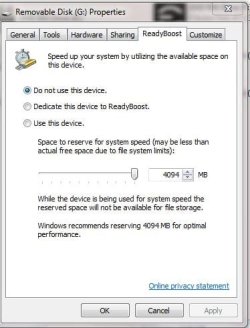
ReadyBoost Only Shows 4093MB on 8GB USB Drive

Hi,

I am having a problem with ReadyBoost in Win 7. It is only showing 4094 mb as the maximum allowable memory I can allocate on an 8GB USB drive.

I have the same problem when I try using my 16GB USB drive.

Can anyone tell me how to fix this problem.

I attached a picture of what I am seeing.

Here are my system specs:
System Manufacturer/Model Number Velocity Micro OS Win 7 Ultimate 64 Bit CPU Intel i7 975 E Overclocked to 4 ghz Motherboard EVGA X58 Classified 3xSLI Memory 6 gb Corsair 1333 ghz OC to 1600 ghz Graphics Card(s) EVGA 285 FTW 2xSLI Sound Card Creative X-Fi Titanium Fatality Monitor(s) Displays Dell 27" 2707WFP Screen Resolution N/A Hard Drives 2x300GB VelociRaptor Raid 0
2x150GB Raptor Raid 1 PSU 1200 Watt Maker Unknow Case Velocity Micro Cooling CoolIt Systems Liquid Cooling
 

Attachments

  • Readyboost.JPG
    Readyboost.JPG
    34.7 KB · Views: 33

My Computer

Computer Manufacturer/Model Number
Velocity Micro
OS
Win 7 Ultimate 64 Bit
CPU
Intel i7 975 E Overclocked to 4 ghz
Motherboard
EVGA X58 Classified 3xSLI
Memory
6 gb Corsair 1333 ghz OC to 1600 ghz
Graphics Card(s)
EVGA 285 FTW 2xSLI
Sound Card
Creative X-Fi Titanium Fatality
Monitor(s) Displays
Dell 27" 2707WFP
Hard Drives
2x300GB VelociRaptor Raid 0
2x150GB Raptor Raid 1
PSU
1200 Watt Maker Unknow
Case
Velocity Micro
Cooling
CoolIt Systems Liquid Cooling
Keyboard
Logitech G19
Mouse
Logitech G9x
Internet Speed
300kb
IMO: Don't bother, especially if its messin with you.

It is just a USB paging file, slower than HD.

If you want a real boost, get the real RAM memory.
 
Back
Top