Readyboost vs pagefile vs RAM

CharlyAR

New member
Local time
8:20 PM
Messages
9
Location
Buenos Aires, Argentina
Hi guys,

I'm running Win7 x64 with a Quad Core and 4GB of RAM. I've enabled Readyboost on two USB devices of 2GB each I had laying around: a SanDisk Cruzer Micro, random read speed is 5341 KB/sec, random write speed is 3068 KB/sec. And a Kingston FCR-HS219, random read speed is 3412 KB/sec, random write speed is 3739 KB/sec. Not much, but should suffice to give it a try.

While booting, I saw and improvement. But the thing is I have my computer on 24/7 so I don't care that much about boot time. And I don't see a lot of activity of these devices once is turned on. Specially over the pendrive.

Is it because I have > 2GB RAM? Or is it because they are too small?
Would I benefit if I create a pagefile over one of these devices instead of Readyboost?
How can I "measure" this?
Is there a guide regarding Readyboost and USB devices?

Thanks a lot!
 

My Computer

OS
Win7 x64
CPU
Intel Core 2 Quad
Motherboard
Asus P5K Deluxe
Memory
4GB DDR2
Graphics Card(s)
Asus ATI EAH3650 Silent
Monitor(s) Displays
ViewSonic VX2255wmb
Screen Resolution
1680x1050
Hard Drives
Western Digital Caviar Black 1TB WD1001FALS;
Western Digital Caviar Blue 500GB WD5000AAKS
PSU
PowerCooler PS-850HE
Case
Thermaltake Soprano DX VE7000
Cooling
Zalman CNPS9700NT
Keyboard
Microsoft Wireless Laser Keyboard 7000
Mouse
Microsoft Wireless Laser Mouse 7000
Other Info
APC Back-UPS RS 800
Readyboost was really intended to assist low memory systems. Some of the older systems which are limited by the MOBO to 2GB, etc. Probably not going to help with 4GB.

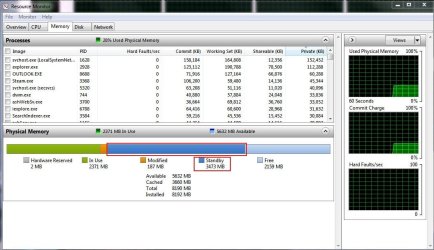
Start the RESOURCE MONITOR and click the MEMORY tab to see how much memory is actually being used after boot and after some actual system use.

P.S. Welcome to SevenForums!
 

My Computer

OS
XP Pro & Vista Home Premium (x86); Windows Ultimate 7600 x64 Retail
Thanks Muad Dib for your fast reply!

So that's it. I thougth it was also being used for caching. I guess I will leave only one then. Win7 after booting only uses 1GB. Sometimes I use 100% of RAM, but most of the time I'm working I use about 2~3 GB.

And thansk for your welcome. :)

Cheers.
 

My Computer

OS
Win7 x64
CPU
Intel Core 2 Quad
Motherboard
Asus P5K Deluxe
Memory
4GB DDR2
Graphics Card(s)
Asus ATI EAH3650 Silent
Monitor(s) Displays
ViewSonic VX2255wmb
Screen Resolution
1680x1050
Hard Drives
Western Digital Caviar Black 1TB WD1001FALS;
Western Digital Caviar Blue 500GB WD5000AAKS
PSU
PowerCooler PS-850HE
Case
Thermaltake Soprano DX VE7000
Cooling
Zalman CNPS9700NT
Keyboard
Microsoft Wireless Laser Keyboard 7000
Mouse
Microsoft Wireless Laser Mouse 7000
Other Info
APC Back-UPS RS 800
Well, Win7 will EVENTUALLY use all available memory as "Standby". As you use apps and close them Win7 does not remove them from memory (unless it runs out of memory). Instead it marks the memory usage as "Standby" and if you use the app again it is already loaded. Thus you get a quick response when changing between apps that have already been loaded from the HDD.

One of the benefits of using "Sleep" mode is that all the most used apps stay loaded in memory.
 

My Computer

OS
XP Pro & Vista Home Premium (x86); Windows Ultimate 7600 x64 Retail
Thanks for the extended reply. That's useful.
Just out of curiosity, wow do you see how much memory is marked as "sleep"?
I also wonder how does it manage the fragmentation. I guess it will release the memory if it runs out OR it needs contiguous?
 

My Computer

OS
Win7 x64
CPU
Intel Core 2 Quad
Motherboard
Asus P5K Deluxe
Memory
4GB DDR2
Graphics Card(s)
Asus ATI EAH3650 Silent
Monitor(s) Displays
ViewSonic VX2255wmb
Screen Resolution
1680x1050
Hard Drives
Western Digital Caviar Black 1TB WD1001FALS;
Western Digital Caviar Blue 500GB WD5000AAKS
PSU
PowerCooler PS-850HE
Case
Thermaltake Soprano DX VE7000
Cooling
Zalman CNPS9700NT
Keyboard
Microsoft Wireless Laser Keyboard 7000
Mouse
Microsoft Wireless Laser Mouse 7000
Other Info
APC Back-UPS RS 800
i have 8GB of RAM and i noticed a pretty good difference using my 8GB flash drive for readyboost
 

My Computer

Computer Manufacturer/Model Number
My Own Build
OS
Windows 7 Proffesional
CPU
Q6600 @ 3.6ghz
Motherboard
Gigabyte P45-UD3P
Memory
8GB Kingston HyperX T1
Graphics Card(s)
MSI 8800GTS 512
Sound Card
Realtek ALC889A
Monitor(s) Displays
HP w2207
Screen Resolution
1650 x 1050
Hard Drives
OCZ Agility 60GB SSD
WD 6400AAKS
WD 1TB My Book
PSU
Corsair 650 watt
Case
Antec 900
Cooling
Thermaltake
Keyboard
Logitech Illuminated
Mouse
MX Revolution
Internet Speed
20/8
It must be over simplified for mass consumption...

Yes, the more RAM you have, the less readily apparent the effect is. No, it is not a disk cache. Yes, it is integral to the design of Windows 7.

I am just tired of the FUD on ReadyBoost and SuperFetch. Several highly knowledgeable posts exist on this forum addressing the matter in detail.

All due respect, Muad Dib, but you are less than entirely correct. Being pragmatic, your answer is good enough.
 
Thanks for the extended reply. That's useful.
Just out of curiosity, wow do you see how much memory is marked as "sleep"?
I also wonder how does it manage the fragmentation. I guess it will release the memory if it runs out OR it needs contiguous?

Not "Sleep" but Standby. The memory outlined in the red boxes is STANDBY memory. It consists of programs/data that will not have to be read from the HDD when it is used again.

Capture4.JPG

When the computer "Sleeps" the memory, including Standby memory, is retained.

The next time you re-boot start the biggest/slowest loading app you use and note how long it takes to load the first time. Close the app. Now start it again and note how long it takes to load.
 

My Computer

OS
XP Pro & Vista Home Premium (x86); Windows Ultimate 7600 x64 Retail
It must be over simplified for mass consumption...

Yes, the more RAM you have, the less readily apparent the effect is. No, it is not a disk cache. Yes, it is integral to the design of Windows 7.

I am just tired of the FUD on ReadyBoost and SuperFetch. Several highly knowledgeable posts exist on this forum addressing the matter in detail.

All due respect, Muad Dib, but you are less than entirely correct. Being pragmatic, your answer is good enough.


Antman, I am grateful for your blessing. I will be happy to post the MS Whitepaper in another thread if that will satisfy your stringent discipline. But for most people it is a bit of overkill. :sarc:
 

My Computer

OS
XP Pro & Vista Home Premium (x86); Windows Ultimate 7600 x64 Retail
Antman, I am grateful for your blessing. I will be happy to post the MS Whitepaper in another thread if that will satisfy your stringent discipline. But for most people it is a bit of overkill. :sarc:
Half of the truth is less than the truth. You could preface an incomplete response with, "For your particular situation..." or "Practically..."

False information begins with partial information. You are being held to a high standard because this is not a lesser forum.
 
Half of the truth is less than the truth. You could preface an incomplete response with, "For your particular situation..." or "Practically..."

False information begins with partial information. You are being held to a high standard because this is not a lesser forum.

In which case, a better, and more constructive, response on your part would have been to provide a link to the "complete truth" so the OP and others could investigate subject at their leisure.

May I suggest, perhaps you could have written "For a more detailed and complete explanation of the details regarding pre-fetch and standby memory please refer to...."

"Half the truth is less than the truth...", "False Information begins with partial information...". Cute, yes... helpful, no. :p

There are few posts in a technical forum that constitute a "complete response". If a user really wanted to read the the complete technical reference manual they would not post the question on a forum.
 

My Computer

OS
XP Pro & Vista Home Premium (x86); Windows Ultimate 7600 x64 Retail
that wonderful guys, just great. but no one answered the question. Is it more beneficial to use your flash drive as a ready boost or just set a page file on it. I have a small netbook that I use for school and it is rather slow. So i bought a small [8mm , very low profile and totally cool] 4gb usb flash drive. Which would help regular computing more. Windows ready boost or jsut setting the page file to 4gb on the drive. I could care less about boot time.


thanks.
 

My Computer

Computer Manufacturer/Model Number
personal build
OS
windows 7 home premium x64
CPU
i7-950
Motherboard
sabertooth x58
Memory
g.skill pi 6-8-6-20
Graphics Card(s)
Sapphire hd6790
Monitor(s) Displays
NEC 23" widescreen
Hard Drives
120 GB OCZ vertex III SATA III 6GB/s boot/system drive, 1 TB WD Caviar Black SATA III, 1TB Western Digital Caviar Black SATA II.
PSU
pc power and cooling silencer 750w Quad [red]
Case
antec 300
Cooling
Noctua NH-D14
Since you seem to have sufficient RAM in that Readyboost really provides no benefit to you, I'd go with the pagefile :) Just try it...but might I add that generally the pagefile is just a poor substitute for, well, more RAM...
 

My Computer

Computer type
PC/Desktop
Computer Manufacturer/Model Number
Custom-built
OS
Windows 7 Professional SP1 32-bit
CPU
Intel Core 2 Duo E6600 2.4GHz
Motherboard
Asus PL5D2
Memory
4GB DDR2-667 (4x1GB in dual-channel config)
Graphics Card(s)
nVidia GeForce 9800 GT
Sound Card
Creative X-Fi XtremeMusic
Monitor(s) Displays
Acer P236H
Screen Resolution
1920x1200 (DVI)
Hard Drives
OCZ SSD Vertex Plus 60GB SATA (Firmware 3.55), 64MB cache
Hitachi HD321KJ SATA, 320GB, 7200rpm, 16MB cache
PSU
Antec TruePower 2.0
Case
Cooler Master Centurion
Cooling
Too many fans
Keyboard
Standard
Mouse
Microsoft wireless optical mouse
Internet Speed
AT&T U-verse (18mbit/sec)
Antivirus
Microsoft Security Essentials
Browser
Firefox
Other Info
Other devices:
Compaq CQ-60 laptop
Google Nexus 7 (2012) tablet
Nvidia SHIELD tablet (US/LTE)
Hardkernel ODROID-XU single-board computer (Samsung Exynos 5420)
Here is a Ready Boost Monitor with which you can measure the activities. I think with 4GB of RAM or more, you will find very little, if any, activity since there is hardly any paging (hard faults) going on. You can check that in Resource Monitor > Memory tab > the graph on the bottom right. That shows you the paging activities over a certain period of time.
 

My Computer

Computer Manufacturer/Model Number
HP, Dell, Gateway, Toshiba - 4 laptops and 2 desktops
OS
Vista, Windows7, Mint Mate, Zorin, Windows 8
CPU
from 1.6GHz Duo to i7
Monitor(s) Displays
2x HP w2207
Hard Drives
5x HDD, 7x SSD, 12x Externals
Keyboard
with trackball - no mices
Mouse
Trackball mice
Internet Speed
DSL 6000
the size of the flash drive I am using is 4gb... The amount of RAM on the net book I am talking about is less than 2
 

My Computer

Computer Manufacturer/Model Number
personal build
OS
windows 7 home premium x64
CPU
i7-950
Motherboard
sabertooth x58
Memory
g.skill pi 6-8-6-20
Graphics Card(s)
Sapphire hd6790
Monitor(s) Displays
NEC 23" widescreen
Hard Drives
120 GB OCZ vertex III SATA III 6GB/s boot/system drive, 1 TB WD Caviar Black SATA III, 1TB Western Digital Caviar Black SATA II.
PSU
pc power and cooling silencer 750w Quad [red]
Case
antec 300
Cooling
Noctua NH-D14
Welcome to Seven Forums etdavenport. since your netbook has 2GB RAM installed I would expect it to show some type of speed improvement,say, lagre apps opening or more steady video. You can try both options mentioned here i.e. page file on the USB and use as more RAM. I suspect you'll have more benefit with ReadyBoost, as WHS said.
 

My Computer

Computer type
PC/Desktop
Computer Manufacturer/Model Number
Home Built Desktop By DataTech
OS
Windows 7 Ultimate X64 SP1
CPU
Intel i5-2550K, Differing ~4.4-4.8GHz No built in GPU
Motherboard
ASUS P8Z68-V PRO/GEN3
Memory
16GB G.Skill Sniper 1866MHz @ 2133MHz 2x8GB
Graphics Card(s)
ASUS GTX650TIB-DC2OC-2GD5, (650TI Boost)
Sound Card
Onboard Realtek 5-1
Monitor(s) Displays
Samsung P2570HD
Screen Resolution
1920x1080
Hard Drives
Samsung 840 Pro 256GB SSD for OS, 500GB Seagate Constellation (Enterprise drive) for Data
PSU
Corsair HX650W
Case
Inwin Dragon Rider
Cooling
Hyper 212 EVO w/two Noctua fans, push-pull, @1300 RPM
Keyboard
E-Z Eyes, bright yellow keys with large characters
Mouse
steelseries SENSEI Laser Pro Gaming
Internet Speed
48-51Mbs Mbs down, 11 Mbs up Xfinity Cable
Antivirus
Norton Internet Security 2013
Browser
IE 10, Opera, Pale Moon if needed
Other Info
4 case fans, LG BluRay-RE, ASUS DVD-RW, Mr. Fusion power supply, 1.21 gigawatts.
thank you!
 

My Computer

Computer Manufacturer/Model Number
personal build
OS
windows 7 home premium x64
CPU
i7-950
Motherboard
sabertooth x58
Memory
g.skill pi 6-8-6-20
Graphics Card(s)
Sapphire hd6790
Monitor(s) Displays
NEC 23" widescreen
Hard Drives
120 GB OCZ vertex III SATA III 6GB/s boot/system drive, 1 TB WD Caviar Black SATA III, 1TB Western Digital Caviar Black SATA II.
PSU
pc power and cooling silencer 750w Quad [red]
Case
antec 300
Cooling
Noctua NH-D14
Very welcome.:)
 

My Computer

Computer type
PC/Desktop
Computer Manufacturer/Model Number
Home Built Desktop By DataTech
OS
Windows 7 Ultimate X64 SP1
CPU
Intel i5-2550K, Differing ~4.4-4.8GHz No built in GPU
Motherboard
ASUS P8Z68-V PRO/GEN3
Memory
16GB G.Skill Sniper 1866MHz @ 2133MHz 2x8GB
Graphics Card(s)
ASUS GTX650TIB-DC2OC-2GD5, (650TI Boost)
Sound Card
Onboard Realtek 5-1
Monitor(s) Displays
Samsung P2570HD
Screen Resolution
1920x1080
Hard Drives
Samsung 840 Pro 256GB SSD for OS, 500GB Seagate Constellation (Enterprise drive) for Data
PSU
Corsair HX650W
Case
Inwin Dragon Rider
Cooling
Hyper 212 EVO w/two Noctua fans, push-pull, @1300 RPM
Keyboard
E-Z Eyes, bright yellow keys with large characters
Mouse
steelseries SENSEI Laser Pro Gaming
Internet Speed
48-51Mbs Mbs down, 11 Mbs up Xfinity Cable
Antivirus
Norton Internet Security 2013
Browser
IE 10, Opera, Pale Moon if needed
Other Info
4 case fans, LG BluRay-RE, ASUS DVD-RW, Mr. Fusion power supply, 1.21 gigawatts.
Back
Top