
ReadyBoost

seekermeister

Old School
Guru
VIP
Local time
2:41 PM
Messages
6,618
Location
Indian Territory
I just installed a SanDisk 4GB Flash Drive, and enabled ReadyBoost, via the dialog that appeared. In less than a minute, there was a BSOD, and on reboot it took an exceptionally long time to reach the login screen. From that point on, the system seems normal, but I haven't noticed any particular improvements yet. When I went to System Properties, it still shows only 2GBs of memory installed, which is what it already had.

When I view My Computer, it shows the drive totally in red vs blue as the other drives, and when I got to the flash drive in the file manager, the only thing that I see related is something called ReadyBoost.sfcache besides some files and folders for the drive's U3 function. I'm trying to figure how to confirm that it is actually doing what it is supposed to? How is that done?

EDIT: The BSOD that I mentioned was caused by hal.dll + 12903, whatever that means.
 

My Computer

Computer Manufacturer/Model Number
DIY
OS
W7x64 Pro, SuSe 12.1/** W7 x64 Pro, XP MCE
CPU
Phenom II 1090T w/Noctua NH-D14 /**4400+ X2 w/CM Hyper TX 3
Motherboard
ASRock 890FX Deluxe 4/**A8N-SLI
Memory
2 x 2GB Patriot PGS34g1600LLKA/**4x1GB Corsair VS
Graphics Card(s)
EVGA GTX460 SC/**EVGA 8800GTS
Sound Card
Asus Xonar D2X/**Xonar D1
Monitor(s) Displays
Acer X233H, Dell E152FPc /**LG M237-WD
Screen Resolution
1920x1080 & 1024x768/**1980x1080
Hard Drives
WDC 2TB, 1.5TB, 1TB, 500GB,Seagate 500GB , Maxtor 80GB /**500GB Seagate & WDC 1TB Black
PSU
CM RS600 w/ APC BX1000G/**Antec 500 TP w/ APC BX1000
Case
HAF922/**Antec 1040IIB
Cooling
3x200mm, 1x140 and 1x120mm/**5x80mm fans
Keyboard
Logitech Media USB/**Saitek Eclipse
Mouse
Cordless Trackman Wheel/**Ditto
Internet Speed
3.3Mbps
Other Info
SB 560 5.1 w/ Sennheiser RS140/**Creative T20 speakers, Dvico FusionHDTV7 Gold RT, Cisco E3000, HP 5510V AIO, Linksys E3000, Belkin F5U237 hub and **F5D8055 adapter
(** = 2nd rig)
Everything you mention, aside from the BSOD, is normal. It's red in My Computer because it has no free space left. Ready boost uses the whole drive. It's my understanding that it uses compression on the drive so you will just see the one file. Think of it like another page file. I had one flash drive that Windows determined was not fast enough and it disabled ready boost on that drive. I got a pop up message when that happened to tell me it wasn't working. If it's not working I think you will know. I don't know how you test it but I do know that my system boots up to my desktop much faster with ready boost enabled. My only complaint is I would like the option to hide the ready boost drive as its not usable for anything else.
 

My Computer

Computer type
PC/Desktop
Computer Manufacturer/Model Number
Home Built
OS
Windows 10 Education 64 bit
CPU
AMD Phenom II X4 980 Black Edition Deneb 3.7GHz
Motherboard
Asus M4N68T-M V2 µATX Motherboard
Memory
8GB 4GBx2 Kingston PC10600 DDR3 1333 Memory
Graphics Card(s)
Zotac NVIDIA Geforce GT640 2 Gig DDR3 PCIe
Sound Card
VIA VT1708s High Definition Audio 8-channel Onboard
Monitor(s) Displays
22" LG E2242 1080p and 2 19" I-INC AG191D
Screen Resolution
1280x1024 - 1920x1080 - 1280x1024
Hard Drives
Crucial M100 256 GB SSD and 500 GB WD Blue SATA
PSU
Thermaltake TR 620
Case
Power Up Black ATX Mid-Tower Case
Cooling
Stock heatsink and fan
Keyboard
Logitech Wireless K350 Wave
Mouse
Logitech Wireless M570 Trackman Wheel
Internet Speed
80 Mbps Down 30 Mbps Up
Antivirus
Windows Defender
Browser
Internet Explorer 11
Other Info
HP DVD1040e Lightscribe - External USB2
Everything you mention, aside from the BSOD, is normal. It's red in My Computer because it has no free space left. Ready boost uses the whole drive. It's my understanding that it uses compression on the drive so you will just see the one file. Think of it like another page file. I had one flash drive that Windows determined was not fast enough and it disabled ready boost on that drive. I got a pop up message when that happened to tell me it wasn't working. If it's not working I think you will know. I don't know how you test it but I do know that my system boots up to my desktop much faster with ready boost enabled. My only complaint is I would like the option to hide the ready boost drive as its not usable for anything else.

That is what is throwing me, because my boot time increased with ReadyBoost, rather than shortened. When the Windows logo page appears and the colored panes begin to fly, they freeze midflight for ~30 seconds before continuing. Afterward, the boot seems normal, whether it is faster or not, I'm not sure.

I understand and accept your explanation of how it is intended to work, except that whereever I have checked, the numbers for both physical and virtual memory remains unchanged. I would have expected either one or the other to have increased.

Since the only effect that I have noticed is regarding boot time, and mine is the reverse of your's, I'm hoping to find some method of determing that it is actually doing it's job.

---------- Post added at 11:18 AM ---------- Previous post was at 11:17 AM ----------


That might be helpful to setup ReadyBoost, but not to diagnose or assess it.
 
Last edited:

My Computer

Computer Manufacturer/Model Number
DIY
OS
W7x64 Pro, SuSe 12.1/** W7 x64 Pro, XP MCE
CPU
Phenom II 1090T w/Noctua NH-D14 /**4400+ X2 w/CM Hyper TX 3
Motherboard
ASRock 890FX Deluxe 4/**A8N-SLI
Memory
2 x 2GB Patriot PGS34g1600LLKA/**4x1GB Corsair VS
Graphics Card(s)
EVGA GTX460 SC/**EVGA 8800GTS
Sound Card
Asus Xonar D2X/**Xonar D1
Monitor(s) Displays
Acer X233H, Dell E152FPc /**LG M237-WD
Screen Resolution
1920x1080 & 1024x768/**1980x1080
Hard Drives
WDC 2TB, 1.5TB, 1TB, 500GB,Seagate 500GB , Maxtor 80GB /**500GB Seagate & WDC 1TB Black
PSU
CM RS600 w/ APC BX1000G/**Antec 500 TP w/ APC BX1000
Case
HAF922/**Antec 1040IIB
Cooling
3x200mm, 1x140 and 1x120mm/**5x80mm fans
Keyboard
Logitech Media USB/**Saitek Eclipse
Mouse
Cordless Trackman Wheel/**Ditto
Internet Speed
3.3Mbps
Other Info
SB 560 5.1 w/ Sennheiser RS140/**Creative T20 speakers, Dvico FusionHDTV7 Gold RT, Cisco E3000, HP 5510V AIO, Linksys E3000, Belkin F5U237 hub and **F5D8055 adapter
(** = 2nd rig)
Maybe that U3 thing is messing it up. I believe you can remove it if you are never going to use it.
 

My Computer

Computer type
PC/Desktop
Computer Manufacturer/Model Number
Home Built
OS
Windows 10 Education 64 bit
CPU
AMD Phenom II X4 980 Black Edition Deneb 3.7GHz
Motherboard
Asus M4N68T-M V2 µATX Motherboard
Memory
8GB 4GBx2 Kingston PC10600 DDR3 1333 Memory
Graphics Card(s)
Zotac NVIDIA Geforce GT640 2 Gig DDR3 PCIe
Sound Card
VIA VT1708s High Definition Audio 8-channel Onboard
Monitor(s) Displays
22" LG E2242 1080p and 2 19" I-INC AG191D
Screen Resolution
1280x1024 - 1920x1080 - 1280x1024
Hard Drives
Crucial M100 256 GB SSD and 500 GB WD Blue SATA
PSU
Thermaltake TR 620
Case
Power Up Black ATX Mid-Tower Case
Cooling
Stock heatsink and fan
Keyboard
Logitech Wireless K350 Wave
Mouse
Logitech Wireless M570 Trackman Wheel
Internet Speed
80 Mbps Down 30 Mbps Up
Antivirus
Windows Defender
Browser
Internet Explorer 11
Other Info
HP DVD1040e Lightscribe - External USB2
I would...if I knew that it was the problem, but don't care to do so, unless I had reason to feel certain that this is the case. Originally, I intended for the drive to be dedicated to this purpose full time, but if I can't resolve the boot issue otherwise, I may pull the plug on it, and U3 would be a useful feature to retain.

---------- Post added at 12:28 PM ---------- Previous post was at 11:44 AM ----------

I found this article:

Disable Auto-Run and Auto-Play of U3 Smart Drives Launchpad My Digital Life

Which speaks about how to remove U3, but also tells how to simply disable it. The thing that caught my eye, is that it keeps referring to the flash drive as a CD/ROM. I did a couple of reboots, to see if using the Shift key during the boot would effect the boot time, but it seemed to act like a Pause key, except that it would start running again, after several seconds delay, and the panes still froze midflight as before, so that is not a solution.

Also, I noticed that the first page of the BIOS would sporadically hang on drive detection. This is something that previously has been caused by having flash drives plugged in. The only mention of the flash drive is on the last page of the BIOS run. I'm not sure what to call it, but in a much older rig that I had in the past, it was call the DMI Pool, or something of that sort. But the odd thing was that the drive was listed twice.

I went into the BIOS setup, and found the drive listed as an option within the CD/DVD listings, and tried moving it to first boot priority, but that didn't help. Something still isn't right, but I'm still not sure that it has to do with U3.
 
Last edited:

My Computer

Computer Manufacturer/Model Number
DIY
OS
W7x64 Pro, SuSe 12.1/** W7 x64 Pro, XP MCE
CPU
Phenom II 1090T w/Noctua NH-D14 /**4400+ X2 w/CM Hyper TX 3
Motherboard
ASRock 890FX Deluxe 4/**A8N-SLI
Memory
2 x 2GB Patriot PGS34g1600LLKA/**4x1GB Corsair VS
Graphics Card(s)
EVGA GTX460 SC/**EVGA 8800GTS
Sound Card
Asus Xonar D2X/**Xonar D1
Monitor(s) Displays
Acer X233H, Dell E152FPc /**LG M237-WD
Screen Resolution
1920x1080 & 1024x768/**1980x1080
Hard Drives
WDC 2TB, 1.5TB, 1TB, 500GB,Seagate 500GB , Maxtor 80GB /**500GB Seagate & WDC 1TB Black
PSU
CM RS600 w/ APC BX1000G/**Antec 500 TP w/ APC BX1000
Case
HAF922/**Antec 1040IIB
Cooling
3x200mm, 1x140 and 1x120mm/**5x80mm fans
Keyboard
Logitech Media USB/**Saitek Eclipse
Mouse
Cordless Trackman Wheel/**Ditto
Internet Speed
3.3Mbps
Other Info
SB 560 5.1 w/ Sennheiser RS140/**Creative T20 speakers, Dvico FusionHDTV7 Gold RT, Cisco E3000, HP 5510V AIO, Linksys E3000, Belkin F5U237 hub and **F5D8055 adapter
(** = 2nd rig)
I don't have a drive with U3 on it to test but I'm thinking that may be causing some of your problems with ready boost. I'd beg borrow or steal a normal flash drive to test further. I wouldn't really steal one but you know what I mean. :)
 

My Computer

Computer type
PC/Desktop
Computer Manufacturer/Model Number
Home Built
OS
Windows 10 Education 64 bit
CPU
AMD Phenom II X4 980 Black Edition Deneb 3.7GHz
Motherboard
Asus M4N68T-M V2 µATX Motherboard
Memory
8GB 4GBx2 Kingston PC10600 DDR3 1333 Memory
Graphics Card(s)
Zotac NVIDIA Geforce GT640 2 Gig DDR3 PCIe
Sound Card
VIA VT1708s High Definition Audio 8-channel Onboard
Monitor(s) Displays
22" LG E2242 1080p and 2 19" I-INC AG191D
Screen Resolution
1280x1024 - 1920x1080 - 1280x1024
Hard Drives
Crucial M100 256 GB SSD and 500 GB WD Blue SATA
PSU
Thermaltake TR 620
Case
Power Up Black ATX Mid-Tower Case
Cooling
Stock heatsink and fan
Keyboard
Logitech Wireless K350 Wave
Mouse
Logitech Wireless M570 Trackman Wheel
Internet Speed
80 Mbps Down 30 Mbps Up
Antivirus
Windows Defender
Browser
Internet Explorer 11
Other Info
HP DVD1040e Lightscribe - External USB2
With 2GBs of RAM you are wasting your time with Ready Boost. You will gain nothing. You have to understand that Ready Boost is only a means to increase the speed for fetching a page from outside of RAM. None of the system parameters change because of it. And, you get a certain overhead because the system has to write the pages to both the disk and the stick (safety measure in case you pull the stick all of a sudden). A few minutes ago I made this post. It tells you how to check whether Ready Boost would even get into the act - but with 2GBs of RAM, I doubt it - especially if your stick is slow. You better measure it first with HD Tune and compare it to the access times of your HDD.
 

My Computer

Computer Manufacturer/Model Number
HP, Dell, Gateway, Toshiba - 4 laptops and 2 desktops
OS
Vista, Windows7, Mint Mate, Zorin, Windows 8
CPU
from 1.6GHz Duo to i7
Monitor(s) Displays
2x HP w2207
Hard Drives
5x HDD, 7x SSD, 12x Externals
Keyboard
with trackball - no mices
Mouse
Trackball mice
Internet Speed
DSL 6000
With 2GBs of RAM you are wasting your time with Ready Boost. You will gain nothing. You have to understand that Ready Boost is only a means to increase the speed for fetching a page from outside of RAM. None of the system parameters change because of it. And, you get a certain overhead because the system has to write the pages to both the disk and the stick (safety measure in case you pull the stick all of a sudden). A few minutes ago I made this post. It tells you how to check whether Ready Boost would even get into the act - but with 2GBs of RAM, I doubt it - especially if your stick is slow. You better measure it first with HD Tune and compare it to the access times of your HDD.

What about alphanumeric's comment about ReadyBoost speeding up his boot time?

EDIT: I had intended to run HD Tune on the drive prior to setting up ReadyBoost, but forgot when Windows asked what to do with the drive. I guess that I will have to disable ReadyBoost before testing it...yes?
 

My Computer

Computer Manufacturer/Model Number
DIY
OS
W7x64 Pro, SuSe 12.1/** W7 x64 Pro, XP MCE
CPU
Phenom II 1090T w/Noctua NH-D14 /**4400+ X2 w/CM Hyper TX 3
Motherboard
ASRock 890FX Deluxe 4/**A8N-SLI
Memory
2 x 2GB Patriot PGS34g1600LLKA/**4x1GB Corsair VS
Graphics Card(s)
EVGA GTX460 SC/**EVGA 8800GTS
Sound Card
Asus Xonar D2X/**Xonar D1
Monitor(s) Displays
Acer X233H, Dell E152FPc /**LG M237-WD
Screen Resolution
1920x1080 & 1024x768/**1980x1080
Hard Drives
WDC 2TB, 1.5TB, 1TB, 500GB,Seagate 500GB , Maxtor 80GB /**500GB Seagate & WDC 1TB Black
PSU
CM RS600 w/ APC BX1000G/**Antec 500 TP w/ APC BX1000
Case
HAF922/**Antec 1040IIB
Cooling
3x200mm, 1x140 and 1x120mm/**5x80mm fans
Keyboard
Logitech Media USB/**Saitek Eclipse
Mouse
Cordless Trackman Wheel/**Ditto
Internet Speed
3.3Mbps
Other Info
SB 560 5.1 w/ Sennheiser RS140/**Creative T20 speakers, Dvico FusionHDTV7 Gold RT, Cisco E3000, HP 5510V AIO, Linksys E3000, Belkin F5U237 hub and **F5D8055 adapter
(** = 2nd rig)
The result that I got with ReadyBoost remaining enabled is as shown in the screenshot. The sporadic speed is not as I would expect, considering what I saw of a similar test in another thread a while back, but apparently it is fast enough that Windows didn't complain, like it did with a couple of other flash drives that I tried to use. Whether this performance is the result of ReadyBoost or indicative of a lack of normal performance, I'm not sure. If the latter, I would try to exchange it, since it just arrived yesterday, but then I do not know what is considered within normal bounds by the manufacturer or the seller.
 

Attachments

  • SanDisk.png
    SanDisk.png
    59 KB · Views: 97

My Computer

Computer Manufacturer/Model Number
DIY
OS
W7x64 Pro, SuSe 12.1/** W7 x64 Pro, XP MCE
CPU
Phenom II 1090T w/Noctua NH-D14 /**4400+ X2 w/CM Hyper TX 3
Motherboard
ASRock 890FX Deluxe 4/**A8N-SLI
Memory
2 x 2GB Patriot PGS34g1600LLKA/**4x1GB Corsair VS
Graphics Card(s)
EVGA GTX460 SC/**EVGA 8800GTS
Sound Card
Asus Xonar D2X/**Xonar D1
Monitor(s) Displays
Acer X233H, Dell E152FPc /**LG M237-WD
Screen Resolution
1920x1080 & 1024x768/**1980x1080
Hard Drives
WDC 2TB, 1.5TB, 1TB, 500GB,Seagate 500GB , Maxtor 80GB /**500GB Seagate & WDC 1TB Black
PSU
CM RS600 w/ APC BX1000G/**Antec 500 TP w/ APC BX1000
Case
HAF922/**Antec 1040IIB
Cooling
3x200mm, 1x140 and 1x120mm/**5x80mm fans
Keyboard
Logitech Media USB/**Saitek Eclipse
Mouse
Cordless Trackman Wheel/**Ditto
Internet Speed
3.3Mbps
Other Info
SB 560 5.1 w/ Sennheiser RS140/**Creative T20 speakers, Dvico FusionHDTV7 Gold RT, Cisco E3000, HP 5510V AIO, Linksys E3000, Belkin F5U237 hub and **F5D8055 adapter
(** = 2nd rig)
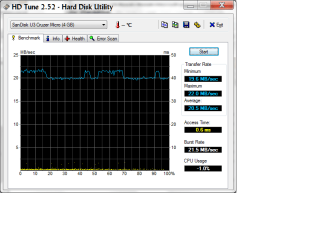
The drive is fine - it is a pretty good one. It is about 25 times faster in access time than your HDD would be. The data transfer rate is of lesser importance because we are here talking about very little pieces of data. But have a look into your Resource Monitor (as explained in the linked post above) and see whether it is really worth bying the Ready Boost overhead. I doubt it.
 

My Computer

Computer Manufacturer/Model Number
HP, Dell, Gateway, Toshiba - 4 laptops and 2 desktops
OS
Vista, Windows7, Mint Mate, Zorin, Windows 8
CPU
from 1.6GHz Duo to i7
Monitor(s) Displays
2x HP w2207
Hard Drives
5x HDD, 7x SSD, 12x Externals
Keyboard
with trackball - no mices
Mouse
Trackball mice
Internet Speed
DSL 6000
I started to run the test with ReadyBoost disabled, but can't seem to find the means to do so. The help guide says to do this on the ReadyBoost tab of General Options, which I assume is within the Properties of the drive, but when I do this within a file manager, or within Disk Management, there is no ReadyBoost tab available. Where do I find this?

---------- Post added at 03:49 PM ---------- Previous post was at 03:44 PM ----------

The drive is fine - it is a pretty good one. It is about 25 times faster in access time than your HDD would be. The data transfer rate is of lesser importance because we are here talking about very little pieces of data. But have a look into your Resource Monitor (as explained in the linked post above) and see whether it is really worth bying the Ready Boost overhead. I doubt it.

I understand what you are saying about the Resource Monitor, but you didn't comment on my question regarding alphanumeric's statement about boot time improvement. It would seem that may be a separate issue, which wouldn't be apparent in the Resource Monitor.
 

My Computer

Computer Manufacturer/Model Number
DIY
OS
W7x64 Pro, SuSe 12.1/** W7 x64 Pro, XP MCE
CPU
Phenom II 1090T w/Noctua NH-D14 /**4400+ X2 w/CM Hyper TX 3
Motherboard
ASRock 890FX Deluxe 4/**A8N-SLI
Memory
2 x 2GB Patriot PGS34g1600LLKA/**4x1GB Corsair VS
Graphics Card(s)
EVGA GTX460 SC/**EVGA 8800GTS
Sound Card
Asus Xonar D2X/**Xonar D1
Monitor(s) Displays
Acer X233H, Dell E152FPc /**LG M237-WD
Screen Resolution
1920x1080 & 1024x768/**1980x1080
Hard Drives
WDC 2TB, 1.5TB, 1TB, 500GB,Seagate 500GB , Maxtor 80GB /**500GB Seagate & WDC 1TB Black
PSU
CM RS600 w/ APC BX1000G/**Antec 500 TP w/ APC BX1000
Case
HAF922/**Antec 1040IIB
Cooling
3x200mm, 1x140 and 1x120mm/**5x80mm fans
Keyboard
Logitech Media USB/**Saitek Eclipse
Mouse
Cordless Trackman Wheel/**Ditto
Internet Speed
3.3Mbps
Other Info
SB 560 5.1 w/ Sennheiser RS140/**Creative T20 speakers, Dvico FusionHDTV7 Gold RT, Cisco E3000, HP 5510V AIO, Linksys E3000, Belkin F5U237 hub and **F5D8055 adapter
(** = 2nd rig)
alphanumeric's statement about boot time improvement is a complete mystery to me. I have no clue how that could possibly happen. In fact it should be slower because the system has to deal with 2 paging devices. So you got me there.
If you want to improve your boot time, get a SSD. My system boots in 15 seconds. In fact my BIOS phase is longer than my boot.
 

My Computer

Computer Manufacturer/Model Number
HP, Dell, Gateway, Toshiba - 4 laptops and 2 desktops
OS
Vista, Windows7, Mint Mate, Zorin, Windows 8
CPU
from 1.6GHz Duo to i7
Monitor(s) Displays
2x HP w2207
Hard Drives
5x HDD, 7x SSD, 12x Externals
Keyboard
with trackball - no mices
Mouse
Trackball mice
Internet Speed
DSL 6000
alphanumeric's statement about boot time improvement is a complete mystery to me. I have no clue how that could possibly happen. In fact it should be slower because the system has to deal with 2 paging devices. So you got me there.
If you want to improve your boot time, get a SSD. My system boots in 15 seconds. In fact my BIOS phase is longer than my boot.
SSD is on the horizon, but still at some distance until I find one that I want and can afford. In the mean time, I was hoping to milk ReadyBoost for a while. Considering your statements and my observations, I'm beginning to wonder what ReadyBoost is good for, except promoting flash drive sales? I suppose that some people might find it an improvement, if the demands of their apps exceed the RAM's capability, but then I would wonder about that, if the virtual memory would have to be used to capacity before ReadyBoost kicked in.

Originally, I thought that ReadyBoost would act as an increase in physical RAM, or at the very least an extension of the pagefile, not as a secondary one, but from what I have been able to see as to memory values as given by Windows, I was wrong.

EDIT: Thinking about this, I think that I got it reversed, Readyboost would be first in line, before the virtual memory, otherwise there would be no advantage in the speed increase. I think that I will try it with the pagefile disabled and see what happens(or would that also disable paging to ReadyBoost)?
 
Last edited:

My Computer

Computer Manufacturer/Model Number
DIY
OS
W7x64 Pro, SuSe 12.1/** W7 x64 Pro, XP MCE
CPU
Phenom II 1090T w/Noctua NH-D14 /**4400+ X2 w/CM Hyper TX 3
Motherboard
ASRock 890FX Deluxe 4/**A8N-SLI
Memory
2 x 2GB Patriot PGS34g1600LLKA/**4x1GB Corsair VS
Graphics Card(s)
EVGA GTX460 SC/**EVGA 8800GTS
Sound Card
Asus Xonar D2X/**Xonar D1
Monitor(s) Displays
Acer X233H, Dell E152FPc /**LG M237-WD
Screen Resolution
1920x1080 & 1024x768/**1980x1080
Hard Drives
WDC 2TB, 1.5TB, 1TB, 500GB,Seagate 500GB , Maxtor 80GB /**500GB Seagate & WDC 1TB Black
PSU
CM RS600 w/ APC BX1000G/**Antec 500 TP w/ APC BX1000
Case
HAF922/**Antec 1040IIB
Cooling
3x200mm, 1x140 and 1x120mm/**5x80mm fans
Keyboard
Logitech Media USB/**Saitek Eclipse
Mouse
Cordless Trackman Wheel/**Ditto
Internet Speed
3.3Mbps
Other Info
SB 560 5.1 w/ Sennheiser RS140/**Creative T20 speakers, Dvico FusionHDTV7 Gold RT, Cisco E3000, HP 5510V AIO, Linksys E3000, Belkin F5U237 hub and **F5D8055 adapter
(** = 2nd rig)
alphanumeric's statement about boot time improvement is a complete mystery to me. I have no clue how that could possibly happen. In fact it should be slower because the system has to deal with 2 paging devices. So you got me there.
If you want to improve your boot time, get a SSD. My system boots in 15 seconds. In fact my BIOS phase is longer than my boot.
SSD is on the horizon, but still at some distance until I find one that I want and can afford. In the mean time, I was hoping to milk ReadyBoost for a while. Considering your statements and my observations, I'm beginning to wonder what ReadyBoost is good for, except promoting flash drive sales? I suppose that some people might find it an improvement, if the demands of their apps exceed the RAM's capability, but then I would wonder about that, if the virtual memory would have to be used to capacity before ReadyBoost kicked in.

Originally, I thought that ReadyBoost would act as an increase in physical RAM, or at the very least an extension of the pagefile, not as a secondary one, but from what I have been able to see as to memory values as given by Windows, I was wrong.

EDIT: Thinking about this, I think that I got it reversed, Readyboost would be first in line, before the virtual memory, otherwise there would be no advantage in the speed increase. I think that I will try it with the pagefile disabled and see what happens(or would that also disable paging to ReadyBoost)?

If you disable the pagefile, Ready Boost has no function to perform. With 2GBs of RAM, disabling the page file may be risky. There is always the odd case where it may be needed.
 

My Computer

Computer Manufacturer/Model Number
HP, Dell, Gateway, Toshiba - 4 laptops and 2 desktops
OS
Vista, Windows7, Mint Mate, Zorin, Windows 8
CPU
from 1.6GHz Duo to i7
Monitor(s) Displays
2x HP w2207
Hard Drives
5x HDD, 7x SSD, 12x Externals
Keyboard
with trackball - no mices
Mouse
Trackball mice
Internet Speed
DSL 6000
If you disable the pagefile, Ready Boost has no function to perform. With 2GBs of RAM, disabling the page file may be risky. There is always the odd case where it may be needed.
Had I not been so hasty, your post would have been of greater benefit, because it seems that something was needed by the pagefiile, because the reboot required after doing that, was not sucessful. I shutdown and pulled the flash drive and used the launch repair utility, which got me to desktop, but the boot hangs was just as when the flash drive was installed. Now to reenable the pagefile and see what happens.

EDIT: Hmm, apparently the launch repair automatically reenabled it on it's own.
 

My Computer

Computer Manufacturer/Model Number
DIY
OS
W7x64 Pro, SuSe 12.1/** W7 x64 Pro, XP MCE
CPU
Phenom II 1090T w/Noctua NH-D14 /**4400+ X2 w/CM Hyper TX 3
Motherboard
ASRock 890FX Deluxe 4/**A8N-SLI
Memory
2 x 2GB Patriot PGS34g1600LLKA/**4x1GB Corsair VS
Graphics Card(s)
EVGA GTX460 SC/**EVGA 8800GTS
Sound Card
Asus Xonar D2X/**Xonar D1
Monitor(s) Displays
Acer X233H, Dell E152FPc /**LG M237-WD
Screen Resolution
1920x1080 & 1024x768/**1980x1080
Hard Drives
WDC 2TB, 1.5TB, 1TB, 500GB,Seagate 500GB , Maxtor 80GB /**500GB Seagate & WDC 1TB Black
PSU
CM RS600 w/ APC BX1000G/**Antec 500 TP w/ APC BX1000
Case
HAF922/**Antec 1040IIB
Cooling
3x200mm, 1x140 and 1x120mm/**5x80mm fans
Keyboard
Logitech Media USB/**Saitek Eclipse
Mouse
Cordless Trackman Wheel/**Ditto
Internet Speed
3.3Mbps
Other Info
SB 560 5.1 w/ Sennheiser RS140/**Creative T20 speakers, Dvico FusionHDTV7 Gold RT, Cisco E3000, HP 5510V AIO, Linksys E3000, Belkin F5U237 hub and **F5D8055 adapter
(** = 2nd rig)
If you disable the pagefile, Ready Boost has no function to perform. With 2GBs of RAM, disabling the page file may be risky. There is always the odd case where it may be needed.
Had I not been so hasty, your post would have been of greater benefit, because it seems that something was needed by the pagefiile, because the reboot required after doing that, was not sucessful. I shutdown and pulled the flash drive and used the launch repair utility, which got me to desktop, but the boot hangs was just as when the flash drive was installed. Now to reenable the pagefile and see what happens.

EDIT: Hmm, apparently the launch repair automatically reenabled it on it's own.

You live and learn - LOL.
 

My Computer

Computer Manufacturer/Model Number
HP, Dell, Gateway, Toshiba - 4 laptops and 2 desktops
OS
Vista, Windows7, Mint Mate, Zorin, Windows 8
CPU
from 1.6GHz Duo to i7
Monitor(s) Displays
2x HP w2207
Hard Drives
5x HDD, 7x SSD, 12x Externals
Keyboard
with trackball - no mices
Mouse
Trackball mice
Internet Speed
DSL 6000
I've done a couple more reboots since last posting, and the hang delays still remain, even though I disabled everything on the Startup tab of msconfig. This seems to leave only two possibilities, either some part of ReadyBoost remains enabled in the OS, or the delays are caused by some driver problems. Since the problem began with ReadyBoost, that seems more likely to be the cause, but since I can't rule out coincidence, I ran Autoruns, to see what I might find.

I do not find anything that is obviously related to ReadyBoost, but there is so many possibilities listed, I thought that the Boot Execute tab would be the place to start. However, there are only two items listed....O&O Defrag, which has been there for a while and is among those disabled previously in msconfig, and an item named "Auto Check Utility". What is this for?

Since I know that there are many drivers loaded during boot, not listed on the Boot Execute tab, How should one determine which to disable for troubleshooting purposes? Obviously, one can't disable them all, like in msconfig, otherwise the system is certain not to boot.

EDIT: I found the definition of Auto Check Utility:

Auto check utility. Run automatically by the system at boot to check disks.

but it sounds as though this is a standard function on boot, so I don't know what would happen if I disabled it?
 

My Computer

Computer Manufacturer/Model Number
DIY
OS
W7x64 Pro, SuSe 12.1/** W7 x64 Pro, XP MCE
CPU
Phenom II 1090T w/Noctua NH-D14 /**4400+ X2 w/CM Hyper TX 3
Motherboard
ASRock 890FX Deluxe 4/**A8N-SLI
Memory
2 x 2GB Patriot PGS34g1600LLKA/**4x1GB Corsair VS
Graphics Card(s)
EVGA GTX460 SC/**EVGA 8800GTS
Sound Card
Asus Xonar D2X/**Xonar D1
Monitor(s) Displays
Acer X233H, Dell E152FPc /**LG M237-WD
Screen Resolution
1920x1080 & 1024x768/**1980x1080
Hard Drives
WDC 2TB, 1.5TB, 1TB, 500GB,Seagate 500GB , Maxtor 80GB /**500GB Seagate & WDC 1TB Black
PSU
CM RS600 w/ APC BX1000G/**Antec 500 TP w/ APC BX1000
Case
HAF922/**Antec 1040IIB
Cooling
3x200mm, 1x140 and 1x120mm/**5x80mm fans
Keyboard
Logitech Media USB/**Saitek Eclipse
Mouse
Cordless Trackman Wheel/**Ditto
Internet Speed
3.3Mbps
Other Info
SB 560 5.1 w/ Sennheiser RS140/**Creative T20 speakers, Dvico FusionHDTV7 Gold RT, Cisco E3000, HP 5510V AIO, Linksys E3000, Belkin F5U237 hub and **F5D8055 adapter
(** = 2nd rig)
I've done a couple more reboots since last posting, and the hang delays still remain, even though I disabled everything on the Startup tab of msconfig. This seems to leave only two possibilities, either some part of ReadyBoost remains enabled in the OS, or the delays are caused by some driver problems. Since the problem began with ReadyBoost, that seems more likely to be the cause, but since I can't rule out coincidence, I ran Autoruns, to see what I might find.

I do not find anything that is obviously related to ReadyBoost, but there is so many possibilities listed, I thought that the Boot Execute tab would be the place to start. However, there are only two items listed....O&O Defrag, which has been there for a while and is among those disabled previously in msconfig, and an item named "Auto Check Utility". What is this for?

Since I know that there are many drivers loaded during boot, not listed on the Boot Execute tab, How should one determine which to disable for troubleshooting purposes? Obviously, one can't disable them all, like in msconfig, otherwise the system is certain not to boot.

Auto chkdsk will run if it detects any possible hard drive issues. That's fine. As for the drivers, try a clean boot, the link is in the troubleshooting guide in my sig. Honestly, your performance would have increased with another stick of RAM. 2GB is not enough for 7, no matter what Microsoft says.
 

My Computer

Computer Manufacturer/Model Number
Sony Vaio Z46GDU
OS
Windows 7 Ultimate x86-64
CPU
[email protected] 1066MHz FSB
Motherboard
Sony branded
Memory
6GB DDR3 1066MHz
Graphics Card(s)
9300M GS 256MB Dedicated (Speed) + Intel4500MHD (Stamina)
Sound Card
Realtek HD Audio
Monitor(s) Displays
13.1' WXGA
Screen Resolution
1600x900
Hard Drives
320GB 7200RPM w/ 16MB cache
Internet Speed
1MB/s
Try the following. Set Superfetch (in services) to "manual" and see whether that helps.


2GB is not enough for 7

I would not subscribe to that. I have run Win7 in 1GB and it ran quite nicely.
 

My Computer

Computer Manufacturer/Model Number
HP, Dell, Gateway, Toshiba - 4 laptops and 2 desktops
OS
Vista, Windows7, Mint Mate, Zorin, Windows 8
CPU
from 1.6GHz Duo to i7
Monitor(s) Displays
2x HP w2207
Hard Drives
5x HDD, 7x SSD, 12x Externals
Keyboard
with trackball - no mices
Mouse
Trackball mice
Internet Speed
DSL 6000
Back
Top