Real Player in Windows 7

Jacee

Consumer Security
Guru
Gold Member
VIP
Local time
8:46 PM
Messages
8,608
How did you get RealPlayer to work with Win7? It tells me that it will not work with my OS :confused:
 

My Computer

Computer type
PC/Desktop
Computer Manufacturer/Model Number
Bruce ... somewhere in his 40's
OS
Windows 7 Ultimate 32bit SP1
CPU
Intel(R) Core(TM)2 Quad CPU @ 2.40GHz, 2400 MHz
Motherboard
INTEL/D975XBX2
Memory
4 GB
Graphics Card(s)
ATI Radeon HD 2600 Pro
Monitor(s) Displays
Samsung SyncMaster 914v
Screen Resolution
1280 x 1024
Hard Drives
2/500GB each ... ST3500630AS ATA Device.
One is not connected
PSU
Rocketfish 700 W
Case
G.Skill Gigabyte Chassis
Keyboard
Standard PS/2 Keyboard
Mouse
Microsoft PS/2 Mouse
Internet Speed
DSL
Antivirus
Avira Internet Security
Browser
IE 11
Other Info
ATI HDMI Audio
I can't quite remember, i've not installed it on 7137 yet (but I have had it running). I'll do it now and report back.
 

My Computer

Computer Manufacturer/Model Number
Compaq Desktop
OS
Windows 7 Ultimate x64
CPU
AMD Sempron Dual Core
Memory
3GB
Graphics Card(s)
NVIDIA GeForce 6150SE nForce 430
Screen Resolution
1024x768
Hard Drives
150GB Sata
Hi Jacee,

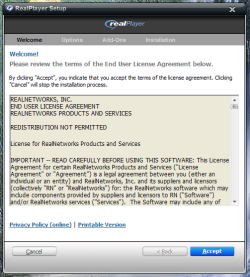
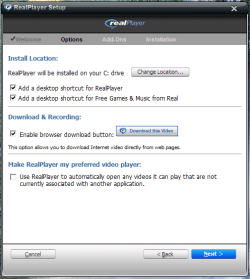
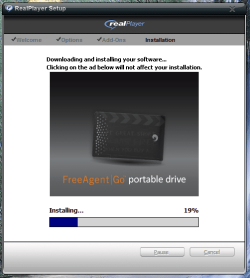
Have just installed Realplayer direct from www.real.com, selecting to run after download (not save to location).

Installation went flawlessly
Realplayer Step 1.PNGRealplayer Step 2.PNG
Realplayer Step 3.PNGRealplayer Step 4 (Install).PNG
Realplayer Step 5 (Choose Version).PNG

Realplayer Running
Realplayer Step 6 (Running).PNG

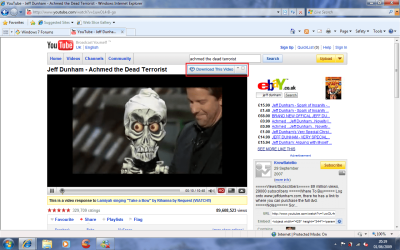
Download button on internet video
Realplayer Step 7 (Download Button).png

I just ran the install, no compatability, no tweaks.
   Note
I'm using x86 if that makes any difference to you


Jeff
 

My Computer

Computer Manufacturer/Model Number
Compaq Desktop
OS
Windows 7 Ultimate x64
CPU
AMD Sempron Dual Core
Memory
3GB
Graphics Card(s)
NVIDIA GeForce 6150SE nForce 430
Screen Resolution
1024x768
Hard Drives
150GB Sata
I'm using 86 and have a premium subscription with Rhapsody ... I'll try it again
 

My Computer

Computer type
PC/Desktop
Computer Manufacturer/Model Number
Bruce ... somewhere in his 40's
OS
Windows 7 Ultimate 32bit SP1
CPU
Intel(R) Core(TM)2 Quad CPU @ 2.40GHz, 2400 MHz
Motherboard
INTEL/D975XBX2
Memory
4 GB
Graphics Card(s)
ATI Radeon HD 2600 Pro
Monitor(s) Displays
Samsung SyncMaster 914v
Screen Resolution
1280 x 1024
Hard Drives
2/500GB each ... ST3500630AS ATA Device.
One is not connected
PSU
Rocketfish 700 W
Case
G.Skill Gigabyte Chassis
Keyboard
Standard PS/2 Keyboard
Mouse
Microsoft PS/2 Mouse
Internet Speed
DSL
Antivirus
Avira Internet Security
Browser
IE 11
Other Info
ATI HDMI Audio
Still can't get Real Player on this machine. "Shell Execution has stopped working", "trying to find a solution", then there's nothing and I'm back to my desktop again :huh:
 

My Computer

Computer type
PC/Desktop
Computer Manufacturer/Model Number
Bruce ... somewhere in his 40's
OS
Windows 7 Ultimate 32bit SP1
CPU
Intel(R) Core(TM)2 Quad CPU @ 2.40GHz, 2400 MHz
Motherboard
INTEL/D975XBX2
Memory
4 GB
Graphics Card(s)
ATI Radeon HD 2600 Pro
Monitor(s) Displays
Samsung SyncMaster 914v
Screen Resolution
1280 x 1024
Hard Drives
2/500GB each ... ST3500630AS ATA Device.
One is not connected
PSU
Rocketfish 700 W
Case
G.Skill Gigabyte Chassis
Keyboard
Standard PS/2 Keyboard
Mouse
Microsoft PS/2 Mouse
Internet Speed
DSL
Antivirus
Avira Internet Security
Browser
IE 11
Other Info
ATI HDMI Audio
Jaycee,

At what stage does the 'Shell Execution....' message appear. It could be something to do with current codecs installed for playing back .RM format video/music.

Added: Might be an idea to start a new thread in Software and see if we can't find a solution :p
 

My Computer

Computer Manufacturer/Model Number
Compaq Desktop
OS
Windows 7 Ultimate x64
CPU
AMD Sempron Dual Core
Memory
3GB
Graphics Card(s)
NVIDIA GeForce 6150SE nForce 430
Screen Resolution
1024x768
Hard Drives
150GB Sata
Wh00 h00! ... got downloaded and it's finally working again in compatible mode with XP SP3. :confused: sheesh Who knew?
 

My Computer

Computer type
PC/Desktop
Computer Manufacturer/Model Number
Bruce ... somewhere in his 40's
OS
Windows 7 Ultimate 32bit SP1
CPU
Intel(R) Core(TM)2 Quad CPU @ 2.40GHz, 2400 MHz
Motherboard
INTEL/D975XBX2
Memory
4 GB
Graphics Card(s)
ATI Radeon HD 2600 Pro
Monitor(s) Displays
Samsung SyncMaster 914v
Screen Resolution
1280 x 1024
Hard Drives
2/500GB each ... ST3500630AS ATA Device.
One is not connected
PSU
Rocketfish 700 W
Case
G.Skill Gigabyte Chassis
Keyboard
Standard PS/2 Keyboard
Mouse
Microsoft PS/2 Mouse
Internet Speed
DSL
Antivirus
Avira Internet Security
Browser
IE 11
Other Info
ATI HDMI Audio
thanxxxxxxxxxxxx you :(
 

My Computer

Computer Manufacturer/Model Number
5800
OS
business
CPU
laptop
problems installing realplayer

i starts to install and puts the icons on my desktop at 88% then gets to 92% my icons vanish and does my installation. have tried downloading from different sites including real.com but the same problem... please help
 

My Computer

OS
windows 7 professional
I have the same problem as adrianagnar above. Does anybody know how to get round this? Have been trying for weeks now, Realplayer sent me a link but that didn't work either!!!
 

My Computer

OS
windows 7
sued25/adrianagnar....did you get a fix on this...I have the exact same problem...and the RP help page didnt work
 

My Computer

OS
Windows 7 Home Premium 32bit
Make record button appear in Real Player

I found something on another forum and it is the only way I can download from Youtube. I had the setting right in Real Player to open after 7 seconds or tried mouse over...still nothing. the button used to appear but quit within the last month.

This worked for me.

When you find a video you want to download on YouTube, copy the URL.

Open up Real Player. I have a shortcut on my desktop, or open it from the All programs ball.

When Real Player opens, there is a little search bar to the right. type anything in there. Example: zxcvb and enter. An address bar appears. Paste the URL from the video you want to download. The video will open up and the Download button appears and you can download.

You can continue to browse through YouTube using Real Player. It is the only way I open YouTube now.
 

My Computer

OS
Windows 7 Home premium 64 bit
This will be the best link ref "RP only downloads to 92% then disappears" Installation fails or freezes
Its the most compehensive advice from them.......but still didn't work for me but I think you should give it a try as it may work for you.
As stated in my previous reporting of this fault......every day for approx 1week I went to the RP page, 2-3 times a day and tried downloading RP......then out of the blue, about a week later.....it installed correctly !!!! I had done nothing to my computer to affect the download over that week of trying !
Would also strongly suggest you go to Facebook.....RealPlayer.....where you can Post your problem in front of the "whole world", and usually get some form of advice, within 12 hrs, less weekends, and just keep returning to them every time you have completed their recomendations to fix the fault and it still exists.....go back to them for more advice.....don't give up !!
 

My Computer

OS
Windows 7 Home Premium 32bit
Back
Top