
Really High Ping and Slow Internet

cmckaycm

New member
Local time
8:45 PM
Messages
66
Location
United Kingdom
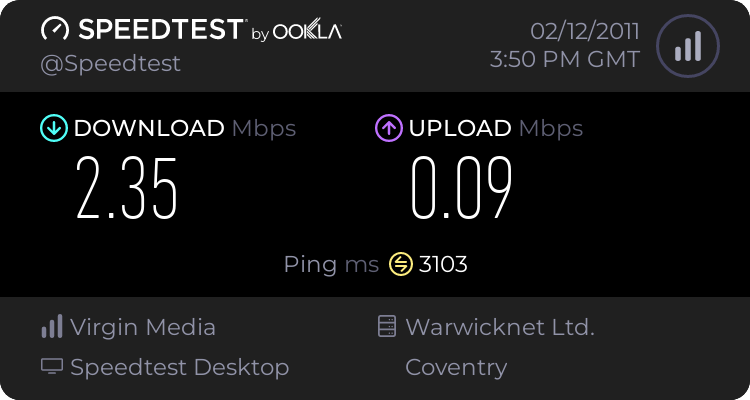
Very recently, I have been experiencing really slow internet connections and it is impossible for online gaming. I have had this problem now twice.
 

My Computer

Computer Manufacturer/Model Number
Custom Built
OS
Windows 7 Ultimate 32bit
CPU
AMD Athlon II X2 250
Motherboard
ASRock N68C-S UCC
Memory
2GB DDR3
Graphics Card(s)
Intergrated GPU
Sound Card
Intergrated HD Audio
Monitor(s) Displays
Belinea
Screen Resolution
1024 by 768
Hard Drives
Maxtor S TM3320613AS SATA 320GB 7200RPM 3.5" HDD
PSU
Compaq 100W PSU (might upgrade to 500W for performance)
Case
iCute Server/Gaming Case
Cooling
AMD CPU Cooler included with CPU
Keyboard
Genius USB Keyboard
Mouse
Microsoft Basic Optical Mouse v2.0
Internet Speed
10MBps
Other Info
BELKIN G Wireless Router (no internet access but used for intranet).
ok, we need some more information to be able to help you.

how do you connect to the internet?

how many machines on your network?

is it possible somebody is using your wifi?

is your pc simply downloading updates in the background?

open up a command prompt, and type netstat -b

that will give you a list of programs currently using your network connection
 

My Computer

Computer Manufacturer/Model Number
mickey megabyte 1234
OS
ultimate 64 sp1
CPU
i5 2500K [email protected]
Motherboard
MSI P67A-GD53
Memory
8 gigs GSkill Ripjaws 1600
Graphics Card(s)
amd hd6950
Sound Card
creative x-fi gamer
Monitor(s) Displays
samsung 24"
Screen Resolution
1920x1080
Hard Drives
ocz vertex 2e 60 gig, samsung f3 1tb, buffalo 2tb ext
PSU
antec 550
Case
antec three hundred
Cooling
i'm a cooling fan
Keyboard
saitek eclipse ii
Mouse
logitech g3
Internet Speed
about 4 Mbps
Other Info
i love win7
I am using a cable modem, there is three to four machines (internet is slow on all of them), it is secured with WPA and I tried rebooting all the devices and computers. The speed is getting worse and worse.
 

My Computer

Computer Manufacturer/Model Number
Custom Built
OS
Windows 7 Ultimate 32bit
CPU
AMD Athlon II X2 250
Motherboard
ASRock N68C-S UCC
Memory
2GB DDR3
Graphics Card(s)
Intergrated GPU
Sound Card
Intergrated HD Audio
Monitor(s) Displays
Belinea
Screen Resolution
1024 by 768
Hard Drives
Maxtor S TM3320613AS SATA 320GB 7200RPM 3.5" HDD
PSU
Compaq 100W PSU (might upgrade to 500W for performance)
Case
iCute Server/Gaming Case
Cooling
AMD CPU Cooler included with CPU
Keyboard
Genius USB Keyboard
Mouse
Microsoft Basic Optical Mouse v2.0
Internet Speed
10MBps
Other Info
BELKIN G Wireless Router (no internet access but used for intranet).
I think it is a virus but I will carry out further tests.
 

My Computer

Computer Manufacturer/Model Number
Custom Built
OS
Windows 7 Ultimate 32bit
CPU
AMD Athlon II X2 250
Motherboard
ASRock N68C-S UCC
Memory
2GB DDR3
Graphics Card(s)
Intergrated GPU
Sound Card
Intergrated HD Audio
Monitor(s) Displays
Belinea
Screen Resolution
1024 by 768
Hard Drives
Maxtor S TM3320613AS SATA 320GB 7200RPM 3.5" HDD
PSU
Compaq 100W PSU (might upgrade to 500W for performance)
Case
iCute Server/Gaming Case
Cooling
AMD CPU Cooler included with CPU
Keyboard
Genius USB Keyboard
Mouse
Microsoft Basic Optical Mouse v2.0
Internet Speed
10MBps
Other Info
BELKIN G Wireless Router (no internet access but used for intranet).
The problem could be in any of three areas: the pc, the local area network (LAN) or the Internet connection itself. The goal in troubleshooting is to systematically eliminate each area till we figure out where the problem is happening. Since the problem is happening on multiple PCs, we can eliminate that as a source unless you have a really noisy virus. The next step should be to eliminate the LAN. Unplug the Cable modem from the LAN and plug a PC directly into it. Now run a speed test. If the speed is normal, it is your LAN. Systematically start adding pieces of your LAN back into the mix until the problem returns. If the speed was not normal when your PC was plugged into your cable modem, then it is something in the Internet itself. The next step is to test it and check the signal noise ratio of your cable modem. This article will help you do that: HostMyCalls Hosted PBX Internet Cable Modem Help Guide.
 

My Computer

OS
Windows 7 home premium
Back
Top