Really need serious help with workgroup please

Jackdanielz

New member
Local time
3:01 AM
Messages
4
Hey everybody

AFter installing win 7 x64 ultimate it worked like a beauty for about a week.. i managed to get my workgroup sorted out at home(cos the other 3 pcs are xp) i could share and access other users shared content. Suddenly the other day i start up my pc,theres a lil yellow exclatmation mark in a triangle on the lan/network icon on the bottom right of the screen,mshome shows no internet access,but i can connect to the internet(we have dsl with 3 seperate accounts on dialup) i just can't see my workgroup computers anymore and their shared content.. i did troubleshoot and it did state that i have a dns error of some sort..funny thing is when i connect to the internet the exclamation mark goes away..but i still cant see the workgroup users i think these problems starting occuring after doing a few windows updates maybe. please help.. been trying to figure this out for days.
 

My Computer

OS
Windows 7 Ultimate 64-bit
CPU
Core 2 Quad Q8300
Motherboard
MSI G31M3 Series (socket775)
Memory
2 x 2gb sticks
Graphics Card(s)
Nvidia XFX Geforce 9600GT
Sound Card
Realtek
Monitor(s) Displays
LG 26" LCD
PSU
500watt no name brand shyte
Case
home modded lol
Cooling
coolermaster something.. quite good
Hey everybody

AFter installing win 7 x64 ultimate it worked like a beauty for about a week.. i managed to get my workgroup sorted out at home(cos the other 3 pcs are xp) i could share and access other users shared content. Suddenly the other day i start up my pc,theres a lil yellow exclatmation mark in a triangle on the lan/network icon on the bottom right of the screen,mshome shows no internet access,but i can connect to the internet(we have dsl with 3 seperate accounts on dialup) i just can't see my workgroup computers anymore and their shared content.. i did troubleshoot and it did state that i have a dns error of some sort..funny thing is when i connect to the internet the exclamation mark goes away..but i still cant see the workgroup users i think these problems starting occuring after doing a few windows updates maybe. please help.. been trying to figure this out for days.

Hi JD and welcome

first are you running homegroup, or workgroup for networking?

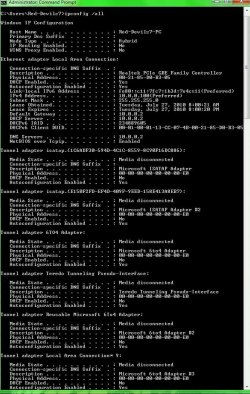
Second can you type cmd in search>then>>ipconfig /all>then make a snapshot of the output and upload it to us?


Thanks

Ken
 

My Computer

Computer Manufacturer/Model Number
HP Pavillion dv-7 1005 Tx
OS
Win 8 Release candidate 8400
CPU
[email protected]
Memory
4 gigs
Graphics Card(s)
Nvidia 9600M
Sound Card
HD built-in
Monitor(s) Displays
17" Wxga
Screen Resolution
1440x900
Cooling
none
Internet Speed
45Mb down 5Mb up
Hey ken

Thank you for the reply. Well i am running workgroup as that was the only way i could get my xp computers to work on the workgroup.. another thin i did use /ipconfig /release and then ipconfig /renew and i have all these things that say media disconnected.. heres my ipconfig /all image..

thanks
 

Attachments

  • ryvz ipconfig.jpg
    ryvz ipconfig.jpg
    116 KB · Views: 12

My Computer

OS
Windows 7 Ultimate 64-bit
CPU
Core 2 Quad Q8300
Motherboard
MSI G31M3 Series (socket775)
Memory
2 x 2gb sticks
Graphics Card(s)
Nvidia XFX Geforce 9600GT
Sound Card
Realtek
Monitor(s) Displays
LG 26" LCD
PSU
500watt no name brand shyte
Case
home modded lol
Cooling
coolermaster something.. quite good
strange thing.. i switch on the pc today.. and everythings back.. and working.. wtf lol
 

My Computer

OS
Windows 7 Ultimate 64-bit
CPU
Core 2 Quad Q8300
Motherboard
MSI G31M3 Series (socket775)
Memory
2 x 2gb sticks
Graphics Card(s)
Nvidia XFX Geforce 9600GT
Sound Card
Realtek
Monitor(s) Displays
LG 26" LCD
PSU
500watt no name brand shyte
Case
home modded lol
Cooling
coolermaster something.. quite good
Sometimes, a reboot is all you need :)
 

My Computer

Computer type
PC/Desktop
Computer Manufacturer/Model Number
Bruce ... somewhere in his 40's
OS
Windows 7 Ultimate 32bit SP1
CPU
Intel(R) Core(TM)2 Quad CPU @ 2.40GHz, 2400 MHz
Motherboard
INTEL/D975XBX2
Memory
4 GB
Graphics Card(s)
ATI Radeon HD 2600 Pro
Monitor(s) Displays
Samsung SyncMaster 914v
Screen Resolution
1280 x 1024
Hard Drives
2/500GB each ... ST3500630AS ATA Device.
One is not connected
PSU
Rocketfish 700 W
Case
G.Skill Gigabyte Chassis
Keyboard
Standard PS/2 Keyboard
Mouse
Microsoft PS/2 Mouse
Internet Speed
DSL
Antivirus
Avira Internet Security
Browser
IE 11
Other Info
ATI HDMI Audio
Hey ken

Thank you for the reply. Well i am running workgroup as that was the only way i could get my xp computers to work on the workgroup.. another thin i did use /ipconfig /release and then ipconfig /renew and i have all these things that say media disconnected.. heres my ipconfig /all image..

thanks

What you have showing there is just the left over ipv6 entries for each network adaptor, the media disconnected messages are normal and only indicate that ipv6 is not connected to the WAN which is correct.

IPv6 is only used on the LAN for Homegroups, it's use on the WAN is limited to testing only so far.

Also, when ever you change the IP settings you need to reboot your machines in order for those settings to work so it's no wonder that everything worked after you rebooted.
 

My Computer

Computer type
PC/Desktop
Computer Manufacturer/Model Number
Home built
OS
Windows 7 Ult, Windows 8.1 Pro,
CPU
Q9650-4.275GHz, E8600 4.5GHz, E6750-3.8GHz
Motherboard
Evga 780i FTW
Memory
G.Skill PC2 9600 1200Mhz 5 5 5 15 2T
Graphics Card(s)
GTX480
Sound Card
Asus Xonar D2
Monitor(s) Displays
HannsG
Screen Resolution
1680X1050
Hard Drives
GSkill Phoenix Pro 120GB SSD
PSU
ThermalTake Toughpower 1000Watt modular
Case
ThermalTake XaserV
Cooling
Xigmatek S1283
Keyboard
Logitech G15
Mouse
Logitech G9
Internet Speed
T1
thnx chev.. over the past 4 days i must've rebooted my pc about 15 times lol.. i never leave my pc on.. always put it off at night .. and in the morning i switch it off before going to work... but we did have a power trip lastnight... and all 5 pcs on the network reset including the router.. maybe that solved it ? :)
 

My Computer

OS
Windows 7 Ultimate 64-bit
CPU
Core 2 Quad Q8300
Motherboard
MSI G31M3 Series (socket775)
Memory
2 x 2gb sticks
Graphics Card(s)
Nvidia XFX Geforce 9600GT
Sound Card
Realtek
Monitor(s) Displays
LG 26" LCD
PSU
500watt no name brand shyte
Case
home modded lol
Cooling
coolermaster something.. quite good
Resetting the router alone has fixed more networking problems than everything else combined so there is a good chance that is what fixed the problem. In this case I think the power outage probably did some good.
 

My Computer

Computer type
PC/Desktop
Computer Manufacturer/Model Number
Home built
OS
Windows 7 Ult, Windows 8.1 Pro,
CPU
Q9650-4.275GHz, E8600 4.5GHz, E6750-3.8GHz
Motherboard
Evga 780i FTW
Memory
G.Skill PC2 9600 1200Mhz 5 5 5 15 2T
Graphics Card(s)
GTX480
Sound Card
Asus Xonar D2
Monitor(s) Displays
HannsG
Screen Resolution
1680X1050
Hard Drives
GSkill Phoenix Pro 120GB SSD
PSU
ThermalTake Toughpower 1000Watt modular
Case
ThermalTake XaserV
Cooling
Xigmatek S1283
Keyboard
Logitech G15
Mouse
Logitech G9
Internet Speed
T1
Back
Top