Really Stressed and Stumped

Dralla

New member
Local time
8:35 PM
Messages
9
Have only had this PC with Windows 7 for a week. Everything was set up and I was using two mail accounts on Windows Live Mail, brilliant and was well pleased. Then up popped a message to update Windows Live essential, so I did and have lost my Windows Live Mail ! Since then I have un-installed all Windows Live Essential programmes and tried to re-install, everything but MAIL installs!! Is it that .MUI file that will not open I thought, so purchased Booster Check, nothing! I have lots of mail files, but no programme it appears in which they will open. Any assistance would be most appreciated, just wish I had never updated as it was all wonderful.
Thanks in anticipation.
 

My Computer

OS
Windows 7
Hi Dralla, welcome to Seven Forums.
Win Live Mail should be in start menu all progs, Windows Live folder.
 

My Computer

Computer Manufacturer/Model Number
Look in my Signature.
OS
Win7 H.Prem. 32bit+SP1
Yes it should be and it was originally, but since updating, removing all Live Essentials and then reloading it does not reappear in the start.all programmes menu. The others do, just Live mail missing. I feel that it has something to do with the exe.mui file not opening and that I may have inadvertently removed something that used to open it. Have been trying everything now for about eleven hours and really stressed out with it. Just want Windows Live Mail to appear once again in my programme menu! Windows 7 was pre-installed on my new PC, so unable to reload.
Its the .exe file for Live mail to load the programme that I seem to require. Help would be most appreciated.
 

My Computer

OS
Windows 7
Hello Dralla and welcome to Seven Forums. Sorry it has to be under these stressful circumstances.

If you have a System Restore point that was created prior to the message to update WLM you may be able to roll back your machine to that earlier date/time.

http://www.sevenforums.com/tutorials/700-system-restore.html
 

My Computer

Computer type
Laptop
Computer Manufacturer/Model Number
Sony Vaio VPCEB47GM Laptop
OS
Win 7 Pro 64-bit
CPU
Intel i5 2.4 Ghz
Memory
8GB DDR3
Graphics Card(s)
Intel HD 3000
Sound Card
IDT High Definition
Monitor(s) Displays
15.6 WGXA Anti-Glare LED
Screen Resolution
1280x800
Hard Drives
640Gb 7200rpm
Antivirus
MSE
Browser
Opera (primary) with IE9 backup
Had a look at that and my restore does not go back far enough. It only goes back to where I in desperation remove from programmes in control panel WLE package and all the foreign programme files as well, such as Windows Live Mesh Active X- Kontrol etc..... That is why I have that feeling that the exe.mui file will not open up enabling the WLEMail programme. I could be completely wrong as I am certainly no techie. One would think that getting Wndows Live Mail back into the programme file list would be easy enough, but not a chance at the moment.
 

My Computer

OS
Windows 7
Hello Dralla

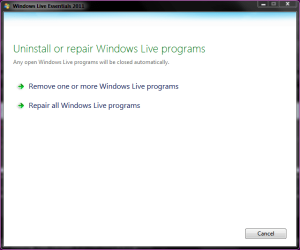
Firstly can you check in this location C:\Program Files (x86)\Windows Live\Mail see if its there.If not try repairing using the installer from the programs and features page.Double click the windows live essentials entry and choose repair.
Capture.PNG

Danny
 

My Computer

Computer Manufacturer/Model Number
acer aspire 5935g
OS
Windows 7 Home Premium x64 SP1
CPU
intel(R)core(TM)2 duo CPU T6600 @ 2.20GHz
Motherboard
intel gm45/gm47 revision 07
Memory
3 gb ddr3
Graphics Card(s)
ati radeon hd4570/512mb
Monitor(s) Displays
lop156wh2-tle1 15.3 flat
Screen Resolution
1366x768
Hard Drives
OCZ-Agility3 60gig ssd
320gig external hdd
500gig external hdd
Mouse
Optical
Internet Speed
30Mbps Down/30Mbps Up
This could help as you are without a restore point.
-
Open Command Prompt.

Important: You must right click and run Command Prompt as an administrator in Windows 7 and Windows Vista to use System File Checker.

Once Command Prompt is open, type the following command and then press Enter.

sfc /scannow

Note: There's a space between sfc and /scannow.

System File Checker will now verify the integrity of every protected operating system file on your computer.

Note: In some situations, especially in Windows XP and Windows 2000, you may also need access to your original Windows installation CD or DVD.

Restart your computer if sfc /scannow did actually repair any files.

Note: System File Checker may or may not prompt you to restart but even if it doesn't, you should restart anyway.

Repeat whatever process caused your original problem to see if sfc /scannow corrected the issue.
 

My Computer

Computer Manufacturer/Model Number
Look in my Signature.
OS
Win7 H.Prem. 32bit+SP1
Eureka ! the file was there so what I have done, knowing no better was dragged it to desktop where it sits as a short cut and clicking it takes me directly to my mail page....just brilliant! However what should I have done upon finding it in Program Files (x86)\windows live\mail ?? The correct thing to have done would have been .........??
Thanks a million though for helping me find it once again.
 

My Computer

OS
Windows 7
Eureka ! the file was there so what I have done, knowing no better was dragged it to desktop where it sits as a short cut and clicking it takes me directly to my mail page....just brilliant! However what should I have done upon finding it in Program Files (x86)\windows live\mail ?? The correct thing to have done would have been .........??
Thanks a million though for helping me find it once again.

Yep what you have done is fine right click\send shortcut to desktop or create a shorcut and drag to desktop would have been better but in this case is makes no difference.You can now drag that shortcut to your start menu and into your windows live folder if you wish.

Danny
 

My Computer

Computer Manufacturer/Model Number
acer aspire 5935g
OS
Windows 7 Home Premium x64 SP1
CPU
intel(R)core(TM)2 duo CPU T6600 @ 2.20GHz
Motherboard
intel gm45/gm47 revision 07
Memory
3 gb ddr3
Graphics Card(s)
ati radeon hd4570/512mb
Monitor(s) Displays
lop156wh2-tle1 15.3 flat
Screen Resolution
1366x768
Hard Drives
OCZ-Agility3 60gig ssd
320gig external hdd
500gig external hdd
Mouse
Optical
Internet Speed
30Mbps Down/30Mbps Up
Many thanks Danny one happy little silver surfer once again. Also thanks to others for suggestions, all were most welcomed. Thank you sincerely.
 

My Computer

OS
Windows 7
Eureka ! the file was there so what I have done, knowing no better was dragged it to desktop where it sits as a short cut and clicking it takes me directly to my mail page....just brilliant! However what should I have done upon finding it in Program Files (x86)\windows live\mail ?? The correct thing to have done would have been .........??
Thanks a million though for helping me find it once again.

Yep what you have done is fine right click\send shortcut to desktop or create a shorcut and drag to desktop would have been better but in this case is makes no difference.You can now drag that shortcut to your start menu and into your windows live folder if you wish.

Danny

+1 for a nice fix, Danny. I'd rep you but have to spread it around some.
 

My Computer

Computer type
Laptop
Computer Manufacturer/Model Number
Sony Vaio VPCEB47GM Laptop
OS
Win 7 Pro 64-bit
CPU
Intel i5 2.4 Ghz
Memory
8GB DDR3
Graphics Card(s)
Intel HD 3000
Sound Card
IDT High Definition
Monitor(s) Displays
15.6 WGXA Anti-Glare LED
Screen Resolution
1280x800
Hard Drives
640Gb 7200rpm
Antivirus
MSE
Browser
Opera (primary) with IE9 backup
Sorry to be a pest, but now I get three e-mails of the same thing, but not from people in contacts, just things like Geocaching.com etc.. I have two e-mail accounts, but for some reason get three copies. Can you advise how I manage to limit it to just one. Also when I go to Google for a second I get three bank menus, then two go away and I am left with one. I am using Firefox.

Any assistance would be appreciated.
 

My Computer

OS
Windows 7
Back
Top