Realtek ALC889

C32C3

New member
Local time
2:16 PM
Messages
228
Greetings to you all,

This is my first post. I am member of the Vista Forum but am getting a new pc this week and I will install Win7 Ultimate x64 on it instead of Vista.

I am trying to decide whether to use the onboard Intel HD Audio via Realtek ALC889 with 8-channel support or purchase an internal sound card (the mother board on my new pc is an Asus P6X58D-E). There is a WIDE variation of reviews online regarding the ALC889 in particular and onboard vs. sound cards in general.

I am leaning towards purchasing a internal sound card. I am not a gamer (though an occassional game is fun). I do listen to music and watch films a lot via the pc.

The Asus Xonar DX seems like a mid-price card that would satisfy my needs but this one review says that it needs a floppy connector for its power supply

ASUS Xonar DX 7.1 PCI-E Sound Card Review - Page 4

Your insight would be much appreciated.

Thank you.
 

My Computer

Computer Manufacturer/Model Number
Deviantsystems
OS
Win7 Ultimate x64
CPU
Intel Core i7 950 (4x 3066 MHz with HT) Quad Core
Motherboard
Asus P6X58D-E
Memory
6GB DDR3 1333Mhz
Graphics Card(s)
Nvidia GTS 450 (1024MB GDDR5 | DX 11)
Sound Card
Intel HD Audio via Realtek ALC889 with 8-channel support
Monitor(s) Displays
Sony Bravia 32"
Screen Resolution
1080i, x1768x992
Hard Drives
2x WD 1TB 7200 RPM Sata
PSU
OCZ ModXStream Pro 600W 80+
Case
Lian Li PC-7FN
Cooling
Processor cooling: Scythe Big Shuriken SCBSK-1000
Keyboard
Microsoft Ergonomic
Mouse
Logitec Trackball
I'd go with onboard at least temporarily. If you are unhappy, you can later purchase a discrete card.

I am using Realtek ALC 892 on a new Windows 7 64-bit install with no issues. I can even record "what you hear" aka "stereo mix", which I could not do easily with my previous Windows 7 build (which had Sigmatel audio).

If you buy a discrete card, it may or may not support "what you hear" recording. That functionality is problematic generally on Windows 7, but works on my Realtek 892.

Don't get swept up in the hype over discrete cards. Trust your own ears. Do blindfold tests to avoid the placebo effect. I can certainly understand going to a discrete card for FUNCTIONALITY purposes, but I would be generally skeptical of going with one for general "sound quality" purposes. If you are a "golden ear" type, then you will of course insist that onboard audio is trash by definition. But do use blindfold tests.
 

My Computer

Computer type
PC/Desktop
Computer Manufacturer/Model Number
Ignatz Special; 4 speed manual gearbox; factory air conditioning; one of one
OS
Windows 7 Home Premium SP1, 64-bit
CPU
Intel Skylake i5-6600K, not overclocked
Motherboard
AsRock Z170M Extreme 4, micro ATX
Memory
8 GB HyperX DDR4-2666 (2 x 4 GB)
Graphics Card(s)
none; graphics are integrated on CPU
Sound Card
onboard: Realtek ALC1150; external: USB Behringer UF0-202
Monitor(s) Displays
Dell S2340M 23 inch IPS
Screen Resolution
1600 x 900
Hard Drives
System: Crucial MX100 series SSD, 128 GB;
Data: Samsung Spinpoint 103SJ, 1 TB;
Backup: WD Caviar Green WD30EZRX-00D8PB0, 3 TB
PSU
Rosewill SilentNight 500 watt fanless, semi-modular
Case
Antec Solo II
Cooling
Noctua NH-U12S; Noctua F12 intake, Noctua S12A exhaust
Keyboard
Microsoft 200 6JH-00001 USB
Mouse
Dell or Microsoft optical wired; USB
Antivirus
Microsoft Security Essentials and Malwarebytes Premium
Browser
Pale Moon
Other Info
All fans PWM; speeds at idle: CPU circa 500 rpm; intake circa 600 rpm; exhaust circa 600 rpm; CPU temps 27 idle and 47 C load in a warm room (27 C/81 F) when running Intel Extreme Tuning Utility stress test.
I appreciate your advice. It's good advice. On the computer that I am now using I have a Creative X-Fi Xtreme audio card and I cannot record "what I hear" which is sometimes what I want to do.

My only experience with an onboard sound card was back in the days of WinXP and the sound quality was poor. However onboard sound quality has improved a lot over the years, according to what I have read. Here is what I found today on the Realtek website Realtek

As you can see from the Product Hits the ALC889 is reported as being top quality.

I will give the RealTek ALC889 onboard card a try.

Thanks.
 

My Computer

Computer Manufacturer/Model Number
Deviantsystems
OS
Win7 Ultimate x64
CPU
Intel Core i7 950 (4x 3066 MHz with HT) Quad Core
Motherboard
Asus P6X58D-E
Memory
6GB DDR3 1333Mhz
Graphics Card(s)
Nvidia GTS 450 (1024MB GDDR5 | DX 11)
Sound Card
Intel HD Audio via Realtek ALC889 with 8-channel support
Monitor(s) Displays
Sony Bravia 32"
Screen Resolution
1080i, x1768x992
Hard Drives
2x WD 1TB 7200 RPM Sata
PSU
OCZ ModXStream Pro 600W 80+
Case
Lian Li PC-7FN
Cooling
Processor cooling: Scythe Big Shuriken SCBSK-1000
Keyboard
Microsoft Ergonomic
Mouse
Logitec Trackball
I received my new pc Saturday. I am using the onboard RealTek ALC889 HD audio codec. It supports 7.1 surround sound speakers but my speakers are 5.1. The 5.1 speaker setup uses three connecting cables and the onboard ALC889 has more connecting points (five, as I remember). I have NO SOUND from my rear speakers.
 

My Computer

Computer Manufacturer/Model Number
Deviantsystems
OS
Win7 Ultimate x64
CPU
Intel Core i7 950 (4x 3066 MHz with HT) Quad Core
Motherboard
Asus P6X58D-E
Memory
6GB DDR3 1333Mhz
Graphics Card(s)
Nvidia GTS 450 (1024MB GDDR5 | DX 11)
Sound Card
Intel HD Audio via Realtek ALC889 with 8-channel support
Monitor(s) Displays
Sony Bravia 32"
Screen Resolution
1080i, x1768x992
Hard Drives
2x WD 1TB 7200 RPM Sata
PSU
OCZ ModXStream Pro 600W 80+
Case
Lian Li PC-7FN
Cooling
Processor cooling: Scythe Big Shuriken SCBSK-1000
Keyboard
Microsoft Ergonomic
Mouse
Logitec Trackball
I received my new pc Saturday. I am using the onboard RealTek ALC889 HD audio codec. It supports 7.1 surround sound speakers but my speakers are 5.1. The 5.1 speaker setup uses three connecting cables and the onboard ALC889 has more connecting points (five, as I remember). I have NO SOUND from my rear speakers.
There should be a way to make that setup work.....unfortunately, I can't tell you how to do it. Don't give up hope yet!
 

My Computer

Computer type
PC/Desktop
Computer Manufacturer/Model Number
Gigabyte Technology Co., Ltd.
OS
Win 7 Ultimate 64-bit SP1 (desktop)
CPU
Intel Core 2 Duo E8400
Motherboard
Gigabyte GA-EP35-DS3R
Memory
2x 2GB OCZ DDR II SDRAM PC2-6400
Graphics Card(s)
NVIDIA GeForce 9400GT
Monitor(s) Displays
HP 2009m(primary), Acer P191W
Screen Resolution
1600x900, 1440x900
Hard Drives
Internal:WD Caviar Black 640GB 32MB cache 7200RPM
External:Samsung Story Station 1TB HDD desktop drive
500GB Toshiba portable drive
PSU
Antec Earthwatts EA500D
Case
Antec Sonata III
Cooling
4 fans
Keyboard
Logitech Wave
Mouse
Logitech M-SBF90
Internet Speed
Slow due to home Wireless-G router
Antivirus
MSE, Hitman Pro, Malwarebytes
Browser
Chrome and Palemoon
Other Info
Laptop....Acer 5750Z-4835
15.6" HD Widescreen CineCrystal™ LED-backlit LCD Display: (1366x768 resolution, 16:9 aspect ratio)
Intel® Pentium® Processor B940 (2.0GHz, 2MB L3 cache)
Windows® 7 Home Premium,500GB Hard Drive,4GB DDR3 RAM, Intel® HD Graphics,8X DVD-Super Multi Double-Layer Drive
Multi-in-1 Digital Media Card Reader,802.11b/g/n Wi-Fi
Chrome and Palemoon, MSE, Hitman Pro
Post Update:

The problem regarding the speaker up is solved. It was a matter of plugging the cables of my Creative 5.1 speakers into the appropriate I/O's on the back of my computer.

I must add that I am quite surprised at the quality of sound that I am hearing from the onboard ALC889 HD audio codec. I am still evaulating it as it is different from the sound that I am accustomed to hearing from the Creative Xi-Fi Xtreme card on my other pc.

Many thanks to you all for your help and encouragement.
 

My Computer

Computer Manufacturer/Model Number
Deviantsystems
OS
Win7 Ultimate x64
CPU
Intel Core i7 950 (4x 3066 MHz with HT) Quad Core
Motherboard
Asus P6X58D-E
Memory
6GB DDR3 1333Mhz
Graphics Card(s)
Nvidia GTS 450 (1024MB GDDR5 | DX 11)
Sound Card
Intel HD Audio via Realtek ALC889 with 8-channel support
Monitor(s) Displays
Sony Bravia 32"
Screen Resolution
1080i, x1768x992
Hard Drives
2x WD 1TB 7200 RPM Sata
PSU
OCZ ModXStream Pro 600W 80+
Case
Lian Li PC-7FN
Cooling
Processor cooling: Scythe Big Shuriken SCBSK-1000
Keyboard
Microsoft Ergonomic
Mouse
Logitec Trackball
I must add that I am quite surprised at the quality of sound that I am hearing from the onboard ALC889 HD audio codec. I am still evaulating it as it is different from the sound that I am accustomed to hearing from the Creative Xi-Fi Xtreme card on my other pc.
I have an ASUS P5Q3, with onboard Realtek ALC1200 sound. I also have a Supermicro C2SBX, with onboard Realtek ALC883 sound.

I have the same high-quality Altec-Lansing speakers on both machines... but the 621 (2.1, fed from just the L/R front speaker outputs of the Realtek ports) version on the ASUS machine and the 641 (4.1, fed from the L/R front and LB/RB speaker outputs of the Realtek ports) version on the Supermicro machine. Neither of these is 7.1 sound.

For some reason, I found the ASUS sound (ALC1200) unsatisfying. In contrast I found the Supermicro sound (ALC883) terrific. Yes, one is playing through a 2.1 speaker system and one is playing through a 4.1 speaker system, but I'm trying to compare apples-to-apples, such as listening to the identical 2-channel stereo music CD audio on both as my reference.

Anyway, I ended up installing a Creative X-Fi Titanium card in the ASUS machine, and find the sound more satisfying than the onboard Realtek ALC1200 sound.

But that's just me. And again, I'm not using a 7.1 implementation... it's really just 2-channel stereo or 4-channel quadrophonic.

Have you used the Realtek HD Audio Manager software? There is a 10-band EQ (on the sound Effects tab, of the Speakers page... it's in the lower section named "Equalizer", push the button to the right of the RESET button to reveal the EQ) which can really improve the sound to your tastes.
 

My Computer

Computer type
PC/Desktop
Computer Manufacturer/Model Number
Home-built, two systems (1) and (2)
OS
Windows 7 Pro x64 (1), Win7 Pro X64 (2)
CPU
i5-3350p 3.1Ghz/6MB-cache (1); E8400 3.0Ghz/6MB-cache (2)
Motherboard
ASUS P8Z77-V Pro (1); ASUS P5Q3 (2)
Memory
8GB PC3-12800 DDR3 (1); 4GB PC3-10600 DDR3 (2)
Graphics Card(s)
ATI HD7750 (1), (see TV cards); ATI R7 250 (2)
Sound Card
Realtek ALC892 HD Audio (1); Realtek ALC1200 HD Audio (2)
Monitor(s) Displays
Eizo HD2441W LCD, Eizo S2433W (1); Eizo 24" S2433W (2)
Screen Resolution
1920x1200, 1920x1200 (1); 1920x1200 (2)
Hard Drives
(1) 1TB SATA-II (7200RPM), 2x2TB SATA-III (7200RPM), 250GB SATA-III (10000RPM) for OS; 2x2TB external USB 3.0

(2) 320GB SATA-II (7200RPM), 750GB SATA-II (7200RPM), 150GB SATA-II (10000RPM) for OS; 2TB external USB 3.0
PSU
Nesteq ECS-6001 600W (1); Nesteq ECS-5001 500W (2)
Case
Acousti-Case 360 (1) and (2)
Cooling
Noctua NH-U12P SE2 for CPU, 2x120mm case fans (1) and (2)
Keyboard
IBM PS/2 (1) and (2)
Mouse
Logitech MX Revolution wireless (1); Microsoft wired (2)
Internet Speed
100mbps down / 10mbps up
Antivirus
Microsoft Security Essentials; Malwarebyte Anti-Malware Pro
Browser
Firefox
Other Info
Ceton InfiniTV 4-tuner cablecard-enabled TV card as well as Hauppauge HVR-2250 OTA/ATSC 2-tuner TV card in (1), running under Win7 WMC
I used the RealTek HD Audio Manager to setup the 7.1 surround sound (with my 5.1 speakers, that is :)). It's a very useful tool. But no, I haven't made use of the Equalizer. I am so glad to have resolved the other problem I am quite satisfied to just sit back for awhile. I received delivery of this pc Saturday and I have been busy "discovering" it every since (a pleasant "journey", I might add :)).

Later I will most likely invest in some quality speakers but that's not a priority. The sound quality that I am now experiencing is satisfying. Oh yeah, I am adding some playlists to Cyberlink PWDVD 10 Ultra, a software that's proving very useful. PWDVD 10 Ultra has its own sound enhancing features. Cyberlink offers a fully functional 30 day trial version. Even if you don't think to purchase it its worth a "look and see".
 

My Computer

Computer Manufacturer/Model Number
Deviantsystems
OS
Win7 Ultimate x64
CPU
Intel Core i7 950 (4x 3066 MHz with HT) Quad Core
Motherboard
Asus P6X58D-E
Memory
6GB DDR3 1333Mhz
Graphics Card(s)
Nvidia GTS 450 (1024MB GDDR5 | DX 11)
Sound Card
Intel HD Audio via Realtek ALC889 with 8-channel support
Monitor(s) Displays
Sony Bravia 32"
Screen Resolution
1080i, x1768x992
Hard Drives
2x WD 1TB 7200 RPM Sata
PSU
OCZ ModXStream Pro 600W 80+
Case
Lian Li PC-7FN
Cooling
Processor cooling: Scythe Big Shuriken SCBSK-1000
Keyboard
Microsoft Ergonomic
Mouse
Logitec Trackball
dsperber, how is the C2SBX working out, I almost bought two of them a while back, but found the C7P67
 

My Computer

Computer Manufacturer/Model Number
Workstation for CAD/Photoshop/Electronics
OS
Windows 7 Pro 64bit
CPU
i5 2500K 3.3GHz, Cooler Master Hyper N520 Heatpipe
Motherboard
Supermicro C7P67
Memory
16GB of Kingston HyperX DDR3 1333, Max is 32GB
Graphics Card(s)
SAPPHIRE Radeon HD 5770 1GB 128-bit GDDR5
Sound Card
On Board REALTEK ALC889 7.1 HD Audio with optional S/PDIF
Monitor(s) Displays
Two eMachine E230H
Screen Resolution
1920x1080
Hard Drives
Four 500GB Seagates, two Samsung CD/DVD SH-S223C
PSU
Tagan BZ Series Modular 800W
Case
Thermaltake Armor+MX ATX Tower
Cooling
1/230mm, 3/120mm Enermax T.B. Silence Twister Bearing
Keyboard
Logitech 920-000914 USB Wired Ultra-thin Illuminated KB
Mouse
two/Logitech Trackman Marble/Microsoft Optical Mouse 3000
Internet Speed
Cable Modem SB5100, 22Mbps Down/4.3Mbps Up
Other Info
CISCO RVS4000, two EnGenius ESR9850 (Router/repeater mode), Epson Perfection V500 Photo Scanner, Cyber Power 850AVR, Scythe KAZE SERVER Advanced Fan Controller, Spyder 3 Express, StarTech PCI Post Diagnostics Test Card, ADS DVDXpressDX2, SIIG USB Video Capture, SIIG 7.1 PCI Soundwave, Panasonic RP-HTX7 Headphone, SanDisk CF Type I/II ImageMate.
dsperber, how is the C2SBX working out, I almost bought two of them a while back, but found the C7P67
Well, back in March 2008 when I built this machine there was no i3/i5/i7. So I was looking for an LGA775 board.

I also had a desire to have PCI-x slots, as at the time I had SCSI U320 drives and wanted to use an Adaptec 29320 host adapter, which required a PCI-x slot to run in U320 mode. Otherwise I would be "under-utilizing" these U320 drives in U160 mode as I always had until then.

The C2SBX was the board I settled on which looked fantastic, and also had PCI-x slots. I've been using it for what now is coming up on 4 years and this board (and the whole machine) has been FANTASTIC! Zero problem ever. Initially I ran WinXP Pro on it but in December 2009 upgraded to Win7 x64.

It's now my HTPC machine, with 4GB, 3.0GHz DualCore CPU, passively cooled ATI Radeon HD4850 video, dual-monitors, and both an ATI TV Wonder 650 PCI OTA/ATSC TV tuner card as well as a cablecard-enabled 4-tuner Ceton InfinitTV card in it, running under WMC. I have three extenders/HDTV's around the house that are fed from it.

As it turns out, over the past three years I've now replaced three of my four U320 (10K rpm) SCSI drives with three new SATA2 drives... both for increased size capacity, increased access speed, and much reduced noise and heat. In retrospect, I don't think I really needed the U320 capability for my modest needs. But I still love my decision to go with the C2SBX.

Anyway, I'm now a loyal supporter of SuperMicro. The C7P67 you bought looks terrific, and if/when I upgrade or replace or supplement my C2SBX machine.


The only thing I kind of miss from my other ASUS P5Q3 machine is the presence of something like ASUS's EPU-6 software to reduce core voltage and fan speeds when not needed. I don't have that firmware/software control on the C2SBX, although it looks like it might now be possible with the C7P67.

Is there a software product from SuperMicro that controls voltage and fan speeds by monitoring CPU demand and temperatures?


But again to answer your question, I think the C2SBX is a terrific board that's been my 100% reliable workhorse since March 2008.

Love it.
 

My Computer

Computer type
PC/Desktop
Computer Manufacturer/Model Number
Home-built, two systems (1) and (2)
OS
Windows 7 Pro x64 (1), Win7 Pro X64 (2)
CPU
i5-3350p 3.1Ghz/6MB-cache (1); E8400 3.0Ghz/6MB-cache (2)
Motherboard
ASUS P8Z77-V Pro (1); ASUS P5Q3 (2)
Memory
8GB PC3-12800 DDR3 (1); 4GB PC3-10600 DDR3 (2)
Graphics Card(s)
ATI HD7750 (1), (see TV cards); ATI R7 250 (2)
Sound Card
Realtek ALC892 HD Audio (1); Realtek ALC1200 HD Audio (2)
Monitor(s) Displays
Eizo HD2441W LCD, Eizo S2433W (1); Eizo 24" S2433W (2)
Screen Resolution
1920x1200, 1920x1200 (1); 1920x1200 (2)
Hard Drives
(1) 1TB SATA-II (7200RPM), 2x2TB SATA-III (7200RPM), 250GB SATA-III (10000RPM) for OS; 2x2TB external USB 3.0

(2) 320GB SATA-II (7200RPM), 750GB SATA-II (7200RPM), 150GB SATA-II (10000RPM) for OS; 2TB external USB 3.0
PSU
Nesteq ECS-6001 600W (1); Nesteq ECS-5001 500W (2)
Case
Acousti-Case 360 (1) and (2)
Cooling
Noctua NH-U12P SE2 for CPU, 2x120mm case fans (1) and (2)
Keyboard
IBM PS/2 (1) and (2)
Mouse
Logitech MX Revolution wireless (1); Microsoft wired (2)
Internet Speed
100mbps down / 10mbps up
Antivirus
Microsoft Security Essentials; Malwarebyte Anti-Malware Pro
Browser
Firefox
Other Info
Ceton InfiniTV 4-tuner cablecard-enabled TV card as well as Hauppauge HVR-2250 OTA/ATSC 2-tuner TV card in (1), running under Win7 WMC
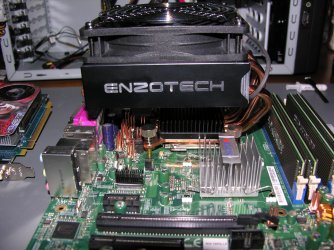
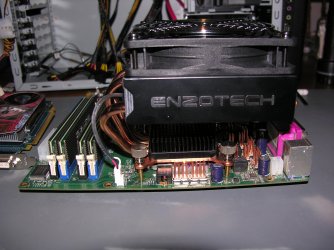
When I was reviewing the C2SBX, I was going to use the E8400 CPU with full 8Gb RAM, funny thing is I started to buy some of the support parts, Power supply, RAM, CPU cooler, Case, HD, but then had to put it all on hold after I finished a contract for a Launch down the Cape and then the job ended. Ended up using some of the parts for two different builds later on in time, updated an older Supermicro PDSLA which my Daughter still uses today for on-line games, and using the power supply for my workstation. I still have one spare CPU cooler that has no home, Enzotech Extreme-X, its a very large cooler.
As for the C7P67, using the i5 2500K and yes you can adj the voltages for cpu/ram by way of software but the fan speed reading and control has changed which takes some time to get used to, but I use an ext fan controller instead to control the two cpu fans as for the other onboard fan supports, I use them for the case fans with the setting set to Norm.
I have added a pic of the older PDSLA with cooler attached
 

Attachments

  • DSCN7022.jpg
    DSCN7022.jpg
    880.7 KB · Views: 15
  • DSCN7026.jpg
    DSCN7026.jpg
    696.5 KB · Views: 11

My Computer

Computer Manufacturer/Model Number
Workstation for CAD/Photoshop/Electronics
OS
Windows 7 Pro 64bit
CPU
i5 2500K 3.3GHz, Cooler Master Hyper N520 Heatpipe
Motherboard
Supermicro C7P67
Memory
16GB of Kingston HyperX DDR3 1333, Max is 32GB
Graphics Card(s)
SAPPHIRE Radeon HD 5770 1GB 128-bit GDDR5
Sound Card
On Board REALTEK ALC889 7.1 HD Audio with optional S/PDIF
Monitor(s) Displays
Two eMachine E230H
Screen Resolution
1920x1080
Hard Drives
Four 500GB Seagates, two Samsung CD/DVD SH-S223C
PSU
Tagan BZ Series Modular 800W
Case
Thermaltake Armor+MX ATX Tower
Cooling
1/230mm, 3/120mm Enermax T.B. Silence Twister Bearing
Keyboard
Logitech 920-000914 USB Wired Ultra-thin Illuminated KB
Mouse
two/Logitech Trackman Marble/Microsoft Optical Mouse 3000
Internet Speed
Cable Modem SB5100, 22Mbps Down/4.3Mbps Up
Other Info
CISCO RVS4000, two EnGenius ESR9850 (Router/repeater mode), Epson Perfection V500 Photo Scanner, Cyber Power 850AVR, Scythe KAZE SERVER Advanced Fan Controller, Spyder 3 Express, StarTech PCI Post Diagnostics Test Card, ADS DVDXpressDX2, SIIG USB Video Capture, SIIG 7.1 PCI Soundwave, Panasonic RP-HTX7 Headphone, SanDisk CF Type I/II ImageMate.
When I was reviewing the C2SBX, I was going to use the E8400 CPU with full 8Gb RAM
I actually have an E8400 in my ASUS P5Q3 machine, but again only 4GB. I used an E6850 with 4GB in the C2SBX machine.

Actually both machines are very very similar in terms of case, PSU, fans, CPU cooler, video, Adaptec SCSI host card, SCSI/SATA hard drives, SCSI DAT tape drive, and overall design.

And both machines are still perfectly adequate for my needs today. I feel no urgent need to upgrade either one.
 

My Computer

Computer type
PC/Desktop
Computer Manufacturer/Model Number
Home-built, two systems (1) and (2)
OS
Windows 7 Pro x64 (1), Win7 Pro X64 (2)
CPU
i5-3350p 3.1Ghz/6MB-cache (1); E8400 3.0Ghz/6MB-cache (2)
Motherboard
ASUS P8Z77-V Pro (1); ASUS P5Q3 (2)
Memory
8GB PC3-12800 DDR3 (1); 4GB PC3-10600 DDR3 (2)
Graphics Card(s)
ATI HD7750 (1), (see TV cards); ATI R7 250 (2)
Sound Card
Realtek ALC892 HD Audio (1); Realtek ALC1200 HD Audio (2)
Monitor(s) Displays
Eizo HD2441W LCD, Eizo S2433W (1); Eizo 24" S2433W (2)
Screen Resolution
1920x1200, 1920x1200 (1); 1920x1200 (2)
Hard Drives
(1) 1TB SATA-II (7200RPM), 2x2TB SATA-III (7200RPM), 250GB SATA-III (10000RPM) for OS; 2x2TB external USB 3.0

(2) 320GB SATA-II (7200RPM), 750GB SATA-II (7200RPM), 150GB SATA-II (10000RPM) for OS; 2TB external USB 3.0
PSU
Nesteq ECS-6001 600W (1); Nesteq ECS-5001 500W (2)
Case
Acousti-Case 360 (1) and (2)
Cooling
Noctua NH-U12P SE2 for CPU, 2x120mm case fans (1) and (2)
Keyboard
IBM PS/2 (1) and (2)
Mouse
Logitech MX Revolution wireless (1); Microsoft wired (2)
Internet Speed
100mbps down / 10mbps up
Antivirus
Microsoft Security Essentials; Malwarebyte Anti-Malware Pro
Browser
Firefox
Other Info
Ceton InfiniTV 4-tuner cablecard-enabled TV card as well as Hauppauge HVR-2250 OTA/ATSC 2-tuner TV card in (1), running under Win7 WMC
I'm glad I held off in a way, found from reviews that photoshop works better with loads of RAM so the C7P67 works well. Funny thing the older PLSLA is working very well for what it supports and it's older then most would keep around, the Prescott 3G CPU does run warm but it was design that way, about 100w.
You could use the quad core for the C2SBX if you have software support.
 

My Computer

Computer Manufacturer/Model Number
Workstation for CAD/Photoshop/Electronics
OS
Windows 7 Pro 64bit
CPU
i5 2500K 3.3GHz, Cooler Master Hyper N520 Heatpipe
Motherboard
Supermicro C7P67
Memory
16GB of Kingston HyperX DDR3 1333, Max is 32GB
Graphics Card(s)
SAPPHIRE Radeon HD 5770 1GB 128-bit GDDR5
Sound Card
On Board REALTEK ALC889 7.1 HD Audio with optional S/PDIF
Monitor(s) Displays
Two eMachine E230H
Screen Resolution
1920x1080
Hard Drives
Four 500GB Seagates, two Samsung CD/DVD SH-S223C
PSU
Tagan BZ Series Modular 800W
Case
Thermaltake Armor+MX ATX Tower
Cooling
1/230mm, 3/120mm Enermax T.B. Silence Twister Bearing
Keyboard
Logitech 920-000914 USB Wired Ultra-thin Illuminated KB
Mouse
two/Logitech Trackman Marble/Microsoft Optical Mouse 3000
Internet Speed
Cable Modem SB5100, 22Mbps Down/4.3Mbps Up
Other Info
CISCO RVS4000, two EnGenius ESR9850 (Router/repeater mode), Epson Perfection V500 Photo Scanner, Cyber Power 850AVR, Scythe KAZE SERVER Advanced Fan Controller, Spyder 3 Express, StarTech PCI Post Diagnostics Test Card, ADS DVDXpressDX2, SIIG USB Video Capture, SIIG 7.1 PCI Soundwave, Panasonic RP-HTX7 Headphone, SanDisk CF Type I/II ImageMate.
dsperber, have you seen the H8SGL, socket G34-16/12/8 core AMD
 

My Computer

Computer Manufacturer/Model Number
Workstation for CAD/Photoshop/Electronics
OS
Windows 7 Pro 64bit
CPU
i5 2500K 3.3GHz, Cooler Master Hyper N520 Heatpipe
Motherboard
Supermicro C7P67
Memory
16GB of Kingston HyperX DDR3 1333, Max is 32GB
Graphics Card(s)
SAPPHIRE Radeon HD 5770 1GB 128-bit GDDR5
Sound Card
On Board REALTEK ALC889 7.1 HD Audio with optional S/PDIF
Monitor(s) Displays
Two eMachine E230H
Screen Resolution
1920x1080
Hard Drives
Four 500GB Seagates, two Samsung CD/DVD SH-S223C
PSU
Tagan BZ Series Modular 800W
Case
Thermaltake Armor+MX ATX Tower
Cooling
1/230mm, 3/120mm Enermax T.B. Silence Twister Bearing
Keyboard
Logitech 920-000914 USB Wired Ultra-thin Illuminated KB
Mouse
two/Logitech Trackman Marble/Microsoft Optical Mouse 3000
Internet Speed
Cable Modem SB5100, 22Mbps Down/4.3Mbps Up
Other Info
CISCO RVS4000, two EnGenius ESR9850 (Router/repeater mode), Epson Perfection V500 Photo Scanner, Cyber Power 850AVR, Scythe KAZE SERVER Advanced Fan Controller, Spyder 3 Express, StarTech PCI Post Diagnostics Test Card, ADS DVDXpressDX2, SIIG USB Video Capture, SIIG 7.1 PCI Soundwave, Panasonic RP-HTX7 Headphone, SanDisk CF Type I/II ImageMate.
dsperber, have you seen the H8SGL, socket G34-16/12/8 core AMD
I know zero about AMD machines.

But this board doesn't have SATA3 or USB3, which would seem to be a big "missing".

Also, not that I would necessarily be using onboard graphics, but isn't a Matrox G200 (16MB, VGA) from the late 1990's? Obviously high-end video wasn't part of the design criteria.

Also, there doesn't seem to be any onboard audio.

Yes, it supports up to 128GB of memory (including ECC). This is certainly not common.

It seems there must be a very specific need for such an unusual machine, that doesn't seem intended for me anyway. I myself would have no interest in this board, I'm afraid.
 

My Computer

Computer type
PC/Desktop
Computer Manufacturer/Model Number
Home-built, two systems (1) and (2)
OS
Windows 7 Pro x64 (1), Win7 Pro X64 (2)
CPU
i5-3350p 3.1Ghz/6MB-cache (1); E8400 3.0Ghz/6MB-cache (2)
Motherboard
ASUS P8Z77-V Pro (1); ASUS P5Q3 (2)
Memory
8GB PC3-12800 DDR3 (1); 4GB PC3-10600 DDR3 (2)
Graphics Card(s)
ATI HD7750 (1), (see TV cards); ATI R7 250 (2)
Sound Card
Realtek ALC892 HD Audio (1); Realtek ALC1200 HD Audio (2)
Monitor(s) Displays
Eizo HD2441W LCD, Eizo S2433W (1); Eizo 24" S2433W (2)
Screen Resolution
1920x1200, 1920x1200 (1); 1920x1200 (2)
Hard Drives
(1) 1TB SATA-II (7200RPM), 2x2TB SATA-III (7200RPM), 250GB SATA-III (10000RPM) for OS; 2x2TB external USB 3.0

(2) 320GB SATA-II (7200RPM), 750GB SATA-II (7200RPM), 150GB SATA-II (10000RPM) for OS; 2TB external USB 3.0
PSU
Nesteq ECS-6001 600W (1); Nesteq ECS-5001 500W (2)
Case
Acousti-Case 360 (1) and (2)
Cooling
Noctua NH-U12P SE2 for CPU, 2x120mm case fans (1) and (2)
Keyboard
IBM PS/2 (1) and (2)
Mouse
Logitech MX Revolution wireless (1); Microsoft wired (2)
Internet Speed
100mbps down / 10mbps up
Antivirus
Microsoft Security Essentials; Malwarebyte Anti-Malware Pro
Browser
Firefox
Other Info
Ceton InfiniTV 4-tuner cablecard-enabled TV card as well as Hauppauge HVR-2250 OTA/ATSC 2-tuner TV card in (1), running under Win7 WMC
all good points
 

My Computer

Computer Manufacturer/Model Number
Workstation for CAD/Photoshop/Electronics
OS
Windows 7 Pro 64bit
CPU
i5 2500K 3.3GHz, Cooler Master Hyper N520 Heatpipe
Motherboard
Supermicro C7P67
Memory
16GB of Kingston HyperX DDR3 1333, Max is 32GB
Graphics Card(s)
SAPPHIRE Radeon HD 5770 1GB 128-bit GDDR5
Sound Card
On Board REALTEK ALC889 7.1 HD Audio with optional S/PDIF
Monitor(s) Displays
Two eMachine E230H
Screen Resolution
1920x1080
Hard Drives
Four 500GB Seagates, two Samsung CD/DVD SH-S223C
PSU
Tagan BZ Series Modular 800W
Case
Thermaltake Armor+MX ATX Tower
Cooling
1/230mm, 3/120mm Enermax T.B. Silence Twister Bearing
Keyboard
Logitech 920-000914 USB Wired Ultra-thin Illuminated KB
Mouse
two/Logitech Trackman Marble/Microsoft Optical Mouse 3000
Internet Speed
Cable Modem SB5100, 22Mbps Down/4.3Mbps Up
Other Info
CISCO RVS4000, two EnGenius ESR9850 (Router/repeater mode), Epson Perfection V500 Photo Scanner, Cyber Power 850AVR, Scythe KAZE SERVER Advanced Fan Controller, Spyder 3 Express, StarTech PCI Post Diagnostics Test Card, ADS DVDXpressDX2, SIIG USB Video Capture, SIIG 7.1 PCI Soundwave, Panasonic RP-HTX7 Headphone, SanDisk CF Type I/II ImageMate.
Back
Top