Realtek Audio Drivers Are Junk

Joshgt2

New member
Local time
8:57 PM
Messages
23
Am I the only person who is experiencing the worst Realtek Drivers right now? I just got done building this new rig and having the most up the date Realtek Drivers are killing me. I used to have great sounds and now they are a pile of garbage. I use a very simply, yet effective, set of Razer Orca's and my 3.5mm microphone doesn't even have the best sound anymore. Is there a stable set of drivers out there that I can get still? I want something that works, and it doesn't have to be brand new.

~Joshgt2
 

My Computer

OS
Windows 7
Are we supposed to guess what your system specs might be?
 

My Computer

OS
7 Ultimate x64
CPU
i5-2500k
Motherboard
Asus P8P67 Pro
Memory
8GB G.Skill Ripjaws X F3-12800CL7D-8GBXH 1866MHz 8-9-8-24
Graphics Card(s)
EVGA GTX 570 SC
Sound Card
X-Fi Titanium Fatality
Monitor(s) Displays
Samsung S27A550H 27" LED
Screen Resolution
1920x1080
Hard Drives
OCZ Vertex 3 120GB.
1TB Samsung F3.
2TB Samsung F4.
PSU
PC Power & Cooling Silencer 760
Case
Lian Li Lancool K62
Cooling
Thermalright Venomous X Black/Scythe S-Flex/Shin-Etsu X23
Keyboard
MS Natural Elite 4000 Ergonomic
Mouse
Logitech G500
Internet Speed
6MB/768
Other Info
Logitech Z-5500 505 watts.
D-Link DGL-4500.
Tripp-Lite Smart Pro 1500.
CASE-IN WIN Dragon Rider ATX Full Tower Case
MOTHERBOARD-EVGA P67 SLI 130-SB-E675-KR LGA 1155 Intel P67 SATA 6Gb/s USB 3.0 ATX Intel Motherboard
CPU-Intel Core i7-2600K Sandy Bridge 3.4GHz (3.8GHz Turbo Boost)
HEATSINK-Corsair Hydro H60 Liquid Cooling
OPERATING SYSTEM-Windows 7 Ultimate 64bit
MEMORY-G.Skill Ripjaws X 8GB (2x4GB) 1600
VIDEO CARD-Nvidia EVGA GTX 460 SE 1GB Overclocked
POWER SUPPLY-Corsair CMPSU-850TX 850W
HARD DRIVE #1-Samsung Spinpoint F3 1TB 7200RPM 32MB Cache
HARD DRIVE #2-Western Digital Caviar Blue 1TB 7200RPM 32MB Cache
OPTICAL DRIVE-CD/DVD Combo Reader & Writer
MOUSE-Logitec G500 5700DPI Laser Gaming Mouse
MOUSE PAD-Razer Kabuto
KEYBOARD-Razer BlackWidow Ultimate Mechanical Gaming Keyboard
MONITOR#1-ASUS VH242H Black 23.6" 5ms HDMI Full 1080P Widescreen LCD
MONITOR#2-Acer 22" Widescreeen LCD
HEADSET-Razer Orca

I just got off of the phone with EVGA and they stated that if this is happening on their board and the previous MSI board I had, it must be something with Realteks drivers. Can't imagine how this is happening on 2 different boards.
 

My Computer

OS
Windows 7
Did you install the drivers off the motherboard's CD or did you go to Realtek?
 

My Computer

OS
7 Ultimate x64
CPU
i5-2500k
Motherboard
Asus P8P67 Pro
Memory
8GB G.Skill Ripjaws X F3-12800CL7D-8GBXH 1866MHz 8-9-8-24
Graphics Card(s)
EVGA GTX 570 SC
Sound Card
X-Fi Titanium Fatality
Monitor(s) Displays
Samsung S27A550H 27" LED
Screen Resolution
1920x1080
Hard Drives
OCZ Vertex 3 120GB.
1TB Samsung F3.
2TB Samsung F4.
PSU
PC Power & Cooling Silencer 760
Case
Lian Li Lancool K62
Cooling
Thermalright Venomous X Black/Scythe S-Flex/Shin-Etsu X23
Keyboard
MS Natural Elite 4000 Ergonomic
Mouse
Logitech G500
Internet Speed
6MB/768
Other Info
Logitech Z-5500 505 watts.
D-Link DGL-4500.
Tripp-Lite Smart Pro 1500.
A couple things to check because I've made these mistakes, especially on my new builds.
Are the cables connected to the proper ports?
Do you have any sound effects enabled in the Realtek sounds control.
Are you connected with the right cable to the mobo, HD audio, Analog audio.
 

My Computer

Computer type
PC/Desktop
Computer Manufacturer/Model Number
Home Built Desktop By DataTech
OS
Windows 7 Ultimate X64 SP1
CPU
Intel i5-2550K, Differing ~4.4-4.8GHz No built in GPU
Motherboard
ASUS P8Z68-V PRO/GEN3
Memory
16GB G.Skill Sniper 1866MHz @ 2133MHz 2x8GB
Graphics Card(s)
ASUS GTX650TIB-DC2OC-2GD5, (650TI Boost)
Sound Card
Onboard Realtek 5-1
Monitor(s) Displays
Samsung P2570HD
Screen Resolution
1920x1080
Hard Drives
Samsung 840 Pro 256GB SSD for OS, 500GB Seagate Constellation (Enterprise drive) for Data
PSU
Corsair HX650W
Case
Inwin Dragon Rider
Cooling
Hyper 212 EVO w/two Noctua fans, push-pull, @1300 RPM
Keyboard
E-Z Eyes, bright yellow keys with large characters
Mouse
steelseries SENSEI Laser Pro Gaming
Internet Speed
48-51Mbs Mbs down, 11 Mbs up Xfinity Cable
Antivirus
Norton Internet Security 2013
Browser
IE 10, Opera, Pale Moon if needed
Other Info
4 case fans, LG BluRay-RE, ASUS DVD-RW, Mr. Fusion power supply, 1.21 gigawatts.
Did you install the drivers off the motherboard's CD or did you go to Realtek?
I installed the ones on the Motherboard, and they worked, but not 100%. And then updated via clean install from the Drivers from Realtek. Both drivers are resulting in the same results.
A couple things to check because I've made these mistakes, especially on my new builds.
Are the cables connected to the proper ports?
Do you have any sound effects enabled in the Realtek sounds control.
Are you connected with the right cable to the mobo, HD audio, Analog audio.
I've got Green for my Razer Orcas and Pink for my Microphone here on my desk. Should they be going into a different port or something because THEN this would be new news to me.
 

My Computer

OS
Windows 7
As mentioned before, get the latest drivers from the Realtek site.

There a lot of adjustments that can be made under the hood.
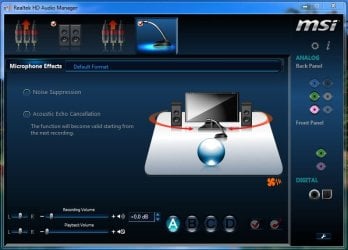
The Realtek HD Audio Manager has MIC settings for recording and Playback volume.
1.JPG

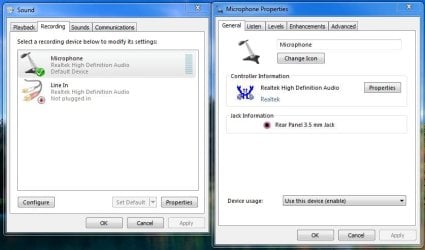
You can also make adjustments through the Windows Volume mixer.
2.JPG

You should probably make adjustments in both places to see if it improves the sound.
 

My Computer

Computer type
PC/Desktop
Computer Manufacturer/Model Number
Custom Build
OS
Windows 7 Home Premium 64 bit
CPU
Intel Core i7-4790
Motherboard
GA-Z87X-D3H
Memory
G.SKILL 8GB (2 x 4GB) DDR3 F3-10666CL9D-8GBNT
Graphics Card(s)
AMD Radeon R7 250
Sound Card
Realtek ALC892
Monitor(s) Displays
Samsung UN32EH5000, Dell 1703FPT
Screen Resolution
1920 x 1080, 1280 x 1024
Hard Drives
WD5003AZEX
WD10EZEX
Samsung HD103SJ
Samsung 128 GB 840 PRO
PSU
SeaSonic M12II SS-500GM
Case
Fractal Design Define R4
Cooling
Zalman CNPS9900ALED
Keyboard
Logitech K800
Mouse
Logitech M705
Internet Speed
16 Mbps
Antivirus
Avast
Browser
Firefox
Other Info
Bose Companion 2 Multimedia Speakers
If they are that bad then why don't you revert back to the windows default audio drivers? I've got the same realtek hardware that you have and they work perfectly fine with windows default drivers, mind you, i don't use them as I decided that surround sound is far superior to stereo and forked out for a set of G35's :p
 

My Computer

Computer type
PC/Desktop
Computer Manufacturer/Model Number
Custom Build
OS
Windows 7 Ultimate x64 SP1
CPU
Intel Q6600 @ 2.6Ghz
Motherboard
Evga NF78-CK-132-A 3-Way SLI
Memory
4Gb DDR2 Corsair Dominator @ 800Mhz 5-5-5-15
Graphics Card(s)
EVGA 560 GTX SC FTW 1GB
Sound Card
Realtek HD 7.1 Audio, Plantronics GameCom780 7.1 Headset
Monitor(s) Displays
Dell S2409W
Screen Resolution
1920 x 1080
Hard Drives
SanDisk SDSSDHII-120G-G25 120GB SSD
Samsung 7200RPM 750Gb SATA
Samsung 850 EVO 120GB SSD
Western Digital Green 1TB 7200RPM
PSU
Xigmatek 750W Quad sli quad core 80% eff
Case
Antec 900 Gaming Case
Cooling
Zalman CNPS9700-NT NVIDIA Tritium
Keyboard
Logitech generic keyboard, MS wireless keyboard
Mouse
Razor Lachesis Banshee V2 Blue, 4000DPI, MS wireless mouse
Internet Speed
152Mb Virgin Media Fibre Optic
Antivirus
Microsoft Security Essentials
Browser
Google Chrome
Other Info
Wireless Gaming Receiver for Windows, Wireless Xbox 360 Pad
As mentioned before, get the latest drivers from the Realtek site.

There a lot of adjustments that can be made under the hood.
The Realtek HD Audio Manager has MIC settings for recording and Playback volume.
View attachment 158801

You can also make adjustments through the Windows Volume mixer.
View attachment 158802

You should probably make adjustments in both places to see if it improves the sound.
Yeah, I know that I can go through all of that, but it doesn't make any bit of difference to the volume of the units that are connected to the port. I have tried multiple 3.5mm devices and they are all extremely low. However; USB devices are fine.

If they are that bad then why don't you revert back to the windows default audio drivers? I've got the same realtek hardware that you have and they work perfectly fine with windows default drivers, mind you, i don't use them as I decided that surround sound is far superior to stereo and forked out for a set of G35's :p
I wear glasses and I really like these Razer Orcas. I would prefer not to use something else. However; when you mention "windows default audio drivers" are we talking simply uninstalling Realtek's crap and running with...... Yeah, can't complete really.
 

My Computer

OS
Windows 7
Back
Top