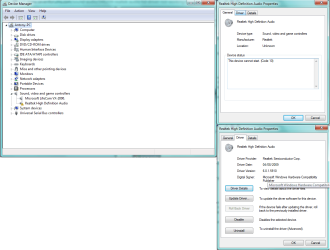
Realtek Audio HD Driver is not working

AntonioC

New member
Local time
5:57 AM
Messages
9
Hi, I am new to these forums and I've tried every possible way to fixing this problem, but I still cant fix it. My problem is that my sound icon says "No audio output device is installed". Ive tried installing Realtek through Device Manager and legacy installs. Even through Windows Troubleshooter and it still doesnt work. This has been going on for 2 days and it wasnt like this before. My model is CQ5621F from HP and I hope someone is able to help me.
 

My Computer My Computer

Computer type
PC/Desktop
Computer Manufacturer/Model Number
HP
OS
Windows Home premium 64 bit
CPU
CQ5621F
Memory
3.00 GB RAM (2.75 usable)
Antivirus
Avast
Browser
Google Chrome
If it worked OK previously, use the System Restore function and restore the PC to an available restore date this BEFORE you had the problem. System Restore will fix many problems (and does not delete any user data). System Restore can be accessed from Start/Programs/Accessories/System Tools.

A comment on your 64bit OS installation. 3GB of RAM is woefully inadequate and you are not getting any benefits from the 64 bit OS as the main reason to have 64 bit OS is having more than 4GB of RAM. In fact you have less useable RAM as a 64 bit OS requires more memory than a 32 bit.
 

My Computer My Computer

Computer type
PC/Desktop
Computer Manufacturer/Model Number
My Own Build
OS
Windows 10 64 bit
CPU
Intel i7 6700K
Motherboard
ASUS ROG Maximus VIII Hero
Memory
16GB Corsair Dominator
Graphics Card(s)
Intel CPU Graphics
Sound Card
RealTek
Monitor(s) Displays
27" Dell S2719dgf
Screen Resolution
2560X1440
Hard Drives
1 TB Samsung 850 EVO SSD for Win 10 Pro
500GB Samsung 850 EVO SSD for Win 10 Insider
2 TB drive for backup
PSU
EVGA Supernova 750G2
Case
BeQuiet Silent Base 600
Cooling
Deepcool Captain 120EX
Keyboard
Microsoft Wireless 2000
Mouse
Microsoft wireless
Internet Speed
100 MB/sec (Cable)
Antivirus
Microsoft Defender and Malwarebytes
Browser
Edge/Firefox
Other Info
Cakewalk (Sonar) by BandLab and Studio One 4.1 Pro recording studio software. MOTU 896Mk3 Hybrid recording interface, Frontier Tranzport wireless control unit, Behringer X-Touch Control Surface.
Five USB connected optical drives for CD Audio production using Nero BurningROM
I did do a system restore to the date before it happened. It did not fix it and yes, I do realize the 64 bit OS issue on systems less than 4 gbs of ram.
 

My Computer My Computer

Computer type
PC/Desktop
Computer Manufacturer/Model Number
HP
OS
Windows Home premium 64 bit
CPU
CQ5621F
Memory
3.00 GB RAM (2.75 usable)
Antivirus
Avast
Browser
Google Chrome

My Computer My Computer

Computer type
PC/Desktop
Computer Manufacturer/Model Number
My Own Build
OS
Windows 10 64 bit
CPU
Intel i7 6700K
Motherboard
ASUS ROG Maximus VIII Hero
Memory
16GB Corsair Dominator
Graphics Card(s)
Intel CPU Graphics
Sound Card
RealTek
Monitor(s) Displays
27" Dell S2719dgf
Screen Resolution
2560X1440
Hard Drives
1 TB Samsung 850 EVO SSD for Win 10 Pro
500GB Samsung 850 EVO SSD for Win 10 Insider
2 TB drive for backup
PSU
EVGA Supernova 750G2
Case
BeQuiet Silent Base 600
Cooling
Deepcool Captain 120EX
Keyboard
Microsoft Wireless 2000
Mouse
Microsoft wireless
Internet Speed
100 MB/sec (Cable)
Antivirus
Microsoft Defender and Malwarebytes
Browser
Edge/Firefox
Other Info
Cakewalk (Sonar) by BandLab and Studio One 4.1 Pro recording studio software. MOTU 896Mk3 Hybrid recording interface, Frontier Tranzport wireless control unit, Behringer X-Touch Control Surface.
Five USB connected optical drives for CD Audio production using Nero BurningROM
device manager.png
 

My Computer My Computer

Computer type
PC/Desktop
Computer Manufacturer/Model Number
HP
OS
Windows Home premium 64 bit
CPU
CQ5621F
Memory
3.00 GB RAM (2.75 usable)
Antivirus
Avast
Browser
Google Chrome
Disable the Microsoft Life Cam and then see if that makes any difference. Some Cams have been known to interfere with PC sound.

You may have to force a reinstall of the RealTek after disabling the cam. In the Device Manager, RIGHT click on the RealTek entry to highlight it and then LEFT click "Uninstall". DO NOT uninstall the drivers. Restart the PC and see if Windows detects the sound and reinstalls it.
 

My Computer My Computer

Computer type
PC/Desktop
Computer Manufacturer/Model Number
My Own Build
OS
Windows 10 64 bit
CPU
Intel i7 6700K
Motherboard
ASUS ROG Maximus VIII Hero
Memory
16GB Corsair Dominator
Graphics Card(s)
Intel CPU Graphics
Sound Card
RealTek
Monitor(s) Displays
27" Dell S2719dgf
Screen Resolution
2560X1440
Hard Drives
1 TB Samsung 850 EVO SSD for Win 10 Pro
500GB Samsung 850 EVO SSD for Win 10 Insider
2 TB drive for backup
PSU
EVGA Supernova 750G2
Case
BeQuiet Silent Base 600
Cooling
Deepcool Captain 120EX
Keyboard
Microsoft Wireless 2000
Mouse
Microsoft wireless
Internet Speed
100 MB/sec (Cable)
Antivirus
Microsoft Defender and Malwarebytes
Browser
Edge/Firefox
Other Info
Cakewalk (Sonar) by BandLab and Studio One 4.1 Pro recording studio software. MOTU 896Mk3 Hybrid recording interface, Frontier Tranzport wireless control unit, Behringer X-Touch Control Surface.
Five USB connected optical drives for CD Audio production using Nero BurningROM
Did that and Windows did not detect the sound, so it did not reinstall it after unistalling and restarting.
 

My Computer My Computer

Computer type
PC/Desktop
Computer Manufacturer/Model Number
HP
OS
Windows Home premium 64 bit
CPU
CQ5621F
Memory
3.00 GB RAM (2.75 usable)
Antivirus
Avast
Browser
Google Chrome
If it was not detected, the sound could have been somehow disabled in the BIOS. I don't know what F key you press to enter the BIOS at boot up, but that is the next step - make sure its enabled in the BIOS.
 

My Computer My Computer

Computer type
PC/Desktop
Computer Manufacturer/Model Number
My Own Build
OS
Windows 10 64 bit
CPU
Intel i7 6700K
Motherboard
ASUS ROG Maximus VIII Hero
Memory
16GB Corsair Dominator
Graphics Card(s)
Intel CPU Graphics
Sound Card
RealTek
Monitor(s) Displays
27" Dell S2719dgf
Screen Resolution
2560X1440
Hard Drives
1 TB Samsung 850 EVO SSD for Win 10 Pro
500GB Samsung 850 EVO SSD for Win 10 Insider
2 TB drive for backup
PSU
EVGA Supernova 750G2
Case
BeQuiet Silent Base 600
Cooling
Deepcool Captain 120EX
Keyboard
Microsoft Wireless 2000
Mouse
Microsoft wireless
Internet Speed
100 MB/sec (Cable)
Antivirus
Microsoft Defender and Malwarebytes
Browser
Edge/Firefox
Other Info
Cakewalk (Sonar) by BandLab and Studio One 4.1 Pro recording studio software. MOTU 896Mk3 Hybrid recording interface, Frontier Tranzport wireless control unit, Behringer X-Touch Control Surface.
Five USB connected optical drives for CD Audio production using Nero BurningROM
I went to the BiOS before and checked that it was enabled. It is enabled
 

My Computer My Computer

Computer type
PC/Desktop
Computer Manufacturer/Model Number
HP
OS
Windows Home premium 64 bit
CPU
CQ5621F
Memory
3.00 GB RAM (2.75 usable)
Antivirus
Avast
Browser
Google Chrome
If the device is present (the sound chip) Windows would at least install the generic basic function "High Definition Audio Device (Codec). As this is not happening, either a BIOS glitch or something has happened to the hardware.

Did you have some type of hardware error, power failure, etc? and it didn't work after that?
 

My Computer My Computer

Computer type
PC/Desktop
Computer Manufacturer/Model Number
My Own Build
OS
Windows 10 64 bit
CPU
Intel i7 6700K
Motherboard
ASUS ROG Maximus VIII Hero
Memory
16GB Corsair Dominator
Graphics Card(s)
Intel CPU Graphics
Sound Card
RealTek
Monitor(s) Displays
27" Dell S2719dgf
Screen Resolution
2560X1440
Hard Drives
1 TB Samsung 850 EVO SSD for Win 10 Pro
500GB Samsung 850 EVO SSD for Win 10 Insider
2 TB drive for backup
PSU
EVGA Supernova 750G2
Case
BeQuiet Silent Base 600
Cooling
Deepcool Captain 120EX
Keyboard
Microsoft Wireless 2000
Mouse
Microsoft wireless
Internet Speed
100 MB/sec (Cable)
Antivirus
Microsoft Defender and Malwarebytes
Browser
Edge/Firefox
Other Info
Cakewalk (Sonar) by BandLab and Studio One 4.1 Pro recording studio software. MOTU 896Mk3 Hybrid recording interface, Frontier Tranzport wireless control unit, Behringer X-Touch Control Surface.
Five USB connected optical drives for CD Audio production using Nero BurningROM
That I am not sure. I simply went off the computer (shutdown) and went back on 3 hours later and my audio started to not work.
 

My Computer My Computer

Computer type
PC/Desktop
Computer Manufacturer/Model Number
HP
OS
Windows Home premium 64 bit
CPU
CQ5621F
Memory
3.00 GB RAM (2.75 usable)
Antivirus
Avast
Browser
Google Chrome
You've done everything to get it back, except a complete reinstall and that is not something I like to suggest.

Try resetting the BIOS and see if helps. Since you have a desktop, with the PC powered off, open the case, remove the CR2032 CMOS (BIOS) backup battery for at least 10 minutes. Replace the battery, observing polarity and then power on and see what happens. If there were any customization in the BIOS you will have to reset that.
 

My Computer My Computer

Computer type
PC/Desktop
Computer Manufacturer/Model Number
My Own Build
OS
Windows 10 64 bit
CPU
Intel i7 6700K
Motherboard
ASUS ROG Maximus VIII Hero
Memory
16GB Corsair Dominator
Graphics Card(s)
Intel CPU Graphics
Sound Card
RealTek
Monitor(s) Displays
27" Dell S2719dgf
Screen Resolution
2560X1440
Hard Drives
1 TB Samsung 850 EVO SSD for Win 10 Pro
500GB Samsung 850 EVO SSD for Win 10 Insider
2 TB drive for backup
PSU
EVGA Supernova 750G2
Case
BeQuiet Silent Base 600
Cooling
Deepcool Captain 120EX
Keyboard
Microsoft Wireless 2000
Mouse
Microsoft wireless
Internet Speed
100 MB/sec (Cable)
Antivirus
Microsoft Defender and Malwarebytes
Browser
Edge/Firefox
Other Info
Cakewalk (Sonar) by BandLab and Studio One 4.1 Pro recording studio software. MOTU 896Mk3 Hybrid recording interface, Frontier Tranzport wireless control unit, Behringer X-Touch Control Surface.
Five USB connected optical drives for CD Audio production using Nero BurningROM
Is complete reinstall reformatting? If so, I have also done that,
 

My Computer My Computer

Computer type
PC/Desktop
Computer Manufacturer/Model Number
HP
OS
Windows Home premium 64 bit
CPU
CQ5621F
Memory
3.00 GB RAM (2.75 usable)
Antivirus
Avast
Browser
Google Chrome
Jack (fireberd) is tops with audio, I'm just jumping in to suggest HP centric trouble shooting pages.

No Sound from the Speakers or Headphones (Windows 7) Compaq Presario CQ5621F Desktop PC | HP® Support

Error in Windows 7: No Audio Output Device is installed Compaq Presario CQ5621F Desktop PC | HP® Support

You've already done some of the steps in the troubleshooting pages above. There might be a nugget of information that might help.

You should also check that Windows Audio and Windows Audio Endpoint builder services are started. I think the mixer dialog will prompt you to restart them if they are not started.

The Event log summary might also clue you in to service issues (error or warning)

Back to fireberd ... good luck
 

My Computer My Computer

Computer type
Laptop
Computer Manufacturer/Model Number
HP Pavilion dv6-6c10us
OS
x64 (6.3.9600) Win8.1 Pro & soon dual boot x64 (6.1.7601) Win7_SP1 HomePrem
CPU
AMD A6-3420M APU with Radeon(tm) HD Graphics
Motherboard
Hewlett-Packard 1805
Memory
6.00 GB
Graphics Card(s)
AMD Radeon(TM) HD 6520G
Sound Card
(1) AMD High Definition Audio Device (2) IDT High Definiti
Monitor(s) Displays
HP W2072a 20" LCD (1600 x 900) @ 60 Hz
Screen Resolution
1366 x 768 x 32 bits (4294967296 colors) @ 60 Hz
Hard Drives
ST640LM0 00 HM641JI SATA Disk Device
Keyboard
Logitech k520 wireless KB
Mouse
Logitech m320 wireless mouse (bundled with KB)
Internet Speed
15/5 | 54 MB Wireless 'n'
Antivirus
Realtime: Defender or Avast | On-demand: Malwarebytes, ESET
Browser
IE 11 on Win8, IE 10 on win 7
Other Info
Media: [Gimp, Audacity, VLC] || Comm: [WEmail 2012, Skype] || Productivity: [OpenOffice,| Textpad] || Utils: [Sysinternals, cCleaner, Speccy, Defraggler]
I have done most of the steps outlined in the HP page and none of them seemed to work for me. Also, when I try to troubleshoot the problem, it says there is a problem with audio driver and when I apply the reinstall fix, it gives me the error that it failed.
 

My Computer My Computer

Computer type
PC/Desktop
Computer Manufacturer/Model Number
HP
OS
Windows Home premium 64 bit
CPU
CQ5621F
Memory
3.00 GB RAM (2.75 usable)
Antivirus
Avast
Browser
Google Chrome
There is either a hardware problem or a Windows problem. If the RealTek drivers are not working, in almost all cases Windows would install the generic "High Definition Audio Controller (Codec) and that would give you basic sound. That apparently not happening.

Did you reset the BIOS - removing the CMOS back up battery as suggested? If the BIOS is not recognizing or not properly recognizing the Sound Chip, Windows will not see it.

If its not the BIOS (or actual hardware) then a Windows corruption is the next thing - and on a "clean" install (reformat the hard drive), and before RealTek is installed, Windows will install the HD Audio Controller, during install, providing its not hardware.

From what I see on the HP site, this Compaq originally had Vista, but Vista/Win 7 are basically the same. Windows 7 is basically "Vista Improved".
 

My Computer My Computer

Computer type
PC/Desktop
Computer Manufacturer/Model Number
My Own Build
OS
Windows 10 64 bit
CPU
Intel i7 6700K
Motherboard
ASUS ROG Maximus VIII Hero
Memory
16GB Corsair Dominator
Graphics Card(s)
Intel CPU Graphics
Sound Card
RealTek
Monitor(s) Displays
27" Dell S2719dgf
Screen Resolution
2560X1440
Hard Drives
1 TB Samsung 850 EVO SSD for Win 10 Pro
500GB Samsung 850 EVO SSD for Win 10 Insider
2 TB drive for backup
PSU
EVGA Supernova 750G2
Case
BeQuiet Silent Base 600
Cooling
Deepcool Captain 120EX
Keyboard
Microsoft Wireless 2000
Mouse
Microsoft wireless
Internet Speed
100 MB/sec (Cable)
Antivirus
Microsoft Defender and Malwarebytes
Browser
Edge/Firefox
Other Info
Cakewalk (Sonar) by BandLab and Studio One 4.1 Pro recording studio software. MOTU 896Mk3 Hybrid recording interface, Frontier Tranzport wireless control unit, Behringer X-Touch Control Surface.
Five USB connected optical drives for CD Audio production using Nero BurningROM
Disable the Microsoft Life Cam and then see if that makes any difference. Some Cams have been known to interfere with PC sound.

You may have to force a reinstall of the RealTek after disabling the cam. In the Device Manager, RIGHT click on the RealTek entry to highlight it and then LEFT click "Uninstall". DO NOT uninstall the drivers. Restart the PC and see if Windows detects the sound and reinstalls it.

@fireberd: I think it might be time to roll the audio all the way back to the base audio. In this post you said DO NOT uninstall the drivers - it might be time to remove the software when uninstalling so that Windows finds the device and installs the base driver.

@Antonio: Have you tried headphones - that would eliminate speakers being bad, off or low volume.

I had an HP that developed a few device problems (no audio and no DVD) - a reinstall solved the issues for a while, but they came back. I was able to solve the audio issue, but I can't recall the resolution. Too many attempts with drivers and configurations and it was a long time ago.

Fix: "This device cannot start" Code 10 error in Device Manager in Windows
I don't know your comfort level with the registry Antonio, but the KB article above reminded me of other things I attempted way back when.

I would hold off on any manual registry changes until you've eliminated all other solutions.
The uninstall - roll back to base driver might do the trick.
 

My Computer My Computer

Computer type
Laptop
Computer Manufacturer/Model Number
HP Pavilion dv6-6c10us
OS
x64 (6.3.9600) Win8.1 Pro & soon dual boot x64 (6.1.7601) Win7_SP1 HomePrem
CPU
AMD A6-3420M APU with Radeon(tm) HD Graphics
Motherboard
Hewlett-Packard 1805
Memory
6.00 GB
Graphics Card(s)
AMD Radeon(TM) HD 6520G
Sound Card
(1) AMD High Definition Audio Device (2) IDT High Definiti
Monitor(s) Displays
HP W2072a 20" LCD (1600 x 900) @ 60 Hz
Screen Resolution
1366 x 768 x 32 bits (4294967296 colors) @ 60 Hz
Hard Drives
ST640LM0 00 HM641JI SATA Disk Device
Keyboard
Logitech k520 wireless KB
Mouse
Logitech m320 wireless mouse (bundled with KB)
Internet Speed
15/5 | 54 MB Wireless 'n'
Antivirus
Realtime: Defender or Avast | On-demand: Malwarebytes, ESET
Browser
IE 11 on Win8, IE 10 on win 7
Other Info
Media: [Gimp, Audacity, VLC] || Comm: [WEmail 2012, Skype] || Productivity: [OpenOffice,| Textpad] || Utils: [Sysinternals, cCleaner, Speccy, Defraggler]
I have done most of the steps outlined in the HP page and none of them seemed to work for me. Also, when I try to troubleshoot the problem, it says there is a problem with audio driver and when I apply the reinstall fix, it gives me the error that it failed.

Most of the steps?
--> Try all of the steps.

Troubleshooting - what was the exact information ... was it simply there is a problem with audio driver or was there more information?

Reinstall the fix?
Error that it failed?

You'll need to be more specific - members can't see what you see.

What was the fix you tried? Reinstalling the driver?
What was the error code and exact message.

You can post screen shots of any error dialog boxes.
See: http://www.sevenforums.com/tutorials/9733-screenshots-files-upload-post-seven-forums.html

Thanks
 

My Computer My Computer

Computer type
Laptop
Computer Manufacturer/Model Number
HP Pavilion dv6-6c10us
OS
x64 (6.3.9600) Win8.1 Pro & soon dual boot x64 (6.1.7601) Win7_SP1 HomePrem
CPU
AMD A6-3420M APU with Radeon(tm) HD Graphics
Motherboard
Hewlett-Packard 1805
Memory
6.00 GB
Graphics Card(s)
AMD Radeon(TM) HD 6520G
Sound Card
(1) AMD High Definition Audio Device (2) IDT High Definiti
Monitor(s) Displays
HP W2072a 20" LCD (1600 x 900) @ 60 Hz
Screen Resolution
1366 x 768 x 32 bits (4294967296 colors) @ 60 Hz
Hard Drives
ST640LM0 00 HM641JI SATA Disk Device
Keyboard
Logitech k520 wireless KB
Mouse
Logitech m320 wireless mouse (bundled with KB)
Internet Speed
15/5 | 54 MB Wireless 'n'
Antivirus
Realtime: Defender or Avast | On-demand: Malwarebytes, ESET
Browser
IE 11 on Win8, IE 10 on win 7
Other Info
Media: [Gimp, Audacity, VLC] || Comm: [WEmail 2012, Skype] || Productivity: [OpenOffice,| Textpad] || Utils: [Sysinternals, cCleaner, Speccy, Defraggler]
My take, from what the user has posted. Windows is not seeing the sound hardware. Three things can cause this (1) the BIOS is not detecting it (and if the BIOS is not detecting it then Windows will not detect it). (2) There is a hardware problem with the Device (3) A Windows Corruption (or not installed properly).

Jack
 

My Computer My Computer

Computer type
PC/Desktop
Computer Manufacturer/Model Number
My Own Build
OS
Windows 10 64 bit
CPU
Intel i7 6700K
Motherboard
ASUS ROG Maximus VIII Hero
Memory
16GB Corsair Dominator
Graphics Card(s)
Intel CPU Graphics
Sound Card
RealTek
Monitor(s) Displays
27" Dell S2719dgf
Screen Resolution
2560X1440
Hard Drives
1 TB Samsung 850 EVO SSD for Win 10 Pro
500GB Samsung 850 EVO SSD for Win 10 Insider
2 TB drive for backup
PSU
EVGA Supernova 750G2
Case
BeQuiet Silent Base 600
Cooling
Deepcool Captain 120EX
Keyboard
Microsoft Wireless 2000
Mouse
Microsoft wireless
Internet Speed
100 MB/sec (Cable)
Antivirus
Microsoft Defender and Malwarebytes
Browser
Edge/Firefox
Other Info
Cakewalk (Sonar) by BandLab and Studio One 4.1 Pro recording studio software. MOTU 896Mk3 Hybrid recording interface, Frontier Tranzport wireless control unit, Behringer X-Touch Control Surface.
Five USB connected optical drives for CD Audio production using Nero BurningROM
Sorry for late reply,

@Slatty, I have always used speakers and just not long ago, I switched to headphones. The issue here is that the Driver has a problem. The troubleshooter simply said there's a problem with the driver, nothing else and the fix did not work. Also, I literally have no experience with the registry.

@Fire, I have tried resetting the BiOS and removed the battery and what you have suggested.
 

My Computer My Computer

Computer type
PC/Desktop
Computer Manufacturer/Model Number
HP
OS
Windows Home premium 64 bit
CPU
CQ5621F
Memory
3.00 GB RAM (2.75 usable)
Antivirus
Avast
Browser
Google Chrome
Back
Top