Solved realtek audio not detecting speakers or headphones.

Reid

New member
Local time
4:14 AM
Messages
12
I have an Asus M4A89TD pro / usb3 that has Realtek audio onboard. I have just finished my build and have never been able to get any sound from any of my IO ports. None of the ports recognize anything that I plug in (i only have 2 sets of 2.1 speakers, one uses a single light green jack and the other uses the light green jack and a black jack.) I DO get sound from some old usb headphones. The integrated Realtek audio does not detect any analog connection (tried with mic/speakers/headphones) in any of the jacks.

I removed the current drivers through uninstalling from device manager, rebooted, then installed the latest drivers from Asus, then Realtek directly. Additionally, I disconnected the front audio jacks from the motherboard in case that was causing a problem. Windows detects the audio device and there is no problems in device manager.

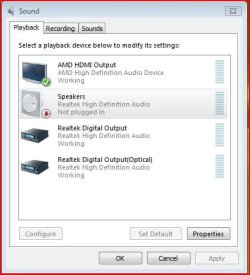
I've gone through every available option in the Realtek sound control options, but I'm at a loss. I have a USB headset that works without a problem, but I can't get these analog speakers to work. Any advice? The "set default device" is grayed out as an option for the speakers as well as saying they are "not plugged in".

I went through all the above several times with different drivers, uninstalled my graphics card (completely removed it from the motherboard during one setting), RMA'ed my motherboard, spoke to Asus support (who state it is a driver/software issue) to no avail over about a 3 week period. How can I get on with overclocking this system when I cant even get the sound ports to work?? Please help.
 

My Computer My Computer

At a glance

win 7 64bit proamd 1100 x6 black8gb corsair 1600gtx 460 1gb 256bit
OS
win 7 64bit pro
CPU
amd 1100 x6 black
Motherboard
asus m4a89td pro / usb3
Memory
8gb corsair 1600
Graphics Card(s)
gtx 460 1gb 256bit
Sound Card
onboard (realtek)...
Monitor(s) Displays
acer 24"
Hard Drives
seagate 1.5tb 64mb cache 6gb/sec sataIII
PSU
cosair 750
Case
antec 902 v3
Cooling
secret
Internet Speed
50.0 Insight cable
Unplug all your inputs.
Plug in one device at a time.
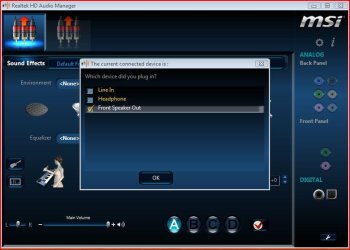
If the Realtek software is functioning properly you should see a pop up after plugging in the green main speaker plug.
Capture 3.JPG

Capture 4.JPG

After confirming by pressing OK, you should get the following.

Capture 5.JPG

You should then plug in the black input and go through the confirmation process, again.
 

My Computer My Computer

At a glance

Windows 7 Home Premium 64 bitIntel Core i7-4790G.SKILL 8GB (2 x 4GB) DDR3 F3-10666CL9D-8GBNTAMD Radeon R7 250
Computer type
PC/Desktop
Computer Manufacturer/Model Number
Custom Build
OS
Windows 7 Home Premium 64 bit
CPU
Intel Core i7-4790
Motherboard
GA-Z87X-D3H
Memory
G.SKILL 8GB (2 x 4GB) DDR3 F3-10666CL9D-8GBNT
Graphics Card(s)
AMD Radeon R7 250
Sound Card
Realtek ALC892
Monitor(s) Displays
Samsung UN32EH5000, Dell 1703FPT
Screen Resolution
1920 x 1080, 1280 x 1024
Hard Drives
WD5003AZEX
WD10EZEX
Samsung HD103SJ
Samsung 128 GB 840 PRO
PSU
SeaSonic M12II SS-500GM
Case
Fractal Design Define R4
Cooling
Zalman CNPS9900ALED
Keyboard
Logitech K800
Mouse
Logitech M705
Internet Speed
16 Mbps
Antivirus
Avast
Browser
Firefox
Other Info
Bose Companion 2 Multimedia Speakers
Yes I would always unplug the devices and start every "instance" (new driver, new settings, etc) from scratch. Nothing I do gets the control panel to recognize that I am plugging a jack into a port.
 
Last edited:

My Computer My Computer

At a glance

win 7 64bit proamd 1100 x6 black8gb corsair 1600gtx 460 1gb 256bit
OS
win 7 64bit pro
CPU
amd 1100 x6 black
Motherboard
asus m4a89td pro / usb3
Memory
8gb corsair 1600
Graphics Card(s)
gtx 460 1gb 256bit
Sound Card
onboard (realtek)...
Monitor(s) Displays
acer 24"
Hard Drives
seagate 1.5tb 64mb cache 6gb/sec sataIII
PSU
cosair 750
Case
antec 902 v3
Cooling
secret
Internet Speed
50.0 Insight cable
Sometimes the simple things get overlooked. Did you Enable audio in the BIOS?
 

My Computer My Computer

At a glance

Windows 7 Pro-x64i7-2600 3.4GHz - 3.8GHz Turbo8Gb - 2x4GB, Muskin 991770 PC3-1333Integrated Intel HD 2000
Computer type
PC/Desktop
Computer Manufacturer/Model Number
Built 2/11/2011
OS
Windows 7 Pro-x64
CPU
i7-2600 3.4GHz - 3.8GHz Turbo
Motherboard
Intel DH67BL-B3
Memory
8Gb - 2x4GB, Muskin 991770 PC3-1333
Graphics Card(s)
Integrated Intel HD 2000
Sound Card
Integrated Intel 10.1 HD, RealTek ALC892
Monitor(s) Displays
Asus LCD VH222H, Haier HL24XSL2a
Screen Resolution
1920x1080, 1920x1080
Hard Drives
Crucial SSD C300-128Gb,
Western Digital WD5002AALX - 500Gb,
Western Digital WD7501AALS - 750Gb
PSU
Seasonic 650W 80+ Gold Modular
Case
Rosewill Defender
Cooling
Stock CPU, Four 120mm case fans, PCH fan added
Keyboard
Logitech EX100 Y-RBH94 Wireless
Mouse
Logitech EX100 M-RCE95 Wireless
Internet Speed
3.0/1.5 Mbs
Antivirus
Microsoft Security Essentials
Browser
Microsoft Internet Explorer 11
Other Info
Antec Veris Premier-Multimedia IR Station,
Cyber Accoustics-3602 Speakers,
AFT XM-5U Card Reader,
Hauppauge TV-HVR-2250,
Sony LX300 USB Turntable
Yes, i have it enabled =) Actually I have disabled the audio in the bios and ran through several troubleshooting steps (as in uninstall and reinstall drivers, etc) just because I have felt like I have done everything else, hah.
 

My Computer My Computer

At a glance

win 7 64bit proamd 1100 x6 black8gb corsair 1600gtx 460 1gb 256bit
OS
win 7 64bit pro
CPU
amd 1100 x6 black
Motherboard
asus m4a89td pro / usb3
Memory
8gb corsair 1600
Graphics Card(s)
gtx 460 1gb 256bit
Sound Card
onboard (realtek)...
Monitor(s) Displays
acer 24"
Hard Drives
seagate 1.5tb 64mb cache 6gb/sec sataIII
PSU
cosair 750
Case
antec 902 v3
Cooling
secret
Internet Speed
50.0 Insight cable
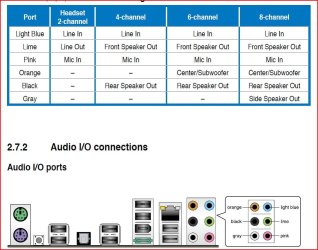
Of course, you're plugging the input jack into the lime port?
Capture 6.JPG
 

My Computer My Computer

At a glance

Windows 7 Home Premium 64 bitIntel Core i7-4790G.SKILL 8GB (2 x 4GB) DDR3 F3-10666CL9D-8GBNTAMD Radeon R7 250
Computer type
PC/Desktop
Computer Manufacturer/Model Number
Custom Build
OS
Windows 7 Home Premium 64 bit
CPU
Intel Core i7-4790
Motherboard
GA-Z87X-D3H
Memory
G.SKILL 8GB (2 x 4GB) DDR3 F3-10666CL9D-8GBNT
Graphics Card(s)
AMD Radeon R7 250
Sound Card
Realtek ALC892
Monitor(s) Displays
Samsung UN32EH5000, Dell 1703FPT
Screen Resolution
1920 x 1080, 1280 x 1024
Hard Drives
WD5003AZEX
WD10EZEX
Samsung HD103SJ
Samsung 128 GB 840 PRO
PSU
SeaSonic M12II SS-500GM
Case
Fractal Design Define R4
Cooling
Zalman CNPS9900ALED
Keyboard
Logitech K800
Mouse
Logitech M705
Internet Speed
16 Mbps
Antivirus
Avast
Browser
Firefox
Other Info
Bose Companion 2 Multimedia Speakers
I have updated my bios. The realtek audio driver is the latest driver (at least was 4 hours ago...) Would my nvidia audio drivers need to be disabled (4 of them in device manager)? I have tried that as well.
Also, even though my speaker sets are a couple years old, they should still be able to be plugged in this motherboard and work. Right? I do not have a 7.2 or even a 5.1 set of HD speakers to try, but I feel it would have the same result. No recognition of any jacks being plugged in and no sound. Thanks for the help, I really appreciate it.
 

My Computer My Computer

At a glance

win 7 64bit proamd 1100 x6 black8gb corsair 1600gtx 460 1gb 256bit
OS
win 7 64bit pro
CPU
amd 1100 x6 black
Motherboard
asus m4a89td pro / usb3
Memory
8gb corsair 1600
Graphics Card(s)
gtx 460 1gb 256bit
Sound Card
onboard (realtek)...
Monitor(s) Displays
acer 24"
Hard Drives
seagate 1.5tb 64mb cache 6gb/sec sataIII
PSU
cosair 750
Case
antec 902 v3
Cooling
secret
Internet Speed
50.0 Insight cable
Yes, I have been using the lime port. I have also tried the other ports only to check for recognition.
 

My Computer My Computer

At a glance

win 7 64bit proamd 1100 x6 black8gb corsair 1600gtx 460 1gb 256bit
OS
win 7 64bit pro
CPU
amd 1100 x6 black
Motherboard
asus m4a89td pro / usb3
Memory
8gb corsair 1600
Graphics Card(s)
gtx 460 1gb 256bit
Sound Card
onboard (realtek)...
Monitor(s) Displays
acer 24"
Hard Drives
seagate 1.5tb 64mb cache 6gb/sec sataIII
PSU
cosair 750
Case
antec 902 v3
Cooling
secret
Internet Speed
50.0 Insight cable

My Computer My Computer

At a glance

Windows 7 Home Premium 64 bitIntel Core i7-4790G.SKILL 8GB (2 x 4GB) DDR3 F3-10666CL9D-8GBNTAMD Radeon R7 250
Computer type
PC/Desktop
Computer Manufacturer/Model Number
Custom Build
OS
Windows 7 Home Premium 64 bit
CPU
Intel Core i7-4790
Motherboard
GA-Z87X-D3H
Memory
G.SKILL 8GB (2 x 4GB) DDR3 F3-10666CL9D-8GBNT
Graphics Card(s)
AMD Radeon R7 250
Sound Card
Realtek ALC892
Monitor(s) Displays
Samsung UN32EH5000, Dell 1703FPT
Screen Resolution
1920 x 1080, 1280 x 1024
Hard Drives
WD5003AZEX
WD10EZEX
Samsung HD103SJ
Samsung 128 GB 840 PRO
PSU
SeaSonic M12II SS-500GM
Case
Fractal Design Define R4
Cooling
Zalman CNPS9900ALED
Keyboard
Logitech K800
Mouse
Logitech M705
Internet Speed
16 Mbps
Antivirus
Avast
Browser
Firefox
Other Info
Bose Companion 2 Multimedia Speakers
I have reinstalled the chipset drivers, updated the bios, uninstalled and reinstalled the latest realtek audio driver, reset cmos, checked and doubled checked everything simple (muted sound, audio enabled in bios, the speakers do work, etc). All this before and after I RMA'ed this board.

There are several similar situations throughout different forums but none of those solutions have solved my problem. I am almost ready to buy a soundcard to remedy this but that seems ridiculous when there is 7.2 capability onboard. Asus recommends reinstalling my operating system. I have not done that yet. Nor do I feel like I need to, but my determination to figure this out will probably drive me to eliminate that option heh.

I want to thank everyone again for their insight and opinions on this matter.
 

My Computer My Computer

At a glance

win 7 64bit proamd 1100 x6 black8gb corsair 1600gtx 460 1gb 256bit
OS
win 7 64bit pro
CPU
amd 1100 x6 black
Motherboard
asus m4a89td pro / usb3
Memory
8gb corsair 1600
Graphics Card(s)
gtx 460 1gb 256bit
Sound Card
onboard (realtek)...
Monitor(s) Displays
acer 24"
Hard Drives
seagate 1.5tb 64mb cache 6gb/sec sataIII
PSU
cosair 750
Case
antec 902 v3
Cooling
secret
Internet Speed
50.0 Insight cable
I have an update. Spoke with tech support at Asus again and inquired about the repairs they did to the motherboard (as per the RMA status report on the website) to find out what exactly was performed.

I have never RMA'ed any equipment but I would figure there would be some kind of printout of repairs, tests, etc with the returned item. There was nothing explaining anything when my RMA'ed motherboard was returned back to me. Sooo... to make a long phone call story short, I am getting a NEW motherboard in exchange for this one. Yay Asus! =) Lets cross our fingers that I can have some sound!

Maybe the actual IO ports are defective? They do not seem to have that crisp "click" when I plug in a jack. That would not explain my front panel though. Anyway, thanks for the support and feedback. Have a great weekend!!
 

My Computer My Computer

At a glance

win 7 64bit proamd 1100 x6 black8gb corsair 1600gtx 460 1gb 256bit
OS
win 7 64bit pro
CPU
amd 1100 x6 black
Motherboard
asus m4a89td pro / usb3
Memory
8gb corsair 1600
Graphics Card(s)
gtx 460 1gb 256bit
Sound Card
onboard (realtek)...
Monitor(s) Displays
acer 24"
Hard Drives
seagate 1.5tb 64mb cache 6gb/sec sataIII
PSU
cosair 750
Case
antec 902 v3
Cooling
secret
Internet Speed
50.0 Insight cable
Finally

I want to thank everyone again for their patience and insight on my problem. I just received the new board that Asus sent me and it works. My sound works!! So it was a faulty board after all. This issue definately strained my brain especially after I RMA'ed the board and they sent it back supposedly "fixed". Anyways, I have sound now and all is well. Have a good one!!
 

My Computer My Computer

At a glance

win 7 64bit proamd 1100 x6 black8gb corsair 1600gtx 460 1gb 256bit
OS
win 7 64bit pro
CPU
amd 1100 x6 black
Motherboard
asus m4a89td pro / usb3
Memory
8gb corsair 1600
Graphics Card(s)
gtx 460 1gb 256bit
Sound Card
onboard (realtek)...
Monitor(s) Displays
acer 24"
Hard Drives
seagate 1.5tb 64mb cache 6gb/sec sataIII
PSU
cosair 750
Case
antec 902 v3
Cooling
secret
Internet Speed
50.0 Insight cable
Great! Glad it was simple. ;) :shock:
 

My Computer My Computer

At a glance

Windows 7 Pro-x64i7-2600 3.4GHz - 3.8GHz Turbo8Gb - 2x4GB, Muskin 991770 PC3-1333Integrated Intel HD 2000
Computer type
PC/Desktop
Computer Manufacturer/Model Number
Built 2/11/2011
OS
Windows 7 Pro-x64
CPU
i7-2600 3.4GHz - 3.8GHz Turbo
Motherboard
Intel DH67BL-B3
Memory
8Gb - 2x4GB, Muskin 991770 PC3-1333
Graphics Card(s)
Integrated Intel HD 2000
Sound Card
Integrated Intel 10.1 HD, RealTek ALC892
Monitor(s) Displays
Asus LCD VH222H, Haier HL24XSL2a
Screen Resolution
1920x1080, 1920x1080
Hard Drives
Crucial SSD C300-128Gb,
Western Digital WD5002AALX - 500Gb,
Western Digital WD7501AALS - 750Gb
PSU
Seasonic 650W 80+ Gold Modular
Case
Rosewill Defender
Cooling
Stock CPU, Four 120mm case fans, PCH fan added
Keyboard
Logitech EX100 Y-RBH94 Wireless
Mouse
Logitech EX100 M-RCE95 Wireless
Internet Speed
3.0/1.5 Mbs
Antivirus
Microsoft Security Essentials
Browser
Microsoft Internet Explorer 11
Other Info
Antec Veris Premier-Multimedia IR Station,
Cyber Accoustics-3602 Speakers,
AFT XM-5U Card Reader,
Hauppauge TV-HVR-2250,
Sony LX300 USB Turntable
hi i had the same problem , guess what its simple . go to control panel click on sound , then when the sound panel opens up right click on it and it gives you the option to enable or disable sound devices . just enable them .
 

My Computer My Computer

At a glance

64 bit windows 7 ultimate
OS
64 bit windows 7 ultimate
Please help!

Hi,
I have an ASUS board as well and am struggling to find a resolution as well.
I tried to right click as you stated but it doesn't allow me to enable anything?
Please advise I have been banging my head against the wall here and I don't want to go through the hassle of RMA'ing this board...
Kind Regards,
Joe
 

My Computer My Computer

At a glance

Windows 7 Home Premium x64
Computer Manufacturer/Model Number
Self
OS
Windows 7 Home Premium x64
Back
Top