Realtek Audio on Intel DZ77GA-70K - no controls

jhabrix

New member
Local time
7:28 AM
Messages
19
Hi...

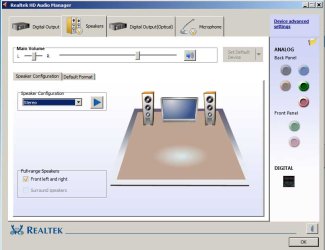
Just installed an (original) Intel DZ77GA-70K. I see that the Realtek Audio Manager has no controls... Meaning, it only has volume control. None of the follwing:

1. No mixer
2. No equalizer
3. No ambient effects, etc. etc.

(Screenshot attached.)

The Realtek is an ALC 899. Have tried the latest drivers from the Intel site: AUD_Win7_8_6.0.1.6804_PV.exe. No luck.

Grateful for any help...
 

Attachments
  • realtek_screenshot.jpg
    realtek_screenshot.jpg
    42.3 KB · Views: 13

My Computer My Computer

At a glance

Windows 7 Ultimate x64
OS
Windows 7 Ultimate x64
Do you have the option to set the "Stereo Mix" as the default recording device? (Stereo Mix or may be called System Mixer, is needed if you want to record streaming audio from the internet). Then, what options show up. Each RealTek control panel is customized by the PC or Motherboard vendor. e.g. my RealTek came from my Motherboard Vendor (Gigabyte) and its fairly basic too, however they also included the Creative SoundBlaster MB software enhancement and it has an EQ and several other effects that can be used.

To check for the System Mixer, go to the Control Panel/Hardware and Sounds and finally the Sound Panel. Click on the Recording Tab. If the System Mixer is shown, enable it if needed, then set it as the default recording device. If its not show, RIGHT click in an empty space in that panel then click to Show "Disabled" and "Disconnected" devices. If the Stereo Mix now shows, make it the default recording device.
 

My Computer My Computer

At a glance

Windows 10 64 bitIntel i7 6700K16GB Corsair DominatorIntel CPU Graphics
Computer type
PC/Desktop
Computer Manufacturer/Model Number
My Own Build
OS
Windows 10 64 bit
CPU
Intel i7 6700K
Motherboard
ASUS ROG Maximus VIII Hero
Memory
16GB Corsair Dominator
Graphics Card(s)
Intel CPU Graphics
Sound Card
RealTek
Monitor(s) Displays
27" Dell S2719dgf
Screen Resolution
2560X1440
Hard Drives
1 TB Samsung 850 EVO SSD for Win 10 Pro
500GB Samsung 850 EVO SSD for Win 10 Insider
2 TB drive for backup
PSU
EVGA Supernova 750G2
Case
BeQuiet Silent Base 600
Cooling
Deepcool Captain 120EX
Keyboard
Microsoft Wireless 2000
Mouse
Microsoft wireless
Internet Speed
100 MB/sec (Cable)
Antivirus
Microsoft Defender and Malwarebytes
Browser
Edge/Firefox
Other Info
Cakewalk (Sonar) by BandLab and Studio One 4.1 Pro recording studio software. MOTU 896Mk3 Hybrid recording interface, Frontier Tranzport wireless control unit, Behringer X-Touch Control Surface.
Five USB connected optical drives for CD Audio production using Nero BurningROM
Thanks for that fireberd... but doesn't really solve the problem. And, recording is out. There's no mike boost...
 

My Computer My Computer

At a glance

Windows 7 Ultimate x64
OS
Windows 7 Ultimate x64
This is a current production motherboard, basically the same as my Gigabyte GAZ77X UD5H motherboard.

Did you install ALL the drivers and software from the Intel CD that came with the motherboard? That would be the first or best step, except for possibly McAfee if you don't use it.

I used to have an Intel motherboard on my previous PC and I found installing everything from the Intel CD was needed for everything on the motherboard to operate properly.

Mic Boost isn't normally needed with a Computer mic. If you are trying to use a standard P.A. type mike (e.g. a Shure SM58) even with the boost it won't really record correctly as the signal from a standard P.A. mike is way below the input level for PC sound inputs (more like Line Level).
 

My Computer My Computer

At a glance

Windows 10 64 bitIntel i7 6700K16GB Corsair DominatorIntel CPU Graphics
Computer type
PC/Desktop
Computer Manufacturer/Model Number
My Own Build
OS
Windows 10 64 bit
CPU
Intel i7 6700K
Motherboard
ASUS ROG Maximus VIII Hero
Memory
16GB Corsair Dominator
Graphics Card(s)
Intel CPU Graphics
Sound Card
RealTek
Monitor(s) Displays
27" Dell S2719dgf
Screen Resolution
2560X1440
Hard Drives
1 TB Samsung 850 EVO SSD for Win 10 Pro
500GB Samsung 850 EVO SSD for Win 10 Insider
2 TB drive for backup
PSU
EVGA Supernova 750G2
Case
BeQuiet Silent Base 600
Cooling
Deepcool Captain 120EX
Keyboard
Microsoft Wireless 2000
Mouse
Microsoft wireless
Internet Speed
100 MB/sec (Cable)
Antivirus
Microsoft Defender and Malwarebytes
Browser
Edge/Firefox
Other Info
Cakewalk (Sonar) by BandLab and Studio One 4.1 Pro recording studio software. MOTU 896Mk3 Hybrid recording interface, Frontier Tranzport wireless control unit, Behringer X-Touch Control Surface.
Five USB connected optical drives for CD Audio production using Nero BurningROM
Yup... installed all drivers and applications except for the third party ones such as McAfee, Acrobat Reader, etc.

From the word go, the whole interface seemed stripped down compared to earlier installs... uninstalled the drivers from the CD and reinstalled from the Intel website - latest, dated this month. Same problem.

Use a cheap ($2) mike... worked fine before with a decibel boost. But now, terrible. And the System Mixer just doesn't cut the ice. Also, overall audio levels playback can't be controlled except for volume.

What gives? How can one get the earlier interface back?
 

My Computer My Computer

At a glance

Windows 7 Ultimate x64
OS
Windows 7 Ultimate x64
I notice earlier versions of the sound drivers on the Intel site. Try one of the earlier driver versions and see what happens.

I don't know if a RealTek driver from another vendor will work - some are set up to look for that vendor's hardware and if its not there it will not install. There may be a generic RealTek that you can install.

Here is the link to the Gigabyte site for my motherboard's RealTek. My motherboard is a Z77 type (and I have an i7 3770 CPU installed). GIGABYTE - Motherboard - Socket 1155 - GA-Z77X-UD5H (rev. 1.1)
No guarantee on this driver but worth a try. Create a System Restore point before installing (or attempting to install).
 

My Computer My Computer

At a glance

Windows 10 64 bitIntel i7 6700K16GB Corsair DominatorIntel CPU Graphics
Computer type
PC/Desktop
Computer Manufacturer/Model Number
My Own Build
OS
Windows 10 64 bit
CPU
Intel i7 6700K
Motherboard
ASUS ROG Maximus VIII Hero
Memory
16GB Corsair Dominator
Graphics Card(s)
Intel CPU Graphics
Sound Card
RealTek
Monitor(s) Displays
27" Dell S2719dgf
Screen Resolution
2560X1440
Hard Drives
1 TB Samsung 850 EVO SSD for Win 10 Pro
500GB Samsung 850 EVO SSD for Win 10 Insider
2 TB drive for backup
PSU
EVGA Supernova 750G2
Case
BeQuiet Silent Base 600
Cooling
Deepcool Captain 120EX
Keyboard
Microsoft Wireless 2000
Mouse
Microsoft wireless
Internet Speed
100 MB/sec (Cable)
Antivirus
Microsoft Defender and Malwarebytes
Browser
Edge/Firefox
Other Info
Cakewalk (Sonar) by BandLab and Studio One 4.1 Pro recording studio software. MOTU 896Mk3 Hybrid recording interface, Frontier Tranzport wireless control unit, Behringer X-Touch Control Surface.
Five USB connected optical drives for CD Audio production using Nero BurningROM
Just installed, as per your suggestion. No luck. The Realtek interface remains the same... as per the screen capture i attached earlier... all the extra i get is an additional Dolby panel for playback... :(
 

My Computer My Computer

At a glance

Windows 7 Ultimate x64
OS
Windows 7 Ultimate x64
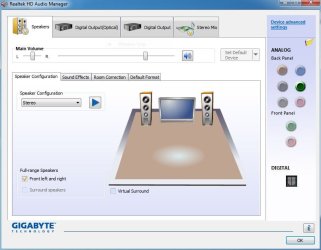
This is my RealTek control panel from the Gigabyte RealTek driver install. You may want to completely uninstall the RealTek in the Device Manager and also check the box to uninstall the drivers. Then restart the PC and when Windows starts it will detect and install the sound with the generic basic function HD Audio Codec drivers. After that is completed install the Gigabyte drivers again, restart the PC and then check the sound panel.
 

Attachments

  • Capture.JPG
    Capture.JPG
    53.9 KB · Views: 12

My Computer My Computer

At a glance

Windows 10 64 bitIntel i7 6700K16GB Corsair DominatorIntel CPU Graphics
Computer type
PC/Desktop
Computer Manufacturer/Model Number
My Own Build
OS
Windows 10 64 bit
CPU
Intel i7 6700K
Motherboard
ASUS ROG Maximus VIII Hero
Memory
16GB Corsair Dominator
Graphics Card(s)
Intel CPU Graphics
Sound Card
RealTek
Monitor(s) Displays
27" Dell S2719dgf
Screen Resolution
2560X1440
Hard Drives
1 TB Samsung 850 EVO SSD for Win 10 Pro
500GB Samsung 850 EVO SSD for Win 10 Insider
2 TB drive for backup
PSU
EVGA Supernova 750G2
Case
BeQuiet Silent Base 600
Cooling
Deepcool Captain 120EX
Keyboard
Microsoft Wireless 2000
Mouse
Microsoft wireless
Internet Speed
100 MB/sec (Cable)
Antivirus
Microsoft Defender and Malwarebytes
Browser
Edge/Firefox
Other Info
Cakewalk (Sonar) by BandLab and Studio One 4.1 Pro recording studio software. MOTU 896Mk3 Hybrid recording interface, Frontier Tranzport wireless control unit, Behringer X-Touch Control Surface.
Five USB connected optical drives for CD Audio production using Nero BurningROM
Nope... still don't get what you're getting... :( My interface remains the same as my original screen capture.

Have completely uninstalled the Realtek drivers using RevoUnistall Pro. Uninstalled the High Definition Audio Devices using Device Manager. Did a reboot. Let Windows find the audio device. Did another reboot. Installed from the file you pointed me to, i.e. Gigabyte's mb_driver_audio_realtek_azalia_7series.exe. Still don't get the other options... :(

Oh! and the logo in the bottom left of the interface remains Realtek... not Gigabyte as in your screen cap.
 

My Computer My Computer

At a glance

Windows 7 Ultimate x64
OS
Windows 7 Ultimate x64
If you are not seeing Gigabyte it suggests it was never installed????
 

My Computer My Computer

At a glance

Windows 10 64 bitIntel i7 6700K16GB Corsair DominatorIntel CPU Graphics
Computer type
PC/Desktop
Computer Manufacturer/Model Number
My Own Build
OS
Windows 10 64 bit
CPU
Intel i7 6700K
Motherboard
ASUS ROG Maximus VIII Hero
Memory
16GB Corsair Dominator
Graphics Card(s)
Intel CPU Graphics
Sound Card
RealTek
Monitor(s) Displays
27" Dell S2719dgf
Screen Resolution
2560X1440
Hard Drives
1 TB Samsung 850 EVO SSD for Win 10 Pro
500GB Samsung 850 EVO SSD for Win 10 Insider
2 TB drive for backup
PSU
EVGA Supernova 750G2
Case
BeQuiet Silent Base 600
Cooling
Deepcool Captain 120EX
Keyboard
Microsoft Wireless 2000
Mouse
Microsoft wireless
Internet Speed
100 MB/sec (Cable)
Antivirus
Microsoft Defender and Malwarebytes
Browser
Edge/Firefox
Other Info
Cakewalk (Sonar) by BandLab and Studio One 4.1 Pro recording studio software. MOTU 896Mk3 Hybrid recording interface, Frontier Tranzport wireless control unit, Behringer X-Touch Control Surface.
Five USB connected optical drives for CD Audio production using Nero BurningROM
Hi... just did another reinstall...

I think that maybe the interface is loaded from the Gigabyte disk and only the driver installs...

I ran an earlier Gigabyte audio driver (earlier mb was a Gigabyte)and noticed the install permision screen says Gigabyte. This one says Macrovision.

Yet, the Dolby Home Surround was installed...
 

My Computer My Computer

At a glance

Windows 7 Ultimate x64
OS
Windows 7 Ultimate x64
Something is still not gettinging installed correctly. I'm not sure where to go with this, Macrovision is a video copy protection program???
 

My Computer My Computer

At a glance

Windows 10 64 bitIntel i7 6700K16GB Corsair DominatorIntel CPU Graphics
Computer type
PC/Desktop
Computer Manufacturer/Model Number
My Own Build
OS
Windows 10 64 bit
CPU
Intel i7 6700K
Motherboard
ASUS ROG Maximus VIII Hero
Memory
16GB Corsair Dominator
Graphics Card(s)
Intel CPU Graphics
Sound Card
RealTek
Monitor(s) Displays
27" Dell S2719dgf
Screen Resolution
2560X1440
Hard Drives
1 TB Samsung 850 EVO SSD for Win 10 Pro
500GB Samsung 850 EVO SSD for Win 10 Insider
2 TB drive for backup
PSU
EVGA Supernova 750G2
Case
BeQuiet Silent Base 600
Cooling
Deepcool Captain 120EX
Keyboard
Microsoft Wireless 2000
Mouse
Microsoft wireless
Internet Speed
100 MB/sec (Cable)
Antivirus
Microsoft Defender and Malwarebytes
Browser
Edge/Firefox
Other Info
Cakewalk (Sonar) by BandLab and Studio One 4.1 Pro recording studio software. MOTU 896Mk3 Hybrid recording interface, Frontier Tranzport wireless control unit, Behringer X-Touch Control Surface.
Five USB connected optical drives for CD Audio production using Nero BurningROM
It's the Windows 7 window that pops up asking if you want to allow X program to make changes (security setting related)... just rechecked on the latest driver from the Intel site... it says Macrovision Corporation. Same applied to the download from your link.

However, tried to install from an earlier Gigabyte driver download that i had and that said Giga-Byte Technology. It did install but the interface was the same as my screenshot and the logo at the bottom left was Realtek. It's not showing your interface, which is what i had as well with my earlier motherboard...

Just can't figure it out... :(
 

My Computer My Computer

At a glance

Windows 7 Ultimate x64
OS
Windows 7 Ultimate x64
BTW... is your front audio connected to the motherboard using the digital or the AC'97 connector?
 

My Computer My Computer

At a glance

Windows 7 Ultimate x64
OS
Windows 7 Ultimate x64
My front audio is connected using the "HD Audio" connector. The older standard was the AC 97. If you have HD Audio" use that as it will allow some additional auto sensing that the older AC97 will not.


The RealTek Audio Manager sounds like its not getting uninstalled when you do the uninstall. thus its not changing. I hate to tell you to uninstall again, but go through the uninstall with the Revo Uninstaller, then restart the PC and check the Hardware and Sound to see if the RealTek Audio Manager is listed or not (it should not).
 

My Computer My Computer

At a glance

Windows 10 64 bitIntel i7 6700K16GB Corsair DominatorIntel CPU Graphics
Computer type
PC/Desktop
Computer Manufacturer/Model Number
My Own Build
OS
Windows 10 64 bit
CPU
Intel i7 6700K
Motherboard
ASUS ROG Maximus VIII Hero
Memory
16GB Corsair Dominator
Graphics Card(s)
Intel CPU Graphics
Sound Card
RealTek
Monitor(s) Displays
27" Dell S2719dgf
Screen Resolution
2560X1440
Hard Drives
1 TB Samsung 850 EVO SSD for Win 10 Pro
500GB Samsung 850 EVO SSD for Win 10 Insider
2 TB drive for backup
PSU
EVGA Supernova 750G2
Case
BeQuiet Silent Base 600
Cooling
Deepcool Captain 120EX
Keyboard
Microsoft Wireless 2000
Mouse
Microsoft wireless
Internet Speed
100 MB/sec (Cable)
Antivirus
Microsoft Defender and Malwarebytes
Browser
Edge/Firefox
Other Info
Cakewalk (Sonar) by BandLab and Studio One 4.1 Pro recording studio software. MOTU 896Mk3 Hybrid recording interface, Frontier Tranzport wireless control unit, Behringer X-Touch Control Surface.
Five USB connected optical drives for CD Audio production using Nero BurningROM
Hi fireberd... really appreciate the patience :)

Have checked that everything was uninstalled... even to uninstalling every instance of 'High Definition Audio Device' under the Sound tree in Device Manager.

No luck... :( Still keep getting the stripped down interface...
 
Last edited:

My Computer My Computer

At a glance

Windows 7 Ultimate x64
OS
Windows 7 Ultimate x64
That is basically what I have with the Gigabyte drivers. I also have some Creative SoundBlaster MB software enhancements which have extra audio applications, similar to what Creative supplies with a SoundBlaster sound card.

I think the Creative SoundBlaster MB software is also available for download on the Gigabyte site link that I provided. Install the Gigabyte sound drivers and then the Creative software (if it will install) and see if that gives you some extra options.

BUT, before you install the sound again, first install the Intel motherboard chipset drivers. One of the prime things the chipset drivers do is identify (define) all the hardwar devices, including the sound chip, on the motherboard. If the RealTek chip is not being properly identified only certain items could be available.

Finally, if this is a new motherboard that you can return, I would return it and get a different motherboard, such as a Gigabyte or ASRock Z77 chipset type board.

Another thought, the RealTek chip on the Intel motherboard may not support all the functions that some others do. I had an issue with the IDT sound chip on the Intel DP35DP motherboard I used to have. I had to use the Intel supplied IDT sound drivers but the Intel supplied drivers did not contain the System Mixer function in Vista and Windows 7 (it was available in the older Windows XP SigmaTel drivers but they were not compatible with Vista/Win 7).
 

My Computer My Computer

At a glance

Windows 10 64 bitIntel i7 6700K16GB Corsair DominatorIntel CPU Graphics
Computer type
PC/Desktop
Computer Manufacturer/Model Number
My Own Build
OS
Windows 10 64 bit
CPU
Intel i7 6700K
Motherboard
ASUS ROG Maximus VIII Hero
Memory
16GB Corsair Dominator
Graphics Card(s)
Intel CPU Graphics
Sound Card
RealTek
Monitor(s) Displays
27" Dell S2719dgf
Screen Resolution
2560X1440
Hard Drives
1 TB Samsung 850 EVO SSD for Win 10 Pro
500GB Samsung 850 EVO SSD for Win 10 Insider
2 TB drive for backup
PSU
EVGA Supernova 750G2
Case
BeQuiet Silent Base 600
Cooling
Deepcool Captain 120EX
Keyboard
Microsoft Wireless 2000
Mouse
Microsoft wireless
Internet Speed
100 MB/sec (Cable)
Antivirus
Microsoft Defender and Malwarebytes
Browser
Edge/Firefox
Other Info
Cakewalk (Sonar) by BandLab and Studio One 4.1 Pro recording studio software. MOTU 896Mk3 Hybrid recording interface, Frontier Tranzport wireless control unit, Behringer X-Touch Control Surface.
Five USB connected optical drives for CD Audio production using Nero BurningROM
Hi fireberd... ever so appreciative of your help and patience. But, i guess i've now reached the end of my tether....

Unfortunately, it's not possible to change the motherboard... mea culpa. When i bought it i saw several others using the same mobo chipset but ignored them as they were targetted at gamers. :(

Anyway, here's my progress:
1. Have completely uninstalled the original Realtek driver for the umpteenth time. Even to removing all sound drivers from Device Manager. And rebooting. Clean reboot shows only Microsoft default drivers.

2. Intel's mobo DVD has a Realtek driver. Ignored that and installed the Gigabyte driver. Rebooted. Same screen.

3. Installed the SB download from the Gigabyte site. Rebooted. No effect. Doesn't recognise the Realtek device...

So, guess that that...
 

My Computer My Computer

At a glance

Windows 7 Ultimate x64
OS
Windows 7 Ultimate x64
Both of the motherboards in the new systems I built last fall are targeted at gamers, but they had all the features I wanted. One system is used mainly for my recording studio system (the Gigabyte motherboard) and the other an ASRock Z77 Professional Fatal1ty is used for general PC work and as a backup to the Gigabyte recording system.

You can try the ASRock Z77's RealTek driver if you want. Nothing else seems to expand past the basic Intel supplied drivers. Here is the drivers, download the RealTek driver and the THX Tru Studio (software enhancement to the sound system, similar to the Creative SoundBlaster MB). ASRock > Products > Motherboard > Fatal1ty Z77 Professional > Download
 

My Computer My Computer

At a glance

Windows 10 64 bitIntel i7 6700K16GB Corsair DominatorIntel CPU Graphics
Computer type
PC/Desktop
Computer Manufacturer/Model Number
My Own Build
OS
Windows 10 64 bit
CPU
Intel i7 6700K
Motherboard
ASUS ROG Maximus VIII Hero
Memory
16GB Corsair Dominator
Graphics Card(s)
Intel CPU Graphics
Sound Card
RealTek
Monitor(s) Displays
27" Dell S2719dgf
Screen Resolution
2560X1440
Hard Drives
1 TB Samsung 850 EVO SSD for Win 10 Pro
500GB Samsung 850 EVO SSD for Win 10 Insider
2 TB drive for backup
PSU
EVGA Supernova 750G2
Case
BeQuiet Silent Base 600
Cooling
Deepcool Captain 120EX
Keyboard
Microsoft Wireless 2000
Mouse
Microsoft wireless
Internet Speed
100 MB/sec (Cable)
Antivirus
Microsoft Defender and Malwarebytes
Browser
Edge/Firefox
Other Info
Cakewalk (Sonar) by BandLab and Studio One 4.1 Pro recording studio software. MOTU 896Mk3 Hybrid recording interface, Frontier Tranzport wireless control unit, Behringer X-Touch Control Surface.
Five USB connected optical drives for CD Audio production using Nero BurningROM
Back
Top