Dear Forum,
Appreciate your feedback on the below problem I'm facing:
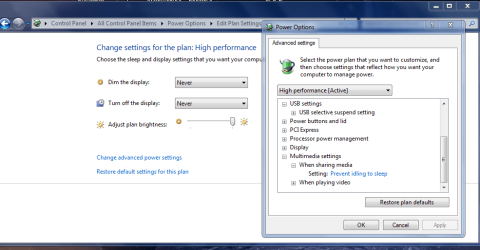
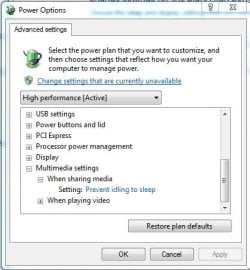
My desktop will not go into sleep mode after the set time. Forcing sleep mode (sleep button) works OK.
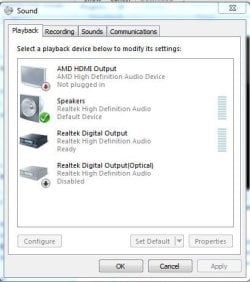
Using the "Windows 7 insomnia" information found in various fora, the "powercfg -requests" command and quite some time (...), the issue boiled down to the "An audio stream is currently in use" message from said command originating from the Realtek High Definition audio driver. Further digging revealed that if I would disable the optical SPDIF output in sound/playback devices, the error message from "powercfg -requests" would disappear and the PC would go into sleep mode as intended. Strangely enough, the 'speakers' and the 'Realtek digital output' (this is the non-optical digital output) can stay enabled for the sleep mode to work OK.
Question: how can I keep also the optical digital audio output enabled AND enjoy the power saving effect from Sleep mode?
Some background: Windows 7 Ultimate, Asus P8P67EVO mobo with Realtek audio, latest audio drivers, using both 'speaker' and 'optical' sound output to feed the PC speakers (using analog audio) as well as the audio system (using digital optical audio). The optical connection to the audio system effectively avoids any ground-loops and hence no hum/noise. If I would use "powercfg" to ignore the audio driver 'in use' information - which is often an effective workaround - the PC would also go into sleep mode when just playing audio. PS: if this is not the right/best forum for this question, please let me know.
Appreciate your feedback on the below problem I'm facing:
My desktop will not go into sleep mode after the set time. Forcing sleep mode (sleep button) works OK.
Using the "Windows 7 insomnia" information found in various fora, the "powercfg -requests" command and quite some time (...), the issue boiled down to the "An audio stream is currently in use" message from said command originating from the Realtek High Definition audio driver. Further digging revealed that if I would disable the optical SPDIF output in sound/playback devices, the error message from "powercfg -requests" would disappear and the PC would go into sleep mode as intended. Strangely enough, the 'speakers' and the 'Realtek digital output' (this is the non-optical digital output) can stay enabled for the sleep mode to work OK.
Question: how can I keep also the optical digital audio output enabled AND enjoy the power saving effect from Sleep mode?
Some background: Windows 7 Ultimate, Asus P8P67EVO mobo with Realtek audio, latest audio drivers, using both 'speaker' and 'optical' sound output to feed the PC speakers (using analog audio) as well as the audio system (using digital optical audio). The optical connection to the audio system effectively avoids any ground-loops and hence no hum/noise. If I would use "powercfg" to ignore the audio driver 'in use' information - which is often an effective workaround - the PC would also go into sleep mode when just playing audio. PS: if this is not the right/best forum for this question, please let me know.
My Computer
At a glance
Winsdows 7 Ultimate x64i7-2700K @ 3.50GHz16GBATE Radeon HD6800
- Computer type
- PC/Desktop
- Computer Manufacturer/Model Number
- Custom
- OS
- Winsdows 7 Ultimate x64
- CPU
- i7-2700K @ 3.50GHz
- Motherboard
- Asus P8P67EVO
- Memory
- 16GB
- Graphics Card(s)
- ATE Radeon HD6800
- Hard Drives
- Samsung SSD 840 EVO 250G
WDC WD 1002F AEX-00Y9A0
- Antivirus
- MSE
- Browser
- IE11