Realtek driver question

PhiliFan26

New member
Local time
6:52 PM
Messages
9
Hello! hoping for some help here...
here are the specs of a machine I purchased a couple years back:

Processor: Intel® Core™ 2 Duo E8400 3.00GHz 6MB Cache 1333MHz FSB
Power Supply: 750 Watt Multi-GPU Approved Power Supply
Graphics Processor: 512MB NVIDIA® GeForce® 9800 GT
Memory: 2GB Dual Channel DDR2 SDRAM at 800MHz - 2 x 1024MB
Motherboard: Approved NVIDIA® nForce 680i SLI Motherboard
Operating System (Office software not included): Windows Vista® Home Premium with Service Pack 1 – DirectX 10 Ready!
Desktop Tuners and Remotes: Without Media Center Remote Control
System Drive: Single Drive Configuration - 250GB SATA 3Gb/s 7,200RPM 16MB Cache
Optical Drives : Single Drive Configuration - 20X Dual-Layer Burner (DVD±RW)
Enthusiast Essentials: Dual High Performance Gigabit Ethernet Ports
Sound Card: High-Definition 7.1 Performance Audio
Speakers: Klipsch ProMedia 2.1 200-Watt THX®-Certified Speakers
Keyboard: Standard Keyboard - Standard Keyboard
Mouse: Standard Mouse - Standard Optical 3-Button Mouse with Scroll Wheel

yesterday I did a clean install of windows 7 32 bit. everything went well except my sound is very low and hard to hear. I checked the drivers on device manager and made sure I had the latest realtek driver. no errors or yellow flags. Just bad sound. All I want is for my Klipsch speakers to work from the rear green port. The base seems to work, but anything else is muffled and you can barely hear it. Any ideas on how to make this work?
 

My Computer

OS
windows 7
Hi, welcome to the forums :)

You'll find that Device Manager will only check what's on Windows Update and if there's no update (based on the defautl installed driver) then it wont offer 1.

Best thing to do is to download the latest from Realtek and install it. It should then solve your issue.


OS
 

My Computer

Computer Manufacturer/Model Number
Compaq Desktop
OS
Windows 7 Ultimate x64
CPU
AMD Sempron Dual Core
Memory
3GB
Graphics Card(s)
NVIDIA GeForce 6150SE nForce 430
Screen Resolution
1024x768
Hard Drives
150GB Sata
Hi, welcome to the forums :)

You'll find that Device Manager will only check what's on Windows Update and if there's no update (based on the defautl installed driver) then it wont offer 1.

Best thing to do is to download the latest from Realtek and install it. It should then solve your issue.


OS

Hi, thanks for replying. I actually have tried that. No difference. What would you try next? one weird thing I see under device manager is there are 4 nvidia sound drivers along with the realtek one. I recently upgraded the card to a gt 430 from a 9800gt (if you can call it an upgrade). Should they be there along with the Realtek high performance driver? would that cause an issue?
 

My Computer

OS
windows 7
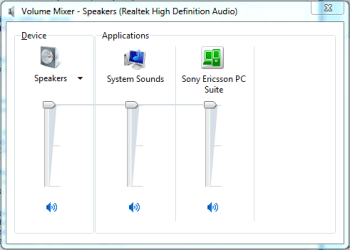
If you right-click Volume Icon.PNG and select Open Volume Mixer are there any volumes showing as extremely low?

Volume Mixer.PNG
 

My Computer

Computer Manufacturer/Model Number
Compaq Desktop
OS
Windows 7 Ultimate x64
CPU
AMD Sempron Dual Core
Memory
3GB
Graphics Card(s)
NVIDIA GeForce 6150SE nForce 430
Screen Resolution
1024x768
Hard Drives
150GB Sata
Set them to 100%, that should help a lot
 

My Computer

Computer Manufacturer/Model Number
Compaq Desktop
OS
Windows 7 Ultimate x64
CPU
AMD Sempron Dual Core
Memory
3GB
Graphics Card(s)
NVIDIA GeForce 6150SE nForce 430
Screen Resolution
1024x768
Hard Drives
150GB Sata
I'll try and get back to you. away from that machine at the moment. thanks for helping :cool:
 

My Computer

OS
windows 7
You're welcome, hope it sorts it :)
 

My Computer

Computer Manufacturer/Model Number
Compaq Desktop
OS
Windows 7 Ultimate x64
CPU
AMD Sempron Dual Core
Memory
3GB
Graphics Card(s)
NVIDIA GeForce 6150SE nForce 430
Screen Resolution
1024x768
Hard Drives
150GB Sata
one last thing(i hope), are there any other settings on the realtek control screen that I should make sure are set a certain way? I guess I am thinking ahead just in case boosting the levels does not solve this / I just read about somebody solving a similar problem by putting the speaker jack in the front and something else in the green port in the back. does that make any sense at all cause it doesn't to me....:confused:
 

My Computer

OS
windows 7
In the realtek HD control panel just make sure that all volumes are set to 100%, you can then change them 1 at a time to suit your needs
 

My Computer

Computer Manufacturer/Model Number
Compaq Desktop
OS
Windows 7 Ultimate x64
CPU
AMD Sempron Dual Core
Memory
3GB
Graphics Card(s)
NVIDIA GeForce 6150SE nForce 430
Screen Resolution
1024x768
Hard Drives
150GB Sata
ok, back on this machine now. All levels are up and I KNOW the realtek driver is the latest and greatest. Still have crappy sound. There is sound, but it sounds like all base. What else can I do??????:confused:
 

My Computer

OS
windows 7
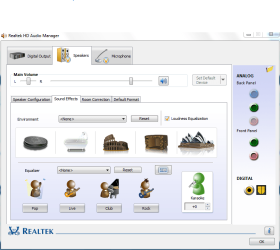
Have you checked Loudness Equalization, as shown below?

Capture.PNG
 

My Computer

Computer type
PC/Desktop
Computer Manufacturer/Model Number
Dwarf Dwf/11/2012 r09/2013
OS
Windows 8.1 Pro RTM x64
CPU
Intel Core-i5-3570K 4-core @ 3.4GHz (Ivy Bridge) (OC 4.4GHz)
Motherboard
ASRock Z77 Extreme4-M
Memory
4 x 4GB DDR3-1600 Corsair Vengeance CMZ8GX3M2A1600C9B (16GB)
Graphics Card(s)
MSI GeForce GTX770 Gaming OC 2GB
Sound Card
Realtek High Definition on board solution (ALC 898)
Monitor(s) Displays
ViewSonic VA1912w Widescreen (VGA)
Screen Resolution
1440x900
Hard Drives
OCZ Agility 3 SSD 120GB SATA III x2 (RAID 0)
Samsung HD501LJ 500GB SATA II x2
Hitachi HDS721010CLA332 1TB SATA II
Iomega 1.5TB Ext USB 2.0
WD 2.0TB Ext USB 3.0
PSU
XFX Pro Series 850W Semi-Modular
Case
Gigabyte IF233
Cooling
1 x 120mm Front Inlet 1 x 120mm Rear Exhaust
Keyboard
Microsoft Comfort Curve Keyboard 3000 (USB)
Mouse
Microsoft Comfort Mouse 3000 for Business (USB)
Internet Speed
NetGear DG834Gv3 ADSL Modem/Router (Ethernet) ~4.0 Mb/s (O2)
Antivirus
Avast! 8.0.1497
Browser
IE 11
Other Info
Optical Drive: HL-DT-ST BD-RE BH10LS30 SATA Bluray
Lexmark S305 Printer/Scanner/Copier (USB)
WEI Score: 8.1/8.1/8.5/8.5/8.25
Asus Eee PC 1011PX Netbook (Windows 7 x86 Starter)
i just did that. Also, i noticed if I stick some headphones in the front jack the sound is great. why cant I get that sound from the rear green port? its all base and low noise from there
 

My Computer

OS
windows 7
ok, I got some good sound now. Just have to play with it a bit more....
all sound seems to be on the left side
 

My Computer

OS
windows 7
Back
Top