RealTek Drivers

garystan

New member
Local time
11:10 AM
Messages
16
Hi everybody :

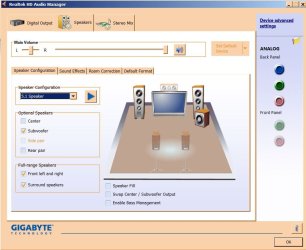
I've been trying to get my 5.1 Channel sound fixed. Right now, I've got onboard sound. But first, my System : Windows 7 Professional 32-bit, 3Gb RAM, SATA II WD 500 Gb Hard Drive, Gigabyte GA-Z77-DS3H Motherboard, 500 Watt PSU and SATA II LG Optical Drive. My situation is......I'm only getting 2-channel sound from my onboard sound chip (I'm looking into a dedicated sound card). When I go into Sound Manager, click on 5.1 Channel, then click on the subwoofer, the 5.1 Channel selection (from the pull-down menu) greys out. I only get sound from the two front speakers. The manual says this motherboard can produce 5.1 and 7.1 Channel sound. I checked everything from Sound Manager to Device Manager. I downloaded and installed the updated audio drivers. That didn't work. So I contacted Gigabyte Support. They recommended downloading the latest drivers (which I already did). I explained to them what I did and what I checked. So, after all the explaining, they just stated that there's not much they can do then. I think it's the sound chip. This is where the dedicated sound card comes in. I'm going to try that. I know that my Creative Labs Inspire 5.1 sound system is still good. It works on my past computer (which I'm using as a back up system) I'm not sure what else to check....other than installing the dedicated sound card.

garystan
 

My Computer

Computer Manufacturer/Model Number
Systemax
OS
Windows 7 Home Edition, 32-Bit
Motherboard
M3A78-EM
Memory
3.0Gb
Graphics Card(s)
NVidia GeForce 210
Can you post a picture of your RealTek HD Audio Manager?

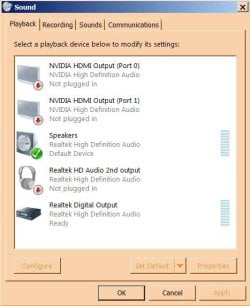
Did you try setting the speaker type in the Sound/Playback section for the "Speakers" (the RealTek)?

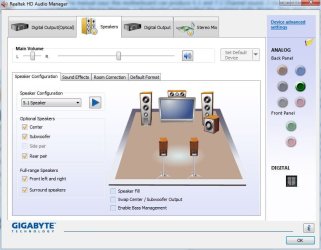
Here is my RealTek Audio manager, with a Gigabyte Z77 motherboard and I can select 5.1 sound. I'm using the Gigabyte supplied RealTek driver for my motherboard.
 

Attachments

  • Capture.JPG
    Capture.JPG
    60.5 KB · Views: 3

My Computer

Computer type
PC/Desktop
Computer Manufacturer/Model Number
My Own Build
OS
Windows 10 64 bit
CPU
Intel i7 6700K
Motherboard
ASUS ROG Maximus VIII Hero
Memory
16GB Corsair Dominator
Graphics Card(s)
Intel CPU Graphics
Sound Card
RealTek
Monitor(s) Displays
27" Dell S2719dgf
Screen Resolution
2560X1440
Hard Drives
1 TB Samsung 850 EVO SSD for Win 10 Pro
500GB Samsung 850 EVO SSD for Win 10 Insider
2 TB drive for backup
PSU
EVGA Supernova 750G2
Case
BeQuiet Silent Base 600
Cooling
Deepcool Captain 120EX
Keyboard
Microsoft Wireless 2000
Mouse
Microsoft wireless
Internet Speed
100 MB/sec (Cable)
Antivirus
Microsoft Defender and Malwarebytes
Browser
Edge/Firefox
Other Info
Cakewalk (Sonar) by BandLab and Studio One 4.1 Pro recording studio software. MOTU 896Mk3 Hybrid recording interface, Frontier Tranzport wireless control unit, Behringer X-Touch Control Surface.
Five USB connected optical drives for CD Audio production using Nero BurningROM
firebird :

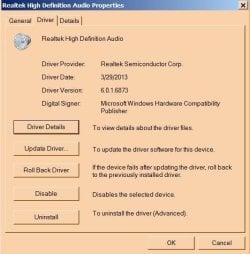
Yes. I have the Settings to Speaker. And I downloaded the latest RealTek drivers for Windows 7. I'm starting to think it's the onboard sound chip. The reason I say that is that.....my Creative Labs Inspire 5.1 sound system works on my old computer....which I updated a short while ago with Windows 7.
Here's a shot of my Settings.
 

Attachments

  • Audio Properties.JPG
    Audio Properties.JPG
    42.2 KB · Views: 28
  • Audio Manager 1.JPG
    Audio Manager 1.JPG
    72.1 KB · Views: 6
  • Real Tek Audio Properties.JPG
    Real Tek Audio Properties.JPG
    42.8 KB · Views: 28

My Computer

Computer Manufacturer/Model Number
Systemax
OS
Windows 7 Home Edition, 32-Bit
Motherboard
M3A78-EM
Memory
3.0Gb
Graphics Card(s)
NVidia GeForce 210
Aha! It looks like you have one of the motherboards that requires using the front panel headphone jack to get the 5.1 output.

Check the Gigabyte manual for your motherboard to find out how to hook it up.
 

My Computer

Computer type
PC/Desktop
Computer Manufacturer/Model Number
My Own Build
OS
Windows 10 64 bit
CPU
Intel i7 6700K
Motherboard
ASUS ROG Maximus VIII Hero
Memory
16GB Corsair Dominator
Graphics Card(s)
Intel CPU Graphics
Sound Card
RealTek
Monitor(s) Displays
27" Dell S2719dgf
Screen Resolution
2560X1440
Hard Drives
1 TB Samsung 850 EVO SSD for Win 10 Pro
500GB Samsung 850 EVO SSD for Win 10 Insider
2 TB drive for backup
PSU
EVGA Supernova 750G2
Case
BeQuiet Silent Base 600
Cooling
Deepcool Captain 120EX
Keyboard
Microsoft Wireless 2000
Mouse
Microsoft wireless
Internet Speed
100 MB/sec (Cable)
Antivirus
Microsoft Defender and Malwarebytes
Browser
Edge/Firefox
Other Info
Cakewalk (Sonar) by BandLab and Studio One 4.1 Pro recording studio software. MOTU 896Mk3 Hybrid recording interface, Frontier Tranzport wireless control unit, Behringer X-Touch Control Surface.
Five USB connected optical drives for CD Audio production using Nero BurningROM
fireberd :

It doesn't say anything in the user manual, other than needing an HD front panel audio module.
First............I'm not totally clear what this module is. Isn't it a piece of hardware that goes into one of my free drive bays..........connected to an internal sound card ? I contacted Gigabyte about this, and they didn't give me any information on this. If it's something that I have to "wire together" , I'd probably have to have the Geek Squad do that. If I have it correctly...........either I could get an internal sound card (with the appropriate connections), or this HD front panel audio module. As for the module, I'd have to look that up online, to really see what it is, and, if it's not incredibly complicated, hook it up myself. While waiting...........I invested $19 in a Sabrent USB sound card. It's supposed to work with Windows 7, but it doesn't. I'm returning that item. (I should've known better than to try a USB sound card). Thanks for your help and advice.
garystan
 

My Computer

Computer Manufacturer/Model Number
Systemax
OS
Windows 7 Home Edition, 32-Bit
Motherboard
M3A78-EM
Memory
3.0Gb
Graphics Card(s)
NVidia GeForce 210
fireberd :

I've got another dumb question (more of a confirmation of correct information). If I install a "good" sound card. The type that will allow me to connect my two front speakers and a subwoofer. One, this card, upon installation will automatically "override" the BIOS's onboard audio, correct ? Two, I'd be able to enjoy that higher quality sound like I had on my old computer, correct ? Three, if the card has a good DSP, I'd definitely hear that stereo "separation" and still get good bass or (what do they call it ?) LFE ? Sorry about all the questions. Thanks.

garystan
 

My Computer

Computer Manufacturer/Model Number
Systemax
OS
Windows 7 Home Edition, 32-Bit
Motherboard
M3A78-EM
Memory
3.0Gb
Graphics Card(s)
NVidia GeForce 210
First, the HD front panel connection is just the HD audio connection to the motherboard for the front panel headphone/mic jack. There are two possible front panel connections in many PC cases, either AC97 or HD Audio. Obviously the HD Audio connection is the one to use. The HD Audio connection has additional jack sensing (sensing when something is plugged in) that the AC97 does not. The front panel connector that plugs into the motherboard, on commercial PC cases, will be marked "HD Audio" (or AC97).

Second, if you install a separate sound card, you must disable the on-board audio in the PC's BIOS, to avoid any conflicts. You can only have one default audio device anyway so disabling in the BIOS is the way to go. Whether it will be better audio depends on the sound card and its capabilities and your speakers (the speakers are the "weak link" in most sound systems). Most new PC integrated audio is as good or better than old separate sound card. I have a recording studio and although I don't use my internal PC's sound card for recording, I have no problems with it on regular sound playback. I had a high end SoundBlaster Xfi sound card installed but it was interfering with my recording studio software so I uninstalled it and I really didn't hear any difference in the PC sound between the RealTek and the SoundBlaster Xfi.
 

My Computer

Computer type
PC/Desktop
Computer Manufacturer/Model Number
My Own Build
OS
Windows 10 64 bit
CPU
Intel i7 6700K
Motherboard
ASUS ROG Maximus VIII Hero
Memory
16GB Corsair Dominator
Graphics Card(s)
Intel CPU Graphics
Sound Card
RealTek
Monitor(s) Displays
27" Dell S2719dgf
Screen Resolution
2560X1440
Hard Drives
1 TB Samsung 850 EVO SSD for Win 10 Pro
500GB Samsung 850 EVO SSD for Win 10 Insider
2 TB drive for backup
PSU
EVGA Supernova 750G2
Case
BeQuiet Silent Base 600
Cooling
Deepcool Captain 120EX
Keyboard
Microsoft Wireless 2000
Mouse
Microsoft wireless
Internet Speed
100 MB/sec (Cable)
Antivirus
Microsoft Defender and Malwarebytes
Browser
Edge/Firefox
Other Info
Cakewalk (Sonar) by BandLab and Studio One 4.1 Pro recording studio software. MOTU 896Mk3 Hybrid recording interface, Frontier Tranzport wireless control unit, Behringer X-Touch Control Surface.
Five USB connected optical drives for CD Audio production using Nero BurningROM
fireberd :

Thanks for your reply and advice.

garystan
 

My Computer

Computer Manufacturer/Model Number
Systemax
OS
Windows 7 Home Edition, 32-Bit
Motherboard
M3A78-EM
Memory
3.0Gb
Graphics Card(s)
NVidia GeForce 210
One more question :
When using a USB Sound card, is it necessary to disable the Onboard Sound Chip ? Being USB is a PnP type device.
garystan
 

My Computer

Computer Manufacturer/Model Number
Systemax
OS
Windows 7 Home Edition, 32-Bit
Motherboard
M3A78-EM
Memory
3.0Gb
Graphics Card(s)
NVidia GeForce 210
Back
Top