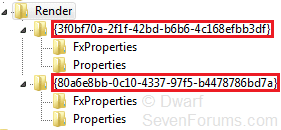
Realtek Equalizer Settings

Dwarf

The Contemplator, (1963-2013)
Guru
Gold Member
Local time
12:08 AM
Messages
9,197
Location
Doncaster, UK
This is for those who, like me, have been looking for where the frequency equalizer (enhancement) settings for Realtek are stored. Here is a zipped file with some settings. These are the plus (maximum) and minus (minimum) settings of each frequency enhancement in turn.

View attachment equaliser.zip

This is the code behind that file, with the relevant details highlighted for each frequency enhancement control.

Code:
Windows Registry Editor Version 5.00
[HKEY_LOCAL_MACHINE\SOFTWARE\Microsoft\Windows\CurrentVersion\MMDevices\Audio\Render\{80a6e8bb-0c10-4337-97f5-b4478786bd7a}\FxProperties]
"{69203b66-c559-499c-bb5f-f54563cd7d59},0"="eq31up"
"{36033203-cbc4-4960-9b48-490166ca34c9},0"=hex:41,00,38,fc,01,00,00,00,[COLOR=red]b0[/COLOR],[COLOR=red]04[/COLOR],\
  [COLOR=red]00[/COLOR],[COLOR=red]00[/COLOR],00,00,00,00,00,00,00,00,00,00,00,00,00,00,00,00,00,00,00,00,00,00,00,\
  00,00,00,00,00,00,00,00,00,00,00,00,00
"{69203b66-c559-499c-bb5f-f54563cd7d59},1"="eq31dwn"
"{36033203-cbc4-4960-9b48-490166ca34c9},1"=hex:41,00,38,fc,01,00,00,00,[COLOR=red]50[/COLOR],[COLOR=red]fb[/COLOR],\
  [COLOR=red]ff[/COLOR],[COLOR=red]ff[/COLOR],00,00,00,00,00,00,00,00,00,00,00,00,00,00,00,00,00,00,00,00,00,00,00,\
  00,00,00,00,00,00,00,00,00,00,00,00,00
"{69203b66-c559-499c-bb5f-f54563cd7d59},2"="eq62up"
"{36033203-cbc4-4960-9b48-490166ca34c9},2"=hex:41,00,38,fc,01,00,00,00,00,00,\
  00,00,[COLOR=red]b0[/COLOR],[COLOR=red]04[/COLOR],[COLOR=red]00[/COLOR],[COLOR=red]00[/COLOR],00,00,00,00,00,00,00,00,00,00,00,00,00,00,00,00,00,00,00,\
  00,00,00,00,00,00,00,00,00,00,00,00,00
"{69203b66-c559-499c-bb5f-f54563cd7d59},3"="eq62dwn"
"{36033203-cbc4-4960-9b48-490166ca34c9},3"=hex:41,00,38,fc,01,00,00,00,00,00,\
  00,00,[COLOR=red]50[/COLOR],[COLOR=red]fb[/COLOR],[COLOR=red]ff[/COLOR],[COLOR=red]ff[/COLOR],00,00,00,00,00,00,00,00,00,00,00,00,00,00,00,00,00,00,00,\
  00,00,00,00,00,00,00,00,00,00,00,00,00
"{69203b66-c559-499c-bb5f-f54563cd7d59},4"="eq125up"
"{36033203-cbc4-4960-9b48-490166ca34c9},4"=hex:41,00,38,fc,01,00,00,00,00,00,\
  00,00,00,00,00,00,[COLOR=red]b0[/COLOR],[COLOR=red]04[/COLOR],[COLOR=red]00[/COLOR],[COLOR=red]00[/COLOR],00,00,00,00,00,00,00,00,00,00,00,00,00,00,00,\
  00,00,00,00,00,00,00,00,00,00,00,00,00
"{69203b66-c559-499c-bb5f-f54563cd7d59},5"="eq125dwn"
"{36033203-cbc4-4960-9b48-490166ca34c9},5"=hex:41,00,38,fc,01,00,00,00,00,00,\
  00,00,00,00,00,00,[COLOR=red]50[/COLOR],[COLOR=red]fb[/COLOR],[COLOR=red]ff[/COLOR],[COLOR=red]ff[/COLOR],00,00,00,00,00,00,00,00,00,00,00,00,00,00,00,\
  00,00,00,00,00,00,00,00,00,00,00,00,00
"{69203b66-c559-499c-bb5f-f54563cd7d59},6"="eq250up"
"{36033203-cbc4-4960-9b48-490166ca34c9},6"=hex:41,00,38,fc,01,00,00,00,00,00,\
  00,00,00,00,00,00,00,00,00,00,[COLOR=red]b0[/COLOR],[COLOR=red]04[/COLOR],[COLOR=red]00[/COLOR],[COLOR=red]00[/COLOR],00,00,00,00,00,00,00,00,00,00,00,\
  00,00,00,00,00,00,00,00,00,00,00,00,00
"{69203b66-c559-499c-bb5f-f54563cd7d59},7"="eq250dwn"
"{36033203-cbc4-4960-9b48-490166ca34c9},7"=hex:41,00,38,fc,01,00,00,00,00,00,\
  00,00,00,00,00,00,00,00,00,00,[COLOR=red]50[/COLOR],[COLOR=red]fb[/COLOR],[COLOR=red]ff[/COLOR],[COLOR=red]ff[/COLOR],00,00,00,00,00,00,00,00,00,00,00,\
  00,00,00,00,00,00,00,00,00,00,00,00,00
"{69203b66-c559-499c-bb5f-f54563cd7d59},8"="eq500up"
"{36033203-cbc4-4960-9b48-490166ca34c9},8"=hex:41,00,38,fc,01,00,00,00,00,00,\
  00,00,00,00,00,00,00,00,00,00,00,00,00,00,[COLOR=red]b0[/COLOR],[COLOR=red]04[/COLOR],[COLOR=red]00[/COLOR],[COLOR=red]00[/COLOR],00,00,00,00,00,00,00,\
  00,00,00,00,00,00,00,00,00,00,00,00,00
"{69203b66-c559-499c-bb5f-f54563cd7d59},9"="eq500dwn"
"{36033203-cbc4-4960-9b48-490166ca34c9},9"=hex:41,00,38,fc,01,00,00,00,00,00,\
  00,00,00,00,00,00,00,00,00,00,00,00,00,00,[COLOR=red]50[/COLOR],[COLOR=red]fb[/COLOR],[COLOR=red]ff[/COLOR],[COLOR=red]ff[/COLOR],00,00,00,00,00,00,00,\
  00,00,00,00,00,00,00,00,00,00,00,00,00
"{69203b66-c559-499c-bb5f-f54563cd7d59},10"="eq1kup"
"{36033203-cbc4-4960-9b48-490166ca34c9},10"=hex:41,00,38,fc,01,00,00,00,00,00,\
  00,00,00,00,00,00,00,00,00,00,00,00,00,00,00,00,00,00,[COLOR=red]b0[/COLOR],[COLOR=red]04[/COLOR],[COLOR=red]00[/COLOR],[COLOR=red]00[/COLOR],00,00,00,\
  00,00,00,00,00,00,00,00,00,00,00,00,00
"{69203b66-c559-499c-bb5f-f54563cd7d59},11"="eq1kdwn"
"{36033203-cbc4-4960-9b48-490166ca34c9},11"=hex:41,00,38,fc,01,00,00,00,00,00,\
  00,00,00,00,00,00,00,00,00,00,00,00,00,00,00,00,00,00,[COLOR=red]50[/COLOR],[COLOR=red]fb[/COLOR],[COLOR=red]ff[/COLOR],[COLOR=red]ff[/COLOR],00,00,00,\
  00,00,00,00,00,00,00,00,00,00,00,00,00
"{69203b66-c559-499c-bb5f-f54563cd7d59},12"="eq2kup"
"{36033203-cbc4-4960-9b48-490166ca34c9},12"=hex:41,00,38,fc,01,00,00,00,00,00,\
  00,00,00,00,00,00,00,00,00,00,00,00,00,00,00,00,00,00,00,00,00,00,[COLOR=red]b0[/COLOR],[COLOR=red]04[/COLOR],[COLOR=red]00[/COLOR],\
  [COLOR=red]00[/COLOR],00,00,00,00,00,00,00,00,00,00,00,00
"{69203b66-c559-499c-bb5f-f54563cd7d59},13"="eq2kdwn"
"{36033203-cbc4-4960-9b48-490166ca34c9},13"=hex:41,00,38,fc,01,00,00,00,00,00,\
  00,00,00,00,00,00,00,00,00,00,00,00,00,00,00,00,00,00,00,00,00,00,[COLOR=red]50[/COLOR],[COLOR=red]fb[/COLOR],[COLOR=red]ff[/COLOR],\
  [COLOR=red]ff[/COLOR],00,00,00,00,00,00,00,00,00,00,00,00
"{69203b66-c559-499c-bb5f-f54563cd7d59},14"="eq4kup"
"{36033203-cbc4-4960-9b48-490166ca34c9},14"=hex:41,00,38,fc,01,00,00,00,00,00,\
  00,00,00,00,00,00,00,00,00,00,00,00,00,00,00,00,00,00,00,00,00,00,00,00,00,\
  00,[COLOR=red]b0[/COLOR],[COLOR=red]04[/COLOR],[COLOR=red]00[/COLOR],[COLOR=red]00[/COLOR],00,00,00,00,00,00,00,00
"{69203b66-c559-499c-bb5f-f54563cd7d59},15"="eq4kdwn"
"{36033203-cbc4-4960-9b48-490166ca34c9},15"=hex:41,00,38,fc,01,00,00,00,00,00,\
  00,00,00,00,00,00,00,00,00,00,00,00,00,00,00,00,00,00,00,00,00,00,00,00,00,\
  00,[COLOR=red]50[/COLOR],[COLOR=red]fb[/COLOR],[COLOR=red]ff[/COLOR],[COLOR=red]ff[/COLOR],00,00,00,00,00,00,00,00
"{69203b66-c559-499c-bb5f-f54563cd7d59},16"="eq8kup"
"{36033203-cbc4-4960-9b48-490166ca34c9},16"=hex:41,00,38,fc,01,00,00,00,00,00,\
  00,00,00,00,00,00,00,00,00,00,00,00,00,00,00,00,00,00,00,00,00,00,00,00,00,\
  00,00,00,00,00,[COLOR=red]b0[/COLOR],[COLOR=red]04[/COLOR],[COLOR=red]00[/COLOR],[COLOR=red]00[/COLOR],00,00,00,00
"{69203b66-c559-499c-bb5f-f54563cd7d59},17"="eq8kdwn"
"{36033203-cbc4-4960-9b48-490166ca34c9},17"=hex:41,00,38,fc,01,00,00,00,00,00,\
  00,00,00,00,00,00,00,00,00,00,00,00,00,00,00,00,00,00,00,00,00,00,00,00,00,\
  00,00,00,00,00,[COLOR=red]50[/COLOR],[COLOR=red]fb[/COLOR],[COLOR=red]ff[/COLOR],[COLOR=red]ff[/COLOR],00,00,00,00
"{69203b66-c559-499c-bb5f-f54563cd7d59},18"="eq16kup"
"{36033203-cbc4-4960-9b48-490166ca34c9},18"=hex:41,00,38,fc,01,00,00,00,00,00,\
  00,00,00,00,00,00,00,00,00,00,00,00,00,00,00,00,00,00,00,00,00,00,00,00,00,\
  00,00,00,00,00,00,00,00,00,[COLOR=red]b0[/COLOR],[COLOR=red]04[/COLOR],[COLOR=red]00[/COLOR],[COLOR=red]00[/COLOR]
"{69203b66-c559-499c-bb5f-f54563cd7d59},19"="eq16kdwn"
"{36033203-cbc4-4960-9b48-490166ca34c9},19"=hex:41,00,38,fc,01,00,00,00,00,00,\
  00,00,00,00,00,00,00,00,00,00,00,00,00,00,00,00,00,00,00,00,00,00,00,00,00,\
  00,00,00,00,00,00,00,00,00,[COLOR=red]50[/COLOR],[COLOR=red]fb[/COLOR],[COLOR=red]ff[/COLOR],[COLOR=red]ff[/COLOR]

This shows the structure of an individual entry. The data is entered as shown below, with each frequency enhancement having the limits shown above. Each frequency enhancement occupies 4 bytes and is represented in red. The first 4 red figures represent the 31Hz frequency enhancement, the second 4 the 62Hz frequency enhancement and so on, until the final 4 figures which represents the 16KHz frequency enhancement.

Code:
"{69203b66-c559-499c-bb5f-f54563cd7d59},[COLOR=red]n[/COLOR]"="[COLOR=black]<user preset name [/COLOR][COLOR=red]n[/COLOR][COLOR=black]>[/COLOR]"
"{36033203-cbc4-4960-9b48-490166ca34c9},[COLOR=red]n[/COLOR]"=hex:41,00,38,fc,01,00,00,00,[COLOR=red]00[/COLOR],[COLOR=red]00[/COLOR],\
  [COLOR=red]00[/COLOR],[COLOR=red]00[/COLOR],[COLOR=red]00[/COLOR],[COLOR=red]00[/COLOR],[COLOR=red]00[/COLOR],[COLOR=red]00[/COLOR],[COLOR=red]00[/COLOR],[COLOR=red]00[/COLOR],[COLOR=red]00[/COLOR],[COLOR=red]00[/COLOR],[COLOR=red]00[/COLOR],[COLOR=red]00[/COLOR],[COLOR=red]00[/COLOR],[COLOR=red]00[/COLOR],[COLOR=red]00[/COLOR],[COLOR=red]00[/COLOR],[COLOR=red]00[/COLOR],[COLOR=red]00[/COLOR],[COLOR=red]00[/COLOR],[COLOR=red]00[/COLOR],[COLOR=red]00[/COLOR],[COLOR=red]00[/COLOR],[COLOR=red]00[/COLOR],[COLOR=red]00[/COLOR],[COLOR=red]00[/COLOR],\
  [COLOR=red]00[/COLOR],[COLOR=red]00[/COLOR],[COLOR=red]00[/COLOR],[COLOR=red]00[/COLOR],[COLOR=red]00[/COLOR],[COLOR=red]00[/COLOR],[COLOR=red]00[/COLOR],[COLOR=red]00[/COLOR],[COLOR=red]00[/COLOR],[COLOR=red]00[/COLOR],[COLOR=red]00[/COLOR],[COLOR=red]00[/COLOR],[COLOR=red]00[/COLOR]

So, in order to backup your user frequency enhancements, simply save (export) this registry key:

Code:
[HKEY_LOCAL_MACHINE\SOFTWARE\Microsoft\Windows\CurrentVersion\MMDevices\Audio\Render\{80a6e8bb-0c10-4337-97f5-b4478786bd7a}\FxProperties]

You can then load (import) this key back into the registry to restore your previous settings.

Credit to Aphelion. Thanks!

   Note
Because the key involved is in the HKLM branch of the registry, you will need to use an account with administrative privileges (or elevate to administrative privileges) before editing.
 
Last edited:

My Computer

Computer type
PC/Desktop
Computer Manufacturer/Model Number
Dwarf Dwf/11/2012 r09/2013
OS
Windows 8.1 Pro RTM x64
CPU
Intel Core-i5-3570K 4-core @ 3.4GHz (Ivy Bridge) (OC 4.4GHz)
Motherboard
ASRock Z77 Extreme4-M
Memory
4 x 4GB DDR3-1600 Corsair Vengeance CMZ8GX3M2A1600C9B (16GB)
Graphics Card(s)
MSI GeForce GTX770 Gaming OC 2GB
Sound Card
Realtek High Definition on board solution (ALC 898)
Monitor(s) Displays
ViewSonic VA1912w Widescreen (VGA)
Screen Resolution
1440x900
Hard Drives
OCZ Agility 3 SSD 120GB SATA III x2 (RAID 0)
Samsung HD501LJ 500GB SATA II x2
Hitachi HDS721010CLA332 1TB SATA II
Iomega 1.5TB Ext USB 2.0
WD 2.0TB Ext USB 3.0
PSU
XFX Pro Series 850W Semi-Modular
Case
Gigabyte IF233
Cooling
1 x 120mm Front Inlet 1 x 120mm Rear Exhaust
Keyboard
Microsoft Comfort Curve Keyboard 3000 (USB)
Mouse
Microsoft Comfort Mouse 3000 for Business (USB)
Internet Speed
NetGear DG834Gv3 ADSL Modem/Router (Ethernet) ~4.0 Mb/s (O2)
Antivirus
Avast! 8.0.1497
Browser
IE 11
Other Info
Optical Drive: HL-DT-ST BD-RE BH10LS30 SATA Bluray
Lexmark S305 Printer/Scanner/Copier (USB)
WEI Score: 8.1/8.1/8.5/8.5/8.25
Asus Eee PC 1011PX Netbook (Windows 7 x86 Starter)
BRILLIANT!

Credit and kudos to all deserving individuals who helped finally uncover this.

The entire Realtek user community applauds you.
 

My Computer

Computer type
PC/Desktop
Computer Manufacturer/Model Number
Home-built, two systems (1) and (2)
OS
Windows 7 Pro x64 (1), Win7 Pro X64 (2)
CPU
i5-3350p 3.1Ghz/6MB-cache (1); E8400 3.0Ghz/6MB-cache (2)
Motherboard
ASUS P8Z77-V Pro (1); ASUS P5Q3 (2)
Memory
8GB PC3-12800 DDR3 (1); 4GB PC3-10600 DDR3 (2)
Graphics Card(s)
ATI HD7750 (1), (see TV cards); ATI R7 250 (2)
Sound Card
Realtek ALC892 HD Audio (1); Realtek ALC1200 HD Audio (2)
Monitor(s) Displays
Eizo HD2441W LCD, Eizo S2433W (1); Eizo 24" S2433W (2)
Screen Resolution
1920x1200, 1920x1200 (1); 1920x1200 (2)
Hard Drives
(1) 1TB SATA-II (7200RPM), 2x2TB SATA-III (7200RPM), 250GB SATA-III (10000RPM) for OS; 2x2TB external USB 3.0

(2) 320GB SATA-II (7200RPM), 750GB SATA-II (7200RPM), 150GB SATA-II (10000RPM) for OS; 2TB external USB 3.0
PSU
Nesteq ECS-6001 600W (1); Nesteq ECS-5001 500W (2)
Case
Acousti-Case 360 (1) and (2)
Cooling
Noctua NH-U12P SE2 for CPU, 2x120mm case fans (1) and (2)
Keyboard
IBM PS/2 (1) and (2)
Mouse
Logitech MX Revolution wireless (1); Microsoft wired (2)
Internet Speed
100mbps down / 10mbps up
Antivirus
Microsoft Security Essentials; Malwarebyte Anti-Malware Pro
Browser
Firefox
Other Info
Ceton InfiniTV 4-tuner cablecard-enabled TV card as well as Hauppauge HVR-2250 OTA/ATSC 2-tuner TV card in (1), running under Win7 WMC
This is for those who, like me, have been looking for where the frequency equalizer (enhancement) settings for Realtek are stored. Here is a zipped file with some settings. These are the plus (maximum) and minus (minimum) settings of each frequency enhancement in turn.

Credit to Aphelion. Thanks!


You're welcome my friend, thanks for the nice layout and thorough explanation.

Ap
 

My Computer

Computer Manufacturer/Model Number
Assembled in my workshop
OS
Windows 7 Home Premium
CPU
Intel Core 2 Duo @ 3.00gHz
Motherboard
Gigabyte GA-P35-S3G
Memory
4 GB
Graphics Card(s)
ATI Radeon HD 2600 XT
Sound Card
RME 24/96 Card, Realtek Internal Audio PreSonus FireStudio
Monitor(s) Displays
Acer 1917 (x2)
Screen Resolution
1280 x 1024 on both monitors
Hard Drives
Three 250GB Seagate SATA Barracuda 7200rpm
PSU
Rosewill 500-watt
Case
Rosewill mid-tower
Cooling
Noctua NH-U9B (CPU), PwrSupply fan + single large case Fan
Keyboard
Macally w/2/USB ports.
Mouse
Trackman Wheel
Other Info
Event 20/20 bas studio monitors, Yamaha sub.
Rackmount Korg/Roland/Yamaha synthesizers,
Cubase MIDI/audio recording. Sony Soundforge audio/mastering software. CD Architect Mastering. RME & Presonus audio interfaces.
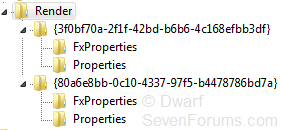
Well... I hate to throw a monkey wrench into this, but the key into the registry for the HKLM entry is not unique... nor is it apparently consistent. My key is different from your key.

In fact, I have MULTIPLE keys under "MMDevices\Audio\Render" that yield an FXProperties detail showing what probably is an EQ setting (or multiple saved EQ settings). I have many more FXProperties stored under "MMDevices\Audio\Capture", but I suppose these are not the saved EQ settings we're hunting down.

I wonder if this multiple keys and multiple FXProperties under \Render reflects multiple driver versions having been uninstalled and re-installed over time since Win7 was installed? You'd think that the UNINSTALL first step in a driver upgrade would have cleaned house on these now obsolete Registry entries but it appears to NOT be the case. Looks like they just accumulate over time! Brilliant, Realtek!

I guess I could certainly figure out which one is "current" by creating a new saved EQ and discovering which FXProperties gets the additional detail entry.

Anyway, it looks like the EXPORT needs to be a bit more selective, if you really want to save what is currently in effect. Looks like the main key is not one single value but dynamically generated with each driver release... or something.

registrymanyfxpropertie.jpg
 

My Computer

Computer type
PC/Desktop
Computer Manufacturer/Model Number
Home-built, two systems (1) and (2)
OS
Windows 7 Pro x64 (1), Win7 Pro X64 (2)
CPU
i5-3350p 3.1Ghz/6MB-cache (1); E8400 3.0Ghz/6MB-cache (2)
Motherboard
ASUS P8Z77-V Pro (1); ASUS P5Q3 (2)
Memory
8GB PC3-12800 DDR3 (1); 4GB PC3-10600 DDR3 (2)
Graphics Card(s)
ATI HD7750 (1), (see TV cards); ATI R7 250 (2)
Sound Card
Realtek ALC892 HD Audio (1); Realtek ALC1200 HD Audio (2)
Monitor(s) Displays
Eizo HD2441W LCD, Eizo S2433W (1); Eizo 24" S2433W (2)
Screen Resolution
1920x1200, 1920x1200 (1); 1920x1200 (2)
Hard Drives
(1) 1TB SATA-II (7200RPM), 2x2TB SATA-III (7200RPM), 250GB SATA-III (10000RPM) for OS; 2x2TB external USB 3.0

(2) 320GB SATA-II (7200RPM), 750GB SATA-II (7200RPM), 150GB SATA-II (10000RPM) for OS; 2TB external USB 3.0
PSU
Nesteq ECS-6001 600W (1); Nesteq ECS-5001 500W (2)
Case
Acousti-Case 360 (1) and (2)
Cooling
Noctua NH-U12P SE2 for CPU, 2x120mm case fans (1) and (2)
Keyboard
IBM PS/2 (1) and (2)
Mouse
Logitech MX Revolution wireless (1); Microsoft wired (2)
Internet Speed
100mbps down / 10mbps up
Antivirus
Microsoft Security Essentials; Malwarebyte Anti-Malware Pro
Browser
Firefox
Other Info
Ceton InfiniTV 4-tuner cablecard-enabled TV card as well as Hauppauge HVR-2250 OTA/ATSC 2-tuner TV card in (1), running under Win7 WMC
Well... I hate to throw a monkey wrench into this, but the key into the registry for the HKLM entry is not unique... nor is it apparently consistent. My key is different from your key.

In fact, I have MULTIPLE keys under "MMDevices\Audio\Render" that yield an FXProperties detail showing what probably is an EQ setting (or multiple saved EQ settings). I have many more FXProperties stored under "MMDevices\Audio\Capture", but I suppose these are not the saved EQ settings we're hunting down.


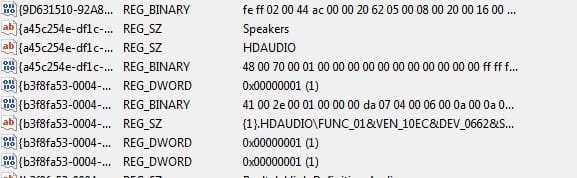
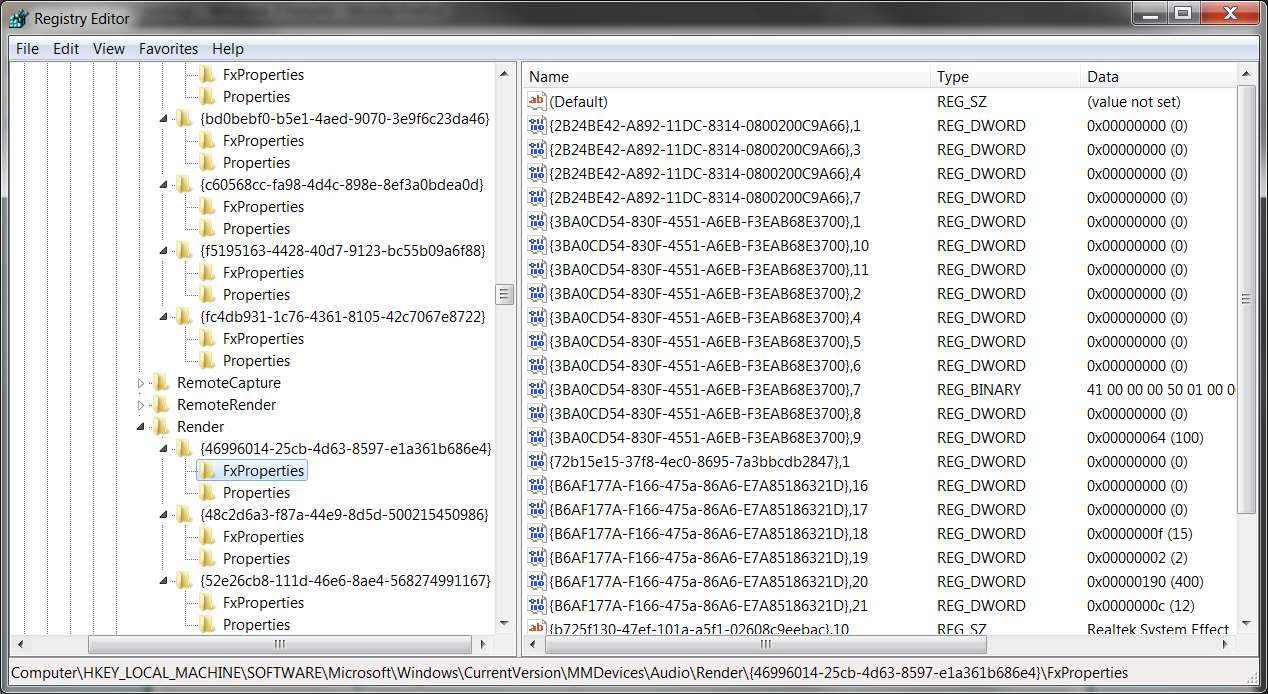
Right, the FXProperties that refelcts the EQ setting has an associated "Properties" key that will have the word "Speaker" in the text.

FXProp2.jpg

The entry looks like this:

FXProp3.jpg


Ap
 

My Computer

Computer Manufacturer/Model Number
Assembled in my workshop
OS
Windows 7 Home Premium
CPU
Intel Core 2 Duo @ 3.00gHz
Motherboard
Gigabyte GA-P35-S3G
Memory
4 GB
Graphics Card(s)
ATI Radeon HD 2600 XT
Sound Card
RME 24/96 Card, Realtek Internal Audio PreSonus FireStudio
Monitor(s) Displays
Acer 1917 (x2)
Screen Resolution
1280 x 1024 on both monitors
Hard Drives
Three 250GB Seagate SATA Barracuda 7200rpm
PSU
Rosewill 500-watt
Case
Rosewill mid-tower
Cooling
Noctua NH-U9B (CPU), PwrSupply fan + single large case Fan
Keyboard
Macally w/2/USB ports.
Mouse
Trackman Wheel
Other Info
Event 20/20 bas studio monitors, Yamaha sub.
Rackmount Korg/Roland/Yamaha synthesizers,
Cubase MIDI/audio recording. Sony Soundforge audio/mastering software. CD Architect Mastering. RME & Presonus audio interfaces.
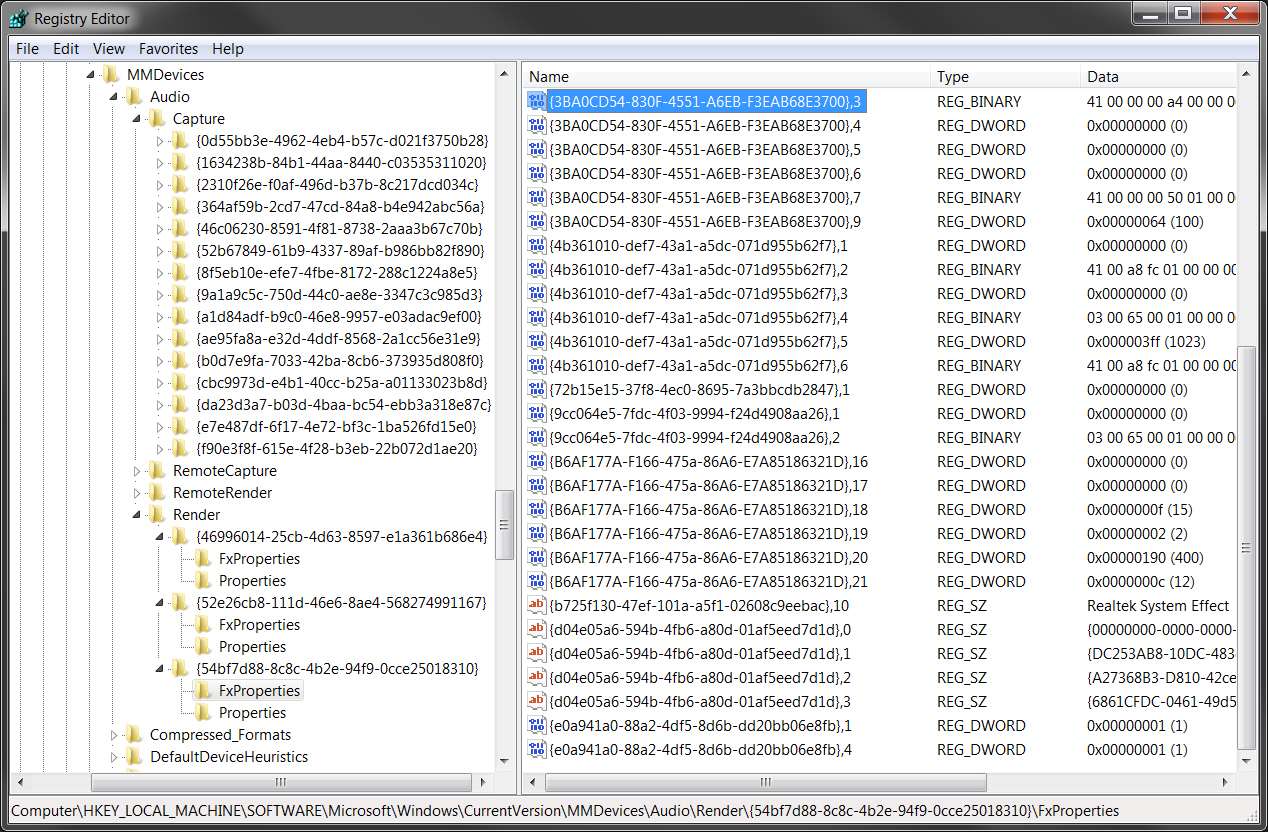
Ok... I think I've got it. You kind of just have to look closely at the \Render Registry entries to pick out the new keys that got added when you save a new EQ.

I just uninstalled my previous driver (I think it was 2.45) and installed the current 2.47. I examined things at each step... first after uninstalling and re-booting, then after installing 2.47 and re-booting but with no saved EQ's, and then after saving two somewhat different EQ's.

Interestingly, after uninstalling the Realtek drivers all of the FXProperties items under \Capture went away, although the three FXProperties items under \Render remained.

However after installing 2.47 a whole bunch of new FXProperties entries got created under \Capture. Furthermore the key of the third FXProperties group under \Render changed from what it was previously (when the Microsoft drivers were probably installed) to a new value, apparently generated by the install of the Realtek driver.

Nevertheless, it definitely looks like it is the third group (for my system, anyway) which is the relevant group under \Render which reflects the install of the active Realtek driver. So it's the FXProperties group there which is of concern to us.

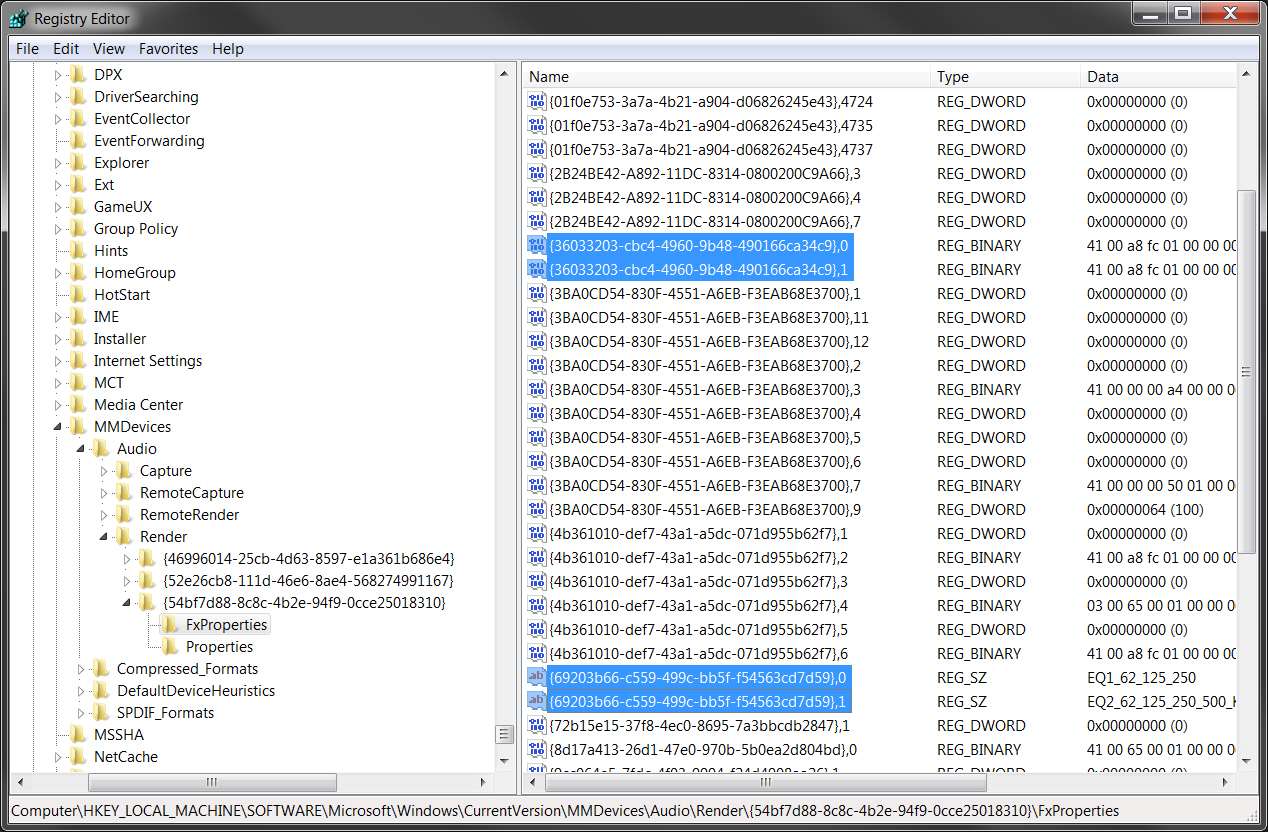
Finally, after saving two different EQ settings I see a total of FOUR new entries in the Registry in this third FXProperties group: two are the REG_SZ items which provide the names of the saved EQ's (and the suffixes of 0 and 1), and the other two are the REG_BINARY items which provide the previously documented internal representation of the 10 EQ slider values (also with suffixed of 0 and 1). Presumably these are created in pairs each time you save an EQ, with appropriately matching suffixes.

Again, note from the following screenshots that my keys do not match those of others... but the concept is solid.

And it would appear that exporting these four items (or however many pairs of entries you have, depending on the number of saved EQ's you have) from the proper FXProperties group under \Render, well that's what you need to do to save them across driver upgrades.

However I'm concerned that the next time I uninstall and reinstall a newly released Realtek driver that the key generated for that third \Render group which contains the crucial FXProperties group will be yet again different from what it is now.

For example, the original 2.45 Realtek install had a key that began with (52e26cb8-...) for that third group under \Render. In contrast the third group after uninstalling 2.45 and reinstalling 2.47 is now (54bfd888-...).

Be careful with the EXPORT and IMPORT.


So you do have to look sharply, to make sure you're looking at the proper items... with the apparently uniquely generated keys from your own system each time a new driver is installed, rather than from some global Realtek constant key that's the same for everybody for every driver release.

Anyway, here is the Registry for that third FXProperties group (on my system) both (a) right after 2.47 installed and before saving any EQ, and (b) after saving two EQ.


registryrealtekinstalle.jpg


registryrealtekinstalle.jpg
 

My Computer

Computer type
PC/Desktop
Computer Manufacturer/Model Number
Home-built, two systems (1) and (2)
OS
Windows 7 Pro x64 (1), Win7 Pro X64 (2)
CPU
i5-3350p 3.1Ghz/6MB-cache (1); E8400 3.0Ghz/6MB-cache (2)
Motherboard
ASUS P8Z77-V Pro (1); ASUS P5Q3 (2)
Memory
8GB PC3-12800 DDR3 (1); 4GB PC3-10600 DDR3 (2)
Graphics Card(s)
ATI HD7750 (1), (see TV cards); ATI R7 250 (2)
Sound Card
Realtek ALC892 HD Audio (1); Realtek ALC1200 HD Audio (2)
Monitor(s) Displays
Eizo HD2441W LCD, Eizo S2433W (1); Eizo 24" S2433W (2)
Screen Resolution
1920x1200, 1920x1200 (1); 1920x1200 (2)
Hard Drives
(1) 1TB SATA-II (7200RPM), 2x2TB SATA-III (7200RPM), 250GB SATA-III (10000RPM) for OS; 2x2TB external USB 3.0

(2) 320GB SATA-II (7200RPM), 750GB SATA-II (7200RPM), 150GB SATA-II (10000RPM) for OS; 2TB external USB 3.0
PSU
Nesteq ECS-6001 600W (1); Nesteq ECS-5001 500W (2)
Case
Acousti-Case 360 (1) and (2)
Cooling
Noctua NH-U12P SE2 for CPU, 2x120mm case fans (1) and (2)
Keyboard
IBM PS/2 (1) and (2)
Mouse
Logitech MX Revolution wireless (1); Microsoft wired (2)
Internet Speed
100mbps down / 10mbps up
Antivirus
Microsoft Security Essentials; Malwarebyte Anti-Malware Pro
Browser
Firefox
Other Info
Ceton InfiniTV 4-tuner cablecard-enabled TV card as well as Hauppauge HVR-2250 OTA/ATSC 2-tuner TV card in (1), running under Win7 WMC
Ok... I think I've got it. You kind of just have to look closely at the \Render Registry entries to pick out the new keys that got added when you save a new EQ.

Again, note from the following screenshots that my keys do not match those of others... but the concept is solid.

However I'm concerned that the next time I uninstall and reinstall a newly released Realtek driver that the key generated for that third \Render group which contains the crucial FXProperties group will be yet again different from what it is now.

Be careful with the EXPORT and IMPORT.

That's a good point, if/when I install a newer set of drivers, I'll first save what I have following the install, then I'll try importing that key over the top of whatever's there.

Ap
 

My Computer

Computer Manufacturer/Model Number
Assembled in my workshop
OS
Windows 7 Home Premium
CPU
Intel Core 2 Duo @ 3.00gHz
Motherboard
Gigabyte GA-P35-S3G
Memory
4 GB
Graphics Card(s)
ATI Radeon HD 2600 XT
Sound Card
RME 24/96 Card, Realtek Internal Audio PreSonus FireStudio
Monitor(s) Displays
Acer 1917 (x2)
Screen Resolution
1280 x 1024 on both monitors
Hard Drives
Three 250GB Seagate SATA Barracuda 7200rpm
PSU
Rosewill 500-watt
Case
Rosewill mid-tower
Cooling
Noctua NH-U9B (CPU), PwrSupply fan + single large case Fan
Keyboard
Macally w/2/USB ports.
Mouse
Trackman Wheel
Other Info
Event 20/20 bas studio monitors, Yamaha sub.
Rackmount Korg/Roland/Yamaha synthesizers,
Cubase MIDI/audio recording. Sony Soundforge audio/mastering software. CD Architect Mastering. RME & Presonus audio interfaces.
It would seem that further investigation is required here, and we might be able to find the other settings such as Loudness and Speaker Configuration as well. As regards the name of the key, that will have to wait until a subsequent driver release so that I can compare them. Incidentally, I use this method to install the driver, just in case it makes a difference: Device Manager - Install Driver - Vista Forums
 

My Computer

Computer type
PC/Desktop
Computer Manufacturer/Model Number
Dwarf Dwf/11/2012 r09/2013
OS
Windows 8.1 Pro RTM x64
CPU
Intel Core-i5-3570K 4-core @ 3.4GHz (Ivy Bridge) (OC 4.4GHz)
Motherboard
ASRock Z77 Extreme4-M
Memory
4 x 4GB DDR3-1600 Corsair Vengeance CMZ8GX3M2A1600C9B (16GB)
Graphics Card(s)
MSI GeForce GTX770 Gaming OC 2GB
Sound Card
Realtek High Definition on board solution (ALC 898)
Monitor(s) Displays
ViewSonic VA1912w Widescreen (VGA)
Screen Resolution
1440x900
Hard Drives
OCZ Agility 3 SSD 120GB SATA III x2 (RAID 0)
Samsung HD501LJ 500GB SATA II x2
Hitachi HDS721010CLA332 1TB SATA II
Iomega 1.5TB Ext USB 2.0
WD 2.0TB Ext USB 3.0
PSU
XFX Pro Series 850W Semi-Modular
Case
Gigabyte IF233
Cooling
1 x 120mm Front Inlet 1 x 120mm Rear Exhaust
Keyboard
Microsoft Comfort Curve Keyboard 3000 (USB)
Mouse
Microsoft Comfort Mouse 3000 for Business (USB)
Internet Speed
NetGear DG834Gv3 ADSL Modem/Router (Ethernet) ~4.0 Mb/s (O2)
Antivirus
Avast! 8.0.1497
Browser
IE 11
Other Info
Optical Drive: HL-DT-ST BD-RE BH10LS30 SATA Bluray
Lexmark S305 Printer/Scanner/Copier (USB)
WEI Score: 8.1/8.1/8.5/8.5/8.25
Asus Eee PC 1011PX Netbook (Windows 7 x86 Starter)
It would seem that further investigation is required here, and we might be able to find the other settings such as Loudness and Speaker Configuration as well.
True. Would be nice to be able to preserve everything before an upgrade.

Really too bad that Realtek has turned a driver upgrade into a 2-step process, the first being the uninstall of existing driver (which apparently also deletes everything in the Registry relating to the current customization) and then an install of the new driver (requiring you to start all over again). Most other manufacturers (e.g. ATI) allow you to just run the new driver installer which upgrades the components but retains existing Registry customizations.


Incidentally, I use this method to install the driver, just in case it makes a difference: Device Manager - Install Driver - Vista Forums
Why? How does this even work? What are you pointing to, in terms of where the expanded driver files are supposed to be found for the "driver update"? Are you using your own manual "unpack" of the Realtek downloaded file?

I thought that the downloaded driver installer file from Realtek needed to be run, with its 2-step process? Running it unpacks it, but how would you unpack it manually and not run it... in order to use its imbedded files for the Device Manager "update driver" method?

And again, is this really allowed? Why would Realtek have packaged their 2-step process if you could actually run a 1-step upgrade directly?

As I've now seen, the Registry key for that third FXProperties group (for me, anyway) changed with the new driver install. So what happens with your Device Manager method?
 

My Computer

Computer type
PC/Desktop
Computer Manufacturer/Model Number
Home-built, two systems (1) and (2)
OS
Windows 7 Pro x64 (1), Win7 Pro X64 (2)
CPU
i5-3350p 3.1Ghz/6MB-cache (1); E8400 3.0Ghz/6MB-cache (2)
Motherboard
ASUS P8Z77-V Pro (1); ASUS P5Q3 (2)
Memory
8GB PC3-12800 DDR3 (1); 4GB PC3-10600 DDR3 (2)
Graphics Card(s)
ATI HD7750 (1), (see TV cards); ATI R7 250 (2)
Sound Card
Realtek ALC892 HD Audio (1); Realtek ALC1200 HD Audio (2)
Monitor(s) Displays
Eizo HD2441W LCD, Eizo S2433W (1); Eizo 24" S2433W (2)
Screen Resolution
1920x1200, 1920x1200 (1); 1920x1200 (2)
Hard Drives
(1) 1TB SATA-II (7200RPM), 2x2TB SATA-III (7200RPM), 250GB SATA-III (10000RPM) for OS; 2x2TB external USB 3.0

(2) 320GB SATA-II (7200RPM), 750GB SATA-II (7200RPM), 150GB SATA-II (10000RPM) for OS; 2TB external USB 3.0
PSU
Nesteq ECS-6001 600W (1); Nesteq ECS-5001 500W (2)
Case
Acousti-Case 360 (1) and (2)
Cooling
Noctua NH-U12P SE2 for CPU, 2x120mm case fans (1) and (2)
Keyboard
IBM PS/2 (1) and (2)
Mouse
Logitech MX Revolution wireless (1); Microsoft wired (2)
Internet Speed
100mbps down / 10mbps up
Antivirus
Microsoft Security Essentials; Malwarebyte Anti-Malware Pro
Browser
Firefox
Other Info
Ceton InfiniTV 4-tuner cablecard-enabled TV card as well as Hauppauge HVR-2250 OTA/ATSC 2-tuner TV card in (1), running under Win7 WMC
True. Would be nice to be able to preserve everything before an upgrade.

I shall have a look at the other settings later when I'm back on my home system.

Why? How does this even work? What are you pointing to, in terms of where the expanded driver files are supposed to be found for the "driver update"? Are you using your own manual "unpack" of the Realtek downloaded file?

As regards driver installation, I download the zipped version of the driver from Realtek. I then extract the files, and it is to the folder where the files are extracted to that I point to.

As I've now seen, the Registry key for that third FXProperties group (for me, anyway) changed with the new driver install. So what happens with your Device Manager method?

As far as I know, mine stays constant, but I will find out in a subsequent driver release.
 

My Computer

Computer type
PC/Desktop
Computer Manufacturer/Model Number
Dwarf Dwf/11/2012 r09/2013
OS
Windows 8.1 Pro RTM x64
CPU
Intel Core-i5-3570K 4-core @ 3.4GHz (Ivy Bridge) (OC 4.4GHz)
Motherboard
ASRock Z77 Extreme4-M
Memory
4 x 4GB DDR3-1600 Corsair Vengeance CMZ8GX3M2A1600C9B (16GB)
Graphics Card(s)
MSI GeForce GTX770 Gaming OC 2GB
Sound Card
Realtek High Definition on board solution (ALC 898)
Monitor(s) Displays
ViewSonic VA1912w Widescreen (VGA)
Screen Resolution
1440x900
Hard Drives
OCZ Agility 3 SSD 120GB SATA III x2 (RAID 0)
Samsung HD501LJ 500GB SATA II x2
Hitachi HDS721010CLA332 1TB SATA II
Iomega 1.5TB Ext USB 2.0
WD 2.0TB Ext USB 3.0
PSU
XFX Pro Series 850W Semi-Modular
Case
Gigabyte IF233
Cooling
1 x 120mm Front Inlet 1 x 120mm Rear Exhaust
Keyboard
Microsoft Comfort Curve Keyboard 3000 (USB)
Mouse
Microsoft Comfort Mouse 3000 for Business (USB)
Internet Speed
NetGear DG834Gv3 ADSL Modem/Router (Ethernet) ~4.0 Mb/s (O2)
Antivirus
Avast! 8.0.1497
Browser
IE 11
Other Info
Optical Drive: HL-DT-ST BD-RE BH10LS30 SATA Bluray
Lexmark S305 Printer/Scanner/Copier (USB)
WEI Score: 8.1/8.1/8.5/8.5/8.25
Asus Eee PC 1011PX Netbook (Windows 7 x86 Starter)
As regards driver installation, I download the zipped version of the driver from Realtek. I then extract the files, and it is to the folder where the files are extracted to that I point to.
Of course. I'm an idiot. I completely forgot about that alternative download option, since I've never used it.

But I still wonder about the Registry key for the FXProperties item when you simply "update drivers" through Device Manager in this manner. If you've been losing your previously saved EQ settings (which we now know to each be represented by a pair of Registry entries) then something must be going on over and above just replacing files. Obviously these old pairs of entries are being deleted, even though you're not going through the 2-step process per the EXE installer.

Or... perhaps the update is deleting the old master key (that contains both FXProperties and Properties group items) and everything that's in it, and creating a new key and two new subordinate group items, just as would be done per the EXE installer.

Who knows... at least for now? Anyway, we're making good progress in understanding more about this whole process.
 

My Computer

Computer type
PC/Desktop
Computer Manufacturer/Model Number
Home-built, two systems (1) and (2)
OS
Windows 7 Pro x64 (1), Win7 Pro X64 (2)
CPU
i5-3350p 3.1Ghz/6MB-cache (1); E8400 3.0Ghz/6MB-cache (2)
Motherboard
ASUS P8Z77-V Pro (1); ASUS P5Q3 (2)
Memory
8GB PC3-12800 DDR3 (1); 4GB PC3-10600 DDR3 (2)
Graphics Card(s)
ATI HD7750 (1), (see TV cards); ATI R7 250 (2)
Sound Card
Realtek ALC892 HD Audio (1); Realtek ALC1200 HD Audio (2)
Monitor(s) Displays
Eizo HD2441W LCD, Eizo S2433W (1); Eizo 24" S2433W (2)
Screen Resolution
1920x1200, 1920x1200 (1); 1920x1200 (2)
Hard Drives
(1) 1TB SATA-II (7200RPM), 2x2TB SATA-III (7200RPM), 250GB SATA-III (10000RPM) for OS; 2x2TB external USB 3.0

(2) 320GB SATA-II (7200RPM), 750GB SATA-II (7200RPM), 150GB SATA-II (10000RPM) for OS; 2TB external USB 3.0
PSU
Nesteq ECS-6001 600W (1); Nesteq ECS-5001 500W (2)
Case
Acousti-Case 360 (1) and (2)
Cooling
Noctua NH-U12P SE2 for CPU, 2x120mm case fans (1) and (2)
Keyboard
IBM PS/2 (1) and (2)
Mouse
Logitech MX Revolution wireless (1); Microsoft wired (2)
Internet Speed
100mbps down / 10mbps up
Antivirus
Microsoft Security Essentials; Malwarebyte Anti-Malware Pro
Browser
Firefox
Other Info
Ceton InfiniTV 4-tuner cablecard-enabled TV card as well as Hauppauge HVR-2250 OTA/ATSC 2-tuner TV card in (1), running under Win7 WMC
Some more information.

Firstly, there are only 2 keys on my system.

Capture.PNG

The first of these keys refers to the digital output, whereas the second refers to the analogue output. It is this key that I was referring to in the first post in this thread.

The equalizer is independent between both outputs, and you can have two identically named equalizer enhancements, one per output, with different slider settings per output.

The format and name of the data keys is identical to that for the analogue output.

Code:
"{69203b66-c559-499c-bb5f-f54563cd7d59},[COLOR=red]n[/COLOR]"="[COLOR=black]<user preset name [/COLOR][COLOR=red]n[/COLOR][COLOR=black]>[/COLOR]"
"{36033203-cbc4-4960-9b48-490166ca34c9},[COLOR=red]n[/COLOR]"=hex:41,00,9d,fb,01,00,00,00,[COLOR=red]00[/COLOR],[COLOR=red]00[/COLOR],\
  [COLOR=red]00[/COLOR],[COLOR=red]00[/COLOR],[COLOR=red]00[/COLOR],[COLOR=red]00[/COLOR],[COLOR=red]00[/COLOR],[COLOR=red]00[/COLOR],[COLOR=red]00[/COLOR],[COLOR=red]00[/COLOR],[COLOR=red]00[/COLOR],[COLOR=red]00[/COLOR],[COLOR=red]00[/COLOR],[COLOR=red]00[/COLOR],[COLOR=red]00[/COLOR],[COLOR=red]00[/COLOR],[COLOR=red]00[/COLOR],[COLOR=red]00[/COLOR],[COLOR=red]00[/COLOR],[COLOR=red]00[/COLOR],[COLOR=red]00[/COLOR],[COLOR=red]00[/COLOR],[COLOR=red]00[/COLOR],[COLOR=red]00[/COLOR],[COLOR=red]00[/COLOR],[COLOR=red]00[/COLOR],[COLOR=red]00[/COLOR],\
  [COLOR=red]00[/COLOR],[COLOR=red]00[/COLOR],[COLOR=red]00[/COLOR],[COLOR=red]00[/COLOR],[COLOR=red]00[/COLOR],[COLOR=red]00[/COLOR],[COLOR=red]00[/COLOR],[COLOR=red]00[/COLOR],[COLOR=red]00[/COLOR],[COLOR=red]00[/COLOR],[COLOR=red]00[/COLOR],[COLOR=red]00[/COLOR],[COLOR=red]00[/COLOR]
 
Last edited:

My Computer

Computer type
PC/Desktop
Computer Manufacturer/Model Number
Dwarf Dwf/11/2012 r09/2013
OS
Windows 8.1 Pro RTM x64
CPU
Intel Core-i5-3570K 4-core @ 3.4GHz (Ivy Bridge) (OC 4.4GHz)
Motherboard
ASRock Z77 Extreme4-M
Memory
4 x 4GB DDR3-1600 Corsair Vengeance CMZ8GX3M2A1600C9B (16GB)
Graphics Card(s)
MSI GeForce GTX770 Gaming OC 2GB
Sound Card
Realtek High Definition on board solution (ALC 898)
Monitor(s) Displays
ViewSonic VA1912w Widescreen (VGA)
Screen Resolution
1440x900
Hard Drives
OCZ Agility 3 SSD 120GB SATA III x2 (RAID 0)
Samsung HD501LJ 500GB SATA II x2
Hitachi HDS721010CLA332 1TB SATA II
Iomega 1.5TB Ext USB 2.0
WD 2.0TB Ext USB 3.0
PSU
XFX Pro Series 850W Semi-Modular
Case
Gigabyte IF233
Cooling
1 x 120mm Front Inlet 1 x 120mm Rear Exhaust
Keyboard
Microsoft Comfort Curve Keyboard 3000 (USB)
Mouse
Microsoft Comfort Mouse 3000 for Business (USB)
Internet Speed
NetGear DG834Gv3 ADSL Modem/Router (Ethernet) ~4.0 Mb/s (O2)
Antivirus
Avast! 8.0.1497
Browser
IE 11
Other Info
Optical Drive: HL-DT-ST BD-RE BH10LS30 SATA Bluray
Lexmark S305 Printer/Scanner/Copier (USB)
WEI Score: 8.1/8.1/8.5/8.5/8.25
Asus Eee PC 1011PX Netbook (Windows 7 x86 Starter)
Firstly, there are only 2 keys on my system.
Perhaps tied to the number of "playback devices" on your system. How many do you have?

I have THREE (of which I have the Realtek HD Audio SPEAKERS device selected and green-checked as my default). And I have THREE keys under \Render which each have FXProperties and Properties in that group.

Though I don't use them or have them connected, I also have a USB type of output device (perhaps from my Pinnacle USB-710 device) and ATI HDMI audio.
 

My Computer

Computer type
PC/Desktop
Computer Manufacturer/Model Number
Home-built, two systems (1) and (2)
OS
Windows 7 Pro x64 (1), Win7 Pro X64 (2)
CPU
i5-3350p 3.1Ghz/6MB-cache (1); E8400 3.0Ghz/6MB-cache (2)
Motherboard
ASUS P8Z77-V Pro (1); ASUS P5Q3 (2)
Memory
8GB PC3-12800 DDR3 (1); 4GB PC3-10600 DDR3 (2)
Graphics Card(s)
ATI HD7750 (1), (see TV cards); ATI R7 250 (2)
Sound Card
Realtek ALC892 HD Audio (1); Realtek ALC1200 HD Audio (2)
Monitor(s) Displays
Eizo HD2441W LCD, Eizo S2433W (1); Eizo 24" S2433W (2)
Screen Resolution
1920x1200, 1920x1200 (1); 1920x1200 (2)
Hard Drives
(1) 1TB SATA-II (7200RPM), 2x2TB SATA-III (7200RPM), 250GB SATA-III (10000RPM) for OS; 2x2TB external USB 3.0

(2) 320GB SATA-II (7200RPM), 750GB SATA-II (7200RPM), 150GB SATA-II (10000RPM) for OS; 2TB external USB 3.0
PSU
Nesteq ECS-6001 600W (1); Nesteq ECS-5001 500W (2)
Case
Acousti-Case 360 (1) and (2)
Cooling
Noctua NH-U12P SE2 for CPU, 2x120mm case fans (1) and (2)
Keyboard
IBM PS/2 (1) and (2)
Mouse
Logitech MX Revolution wireless (1); Microsoft wired (2)
Internet Speed
100mbps down / 10mbps up
Antivirus
Microsoft Security Essentials; Malwarebyte Anti-Malware Pro
Browser
Firefox
Other Info
Ceton InfiniTV 4-tuner cablecard-enabled TV card as well as Hauppauge HVR-2250 OTA/ATSC 2-tuner TV card in (1), running under Win7 WMC
That would sound reasonable and logical.
 

My Computer

Computer type
PC/Desktop
Computer Manufacturer/Model Number
Dwarf Dwf/11/2012 r09/2013
OS
Windows 8.1 Pro RTM x64
CPU
Intel Core-i5-3570K 4-core @ 3.4GHz (Ivy Bridge) (OC 4.4GHz)
Motherboard
ASRock Z77 Extreme4-M
Memory
4 x 4GB DDR3-1600 Corsair Vengeance CMZ8GX3M2A1600C9B (16GB)
Graphics Card(s)
MSI GeForce GTX770 Gaming OC 2GB
Sound Card
Realtek High Definition on board solution (ALC 898)
Monitor(s) Displays
ViewSonic VA1912w Widescreen (VGA)
Screen Resolution
1440x900
Hard Drives
OCZ Agility 3 SSD 120GB SATA III x2 (RAID 0)
Samsung HD501LJ 500GB SATA II x2
Hitachi HDS721010CLA332 1TB SATA II
Iomega 1.5TB Ext USB 2.0
WD 2.0TB Ext USB 3.0
PSU
XFX Pro Series 850W Semi-Modular
Case
Gigabyte IF233
Cooling
1 x 120mm Front Inlet 1 x 120mm Rear Exhaust
Keyboard
Microsoft Comfort Curve Keyboard 3000 (USB)
Mouse
Microsoft Comfort Mouse 3000 for Business (USB)
Internet Speed
NetGear DG834Gv3 ADSL Modem/Router (Ethernet) ~4.0 Mb/s (O2)
Antivirus
Avast! 8.0.1497
Browser
IE 11
Other Info
Optical Drive: HL-DT-ST BD-RE BH10LS30 SATA Bluray
Lexmark S305 Printer/Scanner/Copier (USB)
WEI Score: 8.1/8.1/8.5/8.5/8.25
Asus Eee PC 1011PX Netbook (Windows 7 x86 Starter)
The equalizer settings are remarkably extremely high precision. Each slider can have any one of 1200 distinct values either negative or positive with relation to the central neutral (0) position. Of course, the only way to achieve this precision when setting values is to manually enter them directly into the registry, following the instructions earlier as regards the data format and location.

Positive Range

00 00 00 00 00 00 00 01 = 1
00 00 00 00 00 00 04 B0 = 1200

Neutral

00 00 00 00 00 00 00 00 = 0

Negative

FF FF FF FF FF FF FF FF = -1
FF FF FF FF FF FF FB 50 = -1200

Note that these values are actually 64-bit numbers, but only the least-significant 32-bits (4 bytes) are recorded in the key. They are arranged in the key with the LSB (Least Significant Bit) entered first and the MSB (Most Significant Bit) entered last.
 

My Computer

Computer type
PC/Desktop
Computer Manufacturer/Model Number
Dwarf Dwf/11/2012 r09/2013
OS
Windows 8.1 Pro RTM x64
CPU
Intel Core-i5-3570K 4-core @ 3.4GHz (Ivy Bridge) (OC 4.4GHz)
Motherboard
ASRock Z77 Extreme4-M
Memory
4 x 4GB DDR3-1600 Corsair Vengeance CMZ8GX3M2A1600C9B (16GB)
Graphics Card(s)
MSI GeForce GTX770 Gaming OC 2GB
Sound Card
Realtek High Definition on board solution (ALC 898)
Monitor(s) Displays
ViewSonic VA1912w Widescreen (VGA)
Screen Resolution
1440x900
Hard Drives
OCZ Agility 3 SSD 120GB SATA III x2 (RAID 0)
Samsung HD501LJ 500GB SATA II x2
Hitachi HDS721010CLA332 1TB SATA II
Iomega 1.5TB Ext USB 2.0
WD 2.0TB Ext USB 3.0
PSU
XFX Pro Series 850W Semi-Modular
Case
Gigabyte IF233
Cooling
1 x 120mm Front Inlet 1 x 120mm Rear Exhaust
Keyboard
Microsoft Comfort Curve Keyboard 3000 (USB)
Mouse
Microsoft Comfort Mouse 3000 for Business (USB)
Internet Speed
NetGear DG834Gv3 ADSL Modem/Router (Ethernet) ~4.0 Mb/s (O2)
Antivirus
Avast! 8.0.1497
Browser
IE 11
Other Info
Optical Drive: HL-DT-ST BD-RE BH10LS30 SATA Bluray
Lexmark S305 Printer/Scanner/Copier (USB)
WEI Score: 8.1/8.1/8.5/8.5/8.25
Asus Eee PC 1011PX Netbook (Windows 7 x86 Starter)
Firstly, there are only 2 keys on my system.
Perhaps tied to the number of "playback devices" on your system. How many do you have?


This is correct, I also have an M-Audio 24/96 (stereo) PCI card installed.

Each output device digital/analog will show up with it's own settings.
I also had plugged in a USB audio device at one time so I have several Properties/FXProperties under the Render key.

Ap
 

My Computer

Computer Manufacturer/Model Number
Assembled in my workshop
OS
Windows 7 Home Premium
CPU
Intel Core 2 Duo @ 3.00gHz
Motherboard
Gigabyte GA-P35-S3G
Memory
4 GB
Graphics Card(s)
ATI Radeon HD 2600 XT
Sound Card
RME 24/96 Card, Realtek Internal Audio PreSonus FireStudio
Monitor(s) Displays
Acer 1917 (x2)
Screen Resolution
1280 x 1024 on both monitors
Hard Drives
Three 250GB Seagate SATA Barracuda 7200rpm
PSU
Rosewill 500-watt
Case
Rosewill mid-tower
Cooling
Noctua NH-U9B (CPU), PwrSupply fan + single large case Fan
Keyboard
Macally w/2/USB ports.
Mouse
Trackman Wheel
Other Info
Event 20/20 bas studio monitors, Yamaha sub.
Rackmount Korg/Roland/Yamaha synthesizers,
Cubase MIDI/audio recording. Sony Soundforge audio/mastering software. CD Architect Mastering. RME & Presonus audio interfaces.
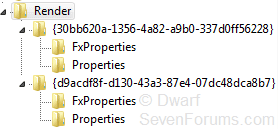
I wonder if the names of the keys highlighted here depend upon which audio codec chip you have installed? Mine is an ALC662.

Capture.PNG
 

My Computer

Computer type
PC/Desktop
Computer Manufacturer/Model Number
Dwarf Dwf/11/2012 r09/2013
OS
Windows 8.1 Pro RTM x64
CPU
Intel Core-i5-3570K 4-core @ 3.4GHz (Ivy Bridge) (OC 4.4GHz)
Motherboard
ASRock Z77 Extreme4-M
Memory
4 x 4GB DDR3-1600 Corsair Vengeance CMZ8GX3M2A1600C9B (16GB)
Graphics Card(s)
MSI GeForce GTX770 Gaming OC 2GB
Sound Card
Realtek High Definition on board solution (ALC 898)
Monitor(s) Displays
ViewSonic VA1912w Widescreen (VGA)
Screen Resolution
1440x900
Hard Drives
OCZ Agility 3 SSD 120GB SATA III x2 (RAID 0)
Samsung HD501LJ 500GB SATA II x2
Hitachi HDS721010CLA332 1TB SATA II
Iomega 1.5TB Ext USB 2.0
WD 2.0TB Ext USB 3.0
PSU
XFX Pro Series 850W Semi-Modular
Case
Gigabyte IF233
Cooling
1 x 120mm Front Inlet 1 x 120mm Rear Exhaust
Keyboard
Microsoft Comfort Curve Keyboard 3000 (USB)
Mouse
Microsoft Comfort Mouse 3000 for Business (USB)
Internet Speed
NetGear DG834Gv3 ADSL Modem/Router (Ethernet) ~4.0 Mb/s (O2)
Antivirus
Avast! 8.0.1497
Browser
IE 11
Other Info
Optical Drive: HL-DT-ST BD-RE BH10LS30 SATA Bluray
Lexmark S305 Printer/Scanner/Copier (USB)
WEI Score: 8.1/8.1/8.5/8.5/8.25
Asus Eee PC 1011PX Netbook (Windows 7 x86 Starter)
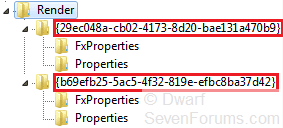
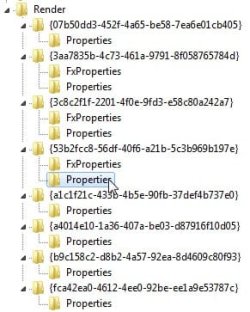
I'm going to throw a spanner in the works here. It would appear that is going to be far more tricky than first anticipated. I've uninstalled the driver and then reinstalled it in Device Manager. The keys are now as shown below.

Capture.PNG

In addition, data keys are slightly different. This is what they show now, with the new data section shown in blue:

Code:
Speakers & Digital Output
"{69203b66-c559-499c-bb5f-f54563cd7d59},[COLOR=red]n[/COLOR]"="[COLOR=black]<user preset name [/COLOR][COLOR=red]n[/COLOR][COLOR=black]>[/COLOR]"
"{36033203-cbc4-4960-9b48-490166ca34c9},[COLOR=red]n[/COLOR]"=hex:[COLOR=blue]41[/COLOR],[COLOR=blue]00[/COLOR],[COLOR=blue]7f[/COLOR],[COLOR=blue]fb[/COLOR],[COLOR=blue]01[/COLOR],[COLOR=blue]00[/COLOR],[COLOR=blue]00[/COLOR],[COLOR=blue]00[/COLOR],[COLOR=red]00[/COLOR],[COLOR=red]00[/COLOR],\
  [COLOR=red]00[/COLOR],[COLOR=red]00[/COLOR],[COLOR=red]00[/COLOR],[COLOR=red]00[/COLOR],[COLOR=red]00[/COLOR],[COLOR=red]00[/COLOR],[COLOR=red]00[/COLOR],[COLOR=red]00[/COLOR],[COLOR=red]00[/COLOR],[COLOR=red]00[/COLOR],[COLOR=red]00[/COLOR],[COLOR=red]00[/COLOR],[COLOR=red]00[/COLOR],[COLOR=red]00[/COLOR],[COLOR=red]00[/COLOR],[COLOR=red]00[/COLOR],[COLOR=red]00[/COLOR],[COLOR=red]00[/COLOR],[COLOR=red]00[/COLOR],[COLOR=red]00[/COLOR],[COLOR=red]00[/COLOR],[COLOR=red]00[/COLOR],[COLOR=red]00[/COLOR],[COLOR=red]00[/COLOR],[COLOR=red]00[/COLOR],\
  [COLOR=red]00[/COLOR],[COLOR=red]00[/COLOR],[COLOR=red]00[/COLOR],[COLOR=red]00[/COLOR],[COLOR=red]00[/COLOR],[COLOR=red]00[/COLOR],[COLOR=red]00[/COLOR],[COLOR=red]00[/COLOR],[COLOR=red]00[/COLOR],[COLOR=red]00[/COLOR],[COLOR=red]00[/COLOR],[COLOR=red]00[/COLOR],[COLOR=red]00[/COLOR]

Because of these differences, I would say that the method I suggested above will not work. You can still export the relevant section, and use it to obtain the data shown in red, but you will have to create a dummy key from the HD manager itself in order to obtain the data shown in blue. Fortunately, the key names remain the same. I would use a name of a preset that you have saved for this, as you can always edit the data afterwards using the registry editor. Alternatively, you can edit the exported registry file so that it has the correct information.

If you just export the Render sub-key and the edit the resultant file just to contain the relevant information, then the data section to alter would be as highlighted below:

Code:
[HKEY_LOCAL_MACHINE\SOFTWARE\Microsoft\Windows\CurrentVersion\MMDevices\Audio\Render\{[COLOR=red]29ec048a[/COLOR]-[COLOR=red]cb02[/COLOR]-[COLOR=red]4173[/COLOR]-[COLOR=red]8d20[/COLOR]-[COLOR=red]bae131a470b9[/COLOR]}\FxProperties]
"{69203b66-c559-499c-bb5f-f54563cd7d59},n"="<user preset name n>"
"{36033203-cbc4-4960-9b48-490166ca34c9},n"=hex:[COLOR=red]41[/COLOR],[COLOR=red]00[/COLOR],[COLOR=red]7f[/COLOR],[COLOR=red]fb[/COLOR],[COLOR=red]01[/COLOR],[COLOR=red]00[/COLOR],[COLOR=red]00[/COLOR],[COLOR=red]00[/COLOR],00,00,\
  00,00,00,00,00,00,00,00,00,00,00,00,00,00,00,00,00,00,00,00,00,00,00,00,00,\
  00,00,00,00,00,00,00,00,00,00,00,00,00
 
[HKEY_LOCAL_MACHINE\SOFTWARE\Microsoft\Windows\CurrentVersion\MMDevices\Audio\Render\{[COLOR=red]b69efb25[/COLOR]-[COLOR=red]5ac5[/COLOR]-[COLOR=red]4f32[/COLOR]-[COLOR=red]819e[/COLOR]-[COLOR=red]efbc8ba37d42[/COLOR]}\FxProperties]
"{69203b66-c559-499c-bb5f-f54563cd7d59},n"="<user preset name n>"
"{36033203-cbc4-4960-9b48-490166ca34c9},n"=hex:[COLOR=red]41[/COLOR],[COLOR=red]00[/COLOR],[COLOR=red]7f[/COLOR],[COLOR=red]fb[/COLOR],[COLOR=red]01[/COLOR],[COLOR=red]00[/COLOR],[COLOR=red]00[/COLOR],[COLOR=red]00[/COLOR],00,00,\
  00,00,00,00,00,00,00,00,00,00,00,00,00,00,00,00,00,00,00,00,00,00,00,00,00,\
  00,00,00,00,00,00,00,00,00,00,00,00,00

Note that the resultant file will need to be merged into the registry. This can only be done from within an account with administrative privileges (as will editing the relevant data directly in the registry).

Here is the equivalent as a batch file. You should be able to infer how to create this file by comparing the code below with that above.

Code:
@ECHO OFF
REG ADD "HKLM\SOFTWARE\Microsoft\Windows\CurrentVersion\MMDevices\Audio\Render\{[COLOR=red]29ec048a-cb02-4173-8d20-bae131a470b9[/COLOR]}\FxProperties" /v "{69203b66-c559-499c-bb5f-f54563cd7d59},n" /t REG_SZ /d "<user preset name n>" /f
REG ADD "HKLM\SOFTWARE\Microsoft\Windows\CurrentVersion\MMDevices\Audio\Render\{[COLOR=red]29ec048a-cb02-4173-8d20-bae131a470b9[/COLOR]}\FxProperties" /v "{36033203-cbc4-4960-9b48-490166ca34c9},n" /t REG_BINARY /d "[COLOR=red]41007ffb01000000[/COLOR]00000000000000000000000000000000000000000000000000000000000000000000000000000000" /f
REG ADD "HKLM\SOFTWARE\Microsoft\Windows\CurrentVersion\MMDevices\Audio\Render\{[COLOR=red]b69efb25-5ac5-4f32-819e-efbc8ba37d42[/COLOR]}\FxProperties" /v "{69203b66-c559-499c-bb5f-f54563cd7d59},n" /t REG_SZ /d "<user preset name n>" /f
REG ADD "HKLM\SOFTWARE\Microsoft\Windows\CurrentVersion\MMDevices\Audio\Render\{[COLOR=red]b69efb25-5ac5-4f32-819e-efbc8ba37d42[/COLOR]}\FxProperties" /v "{36033203-cbc4-4960-9b48-490166ca34c9},n" /t REG_BINARY /d "[COLOR=red]41007ffb01000000[/COLOR]00000000000000000000000000000000000000000000000000000000000000000000000000000000" /f

   Note
To create this files, use Notepad. The file MUST be structured with the syntax as shown above. Give the file a meaningful name and save it with a .bat suffix. I suggest that you save these files in the Public Documents folder. To enter the data in the file into the registry, right click on the file and select Run as administrator. When you provide administrative credentials, the file should execute and the data be merged into the registry. Of course, you could use an account with administrative privileges.
 
Last edited:

My Computer

Computer type
PC/Desktop
Computer Manufacturer/Model Number
Dwarf Dwf/11/2012 r09/2013
OS
Windows 8.1 Pro RTM x64
CPU
Intel Core-i5-3570K 4-core @ 3.4GHz (Ivy Bridge) (OC 4.4GHz)
Motherboard
ASRock Z77 Extreme4-M
Memory
4 x 4GB DDR3-1600 Corsair Vengeance CMZ8GX3M2A1600C9B (16GB)
Graphics Card(s)
MSI GeForce GTX770 Gaming OC 2GB
Sound Card
Realtek High Definition on board solution (ALC 898)
Monitor(s) Displays
ViewSonic VA1912w Widescreen (VGA)
Screen Resolution
1440x900
Hard Drives
OCZ Agility 3 SSD 120GB SATA III x2 (RAID 0)
Samsung HD501LJ 500GB SATA II x2
Hitachi HDS721010CLA332 1TB SATA II
Iomega 1.5TB Ext USB 2.0
WD 2.0TB Ext USB 3.0
PSU
XFX Pro Series 850W Semi-Modular
Case
Gigabyte IF233
Cooling
1 x 120mm Front Inlet 1 x 120mm Rear Exhaust
Keyboard
Microsoft Comfort Curve Keyboard 3000 (USB)
Mouse
Microsoft Comfort Mouse 3000 for Business (USB)
Internet Speed
NetGear DG834Gv3 ADSL Modem/Router (Ethernet) ~4.0 Mb/s (O2)
Antivirus
Avast! 8.0.1497
Browser
IE 11
Other Info
Optical Drive: HL-DT-ST BD-RE BH10LS30 SATA Bluray
Lexmark S305 Printer/Scanner/Copier (USB)
WEI Score: 8.1/8.1/8.5/8.5/8.25
Asus Eee PC 1011PX Netbook (Windows 7 x86 Starter)

My Computer

Computer type
PC/Desktop
Computer Manufacturer/Model Number
Dwarf Dwf/11/2012 r09/2013
OS
Windows 8.1 Pro RTM x64
CPU
Intel Core-i5-3570K 4-core @ 3.4GHz (Ivy Bridge) (OC 4.4GHz)
Motherboard
ASRock Z77 Extreme4-M
Memory
4 x 4GB DDR3-1600 Corsair Vengeance CMZ8GX3M2A1600C9B (16GB)
Graphics Card(s)
MSI GeForce GTX770 Gaming OC 2GB
Sound Card
Realtek High Definition on board solution (ALC 898)
Monitor(s) Displays
ViewSonic VA1912w Widescreen (VGA)
Screen Resolution
1440x900
Hard Drives
OCZ Agility 3 SSD 120GB SATA III x2 (RAID 0)
Samsung HD501LJ 500GB SATA II x2
Hitachi HDS721010CLA332 1TB SATA II
Iomega 1.5TB Ext USB 2.0
WD 2.0TB Ext USB 3.0
PSU
XFX Pro Series 850W Semi-Modular
Case
Gigabyte IF233
Cooling
1 x 120mm Front Inlet 1 x 120mm Rear Exhaust
Keyboard
Microsoft Comfort Curve Keyboard 3000 (USB)
Mouse
Microsoft Comfort Mouse 3000 for Business (USB)
Internet Speed
NetGear DG834Gv3 ADSL Modem/Router (Ethernet) ~4.0 Mb/s (O2)
Antivirus
Avast! 8.0.1497
Browser
IE 11
Other Info
Optical Drive: HL-DT-ST BD-RE BH10LS30 SATA Bluray
Lexmark S305 Printer/Scanner/Copier (USB)
WEI Score: 8.1/8.1/8.5/8.5/8.25
Asus Eee PC 1011PX Netbook (Windows 7 x86 Starter)
My Computer

Computer Manufacturer/Model Number
Assembled in my workshop
OS
Windows 7 Home Premium
CPU
Intel Core 2 Duo @ 3.00gHz
Motherboard
Gigabyte GA-P35-S3G
Memory
4 GB
Graphics Card(s)
ATI Radeon HD 2600 XT
Sound Card
RME 24/96 Card, Realtek Internal Audio PreSonus FireStudio
Monitor(s) Displays
Acer 1917 (x2)
Screen Resolution
1280 x 1024 on both monitors
Hard Drives
Three 250GB Seagate SATA Barracuda 7200rpm
PSU
Rosewill 500-watt
Case
Rosewill mid-tower
Cooling
Noctua NH-U9B (CPU), PwrSupply fan + single large case Fan
Keyboard
Macally w/2/USB ports.
Mouse
Trackman Wheel
Other Info
Event 20/20 bas studio monitors, Yamaha sub.
Rackmount Korg/Roland/Yamaha synthesizers,
Cubase MIDI/audio recording. Sony Soundforge audio/mastering software. CD Architect Mastering. RME & Presonus audio interfaces.
Back
Top