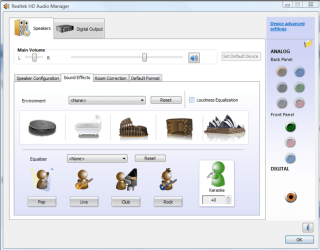
Realtek equalizer

eVaderum

New member
Local time
1:58 PM
Messages
4
I upgraded from XP to 7. When i was using xp, the equalizer in the realtek control panel worked fine. I prefered this over a built in software equalizer such as winamp because it would eq everything, such as youtube, vent, and anything else.

But now that ive upgraded to windows 7, the equalizer is, well, quite horrible, theres almost no bass at all, and it makes music sound overall pretty flat.

Has anyone else had a problem with this? I don't know if this is a limitation of the windows 7 drivers or if theres a way to get the eq to sound as good as it did in XP.

Im currently using the R2.37 driver. My mobo manual says it has ALC861, but the realtek control panel lists audio coded as ALC880, could this have something to do with it?
 

My Computer

Computer Manufacturer/Model Number
Alienware
OS
Windows 7 x86
CPU
Intel P4 3.0ghz single core
Motherboard
Asus P5GD1-VM
Memory
1gb pc-3200
Graphics Card(s)
Integrated Intel 900
Sound Card
Integrated Realtek HD R2.37 driver
Monitor(s) Displays
Dell 19" Ultrasharp
Screen Resolution
1280x1024
Hard Drives
160gb Sata1.5
Mouse
Logitech Wireless Laser
Internet Speed
3mb dsl
the default eq settings still arent great, but i was able to get good sound by setting a custom from the graphical eq, so overall its win since i like having a hardware eq that applies to anysound from any source
 

My Computer

Computer Manufacturer/Model Number
Alienware
OS
Windows 7 x86
CPU
Intel P4 3.0ghz single core
Motherboard
Asus P5GD1-VM
Memory
1gb pc-3200
Graphics Card(s)
Integrated Intel 900
Sound Card
Integrated Realtek HD R2.37 driver
Monitor(s) Displays
Dell 19" Ultrasharp
Screen Resolution
1280x1024
Hard Drives
160gb Sata1.5
Mouse
Logitech Wireless Laser
Internet Speed
3mb dsl
I upgraded from XP to 7. When i was using xp, the equalizer in the realtek control panel worked fine. I prefered this over a built in software equalizer such as winamp because it would eq everything, such as youtube, vent, and anything else.

But now that ive upgraded to windows 7, the equalizer is, well, quite horrible, theres almost no bass at all, and it makes music sound overall pretty flat.

Has anyone else had a problem with this? I don't know if this is a limitation of the windows 7 drivers or if theres a way to get the eq to sound as good as it did in XP.

Im currently using the R2.37 driver. My mobo manual says it has ALC861, but the realtek control panel lists audio coded as ALC880, could this have something to do with it?

Use Realtek;s latest driver R 2.91.
Just uninstall realtek/sound from device manager and then install the r2.91 and then rebood.
 

My Computer

OS
windows 7
Motherboard
gigabyte 945gs
Memory
1 GB
Graphics Card(s)
Nvidia 8400GS
Sound Card
Realtek inbuilt HD audio
Monitor(s) Displays
LG Flatron CRT
Hard Drives
160 GB SATA
The solution to this problem is to download and use the Vista x86 6.0.1.5700 driver. At least it worked for me. The equalizer AQ in the newer Windows 7 drivers suck. This old Vista driver is excellent AQ.
 

My Computer

OS
Windows 7 Professional x64
CPU
2500k @4.4GHz
Motherboard
Asus P8P67 Pro B3 Rev. 3.0
Memory
8GB Corsair
Graphics Card(s)
GTX 570
Screen Resolution
1920x1080
Hard Drives
120GB OCZ Vertex 2 - 1.5TB WD Green
Hi eVaderum
You can set up more in the control panel. In the audio settings.
 

My Computer

OS
windows 7
CPU
p4
Memory
2GB
I have same problem. Just got my computer back from upgrading today. With new Realtek, equalizer is still there but it's programmed. There is no custom EQ which I can adjust each frequency as I had with my XP. Does the latest driver R 2.91 has custom eq function?

My realtek looks like this picture.
 

Attachments

  • realtec.png
    realtec.png
    59.7 KB · Views: 734

My Computer

OS
Window 7
Bom,

You need to user an older drivers. Use a Vista Realtek driver. Stuff in the middle of 2008 should still have the old control panel.

Try this one http://downloads.guru3d.com/Realtek-HD-Audio-1.89-download-1886.html

You may have to completely delete the old HD audio device and remove driver before you can get the old CP back from this driver.
 

My Computer

OS
Windows 7 Professional x64
CPU
2500k @4.4GHz
Motherboard
Asus P8P67 Pro B3 Rev. 3.0
Memory
8GB Corsair
Graphics Card(s)
GTX 570
Screen Resolution
1920x1080
Hard Drives
120GB OCZ Vertex 2 - 1.5TB WD Green
bigdogchris,

thank you for suggestion. I followed your link and it looks like the same software I had with my XP in which it came with my mainboard. Can I use Realtek for XP and Vista with Window Seven? Do you also also use this version of Realtek with Window Seven?
 

My Computer

OS
Window 7
Right now I use a Vista driver on Windows 7. The new version of Realtek has poor audio quality with the EQ on. The older Vista driver has better AQ with EQ on.
 

My Computer

OS
Windows 7 Professional x64
CPU
2500k @4.4GHz
Motherboard
Asus P8P67 Pro B3 Rev. 3.0
Memory
8GB Corsair
Graphics Card(s)
GTX 570
Screen Resolution
1920x1080
Hard Drives
120GB OCZ Vertex 2 - 1.5TB WD Green
I have same problem. Just got my computer back from upgrading today. With new Realtek, equalizer is still there but it's programmed. There is no custom EQ which I can adjust each frequency as I had with my XP. Does the latest driver R 2.91 has custom eq function?

try reinstalling the drivers to go to your computer manufacturers drivers page and get the appropriate driver that way your sure it will work :)
 

My Computer

Computer type
Laptop
Computer Manufacturer/Model Number
Packard Bell Dot S
OS
Windows 7 Starter
Back
Top