Solved Realtek HD Audio EQ settings problem

Androi

New member
Local time
10:18 PM
Messages
6
Hello. :)

i have a problem with Realtek Preset EQ
when i change the EQ settings .. it works perfectly while playing a song
but when i close the audioplayer and restart it again the EQ settings back to it's default
so.. how can i save this settings and make it work everytime i lunch a media palyer?
:confused:
 

My Computer

Computer type
PC/Desktop
OS
Microsoft Windows 7 Ultimate 64-bit 7601 Multiprocessor Free Service Pack 1
CPU
Intel(R) Core(TM) i3-2100 CPU @ 3.10GHz
Motherboard
INTEL Corporation H61M-S2P
Memory
4.000 GB
Graphics Card(s)
NVIDIA GeForce GT 220
Sound Card
(1) High Definition Audio Device (2) Realtek High Definiti
Screen Resolution
1920 x 1080 x 32 bits (4294967296 colors) @ 60 Hz
Hard Drives
WDC WD5000AAKX-083CA1 ATA Device
up up up
 

My Computer

Computer type
PC/Desktop
OS
Microsoft Windows 7 Ultimate 64-bit 7601 Multiprocessor Free Service Pack 1
CPU
Intel(R) Core(TM) i3-2100 CPU @ 3.10GHz
Motherboard
INTEL Corporation H61M-S2P
Memory
4.000 GB
Graphics Card(s)
NVIDIA GeForce GT 220
Sound Card
(1) High Definition Audio Device (2) Realtek High Definiti
Screen Resolution
1920 x 1080 x 32 bits (4294967296 colors) @ 60 Hz
Hard Drives
WDC WD5000AAKX-083CA1 ATA Device
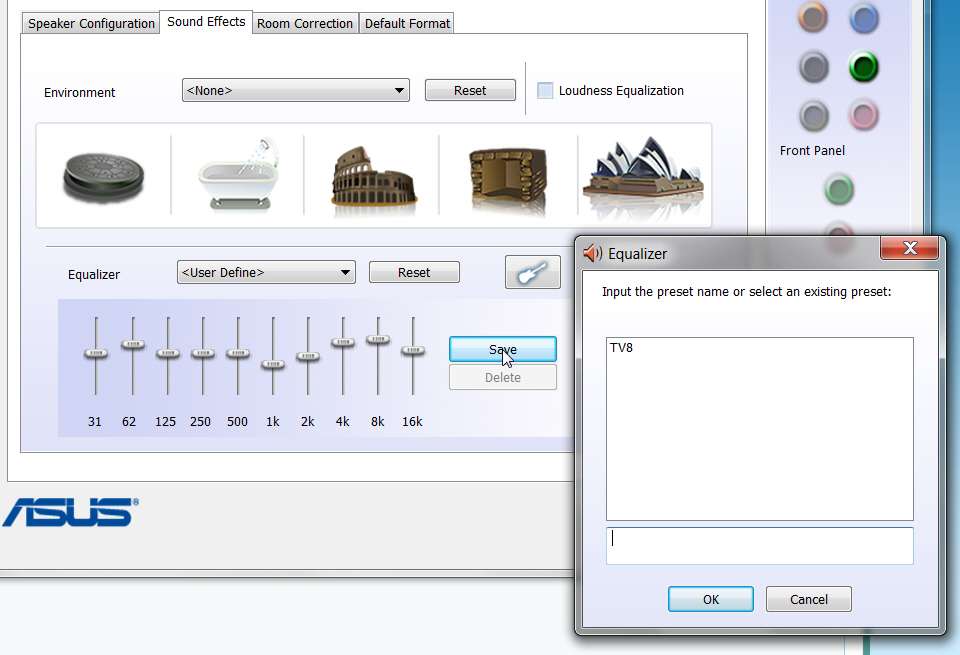
After you make your EQ setup, there is a SAVE button to the right of the sliders.

Push that SAVE button, and then enter the name you want to save the EQ setup as. That setup will remain in effect until you change it.

You can save any number of EQ setups, and you will also be able to re-load them by name.

saveas.jpg


NOTE: You will lose all of your saved EQ setups whenever you upgrade Realtek audio drivers to a new version. That's because the so-called "upgrade" actually consists of two steps: (a) UNINSTALL current driver, and (b) INSTALL new driver.

And unfortunately that first UNINSTALL step deletes all of the Realtek Registry keys, which unfortunately deletes all the EQ setups since it is in the Registry that the SAVE process for an EQ setup gets stored. Too bad they don't put it in \ProgramData or \Users where it obviously belongs and could be preserved.

So be sure you write down how many +/- ticks you push each slider up or down for each EQ setup, since you're going to have to reproduce and save each one all over again whenever you do decide to upgrade your driver version.
 

My Computer

Computer type
PC/Desktop
Computer Manufacturer/Model Number
Home-built, two systems (1) and (2)
OS
Windows 7 Pro x64 (1), Win7 Pro X64 (2)
CPU
i5-3350p 3.1Ghz/6MB-cache (1); E8400 3.0Ghz/6MB-cache (2)
Motherboard
ASUS P8Z77-V Pro (1); ASUS P5Q3 (2)
Memory
8GB PC3-12800 DDR3 (1); 4GB PC3-10600 DDR3 (2)
Graphics Card(s)
ATI HD7750 (1), (see TV cards); ATI R7 250 (2)
Sound Card
Realtek ALC892 HD Audio (1); Realtek ALC1200 HD Audio (2)
Monitor(s) Displays
Eizo HD2441W LCD, Eizo S2433W (1); Eizo 24" S2433W (2)
Screen Resolution
1920x1200, 1920x1200 (1); 1920x1200 (2)
Hard Drives
(1) 1TB SATA-II (7200RPM), 2x2TB SATA-III (7200RPM), 250GB SATA-III (10000RPM) for OS; 2x2TB external USB 3.0

(2) 320GB SATA-II (7200RPM), 750GB SATA-II (7200RPM), 150GB SATA-II (10000RPM) for OS; 2TB external USB 3.0
PSU
Nesteq ECS-6001 600W (1); Nesteq ECS-5001 500W (2)
Case
Acousti-Case 360 (1) and (2)
Cooling
Noctua NH-U12P SE2 for CPU, 2x120mm case fans (1) and (2)
Keyboard
IBM PS/2 (1) and (2)
Mouse
Logitech MX Revolution wireless (1); Microsoft wired (2)
Internet Speed
100mbps down / 10mbps up
Antivirus
Microsoft Security Essentials; Malwarebyte Anti-Malware Pro
Browser
Firefox
Other Info
Ceton InfiniTV 4-tuner cablecard-enabled TV card as well as Hauppauge HVR-2250 OTA/ATSC 2-tuner TV card in (1), running under Win7 WMC
It Worked thank you :)
 

My Computer

Computer type
PC/Desktop
OS
Microsoft Windows 7 Ultimate 64-bit 7601 Multiprocessor Free Service Pack 1
CPU
Intel(R) Core(TM) i3-2100 CPU @ 3.10GHz
Motherboard
INTEL Corporation H61M-S2P
Memory
4.000 GB
Graphics Card(s)
NVIDIA GeForce GT 220
Sound Card
(1) High Definition Audio Device (2) Realtek High Definiti
Screen Resolution
1920 x 1080 x 32 bits (4294967296 colors) @ 60 Hz
Hard Drives
WDC WD5000AAKX-083CA1 ATA Device
WOW! 10 weeks to solve that one. :sarc:
 

My Computer

Computer Manufacturer/Model Number
Hewlett packard/p6512uk
OS
Microsoft Windows 7 Home Premium 64-bit 7600
CPU
IIx4 amd athelon 635 processor
Motherboard
FOXCONN 2AA9
Memory
2x2gb
Graphics Card(s)
ati radeon HD 5450
Sound Card
(1) Realtek High Definition Audio (2) AMD High Definition
Monitor(s) Displays
samsung lcd tv 32"
Screen Resolution
1360x 768
Hard Drives
(1) WDC WD10 01FAES-60Z2A0 SATA Disk Device (2) Maxtor OneTouch USB Device (3) ST310003 33AS USB Device (4) WD My Book 1111 USB Device
PSU
?
Cooling
air!
Keyboard
wireless hp
Mouse
wireless Hp,optical
Internet Speed
1.10mb/s
Antivirus
MSE
Browser
Firefox
Hey! I have the same problem, with saved presets! I set it up, save it while listening to music. When I restart the Win Media Player, I get default sound, when I tweak a bit the EQ setup it goes back to the saved preset, but if I restart WMP it gets resetted again. I updated to latest version, I have no idea, it didn't use to do this, it started to happen after I bought a new headset (same as previous, just it was broken), I have no idea.
 

My Computer

Computer type
PC/Desktop
Computer Manufacturer/Model Number
Agem
OS
Windows 7 64bit
CPU
AMD Phenom II X4 3,2GHz
Memory
4GB GDDR3
Graphics Card(s)
AMD Radeon 6850
Back
Top