
Solved Realtek HD Audio Problem: Headphones appear as "Speakers"

rallym

New member
Local time
12:33 AM
Messages
3
Dear all,

my speakers do work. When i plug in my headphone at front the speakers get replaced, means I head everything through the headphone.

Headphones themselves aint shown under "Sound":
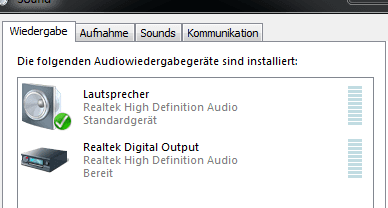
1.PNG

It appears that both, speakers and headphones are used as one source for audio-out.
2.PNG
However, I want to use both. Headphone should not automatically replace Speakers.

What do I make wrong? Setting for simultaneous Audio can't be found with this new Realtek R2.75 as previously?

Thanks a lot for your support!
 

My Computer My Computer

Computer type
PC/Desktop
OS
Win 7 Home Premium 64bit
Hi and welcome to 7F. You won't see a separate entry for standard headphones in the Sound properties and normally you would find the option to disable front panel jack detection in the Realtek Sound Manager and often they seem to bury that option somewhere obscure so try to look for it again in the Realtek Sound manager
 

My Computer My Computer

Computer type
PC/Desktop
Computer Manufacturer/Model Number
Home Made
OS
Windows 7 Ultimate x64
CPU
Q6600 3.1ghz
Motherboard
Gigabyte GA-P35-DS3L
Memory
Kingston DDR2 6400 8GB
Graphics Card(s)
Gigabyte Radeon HD 6850 1GB 256-Bit
Sound Card
On board
Monitor(s) Displays
Acer X243H
Screen Resolution
1920x1080
Hard Drives
Intel 330 120GB SSD
WD 2TB 7200
PSU
Thermaltake Toughpower 750W Semi Modular
Case
Modified Alienware
Keyboard
A4Tech
Mouse
Gigabyte ECO600
Antivirus
Comodo
Browser
Cyberfox
Thanks for your answer.

However, this happens with my brand new PC. With my former one, I had a separate entry for headphones AND I also know about this setting of simultaneous usage of speakers / headphone in the Sound Manager. It just is not visible in this new version of Realtek.

best regards,
 

My Computer My Computer

Computer type
PC/Desktop
OS
Win 7 Home Premium 64bit
Solved. Had to deinstall HD Audio Driver. Plugin headphones. Restart. Windows installed basic audio driver automatically and see there: headphones entry is back and I can manage both audio-outs.

Weird.
 

My Computer My Computer

Computer type
PC/Desktop
OS
Win 7 Home Premium 64bit
Back
Top