Solved Realtek HD - Cannot use Sound Effects

Bobbob

New member
Local time
6:33 PM
Messages
17
Location
Iowa
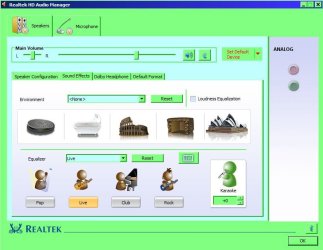
Hi all! Newbie here. Can't find a solution to this problem anywhere. Any help would be greatly appreciated. Home Premium 64bit, Realtek HD. No problem with sound until I use Speaker properties or HD Audio Manager to set a sound effect. Then, if I try to play an mp3, WMP 12 gets a "... encountered a problem while playing the file." Other media players, VLC, MPC-HC, etc., act as though they're playing the file but there's no sound. (AND, just for the heck of it I just tried IrfanView and it will play the file and respond to any enhancements I change.) Anyway, the only way I can get the other players to play again is to tick "Disable all sound effects" under the Enhancements tab for the speakers. I'm baffled! Again, any help would be appreciated.
 

My Computer My Computer

At a glance

Microsoft Windows 7 Home Premium 64-bit 7601 ...Intel(R) Core(TM) i3 CPU 550 @ 3.20GHz4.00 GBIntel(R) HD Graphics
Computer type
PC/Desktop
Computer Manufacturer/Model Number
Si
OS
Microsoft Windows 7 Home Premium 64-bit 7601 Multiprocessor Free Service Pack 1
CPU
Intel(R) Core(TM) i3 CPU 550 @ 3.20GHz
Motherboard
MSI H55M-E23(MS-7636)
Memory
4.00 GB
Graphics Card(s)
Intel(R) HD Graphics
Sound Card
(1) Realtek High Definition Audio (2) Intel(R) Display Aud
Monitor(s) Displays
Acer S201HL
Screen Resolution
1600 x 900 x 32 bits (4294967296 colors) @ 60 Hz
Hard Drives
(1) WDC WD3200AAJB-00WGA0 (2) WDC WD5000AAKX-001CA0 (3) USB2.0 CardReader CF RW USB Device (4) USB2.0 CardReader MS RW USB Device (5) USB2.0 CardReader SD RW USB Device (6) USB2.0 CardReader SM RW USB Device
PSU
300 W
Case
Micro-ATX
Like most realtek stuff this operates primarily on a codec.
installing a codec pack may have messed with it somehow.

Anyhow try running the top one here.
Realtek
There seems to have been a lot of updates going on there.
 

My Computer My Computer

At a glance

Windows 7 x64Intel i7 2600kG.skill Ripjaw 16gigs @ 1866Nvidia gtx580 (evga)
Computer Manufacturer/Model Number
Insane hobo technologies. ;-)
OS
Windows 7 x64
CPU
Intel i7 2600k
Motherboard
Asrock z68 extreme 4 gen 3
Memory
G.skill Ripjaw 16gigs @ 1866
Graphics Card(s)
Nvidia gtx580 (evga)
Sound Card
Integrated HD audio + hdmi
Monitor(s) Displays
24" ASUS widescreen + 42" insignia
Screen Resolution
1080p (1920x1080)
Hard Drives
128 Samsung 830
256 Samsung 840
3 x 1tb storage drive (various)
1 western digital 1tb (eSATA)
1 Seagate 1tb (eSATA)
PSU
1 kilowatt SLI/Crossfire rated Silverstone modular
Case
NZXT Phantom + additional 220 fan
Cooling
Zalmann
Keyboard
Microsoft wireless 3000 (v2)
Mouse
MS - wireless 5000 (bluetrack)
Internet Speed
depends on if you ask me or my provider.
Other Info
The above information is provided as is, and the author assumes no responsibility for issues it may cause with your sanity or fanboyism.
Thanks for the reply, but been there, done that - including two reboots to finish it (and a third to make sure it wasn't going to run again). I actually downloaded Vista, Windows7 Driver (32/64bits) Driver only (ZIP file) and installed from device manager because I found online so many people having problems with the executable. I guess I could try the executable if no other suggestions come about. Thanks again.
 

My Computer My Computer

At a glance

Microsoft Windows 7 Home Premium 64-bit 7601 ...Intel(R) Core(TM) i3 CPU 550 @ 3.20GHz4.00 GBIntel(R) HD Graphics
Computer type
PC/Desktop
Computer Manufacturer/Model Number
Si
OS
Microsoft Windows 7 Home Premium 64-bit 7601 Multiprocessor Free Service Pack 1
CPU
Intel(R) Core(TM) i3 CPU 550 @ 3.20GHz
Motherboard
MSI H55M-E23(MS-7636)
Memory
4.00 GB
Graphics Card(s)
Intel(R) HD Graphics
Sound Card
(1) Realtek High Definition Audio (2) Intel(R) Display Aud
Monitor(s) Displays
Acer S201HL
Screen Resolution
1600 x 900 x 32 bits (4294967296 colors) @ 60 Hz
Hard Drives
(1) WDC WD3200AAJB-00WGA0 (2) WDC WD5000AAKX-001CA0 (3) USB2.0 CardReader CF RW USB Device (4) USB2.0 CardReader MS RW USB Device (5) USB2.0 CardReader SD RW USB Device (6) USB2.0 CardReader SM RW USB Device
PSU
300 W
Case
Micro-ATX
Hi Bobbob, have you tried:-

RR.JPG
 

My Computer My Computer

At a glance

Win7 H.Prem. 32bit+SP1
Computer Manufacturer/Model Number
Look in my Signature.
OS
Win7 H.Prem. 32bit+SP1
Thanks for replying. Yes, I have tried setting enhancements from there (the Realtek HD Audio Mangaer) and from Control Panel Speakers Properties. What it boils down to is that I have to have 'Disable all sound effects' ticked under Speakers Properties or WMP12 gets "... encountered a problem while playing the file" and other players act as though they're playing but there's no sound. Even though I have decent speakers that sounded great on my old XP (VIA Vinyl AC'97) without any enhancement, I'm not getting the expanded sound on my new PC with Realtek so I would like to be able to play with the enhancements - should be able to play with the enhancements - but can't and I can't figure out why not and I don't have that much hair left to pull out. (And how do I insert a smilie here? I've clicked on 'em, double-clicked, quadruple-clicked ...) I've tried every combination of settings I can think of and still no dice. So, I'm open to any other suggestions. Thanks.
 

My Computer My Computer

At a glance

Microsoft Windows 7 Home Premium 64-bit 7601 ...Intel(R) Core(TM) i3 CPU 550 @ 3.20GHz4.00 GBIntel(R) HD Graphics
Computer type
PC/Desktop
Computer Manufacturer/Model Number
Si
OS
Microsoft Windows 7 Home Premium 64-bit 7601 Multiprocessor Free Service Pack 1
CPU
Intel(R) Core(TM) i3 CPU 550 @ 3.20GHz
Motherboard
MSI H55M-E23(MS-7636)
Memory
4.00 GB
Graphics Card(s)
Intel(R) HD Graphics
Sound Card
(1) Realtek High Definition Audio (2) Intel(R) Display Aud
Monitor(s) Displays
Acer S201HL
Screen Resolution
1600 x 900 x 32 bits (4294967296 colors) @ 60 Hz
Hard Drives
(1) WDC WD3200AAJB-00WGA0 (2) WDC WD5000AAKX-001CA0 (3) USB2.0 CardReader CF RW USB Device (4) USB2.0 CardReader MS RW USB Device (5) USB2.0 CardReader SD RW USB Device (6) USB2.0 CardReader SM RW USB Device
PSU
300 W
Case
Micro-ATX
Thanks for replying. Yes, I have tried setting enhancements from there (the Realtek HD Audio Mangaer) and from Control Panel Speakers Properties. What it boils down to is that I have to have 'Disable all sound effects' ticked under Speakers Properties or WMP12 gets "... encountered a problem while playing the file" and other players act as though they're playing but there's no sound. Even though I have decent speakers that sounded great on my old XP (VIA Vinyl AC'97) without any enhancement, I'm not getting the expanded sound on my new PC with Realtek so I would like to be able to play with the enhancements - should be able to play with the enhancements - but can't and I can't figure out why not and I don't have that much hair left to pull out. (And how do I insert a smilie here? I've clicked on 'em, double-clicked, quadruple-clicked ...) I've tried every combination of settings I can think of and still no dice. So, I'm open to any other suggestions. Thanks.
If I think of anything else, I'll post back.:party:
 

My Computer My Computer

At a glance

Win7 H.Prem. 32bit+SP1
Computer Manufacturer/Model Number
Look in my Signature.
OS
Win7 H.Prem. 32bit+SP1
Hmmm ... was here starting a new thread and saw this post I made eons ago. I'm going to mark this thread as solved. I solved it by installing a $25 Envy24 sound card that is the equivalent to the onboard audio I had on my XP. Combined with excellent speakers, it sounded great on the XP and just as great on the Windows 7.
 

My Computer My Computer

At a glance

Microsoft Windows 7 Home Premium 64-bit 7601 ...Intel(R) Core(TM) i3 CPU 550 @ 3.20GHz4.00 GBIntel(R) HD Graphics
Computer type
PC/Desktop
Computer Manufacturer/Model Number
Si
OS
Microsoft Windows 7 Home Premium 64-bit 7601 Multiprocessor Free Service Pack 1
CPU
Intel(R) Core(TM) i3 CPU 550 @ 3.20GHz
Motherboard
MSI H55M-E23(MS-7636)
Memory
4.00 GB
Graphics Card(s)
Intel(R) HD Graphics
Sound Card
(1) Realtek High Definition Audio (2) Intel(R) Display Aud
Monitor(s) Displays
Acer S201HL
Screen Resolution
1600 x 900 x 32 bits (4294967296 colors) @ 60 Hz
Hard Drives
(1) WDC WD3200AAJB-00WGA0 (2) WDC WD5000AAKX-001CA0 (3) USB2.0 CardReader CF RW USB Device (4) USB2.0 CardReader MS RW USB Device (5) USB2.0 CardReader SD RW USB Device (6) USB2.0 CardReader SM RW USB Device
PSU
300 W
Case
Micro-ATX
Better late than never.
 

My Computer My Computer

At a glance

Win7 H.Prem. 32bit+SP1
Computer Manufacturer/Model Number
Look in my Signature.
OS
Win7 H.Prem. 32bit+SP1
Back
Top