Realtek RTL 8139/810x Ethernet controller problem.

Wubz0r

New member
Local time
1:12 AM
Messages
5
Hello,I recently reinstalled my Windows 7 Home premium.After the install I noticed "Ethernet Controller" under unknown devices in device manager.I've been installing diffirent drivers and such,but nothing helps.Thank you in advance.

Some Screenies:

2z7mtu0.jpg


2nk3qk6.jpg
 

My Computer

Computer Manufacturer/Model Number
Hawlett-Packtard
OS
Windows 7 Home Premium 64Bit
CPU
AMD Athlon II x2
Motherboard
Foxconn 2aaf
Memory
3 GB
Graphics Card(s)
Onboard
Sound Card
Onboard
PSU
270W

My Computer

Computer type
PC/Desktop
Computer Manufacturer/Model Number
GIGABYTE Rig (Custom)
OS
Windows 7 Professional (x64/SP1) /Linux Mint 16
CPU
Intel i5-3570k 3.40 GHz @ 4.6 GHz
Motherboard
GIGABYTE Z77X-D3H
Memory
8GB (2133MHz) DDR3
Graphics Card(s)
Asus GTX560 Ti (Nvidia)
Monitor(s) Displays
HP 23", Acer 19" and a Dell 17"
Screen Resolution
1080p, 1440x900 and 1280x1024
Hard Drives
Sandisk Extreme 120GB (SSD), WD 2TB green and 4 other HDDs
PSU
Antec 620w High Current Gamer
Case
Corsair Obsidian 600D
Cooling
CPU - Antec KÜHLER H₂O 920
Keyboard
Steelseries 6Gv2
Mouse
Roccat LUA
Internet Speed
4 - 6mb/s
Antivirus
ESET NOD32
Browser
Chrome/Firefox
Other Info
Intel Gigabit CT (PCIE NIC) and Thinkpad T61p,
Hi Wubz0r and welcome to W7 Forums :party:

Download the driver from Realtek here: Realtek

It is the second option down, Win7 Driver. Save the file, called Driver-Win7_6111_10202010.zip, to a suitable location and then right-click on it and choose Extract all... Accept the default location for the extracted files and click Extract.

Now, follow this Tutorial (remember that, although this shows the procedure for an Audio driver, it will in fact work for any driver whose device is listed): Device Manager - Install Driver - Vista Forums

So, in your case, you will need to expand the Network adapters section instead.
 

My Computer

Computer type
PC/Desktop
Computer Manufacturer/Model Number
Dwarf Dwf/11/2012 r09/2013
OS
Windows 8.1 Pro RTM x64
CPU
Intel Core-i5-3570K 4-core @ 3.4GHz (Ivy Bridge) (OC 4.4GHz)
Motherboard
ASRock Z77 Extreme4-M
Memory
4 x 4GB DDR3-1600 Corsair Vengeance CMZ8GX3M2A1600C9B (16GB)
Graphics Card(s)
MSI GeForce GTX770 Gaming OC 2GB
Sound Card
Realtek High Definition on board solution (ALC 898)
Monitor(s) Displays
ViewSonic VA1912w Widescreen (VGA)
Screen Resolution
1440x900
Hard Drives
OCZ Agility 3 SSD 120GB SATA III x2 (RAID 0)
Samsung HD501LJ 500GB SATA II x2
Hitachi HDS721010CLA332 1TB SATA II
Iomega 1.5TB Ext USB 2.0
WD 2.0TB Ext USB 3.0
PSU
XFX Pro Series 850W Semi-Modular
Case
Gigabyte IF233
Cooling
1 x 120mm Front Inlet 1 x 120mm Rear Exhaust
Keyboard
Microsoft Comfort Curve Keyboard 3000 (USB)
Mouse
Microsoft Comfort Mouse 3000 for Business (USB)
Internet Speed
NetGear DG834Gv3 ADSL Modem/Router (Ethernet) ~4.0 Mb/s (O2)
Antivirus
Avast! 8.0.1497
Browser
IE 11
Other Info
Optical Drive: HL-DT-ST BD-RE BH10LS30 SATA Bluray
Lexmark S305 Printer/Scanner/Copier (USB)
WEI Score: 8.1/8.1/8.5/8.5/8.25
Asus Eee PC 1011PX Netbook (Windows 7 x86 Starter)
Hi Wubz0r and welcome to W7 Forums :party:

Download the driver from Realtek here: Realtek

It is the second option down, Win7 Driver. Save the file, called Driver-Win7_6111_10202010.zip, to a suitable location and then right-click on it and choose Extract all... Accept the default location for the extracted files and click Extract.

Now, follow this Tutorial (remember that, although this shows the procedure for an Audio driver, it will in fact work for any driver whose device is listed): Device Manager - Install Driver - Vista Forums

So, in your case, you will need to expand the Network adapters section instead.

Followed the same steps you pointed out in the tutorial:

4h2t7q.jpg


I'll just install windows Vista.:sleepy:Thanks for the help.:cool:
 

My Computer

Computer Manufacturer/Model Number
Hawlett-Packtard
OS
Windows 7 Home Premium 64Bit
CPU
AMD Athlon II x2
Motherboard
Foxconn 2aaf
Memory
3 GB
Graphics Card(s)
Onboard
Sound Card
Onboard
PSU
270W
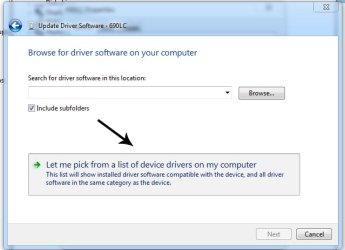
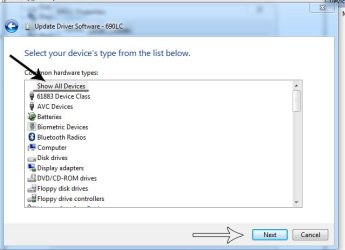
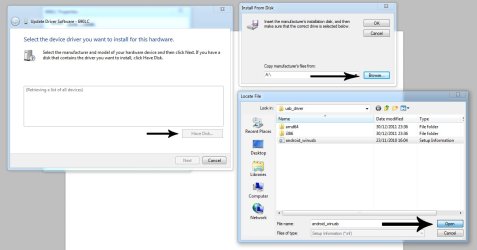
I think your searching for the driver. Did you use the 'Have disk'?

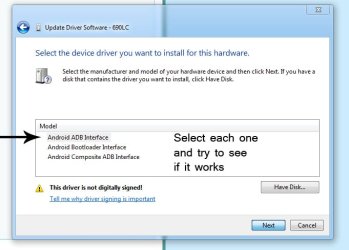
If not follow the same steps but instead of searching for folders on your drive, click 'let me pick'(check the images)

*I know there the wrong drivers on mine but it may work for you*

When browsing for the driver extracting them and place them in a folder in my documents
(it is a .inf file your looking for, keep all files together when extracting)
 

Attachments

  • manual install.jpg
    manual install.jpg
    44.8 KB · Views: 161
  • manual install2.jpg
    manual install2.jpg
    50.6 KB · Views: 155
  • manual install3.jpg
    manual install3.jpg
    82.7 KB · Views: 287
  • manual install4.jpg
    manual install4.jpg
    54.8 KB · Views: 198

My Computer

Computer type
PC/Desktop
Computer Manufacturer/Model Number
GIGABYTE Rig (Custom)
OS
Windows 7 Professional (x64/SP1) /Linux Mint 16
CPU
Intel i5-3570k 3.40 GHz @ 4.6 GHz
Motherboard
GIGABYTE Z77X-D3H
Memory
8GB (2133MHz) DDR3
Graphics Card(s)
Asus GTX560 Ti (Nvidia)
Monitor(s) Displays
HP 23", Acer 19" and a Dell 17"
Screen Resolution
1080p, 1440x900 and 1280x1024
Hard Drives
Sandisk Extreme 120GB (SSD), WD 2TB green and 4 other HDDs
PSU
Antec 620w High Current Gamer
Case
Corsair Obsidian 600D
Cooling
CPU - Antec KÜHLER H₂O 920
Keyboard
Steelseries 6Gv2
Mouse
Roccat LUA
Internet Speed
4 - 6mb/s
Antivirus
ESET NOD32
Browser
Chrome/Firefox
Other Info
Intel Gigabit CT (PCIE NIC) and Thinkpad T61p,
Hello,after messing around i discovered that the device cannot start and there is a driver installed allready? (On a fresh install):sarc:

Is the adapter broken?Do i need a new one?I'm jammed..Please help me!

Agin,some pictures..

2ugi2s0.jpg


24l9etj.jpg
 

My Computer

Computer Manufacturer/Model Number
Hawlett-Packtard
OS
Windows 7 Home Premium 64Bit
CPU
AMD Athlon II x2
Motherboard
Foxconn 2aaf
Memory
3 GB
Graphics Card(s)
Onboard
Sound Card
Onboard
PSU
270W
Back
Top