Realtek - sound not working right.

onyx

New member
Local time
8:53 PM
Messages
20
Hi,

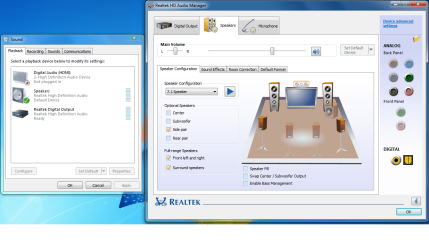
I just installed windows 7 (clean). I did not have sound at first. After downloading the realtek drivers...the sound did start working by switching from stereo to 7.1 speaker (in the realtek HD audio manager) .....so the surround speakers work but the front left and right do not, and thats all i have (the front left and right). Also it sounds like an echo (almost like a sound effect) but there is no sound effect selected.

I did try disabling/re-enabling, switching the in/out-put around, restarting, and i did download all the driver packs.

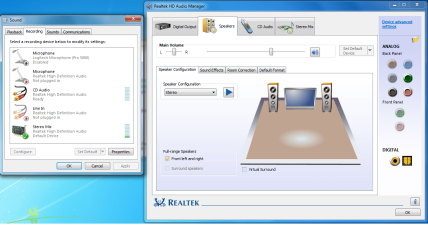
Thanks so much if someone can help me, hope i explained it all ok. I also added 2 pics to this so you can see what i mean. =)

This first pic is when my sound does not work in the realtek manager, and the 2nd pic is when it does work (with an echo)
 

Attachments
  • realtek1.png
    realtek1.png
    87.9 KB · Views: 378
  • realtek2.png
    realtek2.png
    93.8 KB · Views: 234

My Computer

OS
Windows 7
Hello, Welcome!

Try uninstalling the Realtek Manager from Programs and Features. Could you then post a screenshot of your Control Panel>Sound window?

Thanks,
~Jonathan
 

My Computer

Computer Manufacturer/Model Number
Custom
OS
Windows 7 Professional x64
CPU
Intel i7 2600K OC'd @ 4620 MHz
Motherboard
Asus P8Z68-V Pro
Memory
16GB GSkill Sniper 2133 Mhz (4x4GB)
Graphics Card(s)
EVGA GeForce GTX 480 SuperClocked+
Sound Card
Realtek High Definition Audio
Monitor(s) Displays
2x Acer S273HLbmii 27"
Screen Resolution
2 x 1920x1080
Hard Drives
64GB Crucial M4 SSD

Storage: Hitachi 1TB 5400RPM, Samsung 1.5TB 5400RPM
PSU
Corsair HW Series 750w (modular)
Case
Cooler Master HAF 932 Advanced Blue Edition
Cooling
CM Hyper 212+ CPU cooler, 3x 230mm + 1x 140mm case fans
Keyboard
Logitech MK320 (wireless)
Mouse
Logitech MK320 (wireless)
Internet Speed
30 Mb/s : 2 Mb/s
Hi,

Tyvm. Here is the new screen shot. =)
 

Attachments

  • sound.png
    sound.png
    19 KB · Views: 541

My Computer

OS
Windows 7
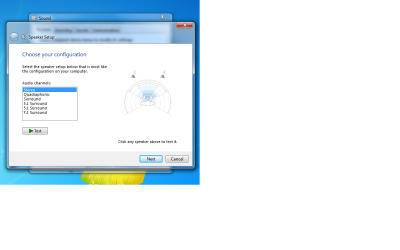
Thanks. Can you right-click on Speakers and select Configure?
 

My Computer

Computer Manufacturer/Model Number
Custom
OS
Windows 7 Professional x64
CPU
Intel i7 2600K OC'd @ 4620 MHz
Motherboard
Asus P8Z68-V Pro
Memory
16GB GSkill Sniper 2133 Mhz (4x4GB)
Graphics Card(s)
EVGA GeForce GTX 480 SuperClocked+
Sound Card
Realtek High Definition Audio
Monitor(s) Displays
2x Acer S273HLbmii 27"
Screen Resolution
2 x 1920x1080
Hard Drives
64GB Crucial M4 SSD

Storage: Hitachi 1TB 5400RPM, Samsung 1.5TB 5400RPM
PSU
Corsair HW Series 750w (modular)
Case
Cooler Master HAF 932 Advanced Blue Edition
Cooling
CM Hyper 212+ CPU cooler, 3x 230mm + 1x 140mm case fans
Keyboard
Logitech MK320 (wireless)
Mouse
Logitech MK320 (wireless)
Internet Speed
30 Mb/s : 2 Mb/s
here it is ...
 

Attachments

  • config.png
    config.png
    43.3 KB · Views: 339

My Computer

OS
Windows 7
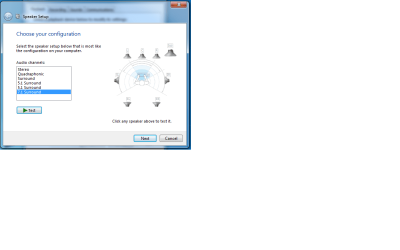
Does the sound work if you set it to Stereo or Surround 7.1?
 

My Computer

Computer Manufacturer/Model Number
Custom
OS
Windows 7 Professional x64
CPU
Intel i7 2600K OC'd @ 4620 MHz
Motherboard
Asus P8Z68-V Pro
Memory
16GB GSkill Sniper 2133 Mhz (4x4GB)
Graphics Card(s)
EVGA GeForce GTX 480 SuperClocked+
Sound Card
Realtek High Definition Audio
Monitor(s) Displays
2x Acer S273HLbmii 27"
Screen Resolution
2 x 1920x1080
Hard Drives
64GB Crucial M4 SSD

Storage: Hitachi 1TB 5400RPM, Samsung 1.5TB 5400RPM
PSU
Corsair HW Series 750w (modular)
Case
Cooler Master HAF 932 Advanced Blue Edition
Cooling
CM Hyper 212+ CPU cooler, 3x 230mm + 1x 140mm case fans
Keyboard
Logitech MK320 (wireless)
Mouse
Logitech MK320 (wireless)
Internet Speed
30 Mb/s : 2 Mb/s
When i put it on 7.1 the SL and the SR work.
 

Attachments

  • 7.1.png
    7.1.png
    23.9 KB · Views: 116

My Computer

OS
Windows 7
Play around with the settings. What setting produces the best results?
 

My Computer

Computer Manufacturer/Model Number
Custom
OS
Windows 7 Professional x64
CPU
Intel i7 2600K OC'd @ 4620 MHz
Motherboard
Asus P8Z68-V Pro
Memory
16GB GSkill Sniper 2133 Mhz (4x4GB)
Graphics Card(s)
EVGA GeForce GTX 480 SuperClocked+
Sound Card
Realtek High Definition Audio
Monitor(s) Displays
2x Acer S273HLbmii 27"
Screen Resolution
2 x 1920x1080
Hard Drives
64GB Crucial M4 SSD

Storage: Hitachi 1TB 5400RPM, Samsung 1.5TB 5400RPM
PSU
Corsair HW Series 750w (modular)
Case
Cooler Master HAF 932 Advanced Blue Edition
Cooling
CM Hyper 212+ CPU cooler, 3x 230mm + 1x 140mm case fans
Keyboard
Logitech MK320 (wireless)
Mouse
Logitech MK320 (wireless)
Internet Speed
30 Mb/s : 2 Mb/s
The 7.1, but i cant hear a video on youtube now (i can just hear the test). With realtek i would put it on 7.1 but there was an echo from videos.
 

My Computer

OS
Windows 7
After I tried everything, I reinstalled windows 7 and installed the driver and codec's but it still didn't work. Then, i was fixing my cords up for the speakers and i tried to plug it in the front, that didn't work either. Sooo when i plugged them back in to the back of the tower it started working!!! I'm sooo happy i finally got it fixed bc i was about to go back to xp lol. I'm not happy that i cant help other people on here with the same problem bc i really have no idea how they started working? - Thanks for your help Jonathan =)
 

My Computer

OS
Windows 7
You're welcome. Your solution is worth reading, though. You never know what other people might read this later on.
 

My Computer

Computer Manufacturer/Model Number
Custom
OS
Windows 7 Professional x64
CPU
Intel i7 2600K OC'd @ 4620 MHz
Motherboard
Asus P8Z68-V Pro
Memory
16GB GSkill Sniper 2133 Mhz (4x4GB)
Graphics Card(s)
EVGA GeForce GTX 480 SuperClocked+
Sound Card
Realtek High Definition Audio
Monitor(s) Displays
2x Acer S273HLbmii 27"
Screen Resolution
2 x 1920x1080
Hard Drives
64GB Crucial M4 SSD

Storage: Hitachi 1TB 5400RPM, Samsung 1.5TB 5400RPM
PSU
Corsair HW Series 750w (modular)
Case
Cooler Master HAF 932 Advanced Blue Edition
Cooling
CM Hyper 212+ CPU cooler, 3x 230mm + 1x 140mm case fans
Keyboard
Logitech MK320 (wireless)
Mouse
Logitech MK320 (wireless)
Internet Speed
30 Mb/s : 2 Mb/s
Thank You - Sound works now

To Onyx:
If it wasn't for you I could have spent days trying to fix the sound problem. I checked out the pictures you posted with the setting and my was changed. It must have happened when I downed loaded Amerisoft conversion software.
I'm very grateful. jjb
 

My Computer

Computer Manufacturer/Model Number
HP
OS
Windows 7 Professioal 32 bi
Sound Card
Realtek
Monitor(s) Displays
Samsong
Back
Top