Realtek Stereo Mix...Can't record

multielvi

New member
Local time
10:50 AM
Messages
5
Suddenly I am no longer able to record audio with any programs. I have been using Cyberlink and/or AVS to record VHS and camcorder tapes for years. I have also used Audacity to record audio. Now all of a sudden I cannot.

I am not very tech savvy, but can usually figure things out eventually. This has me stumped. I haven't changed anything. My speakers work fine so it is an input problem. Stereo mix is enabled and is my default for recording. Properties shows that this device is working properly. I also have the latest driver version. I tried troubleshooter and was told the peripheral is not plugged in. I use a Kworld device to capture video. It is definitely plugged in. It captures video fine but not audio on either program. I do not use any peripherals with Audacity. It will not record audio whether streaming from the net or from a program such as Itunes.

Any suggestions would be appreciated. I am at a loss.
 

My Computer My Computer

Computer type
PC/Desktop
Computer Manufacturer/Model Number
HP
OS
Windows 7 Home Premium 64 bit
Antivirus
Norton
Browser
Chrome
Refresh the sound device. Go to the Device Manager, RIGHT click on the entry for your sound card (e.g. Realtek or whatever) and then LEFT click "Uninstall". DO NOT uninstall the driver. Then restart the PC and when windows starts it will detect and reinstall the sound. This usually corrects any Windows/Sound corruptions.
 

My Computer My Computer

Computer type
PC/Desktop
Computer Manufacturer/Model Number
My Own Build
OS
Windows 10 64 bit
CPU
Intel i7 6700K
Motherboard
ASUS ROG Maximus VIII Hero
Memory
16GB Corsair Dominator
Graphics Card(s)
Intel CPU Graphics
Sound Card
RealTek
Monitor(s) Displays
27" Dell S2719dgf
Screen Resolution
2560X1440
Hard Drives
1 TB Samsung 850 EVO SSD for Win 10 Pro
500GB Samsung 850 EVO SSD for Win 10 Insider
2 TB drive for backup
PSU
EVGA Supernova 750G2
Case
BeQuiet Silent Base 600
Cooling
Deepcool Captain 120EX
Keyboard
Microsoft Wireless 2000
Mouse
Microsoft wireless
Internet Speed
100 MB/sec (Cable)
Antivirus
Microsoft Defender and Malwarebytes
Browser
Edge/Firefox
Other Info
Cakewalk (Sonar) by BandLab and Studio One 4.1 Pro recording studio software. MOTU 896Mk3 Hybrid recording interface, Frontier Tranzport wireless control unit, Behringer X-Touch Control Surface.
Five USB connected optical drives for CD Audio production using Nero BurningROM
@fireberd. I tried it. I saw that windows reinstalled the sound but nothing changed. I should note that all of the capturing programs recognize stereo mix as the audio input, but still no sound. Properties still advises that the device is working properly. One thing that I noticed is that under "levels" in the properties tab the speaker icon was muted. When I unmuted it I got a loud fluttering sound. When I again tried to capture some video, the only sound that recorded was the fluttering, nothing from the tape.
 

My Computer My Computer

Computer type
PC/Desktop
Computer Manufacturer/Model Number
HP
OS
Windows 7 Home Premium 64 bit
Antivirus
Norton
Browser
Chrome
Does this problem ONLY happen with the video capture program? How about if you try to record streaming audio from the Internet?
 

My Computer My Computer

Computer type
PC/Desktop
Computer Manufacturer/Model Number
My Own Build
OS
Windows 10 64 bit
CPU
Intel i7 6700K
Motherboard
ASUS ROG Maximus VIII Hero
Memory
16GB Corsair Dominator
Graphics Card(s)
Intel CPU Graphics
Sound Card
RealTek
Monitor(s) Displays
27" Dell S2719dgf
Screen Resolution
2560X1440
Hard Drives
1 TB Samsung 850 EVO SSD for Win 10 Pro
500GB Samsung 850 EVO SSD for Win 10 Insider
2 TB drive for backup
PSU
EVGA Supernova 750G2
Case
BeQuiet Silent Base 600
Cooling
Deepcool Captain 120EX
Keyboard
Microsoft Wireless 2000
Mouse
Microsoft wireless
Internet Speed
100 MB/sec (Cable)
Antivirus
Microsoft Defender and Malwarebytes
Browser
Edge/Firefox
Other Info
Cakewalk (Sonar) by BandLab and Studio One 4.1 Pro recording studio software. MOTU 896Mk3 Hybrid recording interface, Frontier Tranzport wireless control unit, Behringer X-Touch Control Surface.
Five USB connected optical drives for CD Audio production using Nero BurningROM
Does this problem ONLY happen with the video capture program? How about if you try to record streaming audio from the Internet?

It also happens with streaming audio. That is why I am perplexed. If it was only the video I would have focused on the capture device. I have been recording both audio and video for years with no problem. All of a sudden I can't.

Thanks for your interest and assistance.
 
Last edited:

My Computer My Computer

Computer type
PC/Desktop
Computer Manufacturer/Model Number
HP
OS
Windows 7 Home Premium 64 bit
Antivirus
Norton
Browser
Chrome
This could even be a hardware problem with the sound chip.

Do a complete reinstall. First make sure you have the correct hardware sound driver for Win 7 (or Vista). Then Uninstall the sound driver and drivers in the Device Manager. Restart and Windows should install the generic High Definition Audio Device (Driver). Check operation with this driver. You won't have Stereo Mix but mic or line in should work. If that works OK, install the hardware sound driver and check for proper operation.

(I used to live in Laurel).
 

My Computer My Computer

Computer type
PC/Desktop
Computer Manufacturer/Model Number
My Own Build
OS
Windows 10 64 bit
CPU
Intel i7 6700K
Motherboard
ASUS ROG Maximus VIII Hero
Memory
16GB Corsair Dominator
Graphics Card(s)
Intel CPU Graphics
Sound Card
RealTek
Monitor(s) Displays
27" Dell S2719dgf
Screen Resolution
2560X1440
Hard Drives
1 TB Samsung 850 EVO SSD for Win 10 Pro
500GB Samsung 850 EVO SSD for Win 10 Insider
2 TB drive for backup
PSU
EVGA Supernova 750G2
Case
BeQuiet Silent Base 600
Cooling
Deepcool Captain 120EX
Keyboard
Microsoft Wireless 2000
Mouse
Microsoft wireless
Internet Speed
100 MB/sec (Cable)
Antivirus
Microsoft Defender and Malwarebytes
Browser
Edge/Firefox
Other Info
Cakewalk (Sonar) by BandLab and Studio One 4.1 Pro recording studio software. MOTU 896Mk3 Hybrid recording interface, Frontier Tranzport wireless control unit, Behringer X-Touch Control Surface.
Five USB connected optical drives for CD Audio production using Nero BurningROM
This could even be a hardware problem with the sound chip.

Do a complete reinstall. First make sure you have the correct hardware sound driver for Win 7 (or Vista). Then Uninstall the sound driver and drivers in the Device Manager. Restart and Windows should install the generic High Definition Audio Device (Driver). Check operation with this driver. You won't have Stereo Mix but mic or line in should work. If that works OK, install the hardware sound driver and check for proper operation.

(I used to live in Laurel).

Unfortunately I have no microphone or analog device (line in) to test the reinstall. My video capture device has a USB connection. Do you recommend that I try the procedure (uninstall sound driver and drivers in device manager) anyway? Also how do I determine what is the correct hardware sound driver for stereo mix?

Thanks again
 

My Computer My Computer

Computer type
PC/Desktop
Computer Manufacturer/Model Number
HP
OS
Windows 7 Home Premium 64 bit
Antivirus
Norton
Browser
Chrome
You can determine/get the correct sound driver from HP for your specific model.

Is the video capture device totally USB? If it is then usually the PC's sound card is not used and it records directly to the hard drive, however if the monitor audio is bad, it could be a problem in the USB device.

As there seems to be several problems, I would still do the uninstall I mentioned. Let Windows install the generic driver and see how that acts and then install the correct sound hardware driver.

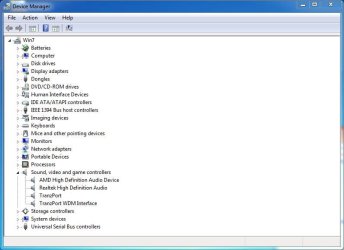
The Device Manager may list what you have. Here is mine for an example (I have Realtek for the sound).
 

Attachments

  • Device Manager Capture.JPG
    Device Manager Capture.JPG
    48.5 KB · Views: 1

My Computer My Computer

Computer type
PC/Desktop
Computer Manufacturer/Model Number
My Own Build
OS
Windows 10 64 bit
CPU
Intel i7 6700K
Motherboard
ASUS ROG Maximus VIII Hero
Memory
16GB Corsair Dominator
Graphics Card(s)
Intel CPU Graphics
Sound Card
RealTek
Monitor(s) Displays
27" Dell S2719dgf
Screen Resolution
2560X1440
Hard Drives
1 TB Samsung 850 EVO SSD for Win 10 Pro
500GB Samsung 850 EVO SSD for Win 10 Insider
2 TB drive for backup
PSU
EVGA Supernova 750G2
Case
BeQuiet Silent Base 600
Cooling
Deepcool Captain 120EX
Keyboard
Microsoft Wireless 2000
Mouse
Microsoft wireless
Internet Speed
100 MB/sec (Cable)
Antivirus
Microsoft Defender and Malwarebytes
Browser
Edge/Firefox
Other Info
Cakewalk (Sonar) by BandLab and Studio One 4.1 Pro recording studio software. MOTU 896Mk3 Hybrid recording interface, Frontier Tranzport wireless control unit, Behringer X-Touch Control Surface.
Five USB connected optical drives for CD Audio production using Nero BurningROM
sound from line-in

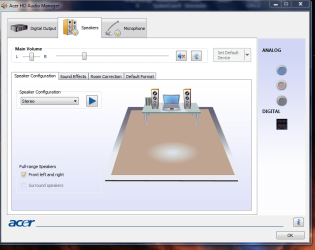
you could try this, if youve got headphones, and a line in jack.

You should then get sound in your headphones, i use it on my lappy as my headphones jack is borked.
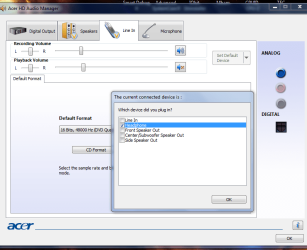
screenshot shot of audio manager
with jack unplugged/plugged.
right clicked top blue dot to open inset

That should check if your hardware is ok
Roy
 

Attachments

  • witout.PNG
    witout.PNG
    42.2 KB · Views: 1
  • with.PNG
    with.PNG
    40 KB · Views: 1
Last edited:

My Computer My Computer

Computer type
PC/Desktop
Computer Manufacturer/Model Number
medionl/Aspire 6930G/acer x55a
OS
W7 home premium 32bit/W7HP 64bit/w10 tp insider ring
CPU
E5300 dual core
Motherboard
medion MS7366
Memory
3gb
Graphics Card(s)
Nvidia Geforce 7100 Nforce 630i
Monitor(s) Displays
avixc
Internet Speed
n (isp resticted to 72)
Antivirus
mse/pands
Browser
palemoon
Other Info
Belkin Fd7050 n USB using Railink RT2870 drivers, more upto date
I tried everything that has been suggested. I am now able to successfully record audio when I capture video. Also I can now see sound levels for Stereo Mix on the "recording" tab. Previously there were no levels visible. I still have a problem with Audacity. When I click the record button the sound becomes terribly distorted. Like a mix of echo, tremelo and vibrato. Perhaps that is another issue.

My primary purpose for this post was to fix the video capture problem and you have helped me with that. Thanks to torchwood and especially firebird for your assistance and patience, I truly appreciate it.
 

My Computer My Computer

Computer type
PC/Desktop
Computer Manufacturer/Model Number
HP
OS
Windows 7 Home Premium 64 bit
Antivirus
Norton
Browser
Chrome
Back
Top