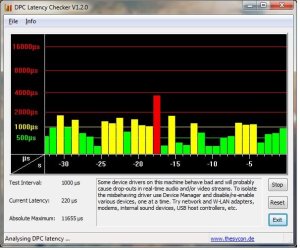
Realtek, Windows 7 64RTM Crackle/static/popping

Thanks to the contributors on this forum I was able to get the cracking to go away on my Win7x64 system with the Realtek HD audio. This also cured another symptom that I had with playing video in Itunes in which the audio would get further and further behind the video.

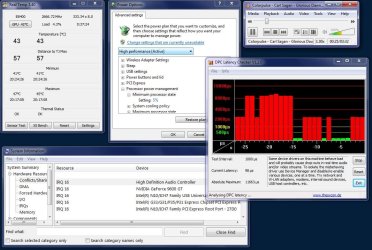
After trying several drivers this one change worked for me:

Control Panel --> All Control Panel Items --> Power Options
Select "Change Plan Settings" on the power plan you are using will take you to

Control Panel --> All Control Panel Items --> Power Options --> Edit Plan Settings
Select "Change advanced power settings" which will bring up a Power Options settings box

Expand "Processor power Management"
Expand "Minimum Processor state"
Set to "100%"
Apply That is all.

That worked for me. I later used the DPC Latency Checker tool (mentioned a couple of pages back) to verify that, on my system at least, any setting below 70% caused high DPC latency and a return of cracking and delays.

This issue came close to making me ditch Win7 and go back to XP. This thread lead me to the solution.

Thanks

Using realtek R2.34 drivers C2D E8400 on G31 gigabyte MB
 

Attachments
  • minproc5.jpg
    minproc5.jpg
    136.7 KB · Views: 287
  • minproc100.jpg
    minproc100.jpg
    132.9 KB · Views: 238
Last edited:

My Computer My Computer

At a glance

Windows 7 x64E84004GBNvidia Asus 9600GT
Computer Manufacturer/Model Number
built
OS
Windows 7 x64
CPU
E8400
Motherboard
Gigabyte GA-g31m-s2l
Memory
4GB
Graphics Card(s)
Nvidia Asus 9600GT
Sound Card
Realtek HD ALC662
Monitor(s) Displays
Dell 2407WFP
Screen Resolution
1920x1200
Keyboard
IBM Model M
BIOS change worked

I had the static/scratching sound whenever IE opened a new window and the sound didn't work at all or produced non-stop scratching. What solved the problem was setting the internal sound card to ENABLE from AUTO. Thanks for the suggestion.
 

My Computer My Computer

At a glance

Windows 7 Home Premium 64Intel E54006GBNvidia 9500GT
Computer Manufacturer/Model Number
HP p6204y
OS
Windows 7 Home Premium 64
CPU
Intel E5400
Motherboard
Benicia
Memory
6GB
Graphics Card(s)
Nvidia 9500GT
Sound Card
Realtek (integrated)
Monitor(s) Displays
Samsung 940mw
Hard Drives
750 GB SATA
Expand "Processor power Management"
Expand "Minimum Processor state"
Set to "100%"
Apply That is all.

I'm really glad to hear this worked for you. For me, this is not the case. The only way to make the popping disappear is to exit uTorrent and restart it. My DPC Latency will stay in the green, and I won't have popping, for a few hours. It will come back, and I'll have to do the same thing again. ****ty workaround but it will have to suffice.
 

My Computer My Computer

At a glance

Windows 7 64bitIntel Core 2 Duo E8400 Wolfdale 3.0GHz LGA 775G.SKILL 4GB (2 x 2GB) 240-Pin DDR2 SDRAM DDR2...EVGA 320-P2-N811-AR GeForce 8800 GTS 320MB
OS
Windows 7 64bit
CPU
Intel Core 2 Duo E8400 Wolfdale 3.0GHz LGA 775
Motherboard
GIGABYTE GA-EP45C-UD3R LGA 775 Intel P45
Memory
G.SKILL 4GB (2 x 2GB) 240-Pin DDR2 SDRAM DDR2 1066
Graphics Card(s)
EVGA 320-P2-N811-AR GeForce 8800 GTS 320MB
Sound Card
Onboard Realtek
Expand "Processor power Management"
Expand "Minimum Processor state"
Set to "100%"
Apply That is all.

I'm really glad to hear this worked for you. For me, this is not the case. The only way to make the popping disappear is to exit uTorrent and restart it. My DPC Latency will stay in the green, and I won't have popping, for a few hours. It will come back, and I'll have to do the same thing again. ****ty workaround but it will have to suffice.
Yes is a just a work around as is my solution. Even is I eliminate Processor Power Management as a source of problems, some other condition that I haven't encountered yet may still cause DPC latency issues.

As a follow-up I discovered I can also LOWER the Maximum Processor State to equal the Min Processor state and still get no DPC latency issues. On my setup, at least, Windows 7 Processor Power Management is triggering or causing the latency issues that I assume is causing the audio problems. (Does everyone with the cracking audio problem have DPC latency issues?)

I don't recall having this problem on the Beta or RC. So what changed? Are more things causing latency problems or is the audio system (Windows or Realtek parts) now just more susceptible to the latency problems?
 

My Computer My Computer

At a glance

Windows 7 x64E84004GBNvidia Asus 9600GT
Computer Manufacturer/Model Number
built
OS
Windows 7 x64
CPU
E8400
Motherboard
Gigabyte GA-g31m-s2l
Memory
4GB
Graphics Card(s)
Nvidia Asus 9600GT
Sound Card
Realtek HD ALC662
Monitor(s) Displays
Dell 2407WFP
Screen Resolution
1920x1200
Keyboard
IBM Model M
After trying several drivers this one change worked for me:

Control Panel --> All Control Panel Items --> Power Options
Select "Change Plan Settings" on the power plan you are using will take you to

Control Panel --> All Control Panel Items --> Power Options --> Edit Plan Settings
Select "Change advanced power settings" which will bring up a Power Options settings box

Expand "Processor power Management"
Expand "Minimum Processor state"
Set to "100%"
Apply That is all.

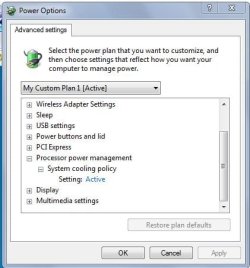
Interesting. All I see on my system is System Cooling Policy. I'm curious how to see the two seetinngs you have "Processor power Management" and "Minimum Processor state".
(I have no issues just curious)
 

Attachments

  • poweroptions.JPG
    poweroptions.JPG
    34.9 KB · Views: 22

My Computer My Computer

At a glance

Windows 7 x64Intel Core i7 930OCZ 6GBkit OCZ3G1600LV6GK 8-8-8-24-2T 1.65V(2) HIS ATI Radeon HD 5770 CROSSFIRE (H577QT1GD)
Computer Manufacturer/Model Number
Built by Mark
OS
Windows 7 x64
CPU
Intel Core i7 930
Motherboard
Gigabyte GA-X58A-UD3R Bios F5
Memory
OCZ 6GBkit OCZ3G1600LV6GK 8-8-8-24-2T 1.65V
Graphics Card(s)
(2) HIS ATI Radeon HD 5770 CROSSFIRE (H577QT1GD)
Sound Card
On board Realtek HD
Monitor(s) Displays
Samsung SyncMaster 2343 22" Wide Screen
Screen Resolution
2048x1152
Hard Drives
Two Western Digital 320 Gig Blue series WDC WD3200AAKS-00L9A0
PSU
Corsiar 750 watts TX750W
Case
Antec NINE Hundred Two (air filters & adjustable fan speed)
Cooling
Cooler Master Hyper 212 Plus CPU cooler
Keyboard
Logitech
Mouse
Logitech MX310
Internet Speed
20 meg down/ 5 meg up
Other Info
Hewlett Packard Deskjet 932C printer
Epson 4990 Photo scanner
After trying several drivers this one change worked for me:

Control Panel --> All Control Panel Items --> Power Options
Select "Change Plan Settings" on the power plan you are using will take you to

Control Panel --> All Control Panel Items --> Power Options --> Edit Plan Settings
Select "Change advanced power settings" which will bring up a Power Options settings box

Expand "Processor power Management"
Expand "Minimum Processor state"
Set to "100%"
Apply That is all.

Interesting. All I see on my system is System Cooling Policy. I'm curious how to see the two seetinngs you have "Processor power Management" and "Minimum Processor state".
(I have no issues just curious)

Did you turn off Cool'n'Quiet in the BIOS?
 

My Computer My Computer

At a glance

Windows 7 x64E84004GBNvidia Asus 9600GT
Computer Manufacturer/Model Number
built
OS
Windows 7 x64
CPU
E8400
Motherboard
Gigabyte GA-g31m-s2l
Memory
4GB
Graphics Card(s)
Nvidia Asus 9600GT
Sound Card
Realtek HD ALC662
Monitor(s) Displays
Dell 2407WFP
Screen Resolution
1920x1200
Keyboard
IBM Model M
Other data points

My old Venice Core Athlon64 system running Win7x64 RC has no DPC latency issues with Windows 7 Processor Power Management changing the CPU clock and voltage.

On my C2D systems running Win7x64, only disabling C1E did not stop the DPC latency problems. Disabling EIST did prevent DPC issues no matter the windows 7 PPM setting. Disabling HPET lowered latency a small amount but by itself did not prevent latency issues.

I looked at a fresh install of the RC on the C2D system. The latency was just as high but there were fewer cracks in the audio using the audio driver included with the Win7 RC. They were there still. Again. not allowing windows PPM made the DPC latency reduce to the sub 100uS level where there were no problems.

The DPC latency does seem to be the main issue but some audio drivers are more forgiving than others.
 

Attachments

  • win7rcdpc.jpg
    win7rcdpc.jpg
    52.9 KB · Views: 18
Last edited:

My Computer My Computer

At a glance

Windows 7 x64E84004GBNvidia Asus 9600GT
Computer Manufacturer/Model Number
built
OS
Windows 7 x64
CPU
E8400
Motherboard
Gigabyte GA-g31m-s2l
Memory
4GB
Graphics Card(s)
Nvidia Asus 9600GT
Sound Card
Realtek HD ALC662
Monitor(s) Displays
Dell 2407WFP
Screen Resolution
1920x1200
Keyboard
IBM Model M
Yes I did. I've had Cool'n'Quiet turned on in the past but I didn't notice any problems.
 

My Computer My Computer

At a glance

Windows 7 x64Intel Core i7 930OCZ 6GBkit OCZ3G1600LV6GK 8-8-8-24-2T 1.65V(2) HIS ATI Radeon HD 5770 CROSSFIRE (H577QT1GD)
Computer Manufacturer/Model Number
Built by Mark
OS
Windows 7 x64
CPU
Intel Core i7 930
Motherboard
Gigabyte GA-X58A-UD3R Bios F5
Memory
OCZ 6GBkit OCZ3G1600LV6GK 8-8-8-24-2T 1.65V
Graphics Card(s)
(2) HIS ATI Radeon HD 5770 CROSSFIRE (H577QT1GD)
Sound Card
On board Realtek HD
Monitor(s) Displays
Samsung SyncMaster 2343 22" Wide Screen
Screen Resolution
2048x1152
Hard Drives
Two Western Digital 320 Gig Blue series WDC WD3200AAKS-00L9A0
PSU
Corsiar 750 watts TX750W
Case
Antec NINE Hundred Two (air filters & adjustable fan speed)
Cooling
Cooler Master Hyper 212 Plus CPU cooler
Keyboard
Logitech
Mouse
Logitech MX310
Internet Speed
20 meg down/ 5 meg up
Other Info
Hewlett Packard Deskjet 932C printer
Epson 4990 Photo scanner
Realtek just pushed some new drivers for their NICs to Windows 7 Update this morning. I suggest running windows update, they will be under the "optional" section, look for Realtek - Network - Realtek PCIe GBE Family Controller. Like I mentioned in my last post, it seems to be a conflict between NICs and other hardware that causes the high DPC latency. Download and install these drivers to see if it helps.
 

My Computer My Computer

At a glance

Windows 7 Ultimate 64 bitIntel Core 2 Duo e6600 2.4 GHz (Overclocked t...G.SKILL 8GB (4 x 2GB) SDRAM DDR2 800 (PC2 6400)EVGA GeForce GTX 260 896MB 192 Processor Cores
OS
Windows 7 Ultimate 64 bit
CPU
Intel Core 2 Duo e6600 2.4 GHz (Overclocked to 3.0 GHz)
Motherboard
Abit AW9D-MAX
Memory
G.SKILL 8GB (4 x 2GB) SDRAM DDR2 800 (PC2 6400)
Graphics Card(s)
EVGA GeForce GTX 260 896MB 192 Processor Cores
Sound Card
Auzen X-Fi Bravura
Monitor(s) Displays
Acer x233H 23 inch
Screen Resolution
1920x1080
Hard Drives
Western Digital Caviar Black WD6401AALS 640GB (Main Drive)
2 other storage drives of randomness.
PSU
Thermaltake W0106RU 700W
Case
LIAN LI Lancool PC-K7B
Cooling
Fan Based
Keyboard
Logitech 920-000914 Illuminated Keyboard
Mouse
Logitech MX518
Internet Speed
Download 8.0 Mbps / Upload 600 Kbps
Realtek just pushed some new drivers for their NICs to Windows 7 Update this morning. I suggest running windows update, they will be under the "optional" section, look for Realtek - Network - Realtek PCIe GBE Family Controller. Like I mentioned in my last post, it seems to be a conflict between NICs and other hardware that causes the high DPC latency. Download and install these drivers to see if it helps.

Don't see it. I updated mine manually a few days ago to 7.11.1127.2009 (11/27/2009). What version is this one?

I agree with you 100% it's definitely a conflict with the NIC. I did buy a standalone Rosewill NIC (which uses a Realtek chip) and had the same high DPC Latency problem!!

See this thread

I found that restarting utorrent is a quick temporary fix.
 

My Computer My Computer

At a glance

Windows 7 64bitIntel Core 2 Duo E8400 Wolfdale 3.0GHz LGA 775G.SKILL 4GB (2 x 2GB) 240-Pin DDR2 SDRAM DDR2...EVGA 320-P2-N811-AR GeForce 8800 GTS 320MB
OS
Windows 7 64bit
CPU
Intel Core 2 Duo E8400 Wolfdale 3.0GHz LGA 775
Motherboard
GIGABYTE GA-EP45C-UD3R LGA 775 Intel P45
Memory
G.SKILL 4GB (2 x 2GB) 240-Pin DDR2 SDRAM DDR2 1066
Graphics Card(s)
EVGA 320-P2-N811-AR GeForce 8800 GTS 320MB
Sound Card
Onboard Realtek
I've tried it all, uninstalling programs, terminating processes, reinstalling windows 7 and disabling devices. I've learned that disabling usb devices can really mess up your computer to where you can't use the usb ports anymore and the disable and enable disappear in the menu. Yes, I've tried reinstalling and uninstalling the drivers for them(and everything else for that matter in hopes to fix the DPC Latency issue). Thankfully a restore to an earlier point worked and the usb port now works again but I can't disable it now still though(not that I would want to now that I know what happens).

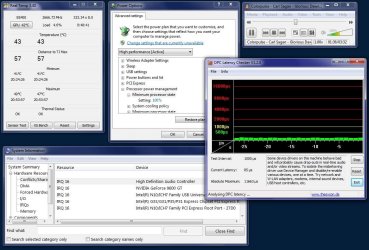
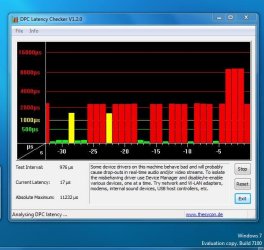
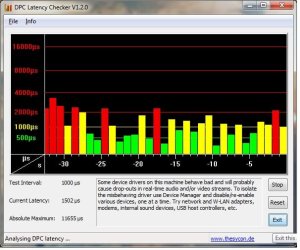
Acer really has me boiling. After all the trouble of packing up the computer and sending it to them and when I get it back the only thing they did was test it? I think it's their problem now (not windows 7). There is definitely something wrong with how they built this computer. It's an Aspire M3802 desktop. I spent 700 bucks on this darn thing a couple months ago just so I could enjoy music, videos and the occasional game and this can do none of it well because of this stupid dpc latency problem. Here's how it looks after about an hour of use just surfing the interweb with firefox or listening to music. When I first start up it hovers around the 200 to 450 mark usually but it gets worse. Any other ideas? should I just file a complaint with the BBB? I guess I will have to keep this junky machine because no one will take it back or fix it. I could just use my laptop if all I wanted to do was microsoft word and web surfing. Didn't need to buy this machine if I knew that's all I could do with it.

checker02.jpg

checker01.jpg
 

My Computer My Computer

At a glance

Windows 7 64geforce gt220
Computer Manufacturer/Model Number
Acer
OS
Windows 7 64
Graphics Card(s)
geforce gt220
Sound Card
realtek
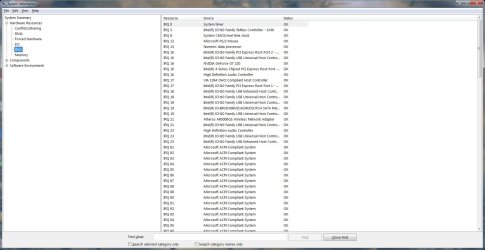
Probably why you should also build a new PC - it would have been cheaper. Can you check msinfo32.exe and the IRQ's - from IRQ 1-24 are there any devices that are sharing the IRQ with your audio controller?
 

My Computer My Computer

At a glance

Windows 7 Ultimate x86-64[email protected] 1066MHz FSB6GB DDR3 1066MHz9300M GS 256MB Dedicated (Speed) + Intel4500M...
Computer Manufacturer/Model Number
Sony Vaio Z46GDU
OS
Windows 7 Ultimate x86-64
CPU
[email protected] 1066MHz FSB
Motherboard
Sony branded
Memory
6GB DDR3 1066MHz
Graphics Card(s)
9300M GS 256MB Dedicated (Speed) + Intel4500MHD (Stamina)
Sound Card
Realtek HD Audio
Monitor(s) Displays
13.1' WXGA
Screen Resolution
1600x900
Hard Drives
320GB 7200RPM w/ 16MB cache
Internet Speed
1MB/s
You should of built me one. :p Seriously, I do not know how to build computers. I can't even install a pci card right. that's why I got one of these cookie cutter ones. No one in my family knows how to build computers and I don't have friends that can build them or any friends for that matter. I was considering cyberpowerpc and ava direct but they get a lot of bad reviews and the computers supposedly often arive in not working condition and not fully assembled. I was also considering maxforcepc but the unprofessional website made me think twice. I was talked out of dell and hp and I kind of wish I went with my gut and got an HP. Someone just said to me though get something with the specs you want and you'll be ok with any brand. I took that and that's what I did and this is what happened :(
 

My Computer My Computer

At a glance

Windows 7 64geforce gt220
Computer Manufacturer/Model Number
Acer
OS
Windows 7 64
Graphics Card(s)
geforce gt220
Sound Card
realtek
You should of built me one. :p Seriously, I do not know how to build computers. I can't even install a pci card right. that's why I got one of these cookie cutter ones. No one in my family knows how to build computers and I don't have friends that can build them or any friends for that matter. I was considering cyberpowerpc and ava direct but they get a lot of bad reviews and the computers supposedly often arive in not working condition and not fully assembled. I was also considering maxforcepc but the unprofessional website made me think twice. I was talked out of dell and hp and I kind of wish I went with my gut and got an HP. Someone just said to me though get something with the specs you want and you'll be ok with any brand. I took that and that's what I did and this is what happened :(

Well, can you check the IRQ's?
 

My Computer My Computer

At a glance

Windows 7 Ultimate x86-64[email protected] 1066MHz FSB6GB DDR3 1066MHz9300M GS 256MB Dedicated (Speed) + Intel4500M...
Computer Manufacturer/Model Number
Sony Vaio Z46GDU
OS
Windows 7 Ultimate x86-64
CPU
[email protected] 1066MHz FSB
Motherboard
Sony branded
Memory
6GB DDR3 1066MHz
Graphics Card(s)
9300M GS 256MB Dedicated (Speed) + Intel4500MHD (Stamina)
Sound Card
Realtek HD Audio
Monitor(s) Displays
13.1' WXGA
Screen Resolution
1600x900
Hard Drives
320GB 7200RPM w/ 16MB cache
Internet Speed
1MB/s
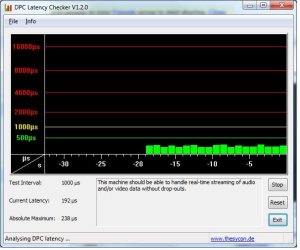
Here's what it says, I don't have a clue what it means.

moz-screenshot.png
 

Attachments

  • IRQwhateverthatmeans.jpg
    IRQwhateverthatmeans.jpg
    128.2 KB · Views: 169

My Computer My Computer

At a glance

Windows 7 64geforce gt220
Computer Manufacturer/Model Number
Acer
OS
Windows 7 64
Graphics Card(s)
geforce gt220
Sound Card
realtek
Its sharing the GPU and is also on another IRQ. YOu could try disabling the onboard sound in the BIOS, rebooting, then reboot back into the BIOS and reenable sound - this may force 7 to reassign the IRQ.
 

My Computer My Computer

At a glance

Windows 7 Ultimate x86-64[email protected] 1066MHz FSB6GB DDR3 1066MHz9300M GS 256MB Dedicated (Speed) + Intel4500M...
Computer Manufacturer/Model Number
Sony Vaio Z46GDU
OS
Windows 7 Ultimate x86-64
CPU
[email protected] 1066MHz FSB
Motherboard
Sony branded
Memory
6GB DDR3 1066MHz
Graphics Card(s)
9300M GS 256MB Dedicated (Speed) + Intel4500MHD (Stamina)
Sound Card
Realtek HD Audio
Monitor(s) Displays
13.1' WXGA
Screen Resolution
1600x900
Hard Drives
320GB 7200RPM w/ 16MB cache
Internet Speed
1MB/s
Hey thanks for helping me out :) . I've tried disabling the onboard sound in the BIOS(I forget how to even access the bios though I think it's either del or f2) before I sent this to acer and used a external creative usb sound card and it still did that after about an hour. Heck, I'm using the creative sound card adapter thing now and it still has those latency issues(however I didn't disable the onboard sound like I did before). Should I give it another go anyway?
 

My Computer My Computer

At a glance

Windows 7 64geforce gt220
Computer Manufacturer/Model Number
Acer
OS
Windows 7 64
Graphics Card(s)
geforce gt220
Sound Card
realtek
Unplug all cards, disable sound, reboot, then reboot and enable sound.
 

My Computer My Computer

At a glance

Windows 7 Ultimate x86-64[email protected] 1066MHz FSB6GB DDR3 1066MHz9300M GS 256MB Dedicated (Speed) + Intel4500M...
Computer Manufacturer/Model Number
Sony Vaio Z46GDU
OS
Windows 7 Ultimate x86-64
CPU
[email protected] 1066MHz FSB
Motherboard
Sony branded
Memory
6GB DDR3 1066MHz
Graphics Card(s)
9300M GS 256MB Dedicated (Speed) + Intel4500MHD (Stamina)
Sound Card
Realtek HD Audio
Monitor(s) Displays
13.1' WXGA
Screen Resolution
1600x900
Hard Drives
320GB 7200RPM w/ 16MB cache
Internet Speed
1MB/s
ok, I did it wrong the first time. This time I unplugged all the cards(the creative) entered that boot software and disabled sound, restarted and enabled the sound. It looks like it didn't change. Anyway this is how the DPC latency checker looks on a fresh restart and here is also the IRQs after doing thatfresh restart.jpg

irq2.jpg
 

My Computer My Computer

At a glance

Windows 7 64geforce gt220
Computer Manufacturer/Model Number
Acer
OS
Windows 7 64
Graphics Card(s)
geforce gt220
Sound Card
realtek
I'd return the PC - I have Realtek onboard for my desktop and laptop - both fully updated and both work fine. I only some corruption in one level in Bioshock for a few min. Never again though. Have you updated your other drivers? I'd return the PC.
 

My Computer My Computer

At a glance

Windows 7 Ultimate x86-64[email protected] 1066MHz FSB6GB DDR3 1066MHz9300M GS 256MB Dedicated (Speed) + Intel4500M...
Computer Manufacturer/Model Number
Sony Vaio Z46GDU
OS
Windows 7 Ultimate x86-64
CPU
[email protected] 1066MHz FSB
Motherboard
Sony branded
Memory
6GB DDR3 1066MHz
Graphics Card(s)
9300M GS 256MB Dedicated (Speed) + Intel4500MHD (Stamina)
Sound Card
Realtek HD Audio
Monitor(s) Displays
13.1' WXGA
Screen Resolution
1600x900
Hard Drives
320GB 7200RPM w/ 16MB cache
Internet Speed
1MB/s
Back
Top