Realtek, Windows 7 64RTM Crackle/static/popping

I have been having similar issues on my new pc with windows 7 64-bit... When I listen to youtube videos or wma it cracks from time to time, it get's worse if I multitask. But for some reason in games I haven't experienced any cracking sounds yet... I'm was so afraid some hardware part was broken but then I saw this thread and got even more confused:S...

Does someone else have ok sound in games, but static and cracking when not playing games, but for instance watching youtube and scrolling some other page?

Since I'm using the integrated sound card on my Asrock 870 Extreme 3, would buying a separate sound card and hooking sound to it resolve the problem?

Please help, I don't know, my service provider already inspected the pc once and blamed the drivers, but I'm scared my mmo games will start having sound issues, too and then I can basically throw this 1200 dollar pc away :(...

P.S. Tried with different drivers and all, doesn't help...
 

My Computer My Computer

At a glance

Windows 7 Home Premium 64bitPhenom II X4 965BE4 GBMSI GTX 460 Hawk Talon Attack 1 GB
OS
Windows 7 Home Premium 64bit
CPU
Phenom II X4 965BE
Motherboard
Asrock 870 Extreme 3
Memory
4 GB
Graphics Card(s)
MSI GTX 460 Hawk Talon Attack 1 GB
Sound Card
Asrock 870 Extreme 3 integrated
Monitor(s) Displays
Samsung CRT
Hard Drives
Samsung F3 1 terab.
So I uninstalled realtek audio driver from add/remove programs and uninstalled all sound devices (and drivers) in device manager, restarted OS and windows found everything itself and installed... Now, if I wanna instal R 2.57 drivers, how do I uninstall only audio drivers that are currently installed without uninstalling the devices, too? Cause every time I restart the pc windows finds it's own drivers and that's it -.-...

P.S. Sometime it installs nvidia high definition audio and sometimes realtek high definition audio oO... What's the difference?
 

My Computer My Computer

At a glance

Windows 7 Home Premium 64bitPhenom II X4 965BE4 GBMSI GTX 460 Hawk Talon Attack 1 GB
OS
Windows 7 Home Premium 64bit
CPU
Phenom II X4 965BE
Motherboard
Asrock 870 Extreme 3
Memory
4 GB
Graphics Card(s)
MSI GTX 460 Hawk Talon Attack 1 GB
Sound Card
Asrock 870 Extreme 3 integrated
Monitor(s) Displays
Samsung CRT
Hard Drives
Samsung F3 1 terab.
Been steadfastly trying to find a fix for this for a year and a half now it seems. I've read NUMEROUS threads on the Internet, but this thread is by far the longest. Seems like everyone has a fix that sorta works. For the last few weeks now I've found a fix, but it only lasts for a session. Meaning the crackling/popping will come back when I shut down the PC and boot it back up.

What I do is go to Device Manager>Open Network Adapter>Right Click on the Driver to open Properties>Click Driver>Roll Back Driver>Install/Update Driver

Granted, you lose your Internet connection for a few seconds, but every time I've done that, I can listen to music via WMP, watch Youtube Videos, or anything with volume whilst browsing the Internet or any other multi-tasking jobs and have no crackling/popping sounds.

I don't know what this all means, but it works for me. Can anyone make sense of this band-aid fix and maybe find a permanent solution?
 

My Computer My Computer

At a glance

Windows 7
OS
Windows 7
Been steadfastly trying to find a fix for this for a year and a half now it seems. I've read NUMEROUS threads on the Internet, but this thread is by far the longest. Seems like everyone has a fix that sorta works. For the last few weeks now I've found a fix, but it only lasts for a session. Meaning the crackling/popping will come back when I shut down the PC and boot it back up.

What I do is go to Device Manager>Open Network Adapter>Right Click on the Driver to open Properties>Click Driver>Roll Back Driver>Install/Update Driver

Granted, you lose your Internet connection for a few seconds, but every time I've done that, I can listen to music via WMP, watch Youtube Videos, or anything with volume whilst browsing the Internet or any other multi-tasking jobs and have no crackling/popping sounds.

I don't know what this all means, but it works for me. Can anyone make sense of this band-aid fix and maybe find a permanent solution?

It might be possible to write a batch script that does just that and make it run automatically every time you startup windows. I don't know how to do it though because I no longer have Windows(this sound problem is one of the reasons I ditched Windows).

Although seeing as this problem only resolves itself for you when you update the driver, it your problem might only come back after the session is restarted because Windows might be reverting to the default driver. Try doing the same thing(updating the driver) either as an Administrator or in Safe Mode. If doing so doesn't help, then research into my startup batch script idea.
 

My Computer My Computer

At a glance

Windows 7AMD Phenom(tm) II X4 945 Processor8 GB DDR3NVIDIA GeForce 9400 GT
Computer Manufacturer/Model Number
Zt Systems
OS
Windows 7
CPU
AMD Phenom(tm) II X4 945 Processor
Motherboard
ASUS
Memory
8 GB DDR3
Graphics Card(s)
NVIDIA GeForce 9400 GT
Sound Card
Realtek High Definition Audio Device
Monitor(s) Displays
2
I see a lot of people are having issues with their Realtek onboard audio cards. I also have a problem with my ALC888 onboard sound card.

I have an HP Pavilion m9450f and approximately November - December 2010 my audio quit working completely.

I have checked different speakers and headphones. No success.
I have updated the drivers to 2.57 and still nothing.

The system does think I have HDMI audio connected by default even though I have speakers plugged into the back jack, and headphones into the front jack. There is no HDMI plug on my PC at all. Video card is dual DVI - so no HDMI there either. When I disable the HDMI and Digital audio on my playback devices - Windows tells me there are no speakers or headphones plugged in and can not set "speakers" or "headphones" as default playback device.

I have disabled the audio in the BIOS. Windows shows no audio device available
I have set the onboard audio device to 'enabled' and to 'auto' - No help
I have updated the BIOS to the latest version. Didn't work
I have installed Windows 7 x64 clean on another HDD and no sound at all either.

I can get some sound when I - changed out my speakers to use the coax audio out and it crackles out of control. Almost distorted.

Sometimes the speakers show that they are plugged in, when using the 3.5mm jack, but there will be no sound at all.

Very strange. It is driving me crazy. Any ideas on what could be going on? I might try to press down on the audio pins as suggested in another reply and see if that works.

Thank you!
 

My Computer My Computer

At a glance

Windows 7 Ultimate x64Intel Core 2 Quad Q9300 @ 2.5GHz8GBGForece 9800GT
Computer Manufacturer/Model Number
HP Pavilion m9450f
OS
Windows 7 Ultimate x64
CPU
Intel Core 2 Quad Q9300 @ 2.5GHz
Motherboard
Benicia (ASUS IPIBL-LB, ICH9 ALC888s/t)
Memory
8GB
Graphics Card(s)
GForece 9800GT
Sound Card
Realtek ALC888S
Monitor(s) Displays
Benq 24 HD2420
Well I have solved it for me at least and many others confirm. I have a custom built PC with an ASUS mobo. I unplugged my speaker wire going to the mobo. In my case the wire said "HD Audio" I think this goes to the speaker that beeps when there is an error but I dont know what would be "HD" about that at all... anyways have no idea why this works but it absolutely fixed the problem in my case. just read the solution off a random forum and though the guy was an idiot, but wow it worked.

Fox
This is so rediculous and it worked for me. I just registered to say what I did.

I moved my 2.1 audio speaker plug to the headphone jack on top of my Dell XPS desktop and I have no latency issues. Before, every single time I would play any games, after about 5-10 minutes I would get tons of audio popping and lag. My speakers were plugged into the digital out (green plug) of the soundcard and I just moved the plug to the aux headphones jack. Yeah I don't think I have digital audio now but at least I can play my damn games! What is up with this stupid hardware bug? Hope this might help others too.
 

My Computer My Computer

At a glance

Windows 7 Home Premium 64
OS
Windows 7 Home Premium 64
I'm having this exact problem with my GA-P55A-UD3 (rev. 2.0) on Windows 7 with Realtek. I've updated the BIOS and all the drivers, reinstalled all the drivers many times but there is still crackling and popping noises.

There are no errors with the DPC Latency checker though. I cannot figure out the problem.
 

My Computer My Computer

At a glance

Windows 7 Home Premium x64
OS
Windows 7 Home Premium x64
Excuse my bad English.

I want to tell you about a solution that helped me. My problem was that whenever I was listening to music there was this random noises, like *crack*, similar to the sound of static or interference. But they had little or no laws, I've tried a lot of ways, but nothing helped. The problem was that what I thought at least - my new ps/2 mouse. More specifically, the fact that before I used the usb-mouse.

Long story short, it appeared that the driver for usb mouse still worked, despite the fact that mouse itself wasn't connected. So just deleting it (HID-compliant mouse device) from "Device Manager" solved my problem.

So, i suggest, if you have similar problem, checking if you had more then one driver for pointing device/keyboard, and disable/delete one you aren't using. Or just test if you have same problem without any ps/2 device connected to PC (i.e. using USB mouse and keyboard).

I can only guess what is the reason behind this. I hope this will help.

UPD. And if you have nVIDIA video card, and that didn't helped, there is a little workaround: launch nvidia control panel, go to "Adjust image settings with preview" tab, where you can see spinning 3d logo, and leave it working (it will work even minimized) to keep video card in 3d mode (switching between idle, 2d and 3d modes causes a lot of work for your chipset).
 
Last edited:

My Computer My Computer

At a glance

Windows 7 Ultimate x64
OS
Windows 7 Ultimate x64
Been steadfastly trying to find a fix for this for a year and a half now it seems. I've read NUMEROUS threads on the Internet, but this thread is by far the longest. Seems like everyone has a fix that sorta works. For the last few weeks now I've found a fix, but it only lasts for a session. Meaning the crackling/popping will come back when I shut down the PC and boot it back up.

What I do is go to Device Manager>Open Network Adapter>Right Click on the Driver to open Properties>Click Driver>Roll Back Driver>Install/Update Driver

Granted, you lose your Internet connection for a few seconds, but every time I've done that, I can listen to music via WMP, watch Youtube Videos, or anything with volume whilst browsing the Internet or any other multi-tasking jobs and have no crackling/popping sounds.

I don't know what this all means, but it works for me. Can anyone make sense of this band-aid fix and maybe find a permanent solution?

UPDATE: As well as this temporary fix was for me, the crackling/popping noise has totally gone away on its own. No more having to disable/enable the network adapter. The only thing I have done lately was upgrade to IE9 and Firefox4 on my PC. I believe there some updates that Windows 7 did also.
 

My Computer My Computer

At a glance

Windows 7
OS
Windows 7
I had this problem on my system (custom with Win7x64 and Gigabyte GA-H67MA-UD2H-B3 mobo) and came to this thread to find a solution.

In the end, I found the culprit, and would recommend to anyone with this problem to download the DCP Latency Checker from Thesycon GmbH; this handy little app will show you what the latency status of your system is and will help to locate the driver with latency problems that causes the audio popping/crackling.

In the end, my problem was that I had plugged a USB device into what I thought was a USB port on my mobo that was actually dedicated to legacy PS2 mice or keyboards. I didn't realize this port was configured in this way until I re-read the mobo manual carefully to be sure I hadn't made a mistake in one of my connections.

Hope this helps someone out there with this extremely annoying problem.
 

My Computer My Computer

At a glance

Windows 7 Ultimate x64Intel Core i5-2500k @3.30 GHz2 pairs G.Skill 4gb Ripjaws-X F3-10600CL9D-4GBXLATI Radeon HD5770
Computer Manufacturer/Model Number
custom build
OS
Windows 7 Ultimate x64
CPU
Intel Core i5-2500k @3.30 GHz
Motherboard
Gigabyte GA-H67MA-UD2H rev. 1
Memory
2 pairs G.Skill 4gb Ripjaws-X F3-10600CL9D-4GBXL
Graphics Card(s)
ATI Radeon HD5770
Sound Card
onboard Realtek RTL8111E
Monitor(s) Displays
Samsung Syncmaster 225MW (DVI)
Hard Drives
2x WD 1tb Caviar Black sata 3 in Raid1 array
PSU
Coolermaster 550W
Case
Silverstone SG1 Revolution
Cooling
stock Intel and case fans
my cracking/popping sounds r coming back again. in my case, I think it's hardware related (maybe cpu, ram, or motherboard). I think this because this only happens when I play games or multitask with "intensive" things running. Such as installing/uninstalling or backing up computer while doing anything that has audio.
 

My Computer My Computer

At a glance

Win 7 & 10 x64Intel(R) Core(TM)2 Quad CPU Q8400 @ 2.66GHz (...8GB DDR2HD 6970 2 GB
Computer type
PC/Desktop
Computer Manufacturer/Model Number
Acer M802
OS
Win 7 & 10 x64
CPU
Intel(R) Core(TM)2 Quad CPU Q8400 @ 2.66GHz (4 CPUs), ~2.7GH
Motherboard
MB.SCQ07.002 MB KIT G43 ICH10R HMII EUPLOT6 ECS R
Memory
8GB DDR2
Graphics Card(s)
HD 6970 2 GB
Sound Card
Realtek ALC 888s
Monitor(s) Displays
AOC
Screen Resolution
1920x1080 60hz
Hard Drives
WD Black 1 TB

WD My Book Essential 1 TB external HDD
PSU
Corsair TX650m
Case
CM 690 II Advanced mid tower
Cooling
fan
Hey guys,

Using DPC latency I narrowed the culprit down to my network card Atheros AR928X. I updated the drivers to the latest version on atheros.cz (9.2.0.113). I also updated Realtek drivers to the latest 2.58. However the problem is still not going away!

I have disabled all sound enhancements and am running in 16-bit 44100 hz. So my question to you is, what do you do when you have found the culprit but driver updates don't fix the problem?
 

My Computer My Computer

At a glance

Windows 7 Ultimate 32-bitIntel Core 2 Duo P73502 GBMobility Radeon 3470
Computer Manufacturer/Model Number
ASUS X82S
OS
Windows 7 Ultimate 32-bit
CPU
Intel Core 2 Duo P7350
Memory
2 GB
Graphics Card(s)
Mobility Radeon 3470
Sound Card
Realtek HD Audio ALC662
Monitor(s) Displays
14.1" WXGA
Hard Drives
250 GB
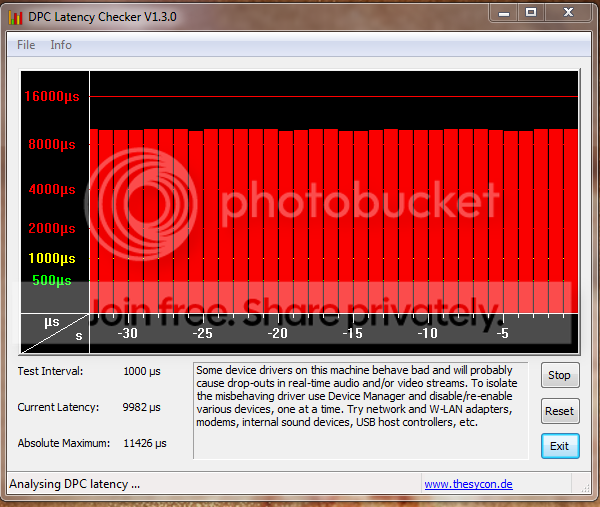
I am having the same crackling/popping problems with my sound and Reatek onboard sound card (see rig below). I've installed/reinstalled sound drivers, updated bios, etc. etc. Nothing helps. I am trying to troubleshoot with DPC latency checker, but I cannot pinpoint where the problem is:

DPCLatency.png


Intel Core i7-2600K 3.4GHz | ASUS P8P67 Deluxe (REV 3.0) LGA 1155 Intel P67 SATA 6Gb/s ATX Intel Motherboard | G.SKILL Ripjaws X Series 16GB (PC3 10666) | 2 x XFX Radeon HD 6970 2GB 256-bit GDDR5 PCI Express 2.1 x16 | Crucial RealSSD C300 128GB SSD | Samsung Spinpoint F3 HD103SJ 1TB 7200 RPM SATA 3.0Gb/s Hard Drive | Silverstone ST1000-P 1000W Modular PSU | Silverstone FT02B ATX Case | Windows 7 Home Premium 64bit
 

My Computer My Computer

At a glance

Windows 7 64-bitIntel Core i7-2600K 3.4GHzG.SKILL Ripjaws X Series 16GB (PC3 10666)2 x XFX Radeon HD 6970 2GB 256-bit GDDR5 PCI ...
OS
Windows 7 64-bit
CPU
Intel Core i7-2600K 3.4GHz
Motherboard
ASUS P8P67 Deluxe (REV 3.0) LGA 1155 Intel P67 SATA 6Gb/s AT
Memory
G.SKILL Ripjaws X Series 16GB (PC3 10666)
Graphics Card(s)
2 x XFX Radeon HD 6970 2GB 256-bit GDDR5 PCI Express 2.1 x16
Hard Drives
Crucial RealSSD C300 128GB SSD
Samsung Spinpoint F3 HD103SJ 1TB 7200 RPM SATA 3.0Gb/s Hard Drive
PSU
Silverstone ST1000-P 1000W Modular PSU
Case
Silverstone FT02B ATX Case
Hi All!

I just registered to tell you guys what i did!
I've got an Acer Aspire TimelineX 5820T, with Realtek HD audio.
I've been having clicks and pops in my speakers for almost 9 months, since i bought the computer. I managed to solve it once, when I installed some new realtek drivers, think it was the 2.45 driver. But few weeks ago I decided to update to the newest 2.5X from the realtek website, and POOF, I got the clicks and pops again!

Finally I found the solution, after checking my DPC latency i found out that my tcpip.sys was making 200.000 us ! So I read through some forum called "network causing high DPC latency" and found the solution....
I disabled the Atheros PCI-E Gigabit Ethernet Controller in device manager, and wolah. IT WORKS!!
Try it out!:D
 

My Computer My Computer

At a glance

Windows 7 Home Premium 64bit
OS
Windows 7 Home Premium 64bit
I found that my latency was related to the Optical Drive. So as long as I keep a disc in the drive, latency is fine. Odd huh?
 

My Computer My Computer

At a glance

Windows 7 64-bitIntel Core i7-2600K 3.4GHzG.SKILL Ripjaws X Series 16GB (PC3 10666)2 x XFX Radeon HD 6970 2GB 256-bit GDDR5 PCI ...
OS
Windows 7 64-bit
CPU
Intel Core i7-2600K 3.4GHz
Motherboard
ASUS P8P67 Deluxe (REV 3.0) LGA 1155 Intel P67 SATA 6Gb/s AT
Memory
G.SKILL Ripjaws X Series 16GB (PC3 10666)
Graphics Card(s)
2 x XFX Radeon HD 6970 2GB 256-bit GDDR5 PCI Express 2.1 x16
Hard Drives
Crucial RealSSD C300 128GB SSD
Samsung Spinpoint F3 HD103SJ 1TB 7200 RPM SATA 3.0Gb/s Hard Drive
PSU
Silverstone ST1000-P 1000W Modular PSU
Case
Silverstone FT02B ATX Case

My Computer My Computer

At a glance

Windows 7 Ultimate x64, Vista Ultimate x64AMD Opteron 222216 GB, 9 bit
Computer Manufacturer/Model Number
HP xw9400
OS
Windows 7 Ultimate x64, Vista Ultimate x64
CPU
AMD Opteron 2222
Motherboard
HP
Memory
16 GB, 9 bit
I just started having the problem recently with by Gigabyte GA-X58A-UD3R and after some playing around I updated the Realtek Drivers to 2.60 via Realtek's website. This didn't fix the problem until I also downloaded the Realtek RTL8111E LAN drivers.

At least for now I'm not having the problem. Hopefully this helps someone.
 

My Computer My Computer

At a glance

Windows 7 Professional x64
OS
Windows 7 Professional x64
OK - maybe not - seemed to have went away for awhile and now it is back :cry:

I'll be sure to update on this thread if I get it fixed
 

My Computer My Computer

At a glance

Windows 7 Professional x64
OS
Windows 7 Professional x64
Hi, I solved my problem by preventing C:\Program Files\Realtek\Audio\HDA\RAVCpl64.exe to run at windows start up.
Disable this file to run at windows startup, then you'll see the problem is gone.
 

My Computer My Computer

At a glance

Windows 7 Home Premium 64bit
OS
Windows 7 Home Premium 64bit
riky, don't be surprised if it comes back. It probably only stopped because you restarted your pc...

I'm getting it very rarely these days, touch wood
 

My Computer My Computer

At a glance

Windows 7 Ultimate x64Q6600 2.4 GHz4 GBnvidea Quadro FX 540
Computer Manufacturer/Model Number
Gigabyte GA-EP45-DS3
OS
Windows 7 Ultimate x64
CPU
Q6600 2.4 GHz
Motherboard
Gigabyte GA-EP45-DS3
Memory
4 GB
Graphics Card(s)
nvidea Quadro FX 540
Sound Card
Realtek HD Audio rolled back to driver 1.0.64.9
Monitor(s) Displays
Hanns-G and Acer
Screen Resolution
1920 x 1080 and 1680 x 1050
Keyboard
IBM PS/2 !
Back
Top