Reassigning hard drive letters

bigonroad

New member
Local time
12:04 AM
Messages
12
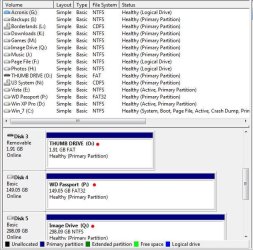
My problem: My computer keeps failing to assign letters to two partitions. I can set it up fine in diskmgmt.msc, but as soon as I restart, it loses them again.


My setup: I have 2 hard disks.
  • Hard disk 1 has 3 partitions.
  • Hard disk 2 has 2 partitions.
However, the hard disk 2 partitions are not labelled or assigned a number automatically by windows. I can assign them one, but it resets when I restart the computer!

Background: I'm running Windows 7, which I installed yesterday. I've never had a problem like this before. Once assigned a letter, all the files are intact and accessible on the missing partitions.

An Image: Check the image below to see my setup in visual terms:

diskmgmt.png


Any help would be much appreciated!
Bless,
Chris
 
Last edited by a moderator:

My Computer My Computer

Computer Manufacturer/Model Number
Homebuilt
OS
Windows 7
CPU
Intel Q9550
Memory
6 Gb DDR2
Graphics Card(s)
Radeon HD 4830
Monitor(s) Displays
2x HPL1906
Hard Drives
640Gb + 160Gb
Hi Chris and welcome to the forum. What letters are you trying to assign? Are you using letters at the bottom end of the alphabet? If so try W,X or Y (I see you have used X)
 
Last edited by a moderator:

My Computer My Computer

Computer type
PC/Desktop
OS
Microsoft Windows 7 Home Premium 64-bit 7601 Multiprocessor Free Service Pack 1
CPU
Intel(R) Core(TM) i7-3770 CPU @ 3.40GHz
Motherboard
ASUSTeK COMPUTER INC. P8H77-M
Memory
8.00 GB
Graphics Card(s)
Intel(R) HD Graphics 4000
Sound Card
On Board
Monitor(s) Displays
Dell 24"
Screen Resolution
1920 x 1080
Hard Drives
(1) INTEL SSDSC2CT180A3 ATA Device (2) ST500DM002-1BD142 ATA Device (3) WDC WD3200AAKS-75L9A0 ATA Device (4) Generic- Compact Flash USB Device (5) Generic- MS/MS-Pro USB Device (6) Generic- SD/MMC USB Device (7) Generic- SM/xD-Picture USB
PSU
500w Corsair
Case
Cooler Master
Cooling
3 Fans
Keyboard
Logitech MK300
Mouse
Logitech WOM
Internet Speed
75Mb
Antivirus
Norton 360
Browser
Firefox, Opera, IE
Are the drives internal or USB/eSATA external drives? Windows 7 generally will not assign a drive letter on external drives in a lot of cases but once the user assigns a drive letter it should remain as the default. If the drive letter assigned is right when you boot into SAFE Mode then it may be some sort of software interference. You may want to review the Microsoft KB Article to see if it references your issue http://support.microsoft.com/kb/929135
 

My Computer My Computer

Computer Manufacturer/Model Number
DELL XPS Studio 435T
OS
Vista 64 Ultimate, Windows 7 64 Ultimate, Ubuntu 9.10
CPU
i7 975 3.3 GHz Extreme (Factory OC'd to 3.6 GHz)
Motherboard
DELL provided
Memory
18 Gb Tri-Channel 1066
Graphics Card(s)
ATI 5970 2048 Mb
Sound Card
X-Fi Extreme Gamer
Monitor(s) Displays
Vizio 37" HD-TV
Screen Resolution
1920 x 1080
Hard Drives
1.5 Tb HDD
1.5 Tb HDD
2.0 Tb Network Drive
512 Gb Crucial SSD
PSU
DELL Provided 475 watts
Case
DELL
Cooling
3 fans
Keyboard
Logitech Performance K350 Wireless
Mouse
Logitech Performance MX Wireless
Internet Speed
3 Mb up 750 Kb down
Other Info
Bamboo Fun Tablet, Belkin N+ Wireless router, Pioneer Dolby System Wireless Headphones, Bose 5.1 Dolby Surround Sound System, LifeCam VX 3000 Webcam, Blu-Ray/Hi Def DVD +RW combo and Blu-ray +RW,l 15 in 1 media card reader, Logitech Rumblepad 2, Hauppauge 2250 DTV Tuner with MS Media Center Remote

Laptop:Alienware M17x, Q9100 CPU, 8Gb RAM, 1920x1200 WUXGA LCD driven by 4870's in CrossFireX, Bl
Windows 7 generally will not assign a drive letter on external drives in a lot of cases

Hi fishnbanjo,

Hmmm......Perhaps I'm missing what you're saying because Windows will assign drive letters to external drives. In fact I hadn't seen where it didn't happen, unless there was a problem.

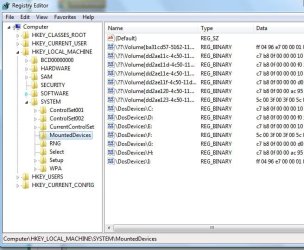
I just now hooked up a thumb drive, an external hard drive, and WD Passport Drive. All the drive letters were automatically assigned by Windows.

External Drives.JPG


@ bigonroad,

Did you "manually" assign any drive letters?

Also, do this, try assigning a drive letter to just the "Photo" drive and see if it will stick. Let us know.
 

My Computer My Computer

Computer type
PC/Desktop
Computer Manufacturer/Model Number
Custom built by me.
OS
Windows 10 Pro
CPU
Intel Core i7-4770K (3.5Ghz)
Motherboard
Gigabyte G1 Sniper 5 (F10 Bios)
Memory
32 gig Corsair Dominator Platinum (4x8Gig)
Graphics Card(s)
Sapphire Tri-X R9 Fury
Sound Card
Soundblaster ZXR
Monitor(s) Displays
NEC PA242W 24" LCD Monitor
Screen Resolution
1920 x 1200
Hard Drives
Primary - Samsung 850 Pro (512gig), Samsung 840 Pro (256gig), 2TB WD Caviar Black.
PSU
EVGA Supernova 1000 G2
Case
Cooler Master HAF X
Cooling
Corsair H100i with Corsair Air Series SP120 Quiet Fans
Keyboard
Logitech Wireless Wave
Mouse
Logitech Performance MX
Internet Speed
High Speed Cable
Antivirus
Norton Security
Browser
IE11
Other Info
Memory Timings - 1866MHz @ 9-9-9-27-1T @ 1.5 volts
It should be assigning letters on its own, but i always thought Windows wanted them in certain order.
Meaning, the 1st partition of each drive gets 1st letter then moving to second partition on each drive assigning alphabetcally.

Such as :
Disk 0: P1(C) P2(E) P3 (G)
Disk 1: P1(D) P2(F)
CD ROM: (H) Or whatever letter you desire

I'm not certain this will make a difference, so please correct me if wrong.

This may not even be the cause, Just a thought.
 

My Computer My Computer

Computer Manufacturer/Model Number
Custom (Self Build)
OS
Windows 7 Home Premium 64bit
CPU
Intel Core i7 2700k
Motherboard
eVGA P67 SLI
Memory
8GB Mushkin Redline Ridgebacks @1866
Graphics Card(s)
EVGA GTX570 SC
Sound Card
XiFi Titanium HD
Monitor(s) Displays
LG W2453V
Screen Resolution
1920x1080
Hard Drives
Intel 320 80GB -- Intel X25-V 40GB --WD Black 1TB x2 -- WD Blue 640GB
PSU
Seasonic x750
Case
Corsair 600T SE White
Cooling
eVGA Superclocked CPU Cooler
Keyboard
Saitek Cyborg
Antivirus
Kaspersky
Browser
IE
Other Info
LG BD/DVD
You have a very strange setup. Your Music partition is the Active partition containing the MBR. That's one of the first things I would fix. Has there been an OS previously on that partition?
 

My Computer My Computer

Computer Manufacturer/Model Number
HP, Dell, Gateway, Toshiba - 4 laptops and 2 desktops
OS
Vista, Windows7, Mint Mate, Zorin, Windows 8
CPU
from 1.6GHz Duo to i7
Monitor(s) Displays
2x HP w2207
Hard Drives
5x HDD, 7x SSD, 12x Externals
Keyboard
with trackball - no mices
Mouse
Trackball mice
Internet Speed
DSL 6000
whs I noticed that as well. What I wanted him to try first was to see if he can assign a drive letter to his photo drive only. If he could, than the problem is not the hard drive but maybe the partitions. And if the music drive is the MBR he can't assign any other letter than what was assigned. Unfortunately he doesn't know what letter that was because it's blank.

That's my shot in the dark anyway.

But.... I had a different problem where I wanted to move my MBR from my "Games" drive to the "C" drive and SIW2 gave me a fix to do it. I think the OP should try and move the MBR first using SIW2's fix than see if he can assign drive letters.

Again, my shot in the dark.

Here's the post - http://www.sevenforums.com/installation-setup/83800-boot-loader-separate-partition.html
 

My Computer My Computer

Computer type
PC/Desktop
Computer Manufacturer/Model Number
Custom built by me.
OS
Windows 10 Pro
CPU
Intel Core i7-4770K (3.5Ghz)
Motherboard
Gigabyte G1 Sniper 5 (F10 Bios)
Memory
32 gig Corsair Dominator Platinum (4x8Gig)
Graphics Card(s)
Sapphire Tri-X R9 Fury
Sound Card
Soundblaster ZXR
Monitor(s) Displays
NEC PA242W 24" LCD Monitor
Screen Resolution
1920 x 1200
Hard Drives
Primary - Samsung 850 Pro (512gig), Samsung 840 Pro (256gig), 2TB WD Caviar Black.
PSU
EVGA Supernova 1000 G2
Case
Cooler Master HAF X
Cooling
Corsair H100i with Corsair Air Series SP120 Quiet Fans
Keyboard
Logitech Wireless Wave
Mouse
Logitech Performance MX
Internet Speed
High Speed Cable
Antivirus
Norton Security
Browser
IE11
Other Info
Memory Timings - 1866MHz @ 9-9-9-27-1T @ 1.5 volts
It could be a problem of hidden partitions. Go to this thread and have a look at my post #14. Look at the paragraph that starts with "Alternatively". Maybe you can unblock the situation with Partition Wizard as described. All links are in this thread.
 

My Computer My Computer

Computer Manufacturer/Model Number
HP, Dell, Gateway, Toshiba - 4 laptops and 2 desktops
OS
Vista, Windows7, Mint Mate, Zorin, Windows 8
CPU
from 1.6GHz Duo to i7
Monitor(s) Displays
2x HP w2207
Hard Drives
5x HDD, 7x SSD, 12x Externals
Keyboard
with trackball - no mices
Mouse
Trackball mice
Internet Speed
DSL 6000
I guess we won't know until he posts back.
 

My Computer My Computer

Computer type
PC/Desktop
Computer Manufacturer/Model Number
Custom built by me.
OS
Windows 10 Pro
CPU
Intel Core i7-4770K (3.5Ghz)
Motherboard
Gigabyte G1 Sniper 5 (F10 Bios)
Memory
32 gig Corsair Dominator Platinum (4x8Gig)
Graphics Card(s)
Sapphire Tri-X R9 Fury
Sound Card
Soundblaster ZXR
Monitor(s) Displays
NEC PA242W 24" LCD Monitor
Screen Resolution
1920 x 1200
Hard Drives
Primary - Samsung 850 Pro (512gig), Samsung 840 Pro (256gig), 2TB WD Caviar Black.
PSU
EVGA Supernova 1000 G2
Case
Cooler Master HAF X
Cooling
Corsair H100i with Corsair Air Series SP120 Quiet Fans
Keyboard
Logitech Wireless Wave
Mouse
Logitech Performance MX
Internet Speed
High Speed Cable
Antivirus
Norton Security
Browser
IE11
Other Info
Memory Timings - 1866MHz @ 9-9-9-27-1T @ 1.5 volts
Boot into 7 - don't assign any letters.

In regedit , go to HKEY_LOCAL_MACHINE\SYSTEM\MountedDevices

click on mounted devices and see what is listed under Dos devices in the right pane ( post a screenie )


My problem: My computer keeps failing to assign letters to two partitions. I can set it up fine in diskmgmt.msc, but as soon as I restart, it loses them again.


My setup: I have 2 hard disks.
  • Hard disk 1 has 3 partitions.
  • Hard disk 2 has 2 partitions.
However, the hard disk 2 partitions are not labelled or assigned a number automatically by windows. I can assign them one, but it resets when I restart the computer!

Background: I'm running Windows 7, which I installed yesterday. I've never had a problem like this before. Once assigned a letter, all the files are intact and accessible on the missing partitions.

An Image: Check the image below to see my setup in visual terms:

diskmgmt.png


Any help would be much appreciated!
Bless,
Chris
 

My Computers My Computers

System One System Two

  • Computer type
    PC/Desktop
    OS
    7 X64
    CPU
    i5 8400
    Motherboard
    gigabyte b365m ds3h
    Memory
    2x8gb 3200mhz
    Hard Drives
    various
    PSU
    pure power 11 400w cm
    Case
    Coolermaster
    Cooling
    cryorig m9i
  • Computer type
    PC/Desktop
    OS
    7x64
    CPU
    g5400
    Motherboard
    ga b365m ds3h
    Memory
    8gb ddr4 2400
    PSU
    xfx pro 450w
Wow, that was a lot of responses. Will try to answer all...

@mitchell65 no, I haven't, mostly tried E and F, as they were on XP on this same machine yesterday. Will try that, but I suspect it won't make a massive difference.

@fishnbanjo sorry, should have made it clear, these are both internal SATA2 drives.

@sygnus21 manually assigning letters works fine, on either or both drives, and i can then access them through My computer. After reboot though, they lose their assignation, whatever I try.

@wishmaster I'm fairly sure this isn't correct. However, assigned in the order you said, still didnt work.

@whs Yes, it wasnt working, when neither partition was 'active', so I turned it on. Sadly you cant turn off active. Should I wipe the MBR on that drive?

@sygnus21 and @whs will try both your solutions and get back to you.

Thanks!
Chris
 

My Computer My Computer

Computer Manufacturer/Model Number
Homebuilt
OS
Windows 7
CPU
Intel Q9550
Memory
6 Gb DDR2
Graphics Card(s)
Radeon HD 4830
Monitor(s) Displays
2x HPL1906
Hard Drives
640Gb + 160Gb
Did you check the mounted devices ?

My little app Sygnus mentioned won't help here - your boot situation is fine as it is.

This is what you are looking for:

mounted devices-2010-05-15_230242.jpg
 

My Computers My Computers

System One System Two

  • Computer type
    PC/Desktop
    OS
    7 X64
    CPU
    i5 8400
    Motherboard
    gigabyte b365m ds3h
    Memory
    2x8gb 3200mhz
    Hard Drives
    various
    PSU
    pure power 11 400w cm
    Case
    Coolermaster
    Cooling
    cryorig m9i
  • Computer type
    PC/Desktop
    OS
    7x64
    CPU
    g5400
    Motherboard
    ga b365m ds3h
    Memory
    8gb ddr4 2400
    PSU
    xfx pro 450w
let's get this registry started!

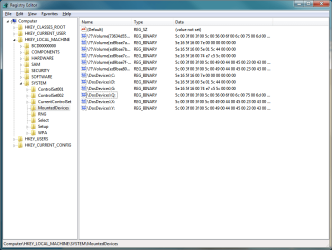
Ok, so I got into regedit, and it tells me this:
regedit.png

Basically, the main difference is that there is a Q drive. Forgot to mention that My computer can see a Q: drive too, but its "not accessible, access is denied".

Is there a free partitioning tool I can use to completely wipe this drive and start again on it? I already have both partitions backed up on Hard Drive 1, so I am willing to do this...

Bless,
Chris
 

My Computer My Computer

Computer Manufacturer/Model Number
Homebuilt
OS
Windows 7
CPU
Intel Q9550
Memory
6 Gb DDR2
Graphics Card(s)
Radeon HD 4830
Monitor(s) Displays
2x HPL1906
Hard Drives
640Gb + 160Gb
Okay, I'm using partition magic to completely wipe the hard drive. Then I will make one partition, and see if Windows can recognise it each time.
 

My Computer My Computer

Computer Manufacturer/Model Number
Homebuilt
OS
Windows 7
CPU
Intel Q9550
Memory
6 Gb DDR2
Graphics Card(s)
Radeon HD 4830
Monitor(s) Displays
2x HPL1906
Hard Drives
640Gb + 160Gb
I think that's working. Just created partitions, and they stayed on reboot.

I *think* the Q drive is due to installing Office 2010 beta, meaning that everything is now working fine, I think!

Thanks for your help guys!
 

My Computer My Computer

Computer Manufacturer/Model Number
Homebuilt
OS
Windows 7
CPU
Intel Q9550
Memory
6 Gb DDR2
Graphics Card(s)
Radeon HD 4830
Monitor(s) Displays
2x HPL1906
Hard Drives
640Gb + 160Gb
I think that's working. Just created partitions, and they stayed on reboot.

I *think* the Q drive is due to installing Office 2010 beta, meaning that everything is now working fine, I think!

Thanks for your help guys!
That is correct. Office 2010 creates a virtual drive (usually Q) for the installer. When you mount images of some imaging programs (e.g. Paragon, Macrium), you get virtual drives too. They disappear with the next reboot.
 

My Computer My Computer

Computer Manufacturer/Model Number
HP, Dell, Gateway, Toshiba - 4 laptops and 2 desktops
OS
Vista, Windows7, Mint Mate, Zorin, Windows 8
CPU
from 1.6GHz Duo to i7
Monitor(s) Displays
2x HP w2207
Hard Drives
5x HDD, 7x SSD, 12x Externals
Keyboard
with trackball - no mices
Mouse
Trackball mice
Internet Speed
DSL 6000
Partition Magic does not play well with Win7. Use free Partition Wizard bootable CD instead, which has helped with hundreds of partioning operations here without failure.

First thing I would do is rightclick that Music partition to Modify>Set to Inactive, then do not mark random partitions Active in the future.
 
Drive letter disappears after each reboot

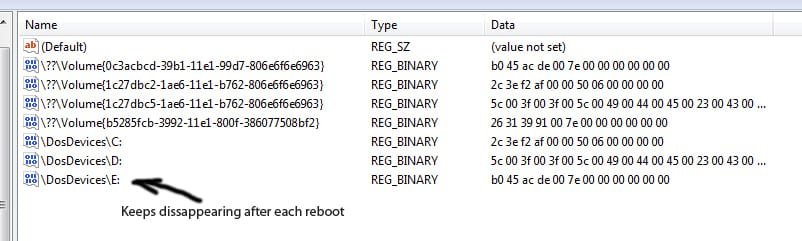
I have the exact same problem as thread starter. Without any manual assignment the print screen shows that E is mounted but I would not be able to see it. The drive in question is a 2tb sata2 externally connected via usb

I did not mount any office application on my newly bought computer

Any fresh help appreciated
 

Attachments

  • drive e.jpg
    drive e.jpg
    49.3 KB · Views: 11

My Computer My Computer

OS
windows 7 home premium 64 bit
I have the exact same problem as thread starter. Without any manual assignment the print screen shows that E is mounted but I would not be able to see it. The drive in question is a 2tb sata2 externally connected via usb

I did not mount any office application on my newly bought computer

Any fresh help appreciated
Would be easier if you posted a screenshot of your Disk Management.
 

My Computer My Computer

Computer Manufacturer/Model Number
HP, Dell, Gateway, Toshiba - 4 laptops and 2 desktops
OS
Vista, Windows7, Mint Mate, Zorin, Windows 8
CPU
from 1.6GHz Duo to i7
Monitor(s) Displays
2x HP w2207
Hard Drives
5x HDD, 7x SSD, 12x Externals
Keyboard
with trackball - no mices
Mouse
Trackball mice
Internet Speed
DSL 6000
I suspect my master boot record could be the problem and i reformatted it (using quick format) using seagate's proprietary hardisk software.

And now it appears again. Thanks all for listening and contributing
 

My Computer My Computer

OS
windows 7 home premium 64 bit
Back
Top