
Solved Reassigning Media Keys on Keyboard

spinksy

New member
Member
Local time
9:12 PM
Messages
70
Hi, im wondering if it is possible to reassign the media keys on my keyboard,
i actually only want to change one, the one that opens up windows media player. it is annoying when i press this accidentally and WMP opens because i never use it.
i either want to set it so it doesnt open anything when it is pressed or to open up itunes rather than WMP.
thank you
 

My Computer My Computer

At a glance

Windows 7 Professional x64Intel Core i7 Q720 1.60GHz4GB DDR3 (2GB + 2GB) (1066MHz)NVIDIA GeForce GTS 250M
Computer Manufacturer/Model Number
Toshiba Qosmio x500 02g - PQX33A 02g00J
OS
Windows 7 Professional x64
CPU
Intel Core i7 Q720 1.60GHz
Motherboard
TOSHIBA Qosmio X500
Memory
4GB DDR3 (2GB + 2GB) (1066MHz)
Graphics Card(s)
NVIDIA GeForce GTS 250M
Sound Card
(1) NVIDIA High Definition Audio (2) Conexant Pebble High
Monitor(s) Displays
18.4” Widescreen Full HD TruBrite® Display (1920 x 1080)
Screen Resolution
1920x1080
Hard Drives
(1) TOSHIBA MK5055GSX (2) TOSHIBA MK5055GSX
What make and model keyboard, and do you have the manufacturers software that goes with it installed? For example, Logitechs Setpoint software lets me change what program opens when I press that key on my Logitech keyboard. Failing that you may have to see if you can set iTunes as the default program for audio files and see if windows remaps that key on the keyboard to match it.
 

My Computer My Computer

At a glance

Windows 10 Education 64 bitAMD Phenom II X4 980 Black Edition Deneb 3.7GHz8GB 4GBx2 Kingston PC10600 DDR3 1333 MemoryZotac NVIDIA Geforce GT640 2 Gig DDR3 PCIe
Computer type
PC/Desktop
Computer Manufacturer/Model Number
Home Built
OS
Windows 10 Education 64 bit
CPU
AMD Phenom II X4 980 Black Edition Deneb 3.7GHz
Motherboard
Asus M4N68T-M V2 µATX Motherboard
Memory
8GB 4GBx2 Kingston PC10600 DDR3 1333 Memory
Graphics Card(s)
Zotac NVIDIA Geforce GT640 2 Gig DDR3 PCIe
Sound Card
VIA VT1708s High Definition Audio 8-channel Onboard
Monitor(s) Displays
22" LG E2242 1080p and 2 19" I-INC AG191D
Screen Resolution
1280x1024 - 1920x1080 - 1280x1024
Hard Drives
Crucial M100 256 GB SSD and 500 GB WD Blue SATA
PSU
Thermaltake TR 620
Case
Power Up Black ATX Mid-Tower Case
Cooling
Stock heatsink and fan
Keyboard
Logitech Wireless K350 Wave
Mouse
Logitech Wireless M570 Trackman Wheel
Internet Speed
80 Mbps Down 30 Mbps Up
Antivirus
Windows Defender
Browser
Internet Explorer 11
Other Info
HP DVD1040e Lightscribe - External USB2
its on the laptop, sorry should have mentioned that, yeah i have tried setting itunes as default but that didnt change it
 

My Computer My Computer

At a glance

Windows 7 Professional x64Intel Core i7 Q720 1.60GHz4GB DDR3 (2GB + 2GB) (1066MHz)NVIDIA GeForce GTS 250M
Computer Manufacturer/Model Number
Toshiba Qosmio x500 02g - PQX33A 02g00J
OS
Windows 7 Professional x64
CPU
Intel Core i7 Q720 1.60GHz
Motherboard
TOSHIBA Qosmio X500
Memory
4GB DDR3 (2GB + 2GB) (1066MHz)
Graphics Card(s)
NVIDIA GeForce GTS 250M
Sound Card
(1) NVIDIA High Definition Audio (2) Conexant Pebble High
Monitor(s) Displays
18.4” Widescreen Full HD TruBrite® Display (1920 x 1080)
Screen Resolution
1920x1080
Hard Drives
(1) TOSHIBA MK5055GSX (2) TOSHIBA MK5055GSX
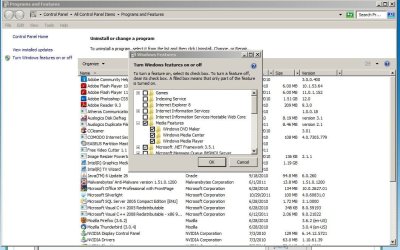
try disabling WMP--since you don't use it--just uncheck it in the box shown in the attached screen capture
 

Attachments

  • Capture.JPG
    Capture.JPG
    113.3 KB · Views: 382

My Computer My Computer

At a glance

win7 ultimate 32bitcore2 Extreme QX6850-OCd to 3.15 GHz4 GBNVidia 8600 GT
Computer Manufacturer/Model Number
SALEON model 2.2b
OS
win7 ultimate 32bit
CPU
core2 Extreme QX6850-OCd to 3.15 GHz
Motherboard
ASUS P5G41-M LE
Memory
4 GB
Graphics Card(s)
NVidia 8600 GT
Monitor(s) Displays
23" acer
Hard Drives
one SATA 250GB partitioned equally in half
one SATA 160GB-internal storage
PSU
500W Thermaltake
Case
mini tower
thanks that does stop anything coming up, annoyingly it disable windows media center when i disable media player.
 

My Computer My Computer

At a glance

Windows 7 Professional x64Intel Core i7 Q720 1.60GHz4GB DDR3 (2GB + 2GB) (1066MHz)NVIDIA GeForce GTS 250M
Computer Manufacturer/Model Number
Toshiba Qosmio x500 02g - PQX33A 02g00J
OS
Windows 7 Professional x64
CPU
Intel Core i7 Q720 1.60GHz
Motherboard
TOSHIBA Qosmio X500
Memory
4GB DDR3 (2GB + 2GB) (1066MHz)
Graphics Card(s)
NVIDIA GeForce GTS 250M
Sound Card
(1) NVIDIA High Definition Audio (2) Conexant Pebble High
Monitor(s) Displays
18.4” Widescreen Full HD TruBrite® Display (1920 x 1080)
Screen Resolution
1920x1080
Hard Drives
(1) TOSHIBA MK5055GSX (2) TOSHIBA MK5055GSX
That could be tricky on a laptop. My old Acer Aspire uses a Launcher app to program a couple of special keys for launching a web browser or e-mail app etc. I can reassign those keys. The one key that originally launched the Acer Arcade (which is not installed) now launches Windows Media Center. I haven't figured out how to change that key. I actually use Media Center so I haven't gone out of my way to remap that key. It looks to be a special key that Acer added. For media player I just remapped one of the other media keys. You may have to install similar software for your laptop to get control over those key functions. Windows will I believe give some of the obvious ones default functions. The Home key, e-mail key, volume up down etc all work out of the box on my Logitech keyboard on my desktop PC without installing Setpoint. The super special blue keys don't though, unless you install setpoint. Once Setpoint is installed I can remap all the media keys.
 

My Computer My Computer

At a glance

Windows 10 Education 64 bitAMD Phenom II X4 980 Black Edition Deneb 3.7GHz8GB 4GBx2 Kingston PC10600 DDR3 1333 MemoryZotac NVIDIA Geforce GT640 2 Gig DDR3 PCIe
Computer type
PC/Desktop
Computer Manufacturer/Model Number
Home Built
OS
Windows 10 Education 64 bit
CPU
AMD Phenom II X4 980 Black Edition Deneb 3.7GHz
Motherboard
Asus M4N68T-M V2 µATX Motherboard
Memory
8GB 4GBx2 Kingston PC10600 DDR3 1333 Memory
Graphics Card(s)
Zotac NVIDIA Geforce GT640 2 Gig DDR3 PCIe
Sound Card
VIA VT1708s High Definition Audio 8-channel Onboard
Monitor(s) Displays
22" LG E2242 1080p and 2 19" I-INC AG191D
Screen Resolution
1280x1024 - 1920x1080 - 1280x1024
Hard Drives
Crucial M100 256 GB SSD and 500 GB WD Blue SATA
PSU
Thermaltake TR 620
Case
Power Up Black ATX Mid-Tower Case
Cooling
Stock heatsink and fan
Keyboard
Logitech Wireless K350 Wave
Mouse
Logitech Wireless M570 Trackman Wheel
Internet Speed
80 Mbps Down 30 Mbps Up
Antivirus
Windows Defender
Browser
Internet Explorer 11
Other Info
HP DVD1040e Lightscribe - External USB2
Back
Top