"reboot and select proper boot device" weirdness

cyclometric

New member
Local time
7:50 AM
Messages
16
Location
Palm Springs, CA
When I boot my system, I get the error "reboot and select proper boot device". I verified my BIOS settings are good (#1 CD, #2 HD). The only thing I can think of that might have caused this is a have booted a few times from a Live Linux disk (Tails) but I thought live disks were not supposed to modify hard drives, right?

Anyway, I inserted Win7 setup disk, ran Startup Repair, but it find no issues. I discovered by accident that with the setup disk inserted, rebooting the system works fine.

What's this about? Would installing the bootloader to the MBR with EasyBCD fix it?

Thank you!

Here's the contents of the detailed boot entry from BCD:
Code:
Windows Boot Manager
--------------------
identifier              {9dea862c-5cdd-4e70-acc1-f32b344d4795}
device                  partition=C:
description             Windows Boot Manager
locale                  en-US
inherit                 {7ea2e1ac-2e61-4728-aaa3-896d9d0a9f0e}
default                 {29881653-4a28-11e1-b5bb-86216f04bb8a}
resumeobject            {29881652-4a28-11e1-b5bb-86216f04bb8a}
displayorder            {29881653-4a28-11e1-b5bb-86216f04bb8a}
toolsdisplayorder       {b2721d73-1db4-4c62-bf78-c548a880142d}
timeout                 10

Windows Boot Loader
-------------------
identifier              {29881653-4a28-11e1-b5bb-86216f04bb8a}
device                  partition=C:
path                    \Windows\system32\winload.exe
description             Windows 7
locale                  en-US
loadoptions             DDISABLE_INTEGRITY_CHECKS
inherit                 {6efb52bf-1766-41db-a6b3-0ee5eff72bd7}
recoverysequence        {29881654-4a28-11e1-b5bb-86216f04bb8a}
recoveryenabled         Yes
testsigning             Yes
osdevice                partition=C:
systemroot              \Windows
resumeobject            {29881652-4a28-11e1-b5bb-86216f04bb8a}
nx                      OptIn
 

My Computer

Computer type
PC/Desktop
Computer Manufacturer/Model Number
Homemade!
OS
windows 7 64 bit
CPU
Phenom II X6 Thuban 1090T
Motherboard
Asus M5A97 R2.0
Memory
Patriot PC3-10700/1333 series 2x4GB @620
Graphics Card(s)
Powercolor ax7850 2gbd5-2dh
Sound Card
onboard realtek
Monitor(s) Displays
Hannspree 22
Screen Resolution
1680x1050
Hard Drives
Samsung 128GB 840 Pro (OS)
Hitachi_HDS723015BLA642 1.5TB (Everything else)
PSU
Corsair CX500M
Case
Fractal Design Arc Midi R2
Cooling
XSPC Raystorm for AMD + XSPC EX240 + XSPC Pump Top Res + DDC
Keyboard
SealShield
Mouse
Microsoft Comfort Mouse 4500
Internet Speed
15/3
Antivirus
Avira Utlimate Protection Suite 2014 (Beta)
Browser
Chrome, IE10, Firefox

My Win7 partition already was marked active, at least according to Disk Management and MiniTools (Active, System, Boot, Primary, PageFile, Crash Dump).

I have run the Startup Repair 3 times in a row, but still, the only way I can boot into my C: Win7 installation is to have the Win7 setup DVD in the drive. I just ignore the "press any key" and let the system boot up. If I take out the DVD, I still get the "Reboot and select" error.

After trying Startup Repair at least 6 times, I tried EasyBCD, following their FAQ: first "BCD Deployment" i.e. Install the Win7 bootloader to the MBR (wonder if I also was to have done, "install BCD" to my system partition...Hmm.. When that didn't have any effect, second was to run "Reset BCD Configuration", and that also did nothing, so next I tried Re-create/repair boot files". That too had no effect.

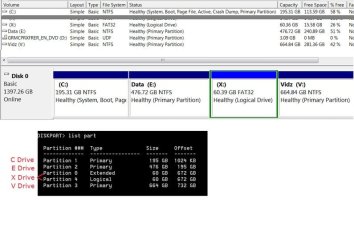
My drive has been partitioned this way for over a year without any trouble til I booted into Tails Live CD, but reviewing the partition table in diskpart, showed me that the numbering of the partitions seems weird, and I wonder if that's something to do with it.

In the order they exist on the drive physically, the drives are lettered C, E, X, and V (with X being a small extended/logical partition), but their respective partition numbers are: 1, 2, 0, 4, 3 (0 and 4 are both drive X).

Here's an image if that helps. I realize looking at this mess maybe I'll wipe everything and install clean on a re-formatted disk. But still I'd like to get this problem figured out.

drives.jpg

Thanks,
 

My Computer

Computer type
PC/Desktop
Computer Manufacturer/Model Number
Homemade!
OS
windows 7 64 bit
CPU
Phenom II X6 Thuban 1090T
Motherboard
Asus M5A97 R2.0
Memory
Patriot PC3-10700/1333 series 2x4GB @620
Graphics Card(s)
Powercolor ax7850 2gbd5-2dh
Sound Card
onboard realtek
Monitor(s) Displays
Hannspree 22
Screen Resolution
1680x1050
Hard Drives
Samsung 128GB 840 Pro (OS)
Hitachi_HDS723015BLA642 1.5TB (Everything else)
PSU
Corsair CX500M
Case
Fractal Design Arc Midi R2
Cooling
XSPC Raystorm for AMD + XSPC EX240 + XSPC Pump Top Res + DDC
Keyboard
SealShield
Mouse
Microsoft Comfort Mouse 4500
Internet Speed
15/3
Antivirus
Avira Utlimate Protection Suite 2014 (Beta)
Browser
Chrome, IE10, Firefox
You may have irreparable corruption in the boot files on C.

If the problem is not solved by running Startup Repair x3 to repair or rewrite the System Boot files on C, you can try constructing a System Reserved partition by resizing C from the left by 200mb using Partition Wizard boot disk to Resize Partition - Video Help.

Create a Primary NTFS partition labeled System Reserved and mark it Active, then run Startup Repair - Run 3 Separate Times until Win7 starts on its own and the 200mb SysReserved holds System Active flags.

To create another Primary partition you'll first need to convert the Data partition to Logical using free Partition Wizard bootable CD.

Back up your files and a Win7 backup image of C first.

If you Clean Reinstall be sure to wipe the HD first with Diskpart Clean Command
 
Last edited:
You may have irreparable corruption in the boot files on C.

If the problem is not solved by . . .
. . .

If you Clean Reinstall be sure to wipe the HD first with Diskpart Clean Command

Thank you, this is invaluable help. I will try your recommendations, and am glad for having CrashPlan, should I decide to "clean" the disk. Two questions: is Minitool Partition Wizard the one you mean? I have that, and am ready to burn a CD if that's the recommened tool. Also, should I make the 3 primary partitions contiguous, by moving the Extended Partition to the last area on the disk?
 

My Computer

Computer type
PC/Desktop
Computer Manufacturer/Model Number
Homemade!
OS
windows 7 64 bit
CPU
Phenom II X6 Thuban 1090T
Motherboard
Asus M5A97 R2.0
Memory
Patriot PC3-10700/1333 series 2x4GB @620
Graphics Card(s)
Powercolor ax7850 2gbd5-2dh
Sound Card
onboard realtek
Monitor(s) Displays
Hannspree 22
Screen Resolution
1680x1050
Hard Drives
Samsung 128GB 840 Pro (OS)
Hitachi_HDS723015BLA642 1.5TB (Everything else)
PSU
Corsair CX500M
Case
Fractal Design Arc Midi R2
Cooling
XSPC Raystorm for AMD + XSPC EX240 + XSPC Pump Top Res + DDC
Keyboard
SealShield
Mouse
Microsoft Comfort Mouse 4500
Internet Speed
15/3
Antivirus
Avira Utlimate Protection Suite 2014 (Beta)
Browser
Chrome, IE10, Firefox
You already have 3 primary partitions and 1 extended. "system reserved" as primary is impossible! Convert Data (E:) to "logical" first using minitool PW
 

My Computer

Computer type
Laptop
Computer Manufacturer/Model Number
ACER ASPIRE 5742G
OS
Microsoft Windows 7 Home Premium 64-bits 7601 Multiprocessor Free Service Pack 1
CPU
Intel(R) Core(TM) i3 CPU M 370 @ 2.40GHz
Motherboard
Acer Aspire 5742G
Memory
4,00 GB
Graphics Card(s)
ATI Mobility Radeon HD 5400 Series
Sound Card
(1) AMD High Definition Audio Device (2) Realtek High Defi
Screen Resolution
1366 x 768 x 32 bits (4294967296 colors) @ 60 Hz
Hard Drives
WDC WD5000BEVT-22ZAT0

My Computer

Computer type
Laptop
Computer Manufacturer/Model Number
ACER ASPIRE 5742G
OS
Microsoft Windows 7 Home Premium 64-bits 7601 Multiprocessor Free Service Pack 1
CPU
Intel(R) Core(TM) i3 CPU M 370 @ 2.40GHz
Motherboard
Acer Aspire 5742G
Memory
4,00 GB
Graphics Card(s)
ATI Mobility Radeon HD 5400 Series
Sound Card
(1) AMD High Definition Audio Device (2) Realtek High Defi
Screen Resolution
1366 x 768 x 32 bits (4294967296 colors) @ 60 Hz
Hard Drives
WDC WD5000BEVT-22ZAT0
Back
Top