
Solved Rebooted the computer and all my desktop icons turned white

martinjh99

New member
Local time
7:44 AM
Messages
4
I rebooted the computer and when I got my desktop back all the cons for third party apps are the default white icon as you can see in my screenshot.

I have tried re-building the icon cache by following the instructions on the forum http://www.sevenforums.com/tutorials/49819-icon-cache-rebuild.html

I can rebuild from a 3 day old image backup but I don't want to have to do that! Anyone got any more tips for trying to work it out - I tried to change one or two manually using the properties/change icon but that did not stay changed for some reason.
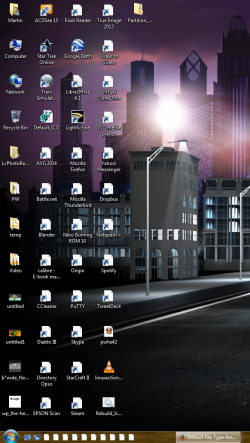
Capture.PNG
 

My Computer My Computer

At a glance

WIndows 7 Home Premium 64BitAMD A Series Quad Core6GBAMD Fusion
Computer Manufacturer/Model Number
HP DV6 Laptop
OS
WIndows 7 Home Premium 64Bit
CPU
AMD A Series Quad Core
Memory
6GB
Graphics Card(s)
AMD Fusion
Hard Drives
1TB
Have you tried doing a system restore to a point before you started having these problems??
 

My Computer My Computer

At a glance

64-bit Windows 8.1 ProCore(TM) i5 CPU 4330 Haswell @ 3.20GHz12.00 GBIntel(R) HD Graphics
Computer type
PC/Desktop
Computer Manufacturer/Model Number
LENOVO K450 @3.0GHZ
OS
64-bit Windows 8.1 Pro
CPU
Core(TM) i5 CPU 4330 Haswell @ 3.20GHz
Motherboard
LENOVO
Memory
12.00 GB
Graphics Card(s)
Intel(R) HD Graphics
Sound Card
Intel HD integtrated
Monitor(s) Displays
HP 25' ISP Monitor
Screen Resolution
1900/1020
Hard Drives
(1) ST1000DM003-1CH162 (2) Generic STORAGE DEVICE USB Device (3) Generic STORAGE DEVICE USB Device
Internet Speed
100mb down/10mb up
If you don`t get it fixed, you could PM our member Brink, he is a genius at fixing these types of problems.

I was going to tell you to rebuild the icon cache, but you`ve already tried that.
 

My Computer My Computer

At a glance

Windows 10 Pro x64Intel Core i7 6700KGSkill TridentZ RGB 16GB 3600 16-16-16-36EVGA GTX 980 Ti SC x2
Computer type
PC/Desktop
Computer Manufacturer/Model Number
Skylake Special #666
OS
Windows 10 Pro x64
CPU
Intel Core i7 6700K
Motherboard
Asus Sabertooth Z170 Mark 1
Memory
GSkill TridentZ RGB 16GB 3600 16-16-16-36
Graphics Card(s)
EVGA GTX 980 Ti SC x2
Sound Card
Realtek High Definition
Monitor(s) Displays
AOC G2460PG
Screen Resolution
1920 x 1080 144Hz
Hard Drives
Samsung 860 Pro 256GB, Seagate Barracuda 4TB x2
PSU
EVGA 1000 P2, EVGA White Custom Braided Cables
Case
Corsair Vengeance C70 Gunmetal Black
Cooling
Corsair H100i v2, Corsair ML120 x2, Thermal Grizzly Kryonaut
Keyboard
Logitech G910 Orion Spectrum
Mouse
Logitech G700s
Internet Speed
Verizon Fios Quantum Gateway 75/75
Antivirus
Windows Defender, Malwarebytes Free 3.8.3
Browser
Chrome
Other Info
Corsair SP120 x4, LG Blu-ray Drive, Durabrand HT-395 100 Watt Dolby Digital Amp, Corsair H2100 Wireless 7.1 Headset
Thanks guys - Will PM Brink if doing a system restore doesn't work! Didn't realise I could use System Restore!

*EDIT* System Restore worked thanks once I disabled my anti-virus!

#
 
Last edited:

My Computer My Computer

At a glance

WIndows 7 Home Premium 64BitAMD A Series Quad Core6GBAMD Fusion
Computer Manufacturer/Model Number
HP DV6 Laptop
OS
WIndows 7 Home Premium 64Bit
CPU
AMD A Series Quad Core
Memory
6GB
Graphics Card(s)
AMD Fusion
Hard Drives
1TB
Back
Top