
recent BSODs

Peregrina

New member
Local time
5:13 PM
Messages
5
Recently I've been getting a STOP 0x0000001E KMODE_EXCEPTION_NOT_HANDLED Error Message and have no idea how to diagnose it or what to look for. Also, My computer has started to shut down completely without even displaying a STOP Error Message and during start up it gets stuck on the black screen with the blinking "_" for a few minutes before doing anything.


My Computer

OS
MS Windows 7 Ultimate 64-bit
CPU
AMD Phenom X4 9500 Agena 65nm Technology
Motherboard
ECS Nettle3 (Socket AM2 )
Memory
3.0GB Dual-Channel DDR2 @ 401MHz 6-6-6-18
Graphics Card(s)
1024MB GeForce GTS 250 (PNY)
Sound Card
High Definition Audio Device
Monitor(s) Displays
HF229
Screen Resolution
1680x1050
Hard Drives
351.64GB Seagate ST336032 0AS SCSI Disk Device (SCSI)
Hi Pererina and welcome to the the forums.

Please fill out your system information. Go to your User CP at the top of the page, look in the left column and click on Edit system specs. Filling in your specs will help us help you.

You can make this easier by downloading
Speccy.
 

My Computer

Computer Manufacturer/Model Number
Home built
OS
Windows 7 Ultimate 32 bit
CPU
Intel(R) Pentium(R) 4 CPU 3.00GHz
Motherboard
ASUS P4P800-VM Motherboard Chipset: Intel 865G + ICH5
Memory
2.50 GB RAM
Graphics Card(s)
NVIDIA GeForce 7600 GS
Sound Card
SoundMax Integrated Digital Audio (Chip)
Monitor(s) Displays
ViewSonic VX 1962 wm
Screen Resolution
1680 X 1050
Hard Drives
Seagate Barracuda 7200.10 80 GB
ST380215A ATA Device 18.6 GB
Western Digital "My Book" external hard drive 750 GB
Cooling
Fan based
Keyboard
Microsoft Comfort Curve Keyboard 2000 v10 USB
Mouse
Logitec optic USB
Internet Speed
3.01 Mb/s download 0.64 Mb/s upload
Sorry, I believe I've filled in everything. If I missed anything just ask. :)
 

My Computer

OS
MS Windows 7 Ultimate 64-bit
CPU
AMD Phenom X4 9500 Agena 65nm Technology
Motherboard
ECS Nettle3 (Socket AM2 )
Memory
3.0GB Dual-Channel DDR2 @ 401MHz 6-6-6-18
Graphics Card(s)
1024MB GeForce GTS 250 (PNY)
Sound Card
High Definition Audio Device
Monitor(s) Displays
HF229
Screen Resolution
1680x1050
Hard Drives
351.64GB Seagate ST336032 0AS SCSI Disk Device (SCSI)
Sorry, It didn't open for me for some reason. It did this time. I'll be right back.
 

My Computer

Computer Manufacturer/Model Number
Home built
OS
Windows 7 Ultimate 32 bit
CPU
Intel(R) Pentium(R) 4 CPU 3.00GHz
Motherboard
ASUS P4P800-VM Motherboard Chipset: Intel 865G + ICH5
Memory
2.50 GB RAM
Graphics Card(s)
NVIDIA GeForce 7600 GS
Sound Card
SoundMax Integrated Digital Audio (Chip)
Monitor(s) Displays
ViewSonic VX 1962 wm
Screen Resolution
1680 X 1050
Hard Drives
Seagate Barracuda 7200.10 80 GB
ST380215A ATA Device 18.6 GB
Western Digital "My Book" external hard drive 750 GB
Cooling
Fan based
Keyboard
Microsoft Comfort Curve Keyboard 2000 v10 USB
Mouse
Logitec optic USB
Internet Speed
3.01 Mb/s download 0.64 Mb/s upload
Your dump files point to hardware issues. Two of your dump files listed STOP 0x00000124.

Please read this thread:
[FONT=&quot][2-Int] Stop 0x124 - what it means and what to try

The other dump file also points to a hardware problem.


[/FONT]
STOP 0x0000003B: SYSTEM_SERVICE_EXCEPTION
Usual causes:
System service, Device driver, graphics driver, ?memory

BSOD Index
Code:
*******************************************************************************
*                                                                             *
*                        Bugcheck Analysis                                    *
*                                                                             *
*******************************************************************************

Use !analyze -v to get detailed debugging information.

BugCheck 3B, {c000001d, fffff80002c99831, fffff88002f6b210, 0}

Probably caused by : ntkrnlmp.exe ( nt!KeGetCurrentProcessorNumberEx+11 )

Followup: MachineOwner

*******************************************************************************
*                                                                             *
*                        Bugcheck Analysis                                    *
*                                                                             *
*******************************************************************************

Use !analyze -v to get detailed debugging information.

BugCheck 124, {0, fffffa8004be9028, fa000000, 400405}

Probably caused by : hardware

Followup: MachineOwner


Download a copy of Memtest86 and burn the ISO to a CD using Iso Recorder. Boot from the CD, and leave it running for at least 5 passes.

Please post back with the results.
 

My Computer

Computer Manufacturer/Model Number
Home built
OS
Windows 7 Ultimate 32 bit
CPU
Intel(R) Pentium(R) 4 CPU 3.00GHz
Motherboard
ASUS P4P800-VM Motherboard Chipset: Intel 865G + ICH5
Memory
2.50 GB RAM
Graphics Card(s)
NVIDIA GeForce 7600 GS
Sound Card
SoundMax Integrated Digital Audio (Chip)
Monitor(s) Displays
ViewSonic VX 1962 wm
Screen Resolution
1680 X 1050
Hard Drives
Seagate Barracuda 7200.10 80 GB
ST380215A ATA Device 18.6 GB
Western Digital "My Book" external hard drive 750 GB
Cooling
Fan based
Keyboard
Microsoft Comfort Curve Keyboard 2000 v10 USB
Mouse
Logitec optic USB
Internet Speed
3.01 Mb/s download 0.64 Mb/s upload
I've got it going, it's on it's 90% into the 3rd pass. No errors so far. Do i just exit memtest when it finishes the 5th pass? Also, if I do, how do I post the results?
 
Last edited:

My Computer

OS
MS Windows 7 Ultimate 64-bit
CPU
AMD Phenom X4 9500 Agena 65nm Technology
Motherboard
ECS Nettle3 (Socket AM2 )
Memory
3.0GB Dual-Channel DDR2 @ 401MHz 6-6-6-18
Graphics Card(s)
1024MB GeForce GTS 250 (PNY)
Sound Card
High Definition Audio Device
Monitor(s) Displays
HF229
Screen Resolution
1680x1050
Hard Drives
351.64GB Seagate ST336032 0AS SCSI Disk Device (SCSI)
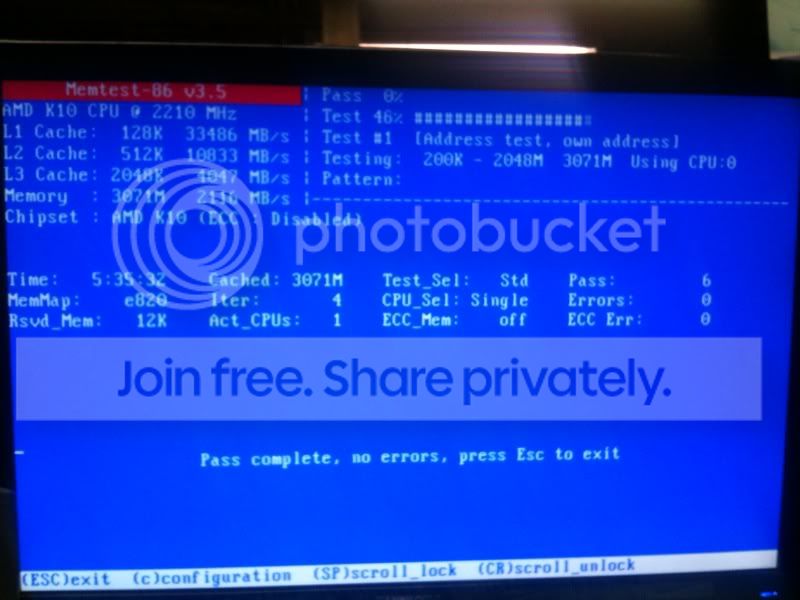
Just let us know whether it found in errors or not.
 

My Computer

Computer Manufacturer/Model Number
Home built
OS
Windows 7 Ultimate 32 bit
CPU
Intel(R) Pentium(R) 4 CPU 3.00GHz
Motherboard
ASUS P4P800-VM Motherboard Chipset: Intel 865G + ICH5
Memory
2.50 GB RAM
Graphics Card(s)
NVIDIA GeForce 7600 GS
Sound Card
SoundMax Integrated Digital Audio (Chip)
Monitor(s) Displays
ViewSonic VX 1962 wm
Screen Resolution
1680 X 1050
Hard Drives
Seagate Barracuda 7200.10 80 GB
ST380215A ATA Device 18.6 GB
Western Digital "My Book" external hard drive 750 GB
Cooling
Fan based
Keyboard
Microsoft Comfort Curve Keyboard 2000 v10 USB
Mouse
Logitec optic USB
Internet Speed
3.01 Mb/s download 0.64 Mb/s upload
Nope, none.
photo8.jpg
 
Last edited:

My Computer

OS
MS Windows 7 Ultimate 64-bit
CPU
AMD Phenom X4 9500 Agena 65nm Technology
Motherboard
ECS Nettle3 (Socket AM2 )
Memory
3.0GB Dual-Channel DDR2 @ 401MHz 6-6-6-18
Graphics Card(s)
1024MB GeForce GTS 250 (PNY)
Sound Card
High Definition Audio Device
Monitor(s) Displays
HF229
Screen Resolution
1680x1050
Hard Drives
351.64GB Seagate ST336032 0AS SCSI Disk Device (SCSI)
One problem source eliminated.

I found the following old drivers on your system:

scmndisp.sys Jan 17 2007 - This is a Netgear driver by Neutral Wireless Solution. I recommend that you update this driver.

nvm62x64.sys Oct 17 2008 - Google "nvm62x64.sys" and see if you can find an update for it.

After you have updated these drivers, especially the first one. let's see what your system is doing before we take the next steps.


[FONT=&quot]http://www.sevenforums.com/crash-lockup-debug-how/35349-2-int-stop-0x124-what-means-what-try.html[/FONT]
 
Last edited:

My Computer

Computer Manufacturer/Model Number
Home built
OS
Windows 7 Ultimate 32 bit
CPU
Intel(R) Pentium(R) 4 CPU 3.00GHz
Motherboard
ASUS P4P800-VM Motherboard Chipset: Intel 865G + ICH5
Memory
2.50 GB RAM
Graphics Card(s)
NVIDIA GeForce 7600 GS
Sound Card
SoundMax Integrated Digital Audio (Chip)
Monitor(s) Displays
ViewSonic VX 1962 wm
Screen Resolution
1680 X 1050
Hard Drives
Seagate Barracuda 7200.10 80 GB
ST380215A ATA Device 18.6 GB
Western Digital "My Book" external hard drive 750 GB
Cooling
Fan based
Keyboard
Microsoft Comfort Curve Keyboard 2000 v10 USB
Mouse
Logitec optic USB
Internet Speed
3.01 Mb/s download 0.64 Mb/s upload
I believe the first driver is from a wireless USB Adapter I used to use but no longer do because i can just run an ethernet cable now. I had to find it and plug it in to update it's drivers and have done so. The second, nvm62x64.sys, I'm having trouble with. I found this thread:
http://www.sevenforums.com/crashes-debugging/70932-driver-power-state-failure-bsod.html
Which seems like the guy is having a similar issue and he was told to uninstall the driver.
 

My Computer

OS
MS Windows 7 Ultimate 64-bit
CPU
AMD Phenom X4 9500 Agena 65nm Technology
Motherboard
ECS Nettle3 (Socket AM2 )
Memory
3.0GB Dual-Channel DDR2 @ 401MHz 6-6-6-18
Graphics Card(s)
1024MB GeForce GTS 250 (PNY)
Sound Card
High Definition Audio Device
Monitor(s) Displays
HF229
Screen Resolution
1680x1050
Hard Drives
351.64GB Seagate ST336032 0AS SCSI Disk Device (SCSI)
See this article on your bugcheck 124: http://www.sevenforums.com/crash-lockup-debug-how/35349-2-int-stop-0x124-what-means-what-try.html

Try this free stress test: Free Software - GIMPS
Prime95 Setup:
- extract the contents of the zip file to a location of your choice
- double click on the executable file
- select "Just stress testing"
- select the "Blend" test. If you've already run MemTest overnight you may want to run the "Small FFTs" test instead.
- "Number of torture test threads to run" should equal the number of CPU's times 2 (if you're using hyperthreading).
The easiest way to figure this out is to go to Task Manager...Performance tab - and see the number of boxes under CPU Usage History
Then run the test for 6 to 24 hours - or until you get errors (whichever comes first).
The Test selection box and the stress.txt file describes what components that the program stresses.
 

My Computer

Computer Manufacturer/Model Number
Custom
OS
Windows 7 Professional x64
CPU
Intel i7 2600K OC'd @ 4620 MHz
Motherboard
Asus P8Z68-V Pro
Memory
16GB GSkill Sniper 2133 Mhz (4x4GB)
Graphics Card(s)
EVGA GeForce GTX 480 SuperClocked+
Sound Card
Realtek High Definition Audio
Monitor(s) Displays
2x Acer S273HLbmii 27"
Screen Resolution
2 x 1920x1080
Hard Drives
64GB Crucial M4 SSD

Storage: Hitachi 1TB 5400RPM, Samsung 1.5TB 5400RPM
PSU
Corsair HW Series 750w (modular)
Case
Cooler Master HAF 932 Advanced Blue Edition
Cooling
CM Hyper 212+ CPU cooler, 3x 230mm + 1x 140mm case fans
Keyboard
Logitech MK320 (wireless)
Mouse
Logitech MK320 (wireless)
Internet Speed
30 Mb/s : 2 Mb/s
Follow Jonathan's advice first.

Before using Driver Verifier, which will be the next step, try this.

1. Create a restore point.
2. Find the nvm62x64.sys file and rename it to nvm62x64.bak.
3. Reboot

Post back and let us know the results. If you are still having problems, we will use Driver verifier.
 

My Computer

Computer Manufacturer/Model Number
Home built
OS
Windows 7 Ultimate 32 bit
CPU
Intel(R) Pentium(R) 4 CPU 3.00GHz
Motherboard
ASUS P4P800-VM Motherboard Chipset: Intel 865G + ICH5
Memory
2.50 GB RAM
Graphics Card(s)
NVIDIA GeForce 7600 GS
Sound Card
SoundMax Integrated Digital Audio (Chip)
Monitor(s) Displays
ViewSonic VX 1962 wm
Screen Resolution
1680 X 1050
Hard Drives
Seagate Barracuda 7200.10 80 GB
ST380215A ATA Device 18.6 GB
Western Digital "My Book" external hard drive 750 GB
Cooling
Fan based
Keyboard
Microsoft Comfort Curve Keyboard 2000 v10 USB
Mouse
Logitec optic USB
Internet Speed
3.01 Mb/s download 0.64 Mb/s upload
Back
Top