
You are using an out of date browser. It may not display this or other websites correctly.
You should upgrade or use an alternative browser.
You should upgrade or use an alternative browser.
Recent Document List
- Thread starter new
- Start date

- Local time
- 12:50 AM
- Messages
- 1,557
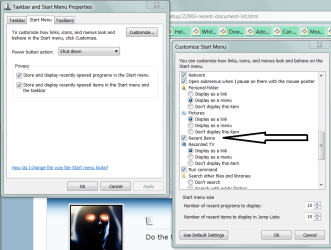
it's still there somewhere under start menu properties (customize button I think). I would tell you exactly where but I'm in Windows XP now.
My Computer
- Computer Manufacturer/Model Number
- Too many to list.
- OS
- XP, Seven, 2008R2
- CPU
- AMD, Intel, VIA
- Motherboard
- Various
- Memory
- Corsair, Kingston, etc.
- Graphics Card(s)
- ATI, NVIDIA
- Monitor(s) Displays
- Samsung
- Hard Drives
- Maxtor, Western Digital
- Keyboard
- qwerty
- Internet Speed
- 22 Mb/s @ home, 1 Gb/s @ server
- Other Info
- All of my systems still run fastest on XP 32-bit for the most part. Win7 is fun to play with, but I still prefer XP for raw speed, security, and functionality.

Do the following ..
1. Type gpedit.msc in the Start menu’s search box and then press Enter.
2. Navigate to User Configuration, Administrative Templates, and then select Start Menu and Taskbar in the left column of the Group Policy editor.
3. Double-click Clear history of recently opened documents on exit on the Advanced menu in the Settings section of the Group Policy editor.
4. Select Enable and then click OK to save the changes.
Good Luck ..
Tom
1. Type gpedit.msc in the Start menu’s search box and then press Enter.
2. Navigate to User Configuration, Administrative Templates, and then select Start Menu and Taskbar in the left column of the Group Policy editor.
3. Double-click Clear history of recently opened documents on exit on the Advanced menu in the Settings section of the Group Policy editor.
4. Select Enable and then click OK to save the changes.
Good Luck ..
Tom
My Computer
- Computer type
- PC/Desktop
- Computer Manufacturer/Model Number
- LENOVO K450 @3.0GHZ
- OS
- 64-bit Windows 8.1 Pro
- CPU
- Core(TM) i5 CPU 4330 Haswell @ 3.20GHz
- Motherboard
- LENOVO
- Memory
- 12.00 GB
- Graphics Card(s)
- Intel(R) HD Graphics
- Sound Card
- Intel HD integtrated
- Monitor(s) Displays
- HP 25' ISP Monitor
- Screen Resolution
- 1900/1020
- Hard Drives
- (1) ST1000DM003-1CH162 (2) Generic STORAGE DEVICE USB Device (3) Generic STORAGE DEVICE USB Device
- Internet Speed
- 100mb down/10mb up
- Local time
- 12:50 AM
- Messages
- 1,557
Well, clearing documents and removing it from the start menu are two different things. But anyhow at least we've got them all covered now. 
My Computer
- Computer Manufacturer/Model Number
- Too many to list.
- OS
- XP, Seven, 2008R2
- CPU
- AMD, Intel, VIA
- Motherboard
- Various
- Memory
- Corsair, Kingston, etc.
- Graphics Card(s)
- ATI, NVIDIA
- Monitor(s) Displays
- Samsung
- Hard Drives
- Maxtor, Western Digital
- Keyboard
- qwerty
- Internet Speed
- 22 Mb/s @ home, 1 Gb/s @ server
- Other Info
- All of my systems still run fastest on XP 32-bit for the most part. Win7 is fun to play with, but I still prefer XP for raw speed, security, and functionality.
That too!! :roflmao:
My Computer
- Computer type
- PC/Desktop
- Computer Manufacturer/Model Number
- LENOVO K450 @3.0GHZ
- OS
- 64-bit Windows 8.1 Pro
- CPU
- Core(TM) i5 CPU 4330 Haswell @ 3.20GHz
- Motherboard
- LENOVO
- Memory
- 12.00 GB
- Graphics Card(s)
- Intel(R) HD Graphics
- Sound Card
- Intel HD integtrated
- Monitor(s) Displays
- HP 25' ISP Monitor
- Screen Resolution
- 1900/1020
- Hard Drives
- (1) ST1000DM003-1CH162 (2) Generic STORAGE DEVICE USB Device (3) Generic STORAGE DEVICE USB Device
- Internet Speed
- 100mb down/10mb up

- Local time
- 6:50 AM
- Messages
- 524
Have some coffee.
Why does everyone have nice fonts while on my windows 7 are all jagged?
Do you use the ClearType tuner to achieve that?
My Computer
- Computer type
- PC/Desktop
- Computer Manufacturer/Model Number
- Custom
- OS
- Windows 7 SP1 x64
- CPU
- Intel E8400 3.0 GHz
- Motherboard
- Gigabyte EP45-DS3R
- Memory
- 4x1 Trascend DDR2 800 Mhz
- Graphics Card(s)
- Gainward 8800GT 512 Mb
- Sound Card
- Realtek HD Audio 889A
- Monitor(s) Displays
- LG L204WS
- Screen Resolution
- 1680x1050
- Hard Drives
- Intel 520 Series 120Gb SSD (System)
Western Digital 6400AAKS 640Gb (Data)
- PSU
- Cooler Master 650W
- Case
- Cooler Master Centurion 532
- Cooling
- 2x 12 cm fans
- Keyboard
- Logitech Wave
- Mouse
- Logitech G5
- Internet Speed
- 10 Mbit Cable Flat
- Antivirus
- NOD32 Smart Security
- Browser
- Google Chrome
That's tew. Yes, I am counting.That too!! :roflmao:
Please provide a screenshot. There is more than one cause for what I think you mean.Why does everyone have nice fonts while on my windows 7 are all jagged?
Do you use the ClearType tuner to achieve that?
- Local time
- 6:50 AM
- Messages
- 524
Never mind, its just me...
here is a pic:

here is a pic:
My Computer
- Computer type
- PC/Desktop
- Computer Manufacturer/Model Number
- Custom
- OS
- Windows 7 SP1 x64
- CPU
- Intel E8400 3.0 GHz
- Motherboard
- Gigabyte EP45-DS3R
- Memory
- 4x1 Trascend DDR2 800 Mhz
- Graphics Card(s)
- Gainward 8800GT 512 Mb
- Sound Card
- Realtek HD Audio 889A
- Monitor(s) Displays
- LG L204WS
- Screen Resolution
- 1680x1050
- Hard Drives
- Intel 520 Series 120Gb SSD (System)
Western Digital 6400AAKS 640Gb (Data)
- PSU
- Cooler Master 650W
- Case
- Cooler Master Centurion 532
- Cooling
- 2x 12 cm fans
- Keyboard
- Logitech Wave
- Mouse
- Logitech G5
- Internet Speed
- 10 Mbit Cable Flat
- Antivirus
- NOD32 Smart Security
- Browser
- Google Chrome