Recent Items - Enable or Disable

How to Enable or Disable Recent Items in Vista, Windows 7, and Windows 8


   Information
Recent Items is a list of your recently used files on the right side of the Start Menu, Taskbar Windows Explorer icon link, in the Navigaton Pane Recent Places, and in Jump Lists.

This will show you how to enable or disable all or specific users on the computer the ability to turn on Recent Items in Vista, Windows 7, and Windows 8.


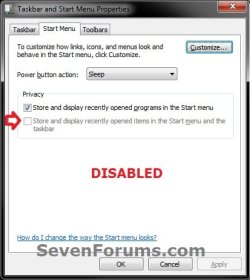
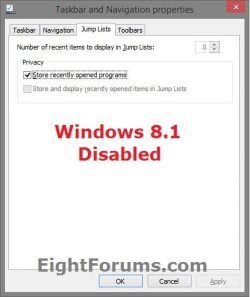
EXAMPLE: Recent Items Enabled and Disable
NOTE: When disabled, you will notice the the Store and display recently opened items in the Start Menu and tasbar option is grayed out it Start Menu Properties. Enabled.jpg
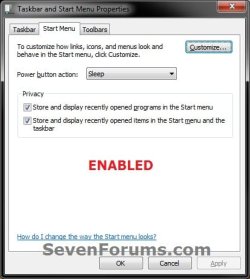
Disabled.jpg8.1_Recent_Items.jpg


OPTION ONE

Disable or Enable Recent Items Using a REG File Download

1. Do step 2 or 3 below for what you would like to do.

2. To Disable Recent Items for All Users A) Click on the Download button below to download the file below, and go to step 4 below. Disable_Recent_Items.reg

Download

3. To Enable Recent Items for All Users
NOTE: This is the default setting. A) Click on the Download button below to download the file below, and go to step 4 below. Enable_Recent_Items.reg

Download


4. Save the .reg file to your desktop.

5. Double click/tap on the downloaded .reg file to merge it.

6. If prompted, click/tap on Run, Yes (UAC), Yes, and OK to approve the merge.

7. Log off and log on, or restart the computer to apply.

8. When done, you can delete the downloaded .reg file if you like.


OPTION TWO

Disable or Enable Recent Items in Local Group Policy Editor

1. Open the all users, specific users or groups, or all users except administrators Local Group Policy Editor for how you want this policy applied.

2. In the left pane, click/tap on the arrow to expand User Configuration, Administrative Templates, then click/tap on Start Menu and Taskbar. (See screenshot below) GPEDIT-1.jpg
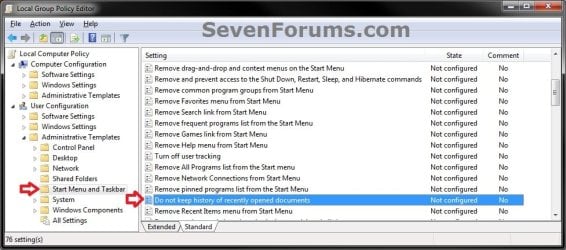
3. In the right pane, double click/tap on Do not keep history of recently opened documents to edit it, and do step 4 or 5 below for what you would like to do. (see screenshot above)

4. To Enable Recent Items
A) Select (dot) Not Configured or Disabled, and go to step 6 below. (see screenshot below step 6)
NOTE: Not Configured is the default setting.5. To Disable Recent Items A) Select (dot) Enabled, and go to step 6 below. (see screenshot below step 6)
6. Click/tap on OK. (see screenshot below) GPEDIT-2.jpg
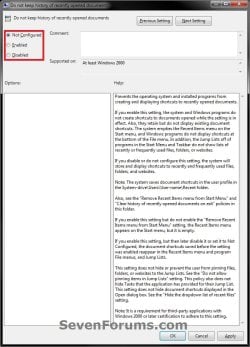
7. Close the Local Group Policy Editor. (see screenshot below step 2)
That's it,
Shawn


Attachments

Last edited:
Here's something that might help someone, like me who got tired of having my photos (or documents or pdf files or ?) sitting under the Favorites and in the Recently Changed folder for anyone to view. I just upgraded to Windows 7 Home Premium x64 and really like it more than I did Vista x64. But getting use to some of the changes and seeing new things got me thinking about either hiding some things or changing them. This might have been covered already so if it has then Brink you can move/delete it or whatever.

To keep certain things from appearing in the Recently Changed folder in Windown 7 Home Premium when you access a photo, document, or whatever try this : Go to Control Panel - open Indexing Options. Highlight Users and at the bottom click Modify. In the window that opens up, the top box "Change Selected Location" click the > next to Local Disk "C". Next click the > next to Users. Then click the > next to "username". There will be your My Documents, My Pictures, My Music, etc folders with check marks in the boxes. Just un-check the box or click the > next to the folder that contains what you don't want to see all the time in the Recently Changed folder and un-check that box. For me it was in My Pictures as I have several sub-folders with photos from different cameras that each time I looked at a photo it would re-appear in the Recently Changed folder. You can't delete anything out of that folder as it is linked to the original file by windows indexing. So by using this indexing option I now don't have to worry about seeing all of these photos appear in the Recently Changed folder. Some things I don't mind coming up like a training log.txt or Changed Computer Settings.doc but other things you know already where they are and don't need the clutter. I noticed in some posts people would try and delete the contents of the Recently Changed folder thus loosing those photos, documents or whatever after they went to empty the trash.
Anyway that's the solution I came up with. Hope this helps someone that has the same issue as I did.
 

My Computer

OS
Windows 7 Home Premium x64
Just a "after the fact" update to the above post.
I did upgrade from Vista to Windows 7 Home Premium so the upgrade took (I believe) the Recently Changed folder and included it in my Windows 7 Home Premium OS install. I understand from reading other posts that they excluded that folder in the RTM and left the Recent Places to replace Recently Changed folder. Apologies for any confusion I might have caused.
 

My Computer

OS
Windows 7 Home Premium x64
I store my files in a password protected containerfile. I want to be able to use the recent documents option for all my applications, like office etc.
However, I donot want them to show up in whatever a kind of \Recent\ or \Roaming\ folder.

It would be great if one day it would be possible to change such recent-folders to the containerfile, so whatever search is done, the names of the files (usually revealing the nature of the contents) will not be visible.

The gpedit.msc solution regretfully cleares the office history (Word/Excel).
=
 

My Computer

OS
Windows 7 Ultimate x64
I recently downgraded from Win 8 to Win 7 Home Premium.

I tried option 1.3 in the tutorial: "To Enable Recent Items for All Users"

The patch was not successful, although all messages were positive.

I don't have gpedit.msc in Win\Sys32. Can I copy it from my company Win 7 Pro when no-one's looking?

Option 2 (LGPE) was not possible for me - I have Win 7 Home Premium.
 

My Computer

Computer type
Laptop
Computer Manufacturer/Model Number
Dell Inspiron 17R
OS
Win 7 64-bit Home Premium
Memory
4 GB
Hello OldGrantonian,

Sorry, but gpedit.msc will not work in an edition that does not support that feature. :(

Is you recent items setting grayed out like in the example screenshots?

If so, you might see if restarting the computer after using step 3 in Option One may help.
 

My Computer

Computer type
PC/Desktop
Computer Manufacturer/Model Number
Self built custom
OS
64-bit Windows 11 Pro for Workstations
CPU
Intel i7-8700K OC'd to 5 GHz
Motherboard
ASUS ROG Maximus XI Formula Z390
Memory
64 GB (4x16GB) G.SKILL TridentZ RGB DDR4 3600 MHz
Graphics Card(s)
ASUS ROG-STRIX-GTX1080TI-O11G-GAMING
Sound Card
Integrated
Monitor(s) Displays
2 x Samsung Odyssey G7 27"
Screen Resolution
2560x1440
Hard Drives
1TB Samsung 990 PRO M.2,
4TB Samsung 990 PRO PRO M.2,
TerraMaster F8 SSD Plus NAS
PSU
Seasonic Prime Titanium 850W
Case
Thermaltake Core P3
Cooling
Corsair Hydro H115i
Keyboard
Logitech wireless K800
Mouse
Logitech MX Master 4
Internet Speed
2 Gb/s Download and 100 Mb/s Upload
Antivirus
Malwarebyte Anti-Malware Premium
Browser
Google Chrome
Other Info
Logitech Z625 speaker system,
Logitech BRIO 4K Pro webcam,
HP Color LaserJet Pro MFP M477fdn,
APC SMART-UPS RT 1000 XL - SURT1000XLI,
Galaxy S23 Plus phone
Is your recent items setting grayed out like in the example screenshots?

It's not greyed out. And the checkbox is checked.

Note that my company Win 7 Pro laptop behaves as follows. With checkbox unchecked, the "Recent Items" label still appears in the Start menu. However, opening the submenu simply displays "Empty".

On my personal laptop Win 7 Home Premium, it does not matter whether the checkbox is checked or unchecked - the "Recent Items" label never appears in the Start menu. (There's a "Games" label instead.)

you might see if restarting the computer after using step 3 in Option One may help.

The reboot does not help.
 

My Computer

Computer type
Laptop
Computer Manufacturer/Model Number
Dell Inspiron 17R
OS
Win 7 64-bit Home Premium
Memory
4 GB
It sounds like your recent items is tuned on (checked) and enabled since it's not grayed out.

Double check to make sure that you have Recent Items checked in your Customize Start Menu settings to have it show in your Start Menu.
 

My Computer

Computer type
PC/Desktop
Computer Manufacturer/Model Number
Self built custom
OS
64-bit Windows 11 Pro for Workstations
CPU
Intel i7-8700K OC'd to 5 GHz
Motherboard
ASUS ROG Maximus XI Formula Z390
Memory
64 GB (4x16GB) G.SKILL TridentZ RGB DDR4 3600 MHz
Graphics Card(s)
ASUS ROG-STRIX-GTX1080TI-O11G-GAMING
Sound Card
Integrated
Monitor(s) Displays
2 x Samsung Odyssey G7 27"
Screen Resolution
2560x1440
Hard Drives
1TB Samsung 990 PRO M.2,
4TB Samsung 990 PRO PRO M.2,
TerraMaster F8 SSD Plus NAS
PSU
Seasonic Prime Titanium 850W
Case
Thermaltake Core P3
Cooling
Corsair Hydro H115i
Keyboard
Logitech wireless K800
Mouse
Logitech MX Master 4
Internet Speed
2 Gb/s Download and 100 Mb/s Upload
Antivirus
Malwarebyte Anti-Malware Premium
Browser
Google Chrome
Other Info
Logitech Z625 speaker system,
Logitech BRIO 4K Pro webcam,
HP Color LaserJet Pro MFP M477fdn,
APC SMART-UPS RT 1000 XL - SURT1000XLI,
Galaxy S23 Plus phone

My Computer

Computer type
Laptop
Computer Manufacturer/Model Number
Dell Inspiron 17R
OS
Win 7 64-bit Home Premium
Memory
4 GB
You're most welcome. :)
 

My Computer

Computer type
PC/Desktop
Computer Manufacturer/Model Number
Self built custom
OS
64-bit Windows 11 Pro for Workstations
CPU
Intel i7-8700K OC'd to 5 GHz
Motherboard
ASUS ROG Maximus XI Formula Z390
Memory
64 GB (4x16GB) G.SKILL TridentZ RGB DDR4 3600 MHz
Graphics Card(s)
ASUS ROG-STRIX-GTX1080TI-O11G-GAMING
Sound Card
Integrated
Monitor(s) Displays
2 x Samsung Odyssey G7 27"
Screen Resolution
2560x1440
Hard Drives
1TB Samsung 990 PRO M.2,
4TB Samsung 990 PRO PRO M.2,
TerraMaster F8 SSD Plus NAS
PSU
Seasonic Prime Titanium 850W
Case
Thermaltake Core P3
Cooling
Corsair Hydro H115i
Keyboard
Logitech wireless K800
Mouse
Logitech MX Master 4
Internet Speed
2 Gb/s Download and 100 Mb/s Upload
Antivirus
Malwarebyte Anti-Malware Premium
Browser
Google Chrome
Other Info
Logitech Z625 speaker system,
Logitech BRIO 4K Pro webcam,
HP Color LaserJet Pro MFP M477fdn,
APC SMART-UPS RT 1000 XL - SURT1000XLI,
Galaxy S23 Plus phone
Cookies?

Hello guys. I wanted to hide somthing from my "Recent Places" and i disabled them... So now i dont have cookies.. I dont know if this is the problem but i cant save even 1 cookie since then... I use Google Chrome and Opera and i'm sure that i've enabled the cookies for the both browsers ...
 

My Computer

Computer type
Laptop
Computer Manufacturer/Model Number
Acer Aspire 5750G
OS
Windows 7 Ultimate x64
CPU
Intel Core i5-2410M
Motherboard
Dont know
Memory
4 GB
Graphics Card(s)
nVidia 540M
Hard Drives
500 Gb
Antivirus
MalwareBytes
Browser
Opera/Chrome
Hello Aaster, and welcome to Seven Forums.

Does enabling "Recent Places" allow you to have cookies again?
 

My Computer

Computer type
PC/Desktop
Computer Manufacturer/Model Number
Self built custom
OS
64-bit Windows 11 Pro for Workstations
CPU
Intel i7-8700K OC'd to 5 GHz
Motherboard
ASUS ROG Maximus XI Formula Z390
Memory
64 GB (4x16GB) G.SKILL TridentZ RGB DDR4 3600 MHz
Graphics Card(s)
ASUS ROG-STRIX-GTX1080TI-O11G-GAMING
Sound Card
Integrated
Monitor(s) Displays
2 x Samsung Odyssey G7 27"
Screen Resolution
2560x1440
Hard Drives
1TB Samsung 990 PRO M.2,
4TB Samsung 990 PRO PRO M.2,
TerraMaster F8 SSD Plus NAS
PSU
Seasonic Prime Titanium 850W
Case
Thermaltake Core P3
Cooling
Corsair Hydro H115i
Keyboard
Logitech wireless K800
Mouse
Logitech MX Master 4
Internet Speed
2 Gb/s Download and 100 Mb/s Upload
Antivirus
Malwarebyte Anti-Malware Premium
Browser
Google Chrome
Other Info
Logitech Z625 speaker system,
Logitech BRIO 4K Pro webcam,
HP Color LaserJet Pro MFP M477fdn,
APC SMART-UPS RT 1000 XL - SURT1000XLI,
Galaxy S23 Plus phone
Hello Aaster, and welcome to Seven Forums.

Does enabling "Recent Places" allow you to have cookies again?

I got a suggestion by the forum to install Registry Reviver. After i installed it it fixed the problem :)
Thanks for the fast reply :)
 

My Computer

Computer type
Laptop
Computer Manufacturer/Model Number
Acer Aspire 5750G
OS
Windows 7 Ultimate x64
CPU
Intel Core i5-2410M
Motherboard
Dont know
Memory
4 GB
Graphics Card(s)
nVidia 540M
Hard Drives
500 Gb
Antivirus
MalwareBytes
Browser
Opera/Chrome
Next time, you could just do a system restore using a restore point dated before the issue to fix it instead of using some questionable 3rd party program.
 

My Computer

Computer type
PC/Desktop
Computer Manufacturer/Model Number
Self built custom
OS
64-bit Windows 11 Pro for Workstations
CPU
Intel i7-8700K OC'd to 5 GHz
Motherboard
ASUS ROG Maximus XI Formula Z390
Memory
64 GB (4x16GB) G.SKILL TridentZ RGB DDR4 3600 MHz
Graphics Card(s)
ASUS ROG-STRIX-GTX1080TI-O11G-GAMING
Sound Card
Integrated
Monitor(s) Displays
2 x Samsung Odyssey G7 27"
Screen Resolution
2560x1440
Hard Drives
1TB Samsung 990 PRO M.2,
4TB Samsung 990 PRO PRO M.2,
TerraMaster F8 SSD Plus NAS
PSU
Seasonic Prime Titanium 850W
Case
Thermaltake Core P3
Cooling
Corsair Hydro H115i
Keyboard
Logitech wireless K800
Mouse
Logitech MX Master 4
Internet Speed
2 Gb/s Download and 100 Mb/s Upload
Antivirus
Malwarebyte Anti-Malware Premium
Browser
Google Chrome
Other Info
Logitech Z625 speaker system,
Logitech BRIO 4K Pro webcam,
HP Color LaserJet Pro MFP M477fdn,
APC SMART-UPS RT 1000 XL - SURT1000XLI,
Galaxy S23 Plus phone
Hi boys.. i have a little problems....... on my Start Menu settings i have all setted like here:
91460d1281920350-recent-items-enable-disable-disabled.jpg


The seconds Privacy option it's grey and i can't uncheck or check to enable or disable it... how i can fix ?
 

My Computer

Computer type
PC/Desktop
OS
Windows 7 X64
Hello DJ, :)

Did you already try enabling it using an option in the tutorial on the first page?
 

My Computer

Computer type
PC/Desktop
Computer Manufacturer/Model Number
Self built custom
OS
64-bit Windows 11 Pro for Workstations
CPU
Intel i7-8700K OC'd to 5 GHz
Motherboard
ASUS ROG Maximus XI Formula Z390
Memory
64 GB (4x16GB) G.SKILL TridentZ RGB DDR4 3600 MHz
Graphics Card(s)
ASUS ROG-STRIX-GTX1080TI-O11G-GAMING
Sound Card
Integrated
Monitor(s) Displays
2 x Samsung Odyssey G7 27"
Screen Resolution
2560x1440
Hard Drives
1TB Samsung 990 PRO M.2,
4TB Samsung 990 PRO PRO M.2,
TerraMaster F8 SSD Plus NAS
PSU
Seasonic Prime Titanium 850W
Case
Thermaltake Core P3
Cooling
Corsair Hydro H115i
Keyboard
Logitech wireless K800
Mouse
Logitech MX Master 4
Internet Speed
2 Gb/s Download and 100 Mb/s Upload
Antivirus
Malwarebyte Anti-Malware Premium
Browser
Google Chrome
Other Info
Logitech Z625 speaker system,
Logitech BRIO 4K Pro webcam,
HP Color LaserJet Pro MFP M477fdn,
APC SMART-UPS RT 1000 XL - SURT1000XLI,
Galaxy S23 Plus phone
In that case, export the two registry keys below, and post them here. I'll be happy to take a look at them to see what may be wrong. :)

HKEY_CURRENT_USER\Software\Microsoft\Windows\CurrentVersion\Policies\Explorer

HKEY_LOCAL_MACHINE\SOFTWARE\Microsoft\Windows\CurrentVersion\Policies\Explorer
 

My Computer

Computer type
PC/Desktop
Computer Manufacturer/Model Number
Self built custom
OS
64-bit Windows 11 Pro for Workstations
CPU
Intel i7-8700K OC'd to 5 GHz
Motherboard
ASUS ROG Maximus XI Formula Z390
Memory
64 GB (4x16GB) G.SKILL TridentZ RGB DDR4 3600 MHz
Graphics Card(s)
ASUS ROG-STRIX-GTX1080TI-O11G-GAMING
Sound Card
Integrated
Monitor(s) Displays
2 x Samsung Odyssey G7 27"
Screen Resolution
2560x1440
Hard Drives
1TB Samsung 990 PRO M.2,
4TB Samsung 990 PRO PRO M.2,
TerraMaster F8 SSD Plus NAS
PSU
Seasonic Prime Titanium 850W
Case
Thermaltake Core P3
Cooling
Corsair Hydro H115i
Keyboard
Logitech wireless K800
Mouse
Logitech MX Master 4
Internet Speed
2 Gb/s Download and 100 Mb/s Upload
Antivirus
Malwarebyte Anti-Malware Premium
Browser
Google Chrome
Other Info
Logitech Z625 speaker system,
Logitech BRIO 4K Pro webcam,
HP Color LaserJet Pro MFP M477fdn,
APC SMART-UPS RT 1000 XL - SURT1000XLI,
Galaxy S23 Plus phone
In that case, export the two registry keys below, and post them here. I'll be happy to take a look at them to see what may be wrong. :)

HKEY_CURRENT_USER\Software\Microsoft\Windows\CurrentVersion\Policies\Explorer

HKEY_LOCAL_MACHINE\SOFTWARE\Microsoft\Windows\CurrentVersion\Policies\Explorer
Ok... apparently in this last hours i have make some modify on gpedit.msc..... i have search all function inside Menu start and apparently i have make some modification on some "not configurated" value and i have reactivated all two option.

Otherwise i want to post also my actual value:
Code:
Windows Registry Editor Version 5.00

[HKEY_CURRENT_USER\Software\Microsoft\Windows\CurrentVersion\Policies\Explorer]
"NoDriveTypeAutoRun"=dword:00000091
"NoCDBurning"=dword:00000001
"NoLowDiskSpaceChecks"=dword:00000001
"NoSimpleNetIDList"=dword:00000001
"TaskbarNoAddRemoveToolbar"=dword:00000000
"QuickLaunchEnabled"=dword:00000001
"NoSearchInternetInStartMenu"=dword:00000001

And here:
Code:
Windows Registry Editor Version 5.00

[HKEY_LOCAL_MACHINE\SOFTWARE\Microsoft\Windows\CurrentVersion\Policies\Explorer]
"NoActiveDesktop"=dword:00000001
"NoActiveDesktopChanges"=dword:00000001
"ForceActiveDesktopOn"=dword:00000000

At this point i want to create some my custom Jump List... i have tryed to use "JumpList Launcher" but it's not work....... i have also found online another tools called "JumpFolder" and also here i can't understand how i can bring up the "Jump List".

Otherwise for speak about Jump List here it's OT....
 

My Computer

Computer type
PC/Desktop
OS
Windows 7 X64
Great news DJ. I'm glad you got it sorted. :)

Yeah, go ahead and create a new thread for jump lists to see what we can do to help with that.
 

My Computer

Computer type
PC/Desktop
Computer Manufacturer/Model Number
Self built custom
OS
64-bit Windows 11 Pro for Workstations
CPU
Intel i7-8700K OC'd to 5 GHz
Motherboard
ASUS ROG Maximus XI Formula Z390
Memory
64 GB (4x16GB) G.SKILL TridentZ RGB DDR4 3600 MHz
Graphics Card(s)
ASUS ROG-STRIX-GTX1080TI-O11G-GAMING
Sound Card
Integrated
Monitor(s) Displays
2 x Samsung Odyssey G7 27"
Screen Resolution
2560x1440
Hard Drives
1TB Samsung 990 PRO M.2,
4TB Samsung 990 PRO PRO M.2,
TerraMaster F8 SSD Plus NAS
PSU
Seasonic Prime Titanium 850W
Case
Thermaltake Core P3
Cooling
Corsair Hydro H115i
Keyboard
Logitech wireless K800
Mouse
Logitech MX Master 4
Internet Speed
2 Gb/s Download and 100 Mb/s Upload
Antivirus
Malwarebyte Anti-Malware Premium
Browser
Google Chrome
Other Info
Logitech Z625 speaker system,
Logitech BRIO 4K Pro webcam,
HP Color LaserJet Pro MFP M477fdn,
APC SMART-UPS RT 1000 XL - SURT1000XLI,
Galaxy S23 Plus phone
Back
Top