
Hi - first-time poster looking for help (Googling did not turn up the answer):
I have numerous clients whose info I keep in folders / subfolders with a set naming convention. As a result, my Recent Places list shows many (sub)folders all with the same name, which isn't very helpful. Is there a way I can include the path to the folders in the Recent Place list to differentiate them? It would greatly increase my productivity! (BTW, I've tried using the folder columns available by right-clicking on the column names in Recent Places - both Folder path and Path return only C:\Users\[username]\App_Data\Roaming... (i.e. the location of the shortcut) vs. the actual path to the true folder).
Thanks!
I have numerous clients whose info I keep in folders / subfolders with a set naming convention. As a result, my Recent Places list shows many (sub)folders all with the same name, which isn't very helpful. Is there a way I can include the path to the folders in the Recent Place list to differentiate them? It would greatly increase my productivity! (BTW, I've tried using the folder columns available by right-clicking on the column names in Recent Places - both Folder path and Path return only C:\Users\[username]\App_Data\Roaming... (i.e. the location of the shortcut) vs. the actual path to the true folder).
Thanks!
My Computer
At a glance
Windows 7 Ultimate 64bitCore i79GBATI Radeon
- Computer Manufacturer/Model Number
- n/a
- OS
- Windows 7 Ultimate 64bit
- CPU
- Core i7
- Motherboard
- Asus
- Memory
- 9GB
- Graphics Card(s)
- ATI Radeon
- Sound Card
- on-board
- Monitor(s) Displays
- 4
- Hard Drives
- 1x1TB
- PSU
- ?
- Case
- Antec
- Cooling
- Air
 Here's a sample of what mine looks like: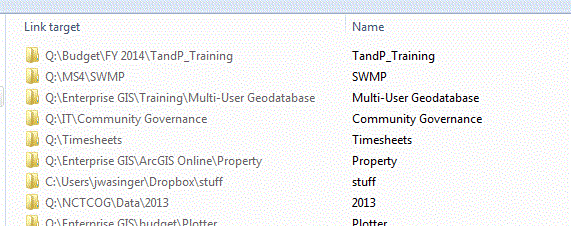
 But it was driving me crazy. I'm surprised Microsoft doesn't say anything (that I could find). Hopefully this will help others too. So, thanks for creating the thread in the first place.


