"Recent Places" not working, pls help!

TheCROW

New member
Local time
5:17 AM
Messages
28
Hello all,
I hope you can help me with my problem, I searched to no avail.
I use 'Recent Places' a lot in my work, you know when opening and saving files in photoshop or other apps, I use Recent Places to go to the folders I'm working on quickly.
Recently I noticed that Recent Places is not being updated with those folders anymore so I cleared the list hoping it will start working again, unfortunately it hasn't. It's still empty.
I have the two options enabled under Privacy in the Start Menu properties.
It's weird.
Please someone help.
Thankyou kindly.
 

My Computer

Computer type
PC/Desktop
OS
Windows 7 64bit SP1
CPU
Intel i7 940
Motherboard
Intel DX58SO
Memory
12GB
Graphics Card(s)
POV Nvidia GTX280EXO
Sound Card
RealtekHD
Monitor(s) Displays
Viewsonic VX2233WM
Screen Resolution
1080p
Hard Drives
2X Samsung 500GB
1x WD 1TB
PSU
ThermalTake ToughPower 700Watts
Case
ThermalTake Strike MX
Cooling
Stock
Keyboard
Logitech MX 3200 Wireless
Mouse
Logitech MX 3200 Laser Wireless
Hello, Welcome!

This does not sound quite normal to me, and I have no solution. I can only suggest clearing the check boxes and rebooting, then re-checking the boxes again.

This probably won't work, but it's worth a shot.
 

My Computer

Computer Manufacturer/Model Number
Custom
OS
Windows 7 Professional x64
CPU
Intel i7 2600K OC'd @ 4620 MHz
Motherboard
Asus P8Z68-V Pro
Memory
16GB GSkill Sniper 2133 Mhz (4x4GB)
Graphics Card(s)
EVGA GeForce GTX 480 SuperClocked+
Sound Card
Realtek High Definition Audio
Monitor(s) Displays
2x Acer S273HLbmii 27"
Screen Resolution
2 x 1920x1080
Hard Drives
64GB Crucial M4 SSD

Storage: Hitachi 1TB 5400RPM, Samsung 1.5TB 5400RPM
PSU
Corsair HW Series 750w (modular)
Case
Cooler Master HAF 932 Advanced Blue Edition
Cooling
CM Hyper 212+ CPU cooler, 3x 230mm + 1x 140mm case fans
Keyboard
Logitech MK320 (wireless)
Mouse
Logitech MK320 (wireless)
Internet Speed
30 Mb/s : 2 Mb/s
If you know about when the problem started, you could try system restore.
 

My Computer

Computer type
PC/Desktop
Computer Manufacturer/Model Number
Dell XPS 420
OS
Windows 10, Home Clean Install
CPU
Intel Core2 processsor Q8200(2.33Ghz 1333FSB) Quad Core Tech
Motherboard
Dell
Memory
6 gb
Graphics Card(s)
ATI Radeon 256MB HD3650
Sound Card
Intergrated 7.1 Channel Audio
Monitor(s) Displays
Dell SP2009W 20"
Hard Drives
640 GB Serial ATA Hard drive
Cooling
Fan
Keyboard
Dell USB Keyboard
Mouse
Dell Premium Optical USB
Internet Speed
DSL 2.85
Thanks for your replies guys but, unchecking/rechecking after rebot didn't fix the problem and I don't want to restore cos I don't remember when this problem started and I wouldn't want to lose any files or settings...
That's weird, any way I could fix this thing?
Thanks.
 

My Computer

Computer type
PC/Desktop
OS
Windows 7 64bit SP1
CPU
Intel i7 940
Motherboard
Intel DX58SO
Memory
12GB
Graphics Card(s)
POV Nvidia GTX280EXO
Sound Card
RealtekHD
Monitor(s) Displays
Viewsonic VX2233WM
Screen Resolution
1080p
Hard Drives
2X Samsung 500GB
1x WD 1TB
PSU
ThermalTake ToughPower 700Watts
Case
ThermalTake Strike MX
Cooling
Stock
Keyboard
Logitech MX 3200 Wireless
Mouse
Logitech MX 3200 Laser Wireless
Thanks for your replies guys but, unchecking/rechecking after rebot didn't fix the problem and I don't want to restore cos I don't remember when this problem started and I wouldn't want to lose any files or settings...
That's weird, any way I could fix this thing?
Thanks.

System restore does not affect your personal settings. But to be sure, make a system image (copy of hard drive), if things go wrong just restore with the system image.
 

My Computer

Computer type
PC/Desktop
Computer Manufacturer/Model Number
Dell XPS 420
OS
Windows 10, Home Clean Install
CPU
Intel Core2 processsor Q8200(2.33Ghz 1333FSB) Quad Core Tech
Motherboard
Dell
Memory
6 gb
Graphics Card(s)
ATI Radeon 256MB HD3650
Sound Card
Intergrated 7.1 Channel Audio
Monitor(s) Displays
Dell SP2009W 20"
Hard Drives
640 GB Serial ATA Hard drive
Cooling
Fan
Keyboard
Dell USB Keyboard
Mouse
Dell Premium Optical USB
Internet Speed
DSL 2.85
The restore points I have date after the date where the problem occurred....
SO I doubt they will do any good.
If I run setup from the window 7 disk and choose upgrade install, will this delete any installed applications and settings I have? Is there any downside for it?
I have run out of solutions for this problem.
Thanks for all your replies.
 

My Computer

Computer type
PC/Desktop
OS
Windows 7 64bit SP1
CPU
Intel i7 940
Motherboard
Intel DX58SO
Memory
12GB
Graphics Card(s)
POV Nvidia GTX280EXO
Sound Card
RealtekHD
Monitor(s) Displays
Viewsonic VX2233WM
Screen Resolution
1080p
Hard Drives
2X Samsung 500GB
1x WD 1TB
PSU
ThermalTake ToughPower 700Watts
Case
ThermalTake Strike MX
Cooling
Stock
Keyboard
Logitech MX 3200 Wireless
Mouse
Logitech MX 3200 Laser Wireless
The restore points I have date after the date where the problem occurred....
SO I doubt they will do any good.
If I run setup from the window 7 disk and choose upgrade install, will this delete any installed applications and settings I have? Is there any downside for it?
I have run out of solutions for this problem.
Thanks for all your replies.

No You will not lose applications. You will be just running, the upgrade version which is at this point the repair version of Windows.

Try this first, from an administrator account go to search and type cmd then in cmd type sfc /scannow. This is suppose to correct any errors in the files.

If that does not work try the upgrade install.
 

My Computer

Computer type
PC/Desktop
Computer Manufacturer/Model Number
Dell XPS 420
OS
Windows 10, Home Clean Install
CPU
Intel Core2 processsor Q8200(2.33Ghz 1333FSB) Quad Core Tech
Motherboard
Dell
Memory
6 gb
Graphics Card(s)
ATI Radeon 256MB HD3650
Sound Card
Intergrated 7.1 Channel Audio
Monitor(s) Displays
Dell SP2009W 20"
Hard Drives
640 GB Serial ATA Hard drive
Cooling
Fan
Keyboard
Dell USB Keyboard
Mouse
Dell Premium Optical USB
Internet Speed
DSL 2.85
So do you think this is the best thing to do at this point?
Do you have any other ideas?
Thankyou.
 

My Computer

Computer type
PC/Desktop
OS
Windows 7 64bit SP1
CPU
Intel i7 940
Motherboard
Intel DX58SO
Memory
12GB
Graphics Card(s)
POV Nvidia GTX280EXO
Sound Card
RealtekHD
Monitor(s) Displays
Viewsonic VX2233WM
Screen Resolution
1080p
Hard Drives
2X Samsung 500GB
1x WD 1TB
PSU
ThermalTake ToughPower 700Watts
Case
ThermalTake Strike MX
Cooling
Stock
Keyboard
Logitech MX 3200 Wireless
Mouse
Logitech MX 3200 Laser Wireless
So do you think this is the best thing to do at this point?
Do you have any other ideas?
Thankyou.

I think this is the best route. If you would just make a system image, first, you can't lose. If you make the image and your efforts make things worse, just install the image,again. You have not gained but you did not lose. I personally, think the sfc thing has a 50% chance of working, but its real easy. The upgrade has a 75% chance, in my opinion. Listen, if our paths do not cross again, until after the holiday, I sincerely wish the best to you and your family.
 

My Computer

Computer type
PC/Desktop
Computer Manufacturer/Model Number
Dell XPS 420
OS
Windows 10, Home Clean Install
CPU
Intel Core2 processsor Q8200(2.33Ghz 1333FSB) Quad Core Tech
Motherboard
Dell
Memory
6 gb
Graphics Card(s)
ATI Radeon 256MB HD3650
Sound Card
Intergrated 7.1 Channel Audio
Monitor(s) Displays
Dell SP2009W 20"
Hard Drives
640 GB Serial ATA Hard drive
Cooling
Fan
Keyboard
Dell USB Keyboard
Mouse
Dell Premium Optical USB
Internet Speed
DSL 2.85
May be you could try in a different Windows Profile

Start\ Control Panel\ User Accounts and Family Safety \User Accounts \Manage Accounts
 

My Computer

Computer Manufacturer/Model Number
Samsung NP550P5C-S02IN
OS
Windows 7 Ultimate - 64-bit | Windows 8 Pro - 64-bit
CPU
Intel® Core™ i7 Processor 3,610QM (2.30Hz, 6MB L3 Cach
Memory
8 GB
Graphics Card(s)
NVIDIA® GeForce® GT 650M 2GB Graphics, Optimus™ techno
Sound Card
SoundAlive™ JBL 3 Speakers (With sub-Woofer)
Monitor(s) Displays
39.62cm (15.6) SuperBright 300nit HD+ LED Display
Screen Resolution
1,600 x 900, Anti-Reflective
Hard Drives
1TB S-ATA II Hard Drive (5,400RPM)
Thanks Rich, I actually did make a system image in case things got worse, thanks for pointing this out.
Merry Christmas and best wishes to you and your family as well.

Capt. Jack, this might be a good idea, I'll try creating a new user and try it. If it works I'd have to move my user files to the new user profile and delete the old one, is there any specific way of doing it?
Thanks.
 

My Computer

Computer type
PC/Desktop
OS
Windows 7 64bit SP1
CPU
Intel i7 940
Motherboard
Intel DX58SO
Memory
12GB
Graphics Card(s)
POV Nvidia GTX280EXO
Sound Card
RealtekHD
Monitor(s) Displays
Viewsonic VX2233WM
Screen Resolution
1080p
Hard Drives
2X Samsung 500GB
1x WD 1TB
PSU
ThermalTake ToughPower 700Watts
Case
ThermalTake Strike MX
Cooling
Stock
Keyboard
Logitech MX 3200 Wireless
Mouse
Logitech MX 3200 Laser Wireless
Thanks Rich, I actually did make a system image in case things got worse, thanks for pointing this out.
Merry Christmas and best wishes to you and your family as well.

Capt. Jack, this might be a good idea, I'll try creating a new user and try it. If it works I'd have to move my user files to the new user profile and delete the old one, is there any specific way of doing it?
Thanks.

If you make a new account. When you go to cancel the old, it asks, where do you want to tranfer or do you want to tranfer?

BTW I would also put evrything on windows easy transfer, in case one transfer gets screwed, you have the other. WET is really easy, too.

Make sure the new account works to your liking, before you transfer and cancel.
 

My Computer

Computer type
PC/Desktop
Computer Manufacturer/Model Number
Dell XPS 420
OS
Windows 10, Home Clean Install
CPU
Intel Core2 processsor Q8200(2.33Ghz 1333FSB) Quad Core Tech
Motherboard
Dell
Memory
6 gb
Graphics Card(s)
ATI Radeon 256MB HD3650
Sound Card
Intergrated 7.1 Channel Audio
Monitor(s) Displays
Dell SP2009W 20"
Hard Drives
640 GB Serial ATA Hard drive
Cooling
Fan
Keyboard
Dell USB Keyboard
Mouse
Dell Premium Optical USB
Internet Speed
DSL 2.85
Hello all,
I hope you can help me with my problem, I searched to no avail.
I use 'Recent Places' a lot in my work, you know when opening and saving files in photoshop or other apps, I use Recent Places to go to the folders I'm working on quickly.
Recently I noticed that Recent Places is not being updated with those folders anymore so I cleared the list hoping it will start working again, unfortunately it hasn't. It's still empty.
I have the two options enabled under Privacy in the Start Menu properties.
It's weird.
Please someone help.
Thankyou kindly.
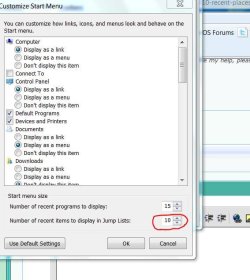
Its not zeroed out by chance is it?
recent list.JPG
 

My Computer

Computer Manufacturer/Model Number
Gateway GT5692
OS
Windows 7 Ulti. x64
CPU
AMD Phenom 8450 triple-core 2.10 ghz
Memory
4GB
Graphics Card(s)
ATI Radion HD 3200
Monitor(s) Displays
Gateway FPD1775W
Screen Resolution
1280x720
Hard Drives
465.6613 Gibibytes
It's set to 10
 

My Computer

Computer type
PC/Desktop
OS
Windows 7 64bit SP1
CPU
Intel i7 940
Motherboard
Intel DX58SO
Memory
12GB
Graphics Card(s)
POV Nvidia GTX280EXO
Sound Card
RealtekHD
Monitor(s) Displays
Viewsonic VX2233WM
Screen Resolution
1080p
Hard Drives
2X Samsung 500GB
1x WD 1TB
PSU
ThermalTake ToughPower 700Watts
Case
ThermalTake Strike MX
Cooling
Stock
Keyboard
Logitech MX 3200 Wireless
Mouse
Logitech MX 3200 Laser Wireless
I created a new account and logged on to it. The recent places there works fine.
So now I need to copy all my user files and preferences to it and delete the old one.
I need to confirm that all my settings will be transfered too (favorites, quicklaunch toolbar, applications settings etc...)
Is there a step-by-step tutorial somewhere I could follow to do this correctly? I spent lots of time configuring my system and don't want to redo it all over again.
Thanks for your help.

EDIT: I found this link here, I will follow it and test.
http://windows.microsoft.com/en-us/windows-vista/Fix-a-corrupted-user-profile
 

My Computer

Computer type
PC/Desktop
OS
Windows 7 64bit SP1
CPU
Intel i7 940
Motherboard
Intel DX58SO
Memory
12GB
Graphics Card(s)
POV Nvidia GTX280EXO
Sound Card
RealtekHD
Monitor(s) Displays
Viewsonic VX2233WM
Screen Resolution
1080p
Hard Drives
2X Samsung 500GB
1x WD 1TB
PSU
ThermalTake ToughPower 700Watts
Case
ThermalTake Strike MX
Cooling
Stock
Keyboard
Logitech MX 3200 Wireless
Mouse
Logitech MX 3200 Laser Wireless
I created a new account and logged on to it. The recent places there works fine.
So now I need to copy all my user files and preferences to it and delete the old one.
I need to confirm that all my settings will be transfered too (favorites, quicklaunch toolbar, applications settings etc...)
Is there a step-by-step tutorial somewhere I could follow to do this correctly? I spent lots of time configuring my system and don't want to redo it all over again.
Thanks for your help.

EDIT: I found this link here, I will follow it and test.
Fix a corrupted user profile

Glad that you got it working :D
Thanks for posting back

Merry Christmas :party:
 

My Computer

Computer Manufacturer/Model Number
Samsung NP550P5C-S02IN
OS
Windows 7 Ultimate - 64-bit | Windows 8 Pro - 64-bit
CPU
Intel® Core™ i7 Processor 3,610QM (2.30Hz, 6MB L3 Cach
Memory
8 GB
Graphics Card(s)
NVIDIA® GeForce® GT 650M 2GB Graphics, Optimus™ techno
Sound Card
SoundAlive™ JBL 3 Speakers (With sub-Woofer)
Monitor(s) Displays
39.62cm (15.6) SuperBright 300nit HD+ LED Display
Screen Resolution
1,600 x 900, Anti-Reflective
Hard Drives
1TB S-ATA II Hard Drive (5,400RPM)
Recent items not working

It sounds like you have got it going with a new user setup, ]

however the solution is as follows


Right click start button then properties, then on the start menu tab, make sure both the privacy tabs are ticked, for store and display recently opened etc
 

My Computer

OS
windows 7
Someone may know the setting that has slipped. You may not need new User acct.

Suggest keep new account as work-in-progress until satisfaction - only then delete old account.

Importing settings (AppData) may well copy back the incorrect setting.
 
STEVEHALL, in my first post I mentioned that those two options are in fact ticked. I also tried to untick them, restart and then tick them back to no avail.

Gregrocker, you are absolutely right, this is exactly what I did and I'm still searching to find a solution for this.
Any help greatly appreciated.
 

My Computer

Computer type
PC/Desktop
OS
Windows 7 64bit SP1
CPU
Intel i7 940
Motherboard
Intel DX58SO
Memory
12GB
Graphics Card(s)
POV Nvidia GTX280EXO
Sound Card
RealtekHD
Monitor(s) Displays
Viewsonic VX2233WM
Screen Resolution
1080p
Hard Drives
2X Samsung 500GB
1x WD 1TB
PSU
ThermalTake ToughPower 700Watts
Case
ThermalTake Strike MX
Cooling
Stock
Keyboard
Logitech MX 3200 Wireless
Mouse
Logitech MX 3200 Laser Wireless
I am at a loss. Since it is a system issue, I offer my last resort options before doing a clean reinstall:

Try running sfc/ scannow to see if any OS files are corrupted.

Either way, you can also try a http://www.sevenforums.com/tutorials/3413-repair-install.html?ltr=R which reinstalls the OS while keeping everything in place. As it is an Upgrade install, it can also import borked settings but is nevertheless worth a try as it refreshes the install.

In the future, save a WIn7 Backup IMage when things are running great after install so you can always save files and reimage back to better times.

You might also increase HD space for System Restore points at Computer>Properties>Advanced>Sysem Protection>Configure.
 
Back
Top