
Hi all. Windows update is not functioning.
The message received is:
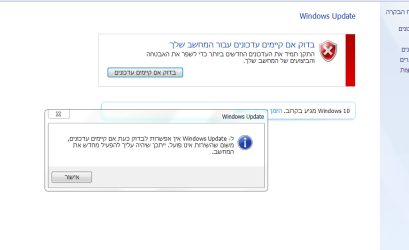
"Windows update cannot currently check for updates because the service is not running. You may need to restart your computer"
Background:
I cloned a dying HDD (48+ bad sectors) to a new healthy one using HDClone Professional. I allowed it to make all automatic partition and file system adjustments.
After the clone operation I performed scans using: JRT, ComboFix, MBAM, ESET Nod32, CCleaner for an auto registry repair, and junkfile removal with Revo.
I also ran the auto repairs with Tweaking.com Windows Repair AIO.
I finished off with running another round of CHKDSK /R and SFC (even though it's included in the Windows Repair AIO).
The OS runs great after the clone and repair tasks, save for the fact that windows update is not functioning.
I have already attempted to stop and start the relevant services, I have also run the windows update troubleshooter to no avail.
Attached are several files: Report from FarBar Service Scanner, Subfolder from Elevated Diagnostics Directory with windows update info, Screen Capture image of the error received (the OS is in Hebrew so the error message likewise is in Hebrew)
Here is a link to the windows log file since it is over 17MB and the max allowed here to upload is 8mb: https://onedrive.live.com/redir?resid=412E99B6BA0E7B17!108931&authkey=!ALVAZmm7mroTUaY&ithint=file%2czip
Serious thanks to anybody who helps me with this!
The message received is:
"Windows update cannot currently check for updates because the service is not running. You may need to restart your computer"
Background:
I cloned a dying HDD (48+ bad sectors) to a new healthy one using HDClone Professional. I allowed it to make all automatic partition and file system adjustments.
After the clone operation I performed scans using: JRT, ComboFix, MBAM, ESET Nod32, CCleaner for an auto registry repair, and junkfile removal with Revo.
I also ran the auto repairs with Tweaking.com Windows Repair AIO.
I finished off with running another round of CHKDSK /R and SFC (even though it's included in the Windows Repair AIO).
The OS runs great after the clone and repair tasks, save for the fact that windows update is not functioning.
I have already attempted to stop and start the relevant services, I have also run the windows update troubleshooter to no avail.
Attached are several files: Report from FarBar Service Scanner, Subfolder from Elevated Diagnostics Directory with windows update info, Screen Capture image of the error received (the OS is in Hebrew so the error message likewise is in Hebrew)
Here is a link to the windows log file since it is over 17MB and the max allowed here to upload is 8mb: https://onedrive.live.com/redir?resid=412E99B6BA0E7B17!108931&authkey=!ALVAZmm7mroTUaY&ithint=file%2czip
Serious thanks to anybody who helps me with this!
Attachments
My Computer
- OS
- Windows 7 Ultimate x64
- CPU
- Core2 Quad Q660
- Motherboard
- ASUS P5KPL-CM
- Memory
- 2x2GB DDR2
- Graphics Card(s)
- NVIDIA GeForce GT 430
- Monitor(s) Displays
- Samsung SyncMaster 2053bw & Acer AL1917
- Hard Drives
- a bunch
