Recently Opened List

rosede

New member
Local time
8:34 AM
Messages
33
One item that I don't like with Windows 7 is the "Recently Opened" List. I like the "Recently Used" list within the start menu, but I don't like the "Recently Opened" sub menu. Is there a way to disable that? This list also appears within the items on the task bar.

I know how to disable the recently used, but not the recently opened. If someone could help me out, I would appreciate it.

Thanks.

Daryl
 

My Computer

OS
7 Home Premium 64bit
Hi,

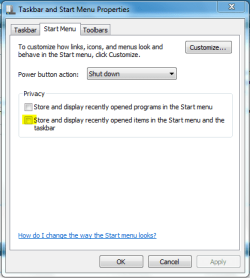
If you right-click the taskbar and select 'Properties', under 'Start Menu' just un-check 'Store and display recently opened items...'

This should stop the sub-menu (jump-list) from appearing.


OS
 

Attachments

  • Capture.PNG
    Capture.PNG
    12.4 KB · Views: 6

My Computer

Computer Manufacturer/Model Number
Compaq Desktop
OS
Windows 7 Ultimate x64
CPU
AMD Sempron Dual Core
Memory
3GB
Graphics Card(s)
NVIDIA GeForce 6150SE nForce 430
Screen Resolution
1024x768
Hard Drives
150GB Sata
OS,

I tired that, however, it also disables the "Recently Used". If you read that label, it say's "Stored and displayed". As I said, I like seeing the recently used that appears in the Start Menu, because I often use the same apps over and over, and I can quickly open the one that I need, but I don't often reopen the same doc, or other file that I had used previously. That option disables both the "Recently Used" and the "Recently Opened".

I want to be able to use the Start Menu the way that I was able to under XP & Vista. Both of those had a separate "Recently Opened Doc" on the right side of the Start Menu. If I needed to reopen a recently opened doc, I could quickly find it in there. Win7 doesn't seem to have that option. I find the current option very annoying.

Thanks.

Daryl
 

My Computer

OS
7 Home Premium 64bit
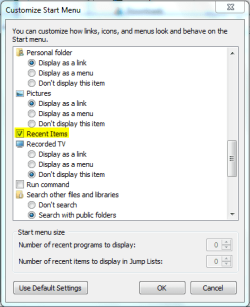
You can use the option above (checked) with the 'Recent Items' option in the start menu preferences.

Capture2.PNG

   Note
Right-click Taskbar -> 'Properties' -> 'Start Menu' -> 'Customise'


Capture1.PNG
 

My Computer

Computer Manufacturer/Model Number
Compaq Desktop
OS
Windows 7 Ultimate x64
CPU
AMD Sempron Dual Core
Memory
3GB
Graphics Card(s)
NVIDIA GeForce 6150SE nForce 430
Screen Resolution
1024x768
Hard Drives
150GB Sata
Now We're getting somewhere. :D

I looked through that list, but didn't see that "recent items" check box. I'll have to take another look.

Thank you.

Daryl
 

My Computer

OS
7 Home Premium 64bit
It's definately there ;)
 

My Computer

Computer Manufacturer/Model Number
Compaq Desktop
OS
Windows 7 Ultimate x64
CPU
AMD Sempron Dual Core
Memory
3GB
Graphics Card(s)
NVIDIA GeForce 6150SE nForce 430
Screen Resolution
1024x768
Hard Drives
150GB Sata
Back
Top