- Local time
- 4:47 PM
- Messages
- 49
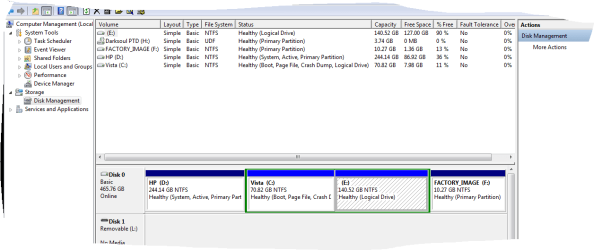
Some time ago I partitioned my drive and I now have 4 separate partitions,I no longer use one of these partitions which is currently set as drive E: and I would like to claim the space back and add it to my C: drive.
I have tried going through some of the tutorials that are online but can't seem to work out how to complete the process.
I would appreciate it if someone could walk me through this process.
When I originally partitioned the drive I used Easeus Partition manager.
I have tried going through some of the tutorials that are online but can't seem to work out how to complete the process.
I would appreciate it if someone could walk me through this process.
When I originally partitioned the drive I used Easeus Partition manager.
My Computer
At a glance
Windows 7 Ultimate x64AMD Phenom 9500 Quad Core 64 Bit 2.20Ghz3 GBATI HD 5450 - 512MB
- Computer Manufacturer/Model Number
- HP a6455
- OS
- Windows 7 Ultimate x64
- CPU
- AMD Phenom 9500 Quad Core 64 Bit 2.20Ghz
- Motherboard
- Not Sure
- Memory
- 3 GB
- Graphics Card(s)
- ATI HD 5450 - 512MB
- Sound Card
- On Board
- Monitor(s) Displays
- 21 Inch Flat TFT
- Hard Drives
- 500GB
- PSU
- N/A
- Case
- Black
- Cooling
- Standard
- Keyboard
- Standard 102Key PS/2
- Mouse
- 1 X Compaq Ball Mouse,1 X FACHI Optical Mouse.
- Internet Speed
- 20 MB
- Other Info
- Perfect except for my video playback problems.
Plays all games great which surprises me seeing it is 3+ years old now.
I doubt that it will but I hope it lasts me another 3 years, Even if I do have to add more RAM and most definately another GFX Card.,