Recommended resolution not coming!

Sachin Agrawal

New member
Local time
1:01 AM
Messages
12
Hi,
I am Sachin,

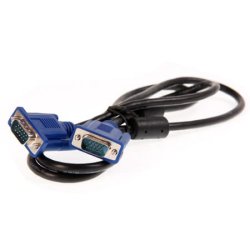
:cry: I am having Windows 7 Ultimate(32-bit) PC in my computer. I am having a Dell computer. My computer is having 1366x768 resolution. My VGA Cable was damaged so I buy a new one. When I attached the VGA cable to my computer the recommended resolution (1366x768) is not coming. Please help me to solve this problem.

I have some details: On my VGA cable packet it was written VGA/HDMI cable.

Thank you
 

My Computer

OS
Windows 7 Ultimate 32-bit
Where did you get the cable from, specifically? VGA and HDMI are both different protocols, connections, and supported resolutions. If it's an HDMI cable, it would support VGA resolution, but not vice versa. In your case, HDMI is obviously not necessary as 1366x768 is simply VGA resolution and not HD requiring HDMI.
 

My Computer

OS
XP / Win7 x64 Pro
CPU
Intel Quad-Core Q9450 @ 3.2GHz
Motherboard
Asus P5-E
Memory
2x2GB GSkill DDR2
Graphics Card(s)
NVIDIA GeForce 8600 GTS (EVGA)
Monitor(s) Displays
Dell 2408WFP
Screen Resolution
1920x1200
correct me if i am wrong are you trying to connect a HDMI to VGA cable?
 

My Computer

Computer type
PC/Desktop
OS
Windows 7 Ultimate 64
CPU
AMD FX - 8350 Oc
Motherboard
ASUS Crosshair V Formula-Z AMD 990FX
Memory
16GB Corsair Vengeance
Graphics Card(s)
HD 4870 1GB
Sound Card
Onboard.
Monitor(s) Displays
Samsung Syncmaster 2032MW & ASUS p191
Screen Resolution
1680x1050
Hard Drives
1 TB WD
320gb WD
PSU
650w OCZ PSU
Case
Zalman Z11
Cooling
Antec H20 920 , 6x Antec Quiet
Keyboard
Logitech RAZ71 Keyboard
Mouse
Logitech RAZ71 Wireless Mouse
Internet Speed
120mb Virgin
Antivirus
Malwarebytes
Browser
Chrome
What monitor are you using?Possible that your monitor doesn't support this resolution.
 

My Computer

Computer type
PC/Desktop
Computer Manufacturer/Model Number
custom build
OS
Windows 10 64bit
CPU
AMD Phenom II X4 925 (Deneb)(2.8GHz) OC 3.4GHz
Motherboard
M5A78L-MLX Plus
Memory
Corsair Vengeance DDR3 4GBX2 (8192MB)
Graphics Card(s)
XFX HD 6870 1GB (OC)- 940MHz core, mem 1150MHz
Monitor(s) Displays
Vizio 26' 1920x1080 / Acer 1336x768
Screen Resolution
1920x1080 60Hz /1336x768
Hard Drives
Kingston Digital 60GB SSDNow V300/500gb HDD Western Digital 7200rpm (/WD 160GB HDD 7200rpm
PSU
CORSAIR CX600 600w
Case
AZZA Orion 202 EVO
Cooling
cooler master hyper TX3 cpu cooler
Keyboard
Razer DeathStalker
Mouse
Logitech Optical Gaming Mouse G400
Antivirus
Defualt on win 10
Browser
Firefox
Other Info
cpu is overclocked in bios
What monitor are you using?Possible that your monitor doesn't support this resolution.

Well that may be 50 percent of the problem as he hasnt explained it very well (time will tell)

He says he wants a resolution but doesnt say the monitor?

And im curious as he states its a vga/hdmi lead? which would tell me hes connecting hdmi one-end vga other.

He may be setting the wrong resolution if hes using that cable in thinking he can get away with vga settings.
 

My Computer

Computer type
PC/Desktop
OS
Windows 7 Ultimate 64
CPU
AMD FX - 8350 Oc
Motherboard
ASUS Crosshair V Formula-Z AMD 990FX
Memory
16GB Corsair Vengeance
Graphics Card(s)
HD 4870 1GB
Sound Card
Onboard.
Monitor(s) Displays
Samsung Syncmaster 2032MW & ASUS p191
Screen Resolution
1680x1050
Hard Drives
1 TB WD
320gb WD
PSU
650w OCZ PSU
Case
Zalman Z11
Cooling
Antec H20 920 , 6x Antec Quiet
Keyboard
Logitech RAZ71 Keyboard
Mouse
Logitech RAZ71 Wireless Mouse
Internet Speed
120mb Virgin
Antivirus
Malwarebytes
Browser
Chrome
When my VGA cable was not damaged, the resolution was 1366x768. But now it is not there.

Please reply
 

My Computer

OS
Windows 7 Ultimate 32-bit
When my VGA cable is not damaged, the resolution was 1366x768, but now it is not.

Please reply
 

My Computer

OS
Windows 7 Ultimate 32-bit
I think my new VGA cable supports both VGA/HDMI ports.
 

My Computer

OS
Windows 7 Ultimate 32-bit
Try a vga to vga cable or just hdmi to hdmi. Also have you tried updating your video drivers? From what you said my understanding is that this cable is vga one side and hdmi on the other side?
 

My Computer

Computer type
PC/Desktop
Computer Manufacturer/Model Number
custom build
OS
Windows 10 64bit
CPU
AMD Phenom II X4 925 (Deneb)(2.8GHz) OC 3.4GHz
Motherboard
M5A78L-MLX Plus
Memory
Corsair Vengeance DDR3 4GBX2 (8192MB)
Graphics Card(s)
XFX HD 6870 1GB (OC)- 940MHz core, mem 1150MHz
Monitor(s) Displays
Vizio 26' 1920x1080 / Acer 1336x768
Screen Resolution
1920x1080 60Hz /1336x768
Hard Drives
Kingston Digital 60GB SSDNow V300/500gb HDD Western Digital 7200rpm (/WD 160GB HDD 7200rpm
PSU
CORSAIR CX600 600w
Case
AZZA Orion 202 EVO
Cooling
cooler master hyper TX3 cpu cooler
Keyboard
Razer DeathStalker
Mouse
Logitech Optical Gaming Mouse G400
Antivirus
Defualt on win 10
Browser
Firefox
Other Info
cpu is overclocked in bios
Try a vga to vga cable or just hdmi to hdmi. Also have you tried updating your video drivers? From what you said my understanding is that this cable is vga one side and hdmi on the other side?

my point exactly for the whole thread :P

Sachin : Please install this program then can you take a picture or print screen and show us what it says in the option that says GRAPHICS. Or tell us what graphics card you have.

CPUID - System & hardware benchmark, monitoring, reporting

And secondly does your cable look like this ?

cable-hdmi-vga-gold-1-big.jpg
 

My Computer

Computer type
PC/Desktop
OS
Windows 7 Ultimate 64
CPU
AMD FX - 8350 Oc
Motherboard
ASUS Crosshair V Formula-Z AMD 990FX
Memory
16GB Corsair Vengeance
Graphics Card(s)
HD 4870 1GB
Sound Card
Onboard.
Monitor(s) Displays
Samsung Syncmaster 2032MW & ASUS p191
Screen Resolution
1680x1050
Hard Drives
1 TB WD
320gb WD
PSU
650w OCZ PSU
Case
Zalman Z11
Cooling
Antec H20 920 , 6x Antec Quiet
Keyboard
Logitech RAZ71 Keyboard
Mouse
Logitech RAZ71 Wireless Mouse
Internet Speed
120mb Virgin
Antivirus
Malwarebytes
Browser
Chrome
Try a vga to vga cable or just hdmi to hdmi. Also have you tried updating your video drivers? From what you said my understanding is that this cable is vga one side and hdmi on the other side?

my point exactly for the whole thread :P

Sachin : Please install this program then can you take a picture or print screen and show us what it says in the option that says GRAPHICS. Or tell us what graphics card you have.

CPUID - System & hardware benchmark, monitoring, reporting

And secondly does your cable look like this ?

cable-hdmi-vga-gold-1-big.jpg

No, My VGA cable is not like this. Its both ends are blue.
 

My Computer

OS
Windows 7 Ultimate 32-bit
Try a vga to vga cable or just hdmi to hdmi. Also have you tried updating your video drivers? From what you said my understanding is that this cable is vga one side and hdmi on the other side?

my point exactly for the whole thread :P

Sachin : Please install this program then can you take a picture or print screen and show us what it says in the option that says GRAPHICS. Or tell us what graphics card you have.

CPUID - System & hardware benchmark, monitoring, reporting

And secondly does your cable look like this ?

cable-hdmi-vga-gold-1-big.jpg

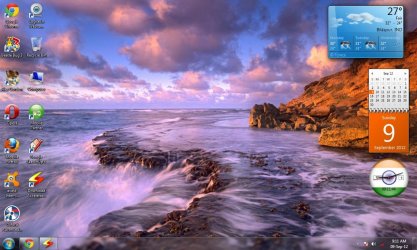
My screen picture is following:
Untitled.jpg
What is graphic card?
 

My Computer

OS
Windows 7 Ultimate 32-bit
My recommended resolution (1366x768) is not coming so i am using 1280x768, but i am getting bad images.
 

My Computer

OS
Windows 7 Ultimate 32-bit
Back
Top