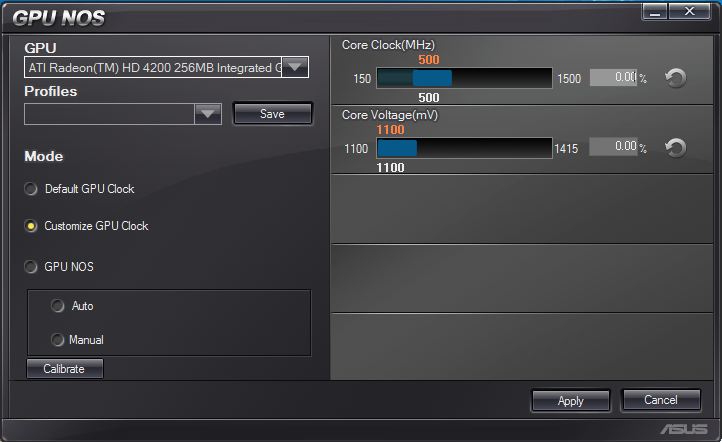
I have a M4A785-M asus Motherboard, a few months ago I sadly had to get rid of my Graphics card due to some IRL reasons, and I am left with the stock internal motherboard graphics, which aren't that bad for integrated. ATI Radeon HD 4200 256MB integrated graphics.
Well, as you can tell by the crappy internal card, it is hard for me to play games, Minecraft, TF2, GTA Series (including 4) COD Portal 1 & 2 etc..
So after a while I just accepted it, and became addicted to Minecraft.
But recently I came across some BIOS issues, the in motherboard drivers crashed, fixed the issue with the Crash Free BIOS3 included with the motherboard, and realised that there were some extra drivers that I didn't have. It came with the turbo key, some extra software for light overclocking of the CPU, and a graphics overclocker.
Me not being a common overclocker myself, I have no idea what I'm doing, my CPU is fine, I can live with what I have.. But I would like to know how to work the GPU NOS..
So I can get back to gaming, the computer can barely run GTA4 with 12FPS on minimum settings. Really cheezy looking.
TL;DR How do I work the GPU NOS overclocking on my asus M4A785-M motherboard safely.
Thermaltake Theron (Highly Recommended) + Razer Imperator
Antivirus
MSE
Browser
IE, FF, WaterFox
Other Info
GT Extreme V2 Sim Racing Cockpit + 40" LCD and K/B Mouse stand ▼
Fanatec CSR Elite Wheel + Clubsport V1 Pedals + CSR shifter/7G-H ▼Saitek X52 Pro ▼ TrackIR 5 Pro
Buttkicker v2 Seat Rumbler with Dedicated 5.1 and Sub Woofer attached to frame ▼
=
Bloody Big Grin
It comes pree unlocked and with the features of the board, I just never bothered installing the program. I've went up and down a few MHz, I just wanna know how I should go about, and the safe levels to set it to and stuff like that.
My Computer
At a glance
Windows 7 home Premium x64 bit SP1, Ubuntu 11...AMD Athlon 64 x2 Dual Core Processor 6000+ 3....3GB DDR2 (temp)ATI Radeon 4200 onboard
OS
Windows 7 home Premium x64 bit SP1, Ubuntu 11.1/10.1/8.2
CPU
AMD Athlon 64 x2 Dual Core Processor 6000+ 3.1GHz
Motherboard
Asus M4A785-M rev X.0x
Memory
3GB DDR2 (temp)
Graphics Card(s)
ATI Radeon 4200 onboard
Sound Card
6.1 onboard.
Monitor(s) Displays
EMachines (couldnt find model number, their site was down)
Screen Resolution
1366x768
Hard Drives
1) 1TB black
2) 500GB green
3) *ONLY SOMETIMES* PS2 thick 40GB HDD (for loading games)
Cooling
Hyper 212 Plus - Coolermaster
Keyboard
backlit generic from newegg (no brand name)
Mouse
(gaming mouse died) JumiMouse APP
Internet Speed
15MB/s Down 1MB/s Up
Other Info
Wiresscard B/G/N/A 350MB/s
Tv tuner card, winhapague.
Floppy drive, for the hell of it. (only in the case, not hooked up)
The Op here says anything over 710 Mhz will freeze the set up he boosted to 775 mhz froze in 30 seconds he also stated 750 mhz froze on benching 710mhz was in between and stable
What works for one person may not work for another. The best you can do is slowly bump it up a little at a time and see how it works. If it gets unstable back it off a little. Also keep in mind overclocking is going to make it run hotter. You could conceivably damage some components and end up with a non functional motherboard if you try to push things too far.
My Computer
At a glance
Windows 10 Education 64 bitAMD Phenom II X4 980 Black Edition Deneb 3.7GHz8GB 4GBx2 Kingston PC10600 DDR3 1333 MemoryZotac NVIDIA Geforce GT640 2 Gig DDR3 PCIe
Computer type
PC/Desktop
Computer Manufacturer/Model Number
Home Built
OS
Windows 10 Education 64 bit
CPU
AMD Phenom II X4 980 Black Edition Deneb 3.7GHz
Motherboard
Asus M4N68T-M V2 µATX Motherboard
Memory
8GB 4GBx2 Kingston PC10600 DDR3 1333 Memory
Graphics Card(s)
Zotac NVIDIA Geforce GT640 2 Gig DDR3 PCIe
Sound Card
VIA VT1708s High Definition Audio 8-channel Onboard