davy crockett
New member
- Local time
- 1:46 PM
- Messages
- 23
I am aware there are many articles showing how to move user folders during or after installing win 7. What I am thinking of is something different:
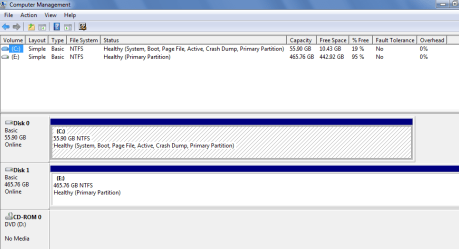
How would I reinstall (clean install) win 7 on drive c if I already have the user folders (documents, pictures, videos, desktop) on a separate drive d?
Would it work if after installation I include the drive d folders in the library and mark them as the default place to save files? Would I then delete those user folders on drive c?
Sorry if this sounds muddling?
How would I reinstall (clean install) win 7 on drive c if I already have the user folders (documents, pictures, videos, desktop) on a separate drive d?
Would it work if after installation I include the drive d folders in the library and mark them as the default place to save files? Would I then delete those user folders on drive c?
Sorry if this sounds muddling?
My Computer
- Computer type
- PC/Desktop
- OS
- Microsoft Windows 7 Home Premium 32-bit 7601 Multiprocessor Free Service Pack 1
- CPU
- Intel(R) Core(TM) i5-4670K CPU @ 3.40GHz
- Motherboard
- Gigabyte Technology Co., Ltd. Z87M-D3H
- Memory
- 4.00 GB
- Graphics Card(s)
- Intel(R) HD Graphics 4600
- Sound Card
- High Definition Audio Device
- Screen Resolution
- 1024 x 768 x 32 bits (4294967296 colors) @ 60 Hz
- Hard Drives
- (1) OCZ-AGIL OCZ-AGILITY3 SCSI Disk Device (2) ST950056 ST95005620AS SCSI Disk Device